
Unable to open debugger port (127.0.0.1:57046): java.net.SocketException "so
原因分析:
出现这个报错的原因是因为端口被占用导致的。
解决方法:
解决方法主要两种:修改端口配置(推荐)、关闭占用端口的进程(不推荐)。
方式一:修改端口配置(推荐)
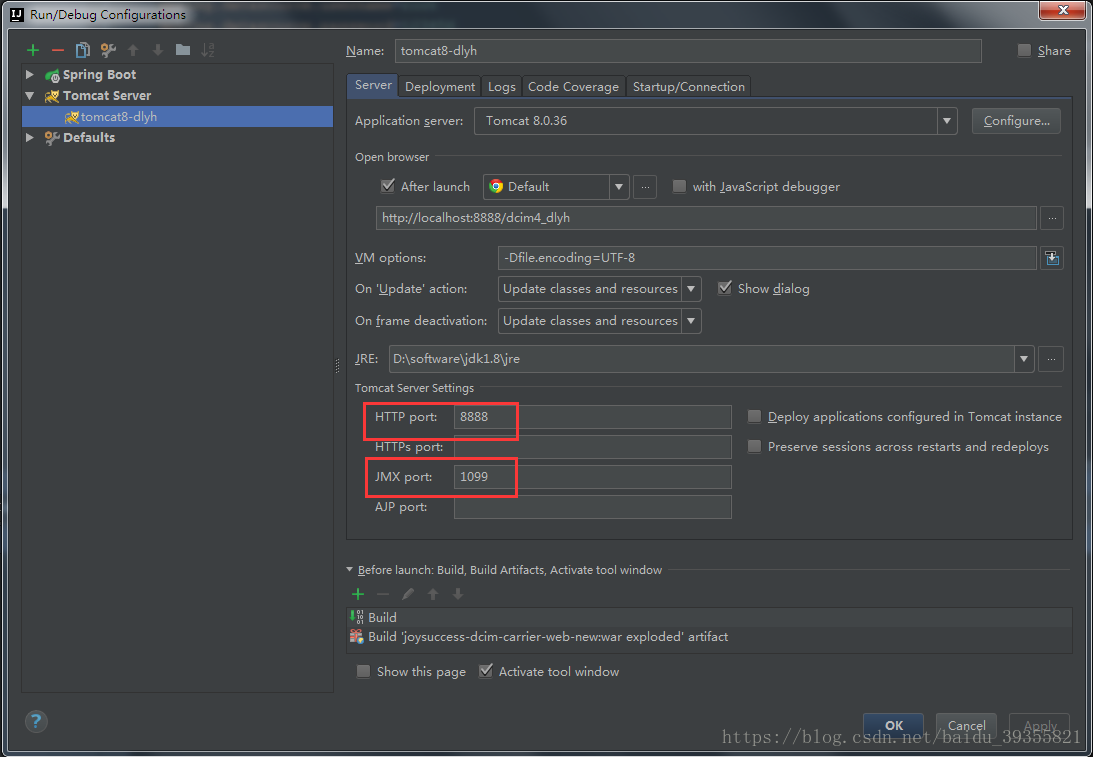
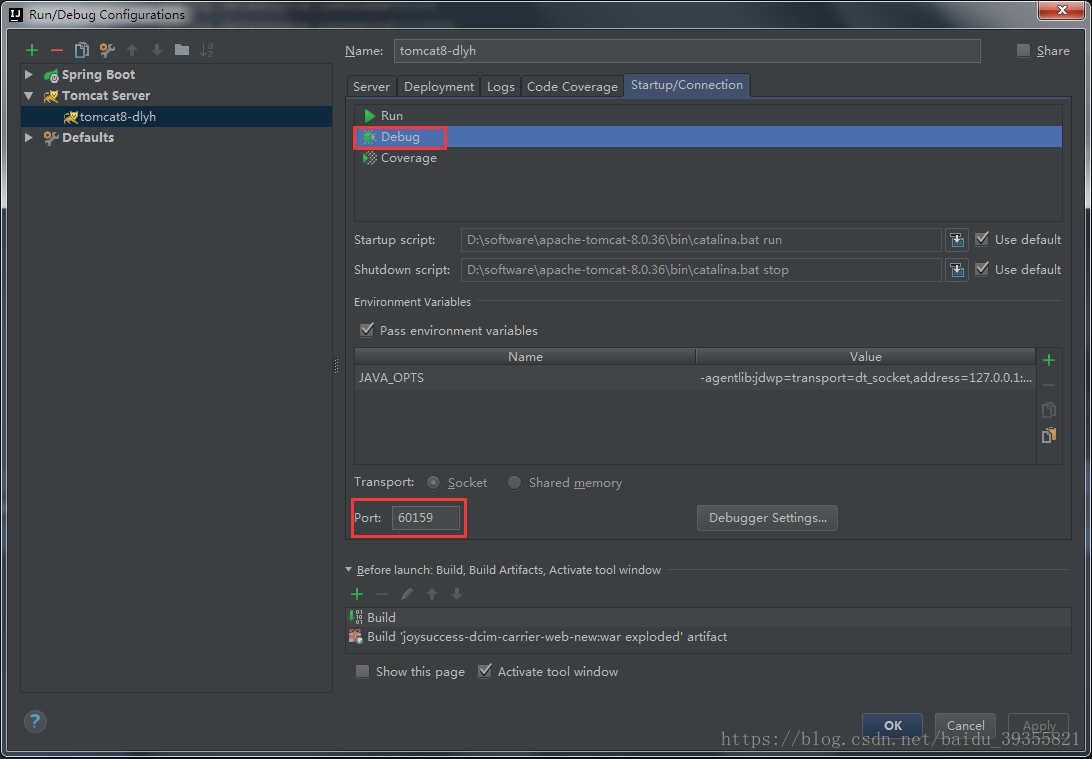
被占用的端口可能是本地端口,也可能是JMX端口或Debug模式下的端口,配置端口位置如图所示,尝试修改后启动tomcat不报错就可以了。
方式二:关闭占用端口的进程(不推荐)
找到占用端口的进程并关闭即可,但这种方式可能导致有用的进程被强行关闭,所以不推荐。
第一步:cmd打开命令行窗口,执行命令:netstat -aon|findstr “1099”查找占用端口的进程。

第二步:根据pid,继续执行命令:taskkill -f -pid 15380关闭该进程。

Unable to open debugger port (127.0.0.1:57046): java.net.SocketException "so的更多相关文章
- IntelliJ运行下载的Servlet时报错 Error running Tomcat 8.5.8: Unable to open debugger port (127.0.0.1:49551): java.net.SocketException
学习Java Servlet时,从Wrox上下载了示例代码,准备run/debug时发现以下错误: Error running Tomcat 8.5.8: Unable to open debugge ...
- Unable to open debugger port (127.0.0.1:51554): java.net.SocketException "socket closed"
刚开始使用IDEA 总是有各种各样奇葩的问题 启动报错: Unable to open debugger port (127.0.0.1:51554): java.net.SocketExceptio ...
- IDEA项目启动报Unable to open debugger port (127.0.0.1:51554): java.net.SocketException "socket closed"
启动报错: Unable to open debugger port (127.0.0.1:51554): java.net.SocketException "socket closed&q ...
- 2017.10.13 unable to open debugger port(127.0.0.1:10308)
参考来自:http://blog.csdn.net/qq_34360219/article/details/76169653 1.场景 突然间IDEA就跑不起项目了,报了如下的错误:unable to ...
- IntelliJ IDEA 启动tomcat 报错: idea Unable to open debugger port (127.0.0.1:58233): java.net.SocketException "socket closed"
debug启动项目弹出提示 Error running omp: Unable to open debugger port (127.0.0.1:50812): java.net.SocketExce ...
- Unable to open debugger port (127.0.0.1:63959): java.net.SocketException "socket closed",编译过来就是无法打开调试器端口,套接字已关闭
最开始的预测: 这台笔记本操作系统是win10专业工作站版,debug启动项目,provide项目完美启动成功,然后consumer项目报错:Unable to open debugger port ...
- java程序报错:Unable to open debugger port (127.0.0.1:63959): java.net.SocketException "socket closed",编译过来就是无法打开调试器端口,套接字已关闭
报错:Unable to open debugger port (127.0.0.1:63959): java.net.SocketException "socket closed" ...
- Unable to open debugger port (127.0.0.1:55119): java.net.SocketException "Socket closed"
1.端口问题 排查端口,lsof -i:8080 修改端口等 2.权限问题 端口排查无解的话,查看idea Event Log(View->Tool Window->Event Log) ...
- IDEA报错 Unable to open debugger port (127.0.0.1:63342): java.net.BindException "Address already in use
Unable to open debugger port (127.0.0.1:63342): java.net.BindException "Address already in use ...
- IDEA中debug启动tomcat报错。Error running t8:Unable to open debugger port(127.0.0.1:49225):java.net.BindException"Address alread in use:JVM_Bind"
解决办法: 1,如下图打开项目配置的tomcat的“Edit Configurations...” 2,打开“Startup/Connection”--------"Debug"- ...
随机推荐
- git卡在Resolving deltas 100%的解决办法
很多同学都有这样的问题.不知道是git的问题,还是tortoisegit的问题. 我的版本: Git-1.8.4-preview20130916 TortoiseGit-1.8.6.0-32bit 已 ...
- React---钩子函数
钩子函数的状态有4个阶段: <p>1.初始化阶段 (componentWillMount() || componentDidMount()) </p> ...
- Spring Boot Admin-应用健康监控后台管理
Spring Boot Admin 用于监控基于 Spring Boot 的应用,它是在 Spring Boot Actuator 的基础上提供简洁的可视化 WEB UI. 1. 什么是Spring ...
- win10 uwp 商业游戏 1.1.5
本文是在win10 uwp 商业游戏 基础上继续开发,添加一些无聊的游戏 因为在发布几个月,下载量很少,小伙伴说游戏就玩不到几分钟就不想玩,于是我就想加入其他游戏 下面我来告诉大家如何在游戏中添加多个 ...
- Python涉及的各个领域以及技术应用
WEB开发 完全主义者高效率框架Django 异步高并发Tornado框架 短小精悍Flask,Bottle框架 网络编程 高并发Twisted网络框架 Python3引入的asyncio异步编程 爬 ...
- IDEA + Spring boot 单元测试
1. 创建测试类 打开IDEA,在任意类名,任意接口名上,按ctrl+shift+t选择Create New Test image 然后根据提示操作(默认即可),点击确认,就在项目的/test/jav ...
- Linux 内核硬件抽象
我们结束 PCI 的讨论, 通过快速看一下系统如何处理在市场上的多种 PCI 控制器. 这只 是一个信息性的小节, 打算来展示给好奇的读者, 内核的面向对象分布如何向下扩展到最 低层. 用来实现硬件抽 ...
- Github Pages 无法调用 node_modules 文件夹的解决方案
今天写一个demo,用npm安装的前端库,然后想在github的pages上展示出来 发布到github后,发现node_modules文件夹下的js无法调用 google解决方案:新增一个名字为.n ...
- 【一起学源码-微服务】Nexflix Eureka 源码八:EurekaClient注册表抓取 精妙设计分析!
前言 前情回顾 上一讲 我们通过单元测试 来梳理了EurekaClient是如何注册到server端,以及server端接收到请求是如何处理的,这里最重要的关注点是注册表的一个数据结构:Concurr ...
- mysql 时间函数总结
1. 获取当前时间 select now(); // 2018-08-24 11:01:26 select unix_timestamp(); // 1535079695 总结:unix_ ...