
The linux command 之存储媒介
一、常用的命令
- mount:挂载文件系统
- unmount:卸载文件系统
- fdisk:硬盘分区命令
- fdformat:格式化软盘
- fsck:检查和修复文件系统
- mkfs:创建文件系统
- dd:转换和拷贝一个文件
- genisoimage(mkisofs):创建一个ISO 9660映象文件
- wodim(cdrecord):向光存储介质中写入数据
- md5sum:计算MD5校验码
二、挂载、卸载存储设备
挂载:将该设备添加到文件树中,从而允许操作系统可以操作该设备,这个过程称为挂载。
/etc/fstab 文件列出了系统启动时挂载的设备。
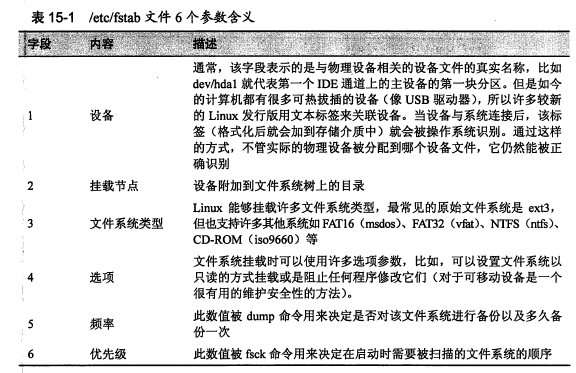
使用mount命令,查看已经挂载的文件系统列表。

列表的格式是:device on mount_point type filesystem_type(options)
/dev/sda2 on / type ext4 (rw)
以上表示dev/sda2设备挂载在根目录下,可读写.
首先切换到超级用户,再使用(umount)命令卸载设备。
[me@linuxbox ~]$ su -

Password:

[root@linuxbox ~]# umount /dev/sdc
然后为设备创建一个新的挂载节点,挂载节点仅仅是文件系统上的某个目录。
[root@linuxbox ~]# mkdir /mnt/cdrom
使用 -t 选项指定文件系统类型:
[root@linuxbox ~]# mount -t iso9660 /dev/sdc /mnt/cdrom
通过新建的挂载节点访问CD光盘的内容:
 [root@linuxbox ~]# cd /mnt/cdrom

 [root@linuxbox cdrom]# ls
然后将目录切换到挂载节点以外的地方,卸载光盘:
 [root@linuxbox cdrom]# cd

 [root@linuxbox ~]# umount /dev/sdc
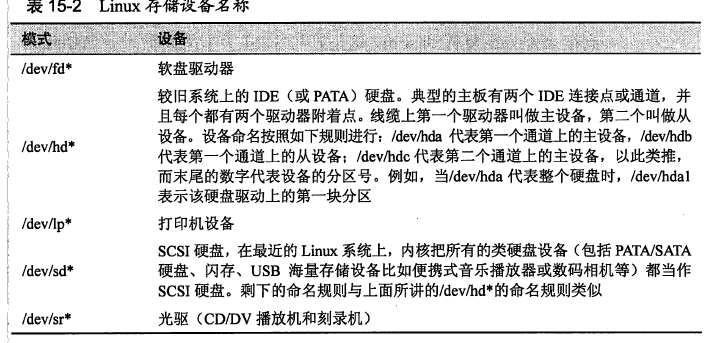
经过上述操作,我们还需要确定设备的名称:
二、创建新的文件系统
使用fdisk命令进行磁盘分区,fdisk命令实现用户与磁盘设备进行较低层次的直接交互,该工具可以用来编辑、删除、创建设备分区。
 [me@linuxbox ~]$ sudo umount /dev/sdb1

 [me@linuxbox ~]$ sudo fdisk /dev/sdb
然后输入m:
 Command action

 a toggle a bootable flag

 b edit bsd disklabel

 c toggle the dos compatibility flag

 d delete a partition

 l list known partition types

 m print this menu

 n add a new partition

 o create a new empty DOS partition table

 p print the partition table

 q quit without saving changes

 s create a new empty Sun disklabel

 t change a partition's system id

 u change display/entry units

 v verify the partition table

 w write table to disk and exit

 x extra functionality (experts only)

 Command (m for help):
使用p可以显示设备的分区表:
 Command (m for help): p

 Disk /dev/sdb:  MB,  bytes

  heads,  sectors/track,  cylinders

 Units = cylinders of  *  =  bytes

 Device Boot Start End Blocks Id System

 /dev/sdb1   + b W95 FAT32
未完待续....
The linux command 之存储媒介的更多相关文章
- 《The Linux Command Line》 读书笔记01 基本命令介绍
<The Linux Command Line> 读书笔记01 基本命令介绍 1. What is the Shell? The Shell is a program that takes ...
- Linux Command Line 解析
Linux Command Line 解析 0 处理模型 Linux kernel的启动包括很多组件的初始化和相关配置,这些配置参数一般是通过command line进行配置的.在进行后续分析之前,先 ...
- 《The Linux Command Line》 读书笔记04 Linux用户以及权限相关命令
Linux用户以及权限相关命令 查看身份 id:Display user identity. 这个命令的输出会显示uid,gid和用户所属的组. uid即user ID,这是账户创建时被赋予的. gi ...
- 《The Linux Command Line》 读书笔记02 关于命令的命令
<The Linux Command Line> 读书笔记02 关于命令的命令 命令的四种类型 type type—Indicate how a command name is inter ...
- Linux Command Line Basics
Most of this note comes from the Beginning the Linux Command Line, Second Edition by Sander van Vugt ...
- 15 Examples To Master Linux Command Line History
When you are using Linux command line frequently, using the history effectively can be a major produ ...
- 10 Interesting Linux Command Line Tricks and Tips Worth Knowing
I passionately enjoy working with commands as they offer more control over a Linux system than GUIs( ...
- linux高级数据存储
linux内此存储模式由5部分组成,自低向上的顺序: 物理卷,内核块设备驱动,内核文件系统驱动,虚拟文件系统,应用程序数据结构; 系统中所有的文件仅按此模式存储,无论是数据还是元数据,均在此模式下统一 ...
- Reso | The Linux Command Line 的中文版
http://book.haoduoshipin.com/tlcl/book/zh/ 本书是 The Linux Command Line 的中文版, 为大家提供了多种不同的阅读方式. 中英文双语版- ...
随机推荐
- [已解决]报错Could not install packages due to an EnvironmentError
安装OpenCV过程中出现错误 代码: pip-conda install -i https://pypi.douban.com/simple/ opencv-python 报错内容如下: Could ...
- ant design 两个tabs如何同时切换
假设界面上有两个地方用到了同一个tabs,但是切换其中一个tabs,另一个tabs并不会同时切换,因为只是在其中一个tabs上调用了onChange,所以需要用到activeKey动态地设置tabs的 ...
- 从零开始搭建系统1.3——Tomcat安装及配置
首先安装jdk,手动解压JDK的压缩包,然后设置环境变量 1.卸载自带openjdk 查询OpenJDK rpm -qa|grep java 批量卸载所有名字包含jdk的已安装程序.命令行: rpm ...
- js查询字符串是否包含指定字符的函数indexOf
今天用到了js的函数indexOf来查看字符串中是否包含指定的字符,最开始没注意看,就拿来用了,结果用的时候才发现,IndexOf的返回值原来是字符在字符串中的index,返回值有0.1等等,如果没有 ...
- PHP算法之最接近的三数之和
给定一个包括 n 个整数的数组 nums 和 一个目标值 target.找出 nums 中的三个整数,使得它们的和与 target 最接近.返回这三个数的和.假定每组输入只存在唯一答案. 例如,给定数 ...
- sql 左连接与右连接
假设有A,B两个表. 表A记录如下: aID aNum 1 a20050111 2 a20050112 3 a20050113 4 a20050114 5 a20050115 表B记录如下: bID ...
- jq-demo-楼梯效果
<!DOCTYPE html> <html> <head> <meta charset="UTF-8"> <title> ...
- JAVA java
{ 用法: java [-options] class [args...] (执行类) 或 java [-options] -jar jarfile [args...] ...
- 「题解」:x
问题 A: x 时间限制: 1 Sec 内存限制: 256 MB 题面 题面谢绝公开. 题解 赛时想到了正解并且对拍了很久.对拍没挂,但是评测姬表示我w0了……一脸懵逼. 不难证明,如果对于两个数字 ...
- bzoj1053题解
[题意分析] 本题中,x被称为反质数,当且仅当没有任意一个严格小于x的正整数的约数个数大于x的约数个数.求不超过N的最大反质数. [解题思路] 数据范围中最大的N=2*109. 首先可以证明,不超过N ...