
33.scrapy采集网站表单数据
这几天一直都再用scrapy写网站数据采集的爬虫,这里我就选一个写过的爬虫来记录一下。

杭州造价网:http://183.129.219.195:8081/bs/hzzjb/web/list

这里出现的主要问题就是:

1.
这里我的代码会出现一些问题,内存溢出,由于程序一直在运行,内存一直在增加(未释放内存,有待改进),就会导致爬虫程序假死等待。

2.
yield scrapy.FormRequest(url='http://183.129.219.195:8081/bs/hzzjb/web/list', callback=self.parse, formdata=data, method="POST", dont_filter=True)

dont_filter 默认设置False 导致 去重过滤,未能获取下一页链接。

3.
还有一个问题就是最后一页的数据我没解决,我拿了5032页,这个翻页还是没完善好。
网站主要信息:
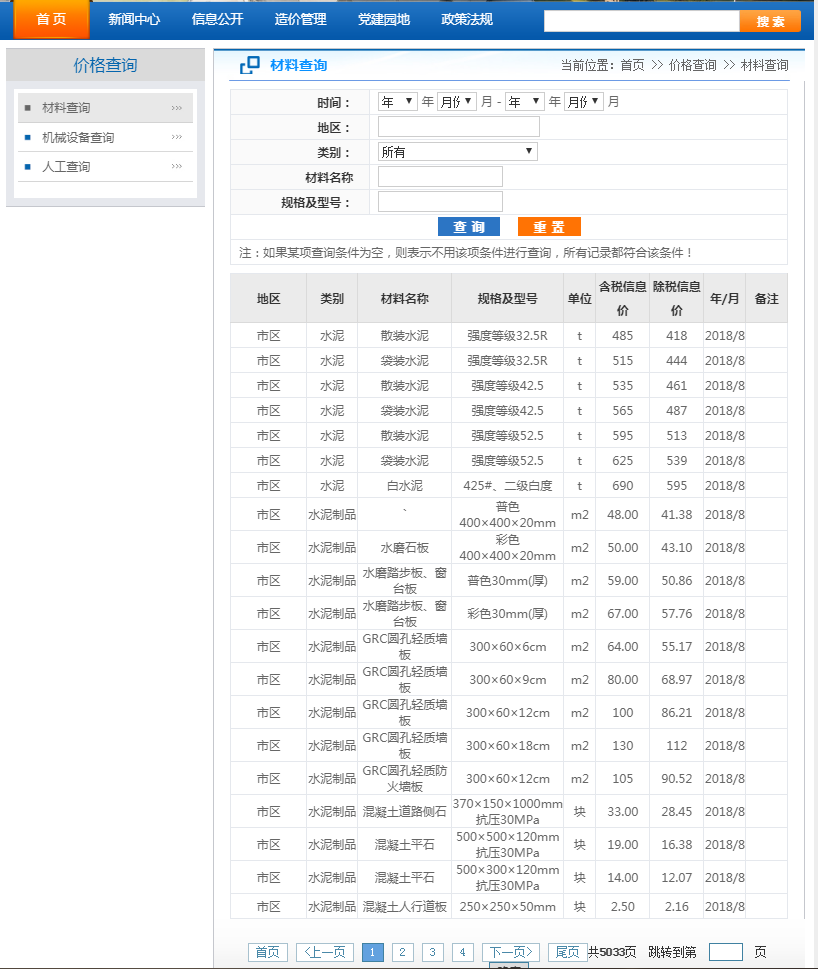
hzzjb.py

# -*- coding: utf-8 -*-

import scrapy

import json

import re

from hzzjb_web.items import HzzjbWebItem

class HzzjbSpider(scrapy.Spider):

    name = 'hzzjb'

    allowed_domains = ['183.129.219.195:8081/bs']

    start_urls = ['http://183.129.219.195:8081/bs/hzzjb/web/list']

    custom_settings = {

        "DOWNLOAD_DELAY": 1,

        "ITEM_PIPELINES": {

            'hzzjb_web.pipelines.MysqlPipeline': 320,

        },

        "DOWNLOADER_MIDDLEWARES": {

            'hzzjb_web.middlewares.HzzjbWebDownloaderMiddleware': 500

        },

    }

    def parse(self, response):

        _response=response.text

        # print(_response)

        try :

            #获取信息表

            tag_list=response.xpath("//table[@class='table1']//tr/td").extract()

            # print(tag_list)

            # for i in tag_list:

            #     print(i)

            tag1=tag_list[:9]

            tag2=tag_list[9:18]

            tag3=tag_list[18:27]

            tag4=tag_list[27:36]

            tag5=tag_list[36:45]

            tag6=tag_list[45:54]

            tag7=tag_list[54:63]

            tag8=tag_list[63:72]

            tag9=tag_list[72:81]

            tag10=tag_list[81:90]

            tag11=tag_list[90:99]

            tag12=tag_list[99:108]

            tag13=tag_list[108:117]

            tag14=tag_list[117:126]

            tag15=tag_list[126:135]

            tag16=tag_list[135:144]

            tag17=tag_list[144:153]

            tag18=tag_list[153:162]

            tag19=tag_list[162:171]

            tag20=tag_list[171:180]

            list=[]

            list.append(tag1)

            list.append(tag2)

            list.append(tag3)

            list.append(tag4)

            list.append(tag5)

            list.append(tag6)

            list.append(tag7)

            list.append(tag8)

            list.append(tag9)

            list.append(tag10)

            list.append(tag11)

            list.append(tag12)

            list.append(tag13)

            list.append(tag14)

            list.append(tag15)

            list.append(tag16)

            list.append(tag17)

            list.append(tag18)

            list.append(tag19)

            list.append(tag20)

            # print(list)

        except:

            print('————————————————网站编码有异常!————————————————————')

        for index,tag in enumerate(list):

            # print('*'*100)

            # print(index+1,TAG(i))

            item = HzzjbWebItem()

            # 地区

            district = tag[0].replace('<td>','').replace('</td>','')

            # print(district)

            item['district'] = district

            # 类别

            category = tag[1].replace('<td>','').replace('</td>','')

            # print(category)

            item['category'] = category

            # 材料名称

            material_name = tag[2].replace('<td>','').replace('</td>','')

            # print(material_name)

            item['material_name'] = material_name

            # 规格及型号

            version = tag[3].replace('<td>','').replace('</td>','')

            # print(version)

            item['version'] = version

            # 单位

            unit = tag[4].replace('<td>','').replace('</td>','')

            # print(unit)

            item['unit'] = unit

            # 含税信息价

            tax_information_price = tag[5].replace('<td>','').replace('</td>','')

            # print(tax_information_price)

            item['tax_information_price'] = tax_information_price

            # 除税信息价

            except_tax_information_price = tag[6].replace('<td>','').replace('</td>','')

            # print(except_tax_information_price)

            item['except_tax_information_price'] = except_tax_information_price

            # 年/月

            year_month = tag[7].replace('<td>','').replace('</td>','')

            # print(year_month)

            item['y_m'] = year_month

            # print('*'*100)

            yield item

        for i in range(2, 5032):

            # 翻页

            data={

                'mtype': '',

                '_query.nfStart':'',

                '_query.yfStart':'',

                '_query.nfEnd':'',

                '_query.yfEnd':'',

                '_query.dqstr':'',

                '_query.dq':'',

                '_query.lbtype':'',

                '_query.clmc':'',

                '_query.ggjxh':'',

                'pageNumber': '{}'.format(i),

                'pageSize':'',

                'orderColunm':'',

                'orderMode':'',

            }

            yield scrapy.FormRequest(url='http://183.129.219.195:8081/bs/hzzjb/web/list', callback=self.parse, formdata=data, method="POST", dont_filter=True)
items.py

# -*- coding: utf-8 -*-

# Define here the models for your scraped items

#

# See documentation in:

# https://doc.scrapy.org/en/latest/topics/items.html

import scrapy

class HzzjbWebItem(scrapy.Item):

    # define the fields for your item here like:

    # name = scrapy.Field()

    district=scrapy.Field()

    category=scrapy.Field()

    material_name=scrapy.Field()

    version=scrapy.Field()

    unit=scrapy.Field()

    tax_information_price=scrapy.Field()

    except_tax_information_price=scrapy.Field()

    y_m=scrapy.Field()
middlewares.py

# -*- coding: utf-8 -*-

# Define here the models for your spider middleware

#

# See documentation in:

# https://doc.scrapy.org/en/latest/topics/spider-middleware.html

from scrapy import signals

class HzzjbWebSpiderMiddleware(object):

    # Not all methods need to be defined. If a method is not defined,

    # scrapy acts as if the spider middleware does not modify the

    # passed objects.

    @classmethod

    def from_crawler(cls, crawler):

        # This method is used by Scrapy to create your spiders.

        s = cls()

        crawler.signals.connect(s.spider_opened, signal=signals.spider_opened)

        return s

    def process_spider_input(self, response, spider):

        # Called for each response that goes through the spider

        # middleware and into the spider.

        # Should return None or raise an exception.

        return None

    def process_spider_output(self, response, result, spider):

        # Called with the results returned from the Spider, after

        # it has processed the response.

        # Must return an iterable of Request, dict or Item objects.

        for i in result:

            yield i

    def process_spider_exception(self, response, exception, spider):

        # Called when a spider or process_spider_input() method

        # (from other spider middleware) raises an exception.

        # Should return either None or an iterable of Response, dict

        # or Item objects.

        pass

    def process_start_requests(self, start_requests, spider):

        # Called with the start requests of the spider, and works

        # similarly to the process_spider_output() method, except

        # that it doesn’t have a response associated.

        # Must return only requests (not items).

        for r in start_requests:

            yield r

    def spider_opened(self, spider):

        spider.logger.info('Spider opened: %s' % spider.name)

class HzzjbWebDownloaderMiddleware(object):

    # Not all methods need to be defined. If a method is not defined,

    # scrapy acts as if the downloader middleware does not modify the

    # passed objects.

    @classmethod

    def from_crawler(cls, crawler):

        # This method is used by Scrapy to create your spiders.

        s = cls()

        crawler.signals.connect(s.spider_opened, signal=signals.spider_opened)

        return s

    def process_request(self, request, spider):

        # Called for each request that goes through the downloader

        # middleware.

        # Must either:

        # - return None: continue processing this request

        # - or return a Response object

        # - or return a Request object

        # - or raise IgnoreRequest: process_exception() methods of

        #   installed downloader middleware will be called

        return None

    def process_response(self, request, response, spider):

        # Called with the response returned from the downloader.

        # Must either;

        # - return a Response object

        # - return a Request object

        # - or raise IgnoreRequest

        return response

    def process_exception(self, request, exception, spider):

        # Called when a download handler or a process_request()

        # (from other downloader middleware) raises an exception.

        # Must either:

        # - return None: continue processing this exception

        # - return a Response object: stops process_exception() chain

        # - return a Request object: stops process_exception() chain

        pass

    def spider_opened(self, spider):

        spider.logger.info('Spider opened: %s' % spider.name)
piplines.py

# -*- coding: utf-8 -*-

# Define your item pipelines here

#

# Don't forget to add your pipeline to the ITEM_PIPELINES setting

# See: https://doc.scrapy.org/en/latest/topics/item-pipeline.html

from scrapy.conf import settings

import pymysql

class HzzjbWebPipeline(object):

    def process_item(self, item, spider):

        return item

# 数据保存mysql

class MysqlPipeline(object):

    def open_spider(self, spider):

        self.host = settings.get('MYSQL_HOST')

        self.port = settings.get('MYSQL_PORT')

        self.user = settings.get('MYSQL_USER')

        self.password = settings.get('MYSQL_PASSWORD')

        self.db = settings.get(('MYSQL_DB'))

        self.table = settings.get('TABLE')

        self.client = pymysql.connect(host=self.host, user=self.user, password=self.password, port=self.port, db=self.db, charset='utf8')

    def process_item(self, item, spider):

        item_dict = dict(item)

        cursor = self.client.cursor()

        values = ','.join(['%s'] * len(item_dict))

        keys = ','.join(item_dict.keys())

        sql = 'INSERT INTO {table}({keys}) VALUES ({values})'.format(table=self.table, keys=keys, values=values)

        try:

            if cursor.execute(sql, tuple(item_dict.values())):  # 第一个值为sql语句第二个为 值 为一个元组

                print('数据入库成功!')

                self.client.commit()

        except Exception as e:

            print(e)

            print('数据已存在!')

            self.client.rollback()

        return item

    def close_spider(self, spider):

        self.client.close()
setting.py

# -*- coding: utf-8 -*-

# Scrapy settings for hzzjb_web project

#

# For simplicity, this file contains only settings considered important or

# commonly used. You can find more settings consulting the documentation:

#

#     https://doc.scrapy.org/en/latest/topics/settings.html

#     https://doc.scrapy.org/en/latest/topics/downloader-middleware.html

#     https://doc.scrapy.org/en/latest/topics/spider-middleware.html

BOT_NAME = 'hzzjb_web'

SPIDER_MODULES = ['hzzjb_web.spiders']

NEWSPIDER_MODULE = 'hzzjb_web.spiders'

# mysql配置参数

MYSQL_HOST = "172.16.10.197"

MYSQL_PORT = 3306

MYSQL_USER = "root"

MYSQL_PASSWORD = ""

MYSQL_DB = 'web_datas'

TABLE = "web_hzzjb"

# Crawl responsibly by identifying yourself (and your website) on the user-agent

#USER_AGENT = 'hzzjb_web (+http://www.yourdomain.com)'

# Obey robots.txt rules

ROBOTSTXT_OBEY = False

# Configure maximum concurrent requests performed by Scrapy (default: 16)

#CONCURRENT_REQUESTS = 32

# Configure a delay for requests for the same website (default: 0)

# See https://doc.scrapy.org/en/latest/topics/settings.html#download-delay

# See also autothrottle settings and docs

#DOWNLOAD_DELAY = 3

# The download delay setting will honor only one of:

#CONCURRENT_REQUESTS_PER_DOMAIN = 16

#CONCURRENT_REQUESTS_PER_IP = 16

# Disable cookies (enabled by default)

#COOKIES_ENABLED = False

# Disable Telnet Console (enabled by default)

#TELNETCONSOLE_ENABLED = False

# Override the default request headers:

#DEFAULT_REQUEST_HEADERS = {

#   'Accept': 'text/html,application/xhtml+xml,application/xml;q=0.9,*/*;q=0.8',

#   'Accept-Language': 'en',

#}

# Enable or disable spider middlewares

# See https://doc.scrapy.org/en/latest/topics/spider-middleware.html

#SPIDER_MIDDLEWARES = {

#    'hzzjb_web.middlewares.HzzjbWebSpiderMiddleware': 543,

#}

# Enable or disable downloader middlewares

# See https://doc.scrapy.org/en/latest/topics/downloader-middleware.html

DOWNLOADER_MIDDLEWARES = {

   'hzzjb_web.middlewares.HzzjbWebDownloaderMiddleware': 500,

}

# Enable or disable extensions

# See https://doc.scrapy.org/en/latest/topics/extensions.html

#EXTENSIONS = {

#    'scrapy.extensions.telnet.TelnetConsole': None,

#}

# Configure item pipelines

# See https://doc.scrapy.org/en/latest/topics/item-pipeline.html

ITEM_PIPELINES = {

   'hzzjb_web.pipelines.HzzjbWebPipeline': 300,

}

# Enable and configure the AutoThrottle extension (disabled by default)

# See https://doc.scrapy.org/en/latest/topics/autothrottle.html

#AUTOTHROTTLE_ENABLED = True

# The initial download delay

#AUTOTHROTTLE_START_DELAY = 5

# The maximum download delay to be set in case of high latencies

#AUTOTHROTTLE_MAX_DELAY = 60

# The average number of requests Scrapy should be sending in parallel to

# each remote server

#AUTOTHROTTLE_TARGET_CONCURRENCY = 1.0

# Enable showing throttling stats for every response received:

#AUTOTHROTTLE_DEBUG = False

# Enable and configure HTTP caching (disabled by default)

# See https://doc.scrapy.org/en/latest/topics/downloader-middleware.html#httpcache-middleware-settings

#HTTPCACHE_ENABLED = True

#HTTPCACHE_EXPIRATION_SECS = 0

#HTTPCACHE_DIR = 'httpcache'

#HTTPCACHE_IGNORE_HTTP_CODES = []

#HTTPCACHE_STORAGE = 'scrapy.extensions.httpcache.FilesystemCacheStorage'
执行文件  :scrapy crawl hzzjb -s JOBDIR=myspider 设置持久化

就会生成如下文件:

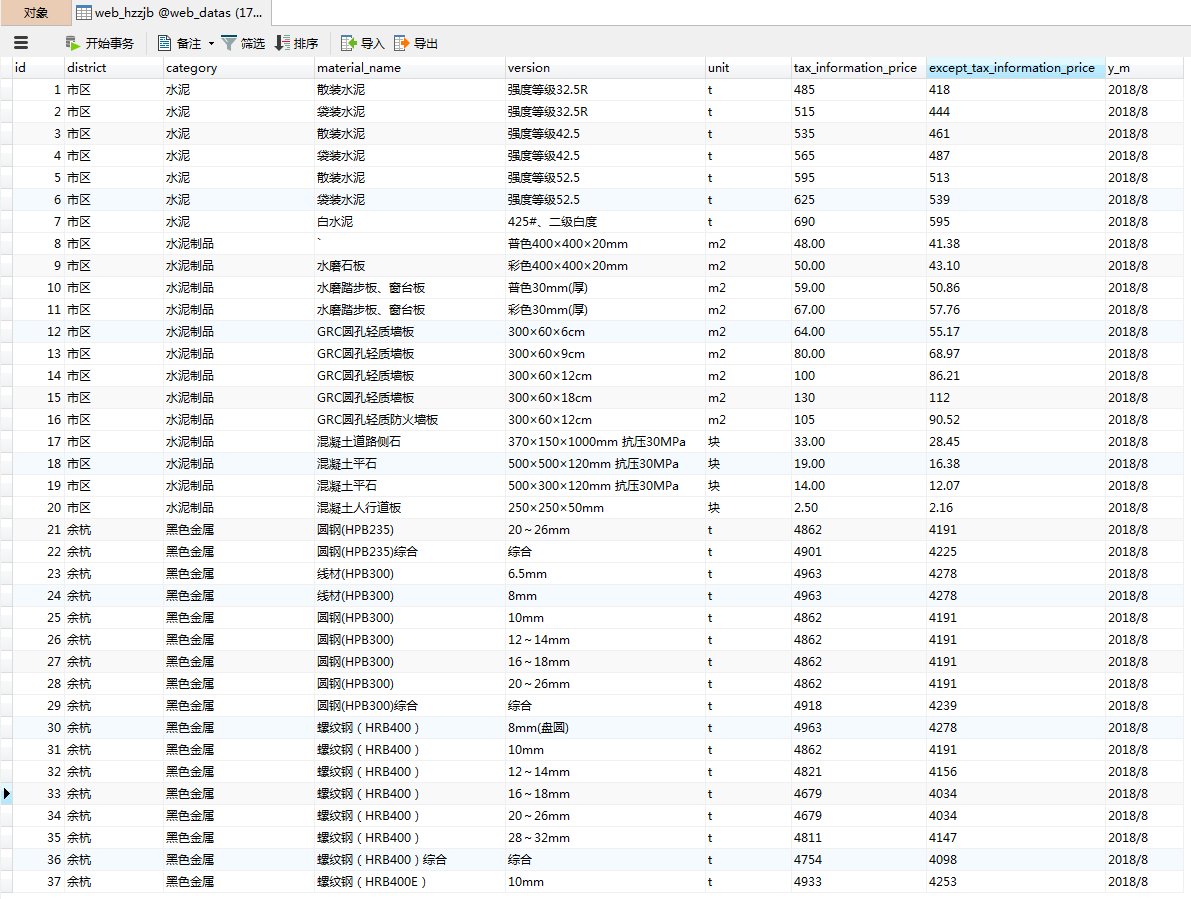
数据入库如图:
33.scrapy采集网站表单数据的更多相关文章
- 使用jQuery实现跨域提交表单数据
我们在WEB开发中有时会遇到这种情况,比如要从A网站收集用户信息,提交给B网站处理,这个时候就会涉及到跨域提交数据的问题.本文将给您介绍如何使用jQuery来实现异步跨域提交表单数据. 在jQue ...
- 如何发送HTML表单数据
多数时候,HTML表单的目的只是为了把数据发给服务器,之后服务器再处理这些数据并发送响应给用户.虽然看起来挺简单的,但我们还是得注意一些事情以确保传送的数据不会破坏服务器.或者给你的用户制造麻烦. 数 ...
- ASP.NET MVC案例教程(基于ASP.NET MVC beta)——第四篇:传递表单数据
摘要 本文将完成我们“MVC公告发布系统”的公告发布功能,以此展示在ASP.NET MVC中如何传递处理表单的数据. 前言 通过前几篇文章,我们已经能比较自如的使用ASP.NET ...
- 如何使用PHP验证客户端提交的表单数据
PHP 表单验证 本章节我们将介绍如何使用PHP验证客户端提交的表单数据. PHP 表单验证 在处理PHP表单时我们需要考虑安全性. 本章节我们将展示PHP表单数据安全处理,为了防止黑客及垃圾信息我们 ...
- Servlet的5种方式实现表单提交(注册小功能),后台获取表单数据
用servlet实现一个注册的小功能 ,后台获取数据. 注册页面: 注册页面代码 : <!DOCTYPE html> <html> <head> <meta ...
- easyui不提交window中的form表单数据
<form id="ff" method="post">, <div id="win" class="easyu ...
- Struct2提交表单数据到Acion
Struct2提交表单数据到Action,Action取表单的数据,传递变量.对象 HTML.jsp <form action="reg.do" method="p ...
- json化表单数据
/** * josn化表单数据 * @name baidu.form.json * @function * @grammar baidu.form.json(form[, replacer]) * @ ...
- [原创作品] Express 4.x 接收表单数据
好久没有写博客,从现在开始,将介绍用nodejs进行web开发的介绍.欢迎加群讨论:164858883. 之前的express版本在接收表单数据时,可以统一用res.params['参数名'],但在4 ...
随机推荐
- 开始使用Chronograf(官方说明)
地址:https://docs.influxdata.com/chronograf/v1.6/introduction/getting-started/ 开始使用Chronograf 在本页面 入门概 ...
- DS二叉树--二叉树之父子结点
题目描述 给定一颗二叉树的逻辑结构如下图,(先序遍历的结果,空树用字符‘0’表示,例如AB0C00D00),建立该二叉树的二叉链式存储结构. 编写程序输出该树的所有叶子结点和它们的父亲结点 输入 第一 ...
- ##Truncated incorrect DOUBLE value: 'E#4' 的问题解决
给sql语句 加了个引号,问题就这么轻易解决了,猜想,应该是mysql 做where对比的时候,把数字5 与数据库里的数据”OABF” 比较,应该是这时的问题.
- 关于MySql悲观锁与乐观锁
悲观锁与乐观锁是两种常见的资源并发锁设计思路,也是并发编程中一个非常基础的概念.本文将对这两种常见的锁机制在数据库数据上的实现进行比较系统的介绍. 悲观锁(Pessimistic Lock) 悲观锁的 ...
- windows2008系统缓存修改
Windwos Server 2008 中经常有物理内存占用较高,但任务管理器中各进程的内存看起来占用并不多情况. 这可能是由于OS为保证服务器性能不限制系统缓存,服务器系统长时间执行I/O,系统文件 ...
- C#批量更新mongodb符合条件的数据
默认情况下只会更新匹配的第一条 jingjiaanalyurl.Update(Query.EQ("auid", jingjiaitem.id), Update.Set(" ...
- mac brew 安装 nginx fpm mysql 教程
一. 安装brew 要求:OS X 10.6以上系统,并且安装有XCode命令行工具 对于10.11的系统需要设置下local的权限为当前用户 $ sudo chown -R $(whoami):ad ...
- python programming作业5
# -*- coding: utf-8 -*- class ageError(Exception): pass class salaryError(Exception): pass class s ...
- 云区域(region),可用区(AZ),跨区域数据复制(Cross-region replication)与灾备(Disaster Recovery)(部分1)
本文分两部分:部分1 和 部分2.部分1 介绍 AWS,部分2 介绍阿里云和OpenStack云. 1. AWS 1.1 AWS 地理组件概况 AWS 提供三种地理性组件: Regions:区域,即A ...
- SEO 图片用IMG插入好还是用Background定义好?
主要的区别就是,background搜索引擎室不知道图片内容说什么的.而img,是可以通过alt标签向搜索引擎描述你图片的内容.所以如果这张图片对你网站内容有帮助,那最好用img,如果没有什么用处的话 ...