
[转载]How To Install Nginx And PHP-FPM On CentOS 6 Via Yum
http://www.lifelinux.com/how-to-install-nginx-and-php-fpm-on-centos-6-via-yum/
http://blog.csdn.net/seanchan/article/details/7680354
Today, I’m going to show you how to install Nginx with PHP-FPM via yum.
Before starting to install Nginx and PHP-FPM, you must uninstall all previous Apache and PHP related RPMs installed on your system. Login as root and type the following command
# yum remove httpd* php*
Enabling Additional Repositories
By default, php-fpm is not available from the official CentOS repositories, but from the Remi RPM repository which itself depends on the EPEL repository; we can enable both repositories as follows:
# yum install yum-priorities -y

# rpm -Uvh http://rpms.famillecollet.com/enterprise/remi-release-6.rpm

# rpm -Uvh http://download.fedoraproject.org/pub/epel/6/i386/epel-release-6-8.noarch.rpm
Sample outputs
Retrieving http://download.fedora.redhat.com/pub/epel/6/x86_64/epel-release-6-5.noarch.rpm

warning: /var/tmp/rpm-tmp.00kiDx: Header V3 RSA/SHA256 Signature, key ID 0608b895: NOKEY

Preparing...                ########################################### [100%]

   1:epel-release           ########################################### [100%]
Installing Nginx
Type the following command
# yum install nginx
Sample outputs
Dependencies Resolved

================================================================================

 Package                  Arch      Version                    Repository  Size

================================================================================

Installing:

 nginx                    x86_64    0.8.54-1.el6               epel       358 k

Installing for dependencies:

 GeoIP                    x86_64    1.4.8-1.el6                epel       620 k

 fontconfig               x86_64    2.8.0-3.el6                base       186 k

 freetype                 x86_64    2.3.11-6.el6_1.8           updates    358 k

 gd                       x86_64    2.0.35-10.el6              base       142 k

 libX11                   x86_64    1.3-2.el6                  base       582 k

 libX11-common            noarch    1.3-2.el6                  base       188 k

 libXau                   x86_64    1.0.5-1.el6                base        22 k

 libXpm                   x86_64    3.5.8-2.el6                base        59 k

 libjpeg                  x86_64    6b-46.el6                  base       134 k

 libpng                   x86_64    2:1.2.46-1.el6_1           base       180 k

 libxcb                   x86_64    1.5-1.el6                  base       100 k

 libxslt                  x86_64    1.1.26-2.el6               base       450 k

 perl                     x86_64    4:5.10.1-119.el6_1.1       base        10 M

 perl-Module-Pluggable    x86_64    1:3.90-119.el6_1.1         base        37 k

 perl-Pod-Escapes         x86_64    1:1.04-119.el6_1.1         base        30 k

 perl-Pod-Simple          x86_64    1:3.13-119.el6_1.1         base       209 k

 perl-libs                x86_64    4:5.10.1-119.el6_1.1       base       575 k

 perl-version             x86_64    3:0.77-119.el6_1.1         base        49 k

Transaction Summary

================================================================================

Install      19 Package(s)

Upgrade       0 Package(s)

Total download size: 14 M

Installed size: 47 M

Is this ok [y/N]: y
If you want to run nginx by default when the system boots, type the following command
# chkconfig --level 345 nginx on
To start Nginx for the first time, type the following command
# /etc/init.d/nginx start
Sample output
Starting nginx: [ OK ]
Installing PHP-FPM
Type the following command
# yum --enablerepo=remi install php php-fpm
Sample outputs
Dependencies Resolved

====================================================================================

 Package            Arch        Version                          Repository    Size

====================================================================================

Installing:

 php                x86_64      5.3.10-2.el6.remi                remi         2.3 M

 php-fpm            x86_64      5.3.10-2.el6.remi                remi         1.1 M

Installing for dependencies:

 apr                x86_64      1.3.9-3.el6_1.2                  base         123 k

 apr-util           x86_64      1.3.9-3.el6_0.1                  base          87 k

 apr-util-ldap      x86_64      1.3.9-3.el6_0.1                  base          15 k

 httpd              x86_64      2.2.15-15.el6.centos.1           updates      813 k

 httpd-tools        x86_64      2.2.15-15.el6.centos.1           updates       70 k

 libedit            x86_64      2.11-4.20080712cvs.1.el6         base          74 k

 mailcap            noarch      2.1.31-2.el6                     base          27 k

 php-cli            x86_64      5.3.10-2.el6.remi                remi         2.2 M

Transaction Summary

====================================================================================

Install      10 Package(s)

Upgrade       0 Package(s)

Total download size: 6.8 M

Installed size: 21 M

Is this ok [y/N]: y
If you want to run php-fpm by default when the system boots, type the following command
# chkconfig --level 345 php-fpm on
PHP was installed with only core modules. It’s very likely that additional modules will be desired, such as MySQL, XML, GD, etc. Type the following command
# yum --enablerepo=remi install php-gd php-mysql php-mbstring php-xml php-mcrypt
To start PHP-FPM for the first time, type the following command
# /etc/init.d/php-fpm restart
Sample output
Starting php-fpm: [ OK ]
Configure PHP-FPM and Nginx working together
The configuration file for Nginx is located at /etc/nginx/nginx.conf. To edit nginx.conf type the following command
# vi /etc/nginx/nginx.conf
Uncomment and edit as follows
        ...

	location / {

            root   /usr/share/nginx/html;

            index  index.html index.htm index.php;

        }

        ...

	location ~ \.php$ {

            root           html;

            fastcgi_pass   127.0.0.1:9000;

            fastcgi_index  index.php;

            fastcgi_param  SCRIPT_FILENAME  $document_root$fastcgi_script_name;

            include        fastcgi_params;

        }

        ...
Restart Nginx to reload new configuration, enter
# /etc/init.d/nginx reload
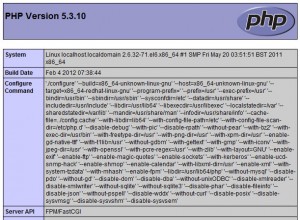
Now create the following PHP file in the document root
# vi /usr/share/nginx/html/info.php
Append content as follows:
<?php

phpinfo();

?>
Access it http://YOUR-SERVER-IP
Nginx Virtual Hosting Configuration
Your sample setup
IP: 192.168.1.113
Domain: domain.local
Hosted at: /home/www/domain.local
Type the following command to create user called www
# useradd www
Create necessary directories
# mkdir -p /home/www/domain.local/public_html

# mkdir -p /home/www/domain.local/log

# chown -R www.www /home/www/

# chmod 755 /home/www/
Creating virtual host config file
# cd /etc/nginx/conf.d/

# cp virtual.conf www.conf
Open www.conf, enter
# vi /etc/nginx/conf.d/www.conf
Append configuration as follows:
server {

        server_name  domain.local;

        root /home/www/domain.local/public_html;

        access_log /home/www/domain.local/log/domain.local-access.log;

        error_log /home/www/domain.local/log/domain.local-error.log;

        location / {

                index  index.html index.htm index.php;

        }

        location ~ \.php$ {

                include /etc/nginx/fastcgi_params;

                fastcgi_pass  127.0.0.1:9000;

                fastcgi_index index.php;

                fastcgi_param SCRIPT_FILENAME $document_root$fastcgi_script_name;

        }

}
You can also check the current status as well as the configuration syntax:
# /etc/init.d/nginx configtest
Sample outputs
the configuration file /etc/nginx/nginx.conf syntax is ok

configuration file /etc/nginx/nginx.conf test is successful
Now edit /etc/php-fpm.d/www.conf to change the users who own the php-fpm processes to www, enter
# vi /etc/php-fpm.d/www.conf
Find “group of processes” and edit as follows:
; Unix user/group of processes

; Note: The user is mandatory. If the group is not set, the default user's group

;       will be used.

; RPM: apache Choosed to be able to access some dir as httpd

user = www

; RPM: Keep a group allowed to write in log dir.

group = www
Finally restart nginx
# /etc/init.d/nginx restart

# /etc/init.d/php-fpm restart
[转载]How To Install Nginx And PHP-FPM On CentOS 6 Via Yum的更多相关文章
- Install NGINX, PHP-FPM (5.6) on CentOS 6
Installing NGINX with PHP on CentOS 6 can be a hassle depending on the install and packages you use. ...
- How to Install Apache Tomcat 8.5 on CentOS 7.3
How to Install Apache Tomcat 8.5 on CentOS 7.3 From: https://www.howtoforge.com/tutorial/how-to-inst ...
- 【转载】CentOS-yum安装Nginx
查看系统版本 $ cat /etc/redhat-release Nginx 不在默认的 yum 源中,使用官网的 yum 源 $ rpm -ivh http://nginx.org/packages ...
- yum install nginx
先安装nginx的yum源 http://nginx.org/en/linux_packages.html#stable 找到链接,安装: rpm -ivh http://nginx.org/pack ...
- centos6.5 64位 yum install nginx的默认安装路径
yum install nginx网站文件存放默认目录 /usr/share/nginx/html 网站默认站点配置 /etc/nginx/conf.d/default.conf 自定义Nginx站点 ...
- 【Ubuntu16.04】 install nginx
1. Download PGP key in order to pass the authentication of the nginx repository signature. click to ...
- mac brew install nginx遇到的坑
默认使用 brew install nginx 出现了一下的错误: p.p1 { margin: 0.0px 0.0px 0.0px 0.0px; font: 11.0px Menlo; color: ...
- Install Nginx on CentOS 7
To set up the yum repository for RHEL/CentOS, create the file named /etc/yum.repos.d/nginx.repo with ...
- ubuntu16 install nginx
1,更新系统 sudo apt-get update 2,安装nginx sudo apt-get install nginx 3,验证是否安装成功 curl 127.0.0.1 常用配置文件和命令 ...
随机推荐
- Appium 连手机失败Error: Android bootstrap socket crashed: Error: getaddrinfo ENOTFOUND localhost undefined:4724
问题:Appium执行,连接手机报下面的错误 Error: Android bootstrap socket crashed: Error: getaddrinfo ENOTFOUND localho ...
- Numpy:ndarray数据类型和运算
Numpy的ndarray:一种多维数组对象 N维数组对象,该对象是一个快速而灵活的大数据集容器,nadarry是一个通用的同构数据多维容器,也就是说,其中的所有元素必须是相同类型的.每个数组都有一个 ...
- Linux 永久PATH环境变量
在/etc/profile文件中添加变量[对所有用户生效(永久的)] 用vim在文件/etc/profile文件中增加变量,该变量将会对Linux下所有用户有效,并且是“永久的”. 例如:编辑/etc ...
- I/O复用之select
作用: 实现I/O的多路复用 该函数允许进程指示内核等待多个事件中的任何一个发生,并只有在一个或多个事件发生时或经历一段指定的时间后才唤醒它.进程将于select处阻塞,直到被检测的描述符有一个或多个 ...
- redis主从复制踩到的那些坑
一.报错:* MASTER <-> SLAVE sync started # Error condition on socket for SYNC: No route to host解决: ...
- python中的命名元组namedtuple
namedtuple是继承自tuple的子类.namedtuple创建一个和tuple类似的对象,而且对象拥有可访问的属性 可利用collections.namedtuple构建一个简单的类. fro ...
- laravel框架部署后有用命令
1.重新生成APP_KEY php artisan key:generate执行后.env文件内的APP_KEY重新生成. 2.修改.env文件内系统运行环境,由debug环境设置为生产环境 APP_ ...
- 了解Queue
在并发队列上JDK提供了两套实现,一个是以ConcurrentLinkedQueue为代表的高性能队列,一个是以BlockingQueue接口为代表的阻塞队列,无论哪种都继承自Queue, 可以对应着 ...
- [Java学习]面向对象-抽象类;接口
抽象类 语法 public abstract class A{ } 定义 抽象类无法实例化.但抽象类有构造方法,在子类创建对象时用. 抽象类中可以定义抽象方法public abstract void ...
- SQL Server2005/2008 作业执行失败的解决办法
数据库:SQL Server 2005/2008,运行环境:Windows Server 2008 在数据库里的所有作业都执行失败,包括自动执行和手动执行.在事件查看器里看到的错误报告如下: 该 作 ...