
Install NGINX, PHP-FPM (5.6) on CentOS 6
Installing NGINX with PHP on CentOS 6 can be a hassle depending on the install and packages you use.
We've made a short and easy guide to install a minimal NGINX web server with PHP-FPM (5.6) support ready to go.
This is beind done in a fresh CentOS 6.6 64-bit Minimal installation.
yum update -y
Once that's done install the latest Webtatic repository which holds our recommended PHP 5.6 and NGINX 1.8 packages:
rpm -Uvh https://mirror.webtatic.com/yum/el6/latest.rpm
yum install epel-release

rpm -ivh http://rpms.famillecollet.com/enterprise/remi-release-7.rpm
rpm -Uvh https://mirror.webtatic.com/yum/el7/webtatic-release.rpm
yum install nginx18 -y
Start the service and make it run after boot:
service nginx start
chkconfig nginx on
Now we can install PHP-FPM, we do not need the regular PHP package installed. If you need any modules such as MySQL, just do "yum install php56w-mysql":
yum install php56w-fpm -y
Start the service and run at boot:
service php-fpm start
chkconfig php-fpm on
Now we need to edit a part of the nginx.conf at /etc/nginx/nginx.conf. Look for the following section and change it accordingly to below (bolded text):
# pass the PHP scripts to FastCGI server listening on 127.0.0.1:9000
#
#location ~ \.php$ {
# root html;
# fastcgi_pass 127.0.0.1:9000;
# fastcgi_index index.php;
# fastcgi_param SCRIPT_FILENAME /scripts$fastcgi_script_name;
# include fastcgi_params;
#}
Uncomment the location section and edit the fastcgi_param script location from /scripts to our public directory like what is bolded below:
# pass the PHP scripts to FastCGI server listening on 127.0.0.1:9000
#
location ~ \.php$ {
root html;
fastcgi_pass 127.0.0.1:9000;
fastcgi_index index.php;
f#astcgi_param SCRIPT_FILENAME $document_root$fastcgi_script_name;
include fastcgi_params;
}
Save the nginx.conf file now once those are changed and restart nginx.
service nginx restart
Now lets make a phpinfo page to confirm that PHP is working correctly with Nginx and as an index page. Make a new "index.php" in the /usr/share/nginx/html/ directory with the following contents:
<?php
phpinfo();
?>
Save the file as "index.php" in /usr/share/nginx/html/, delete the index.html in the same directory, then visit the page in your web browser (http://your_server_ip/index.php). You should see the phpinfo() page with all of the information there like the screenshot below.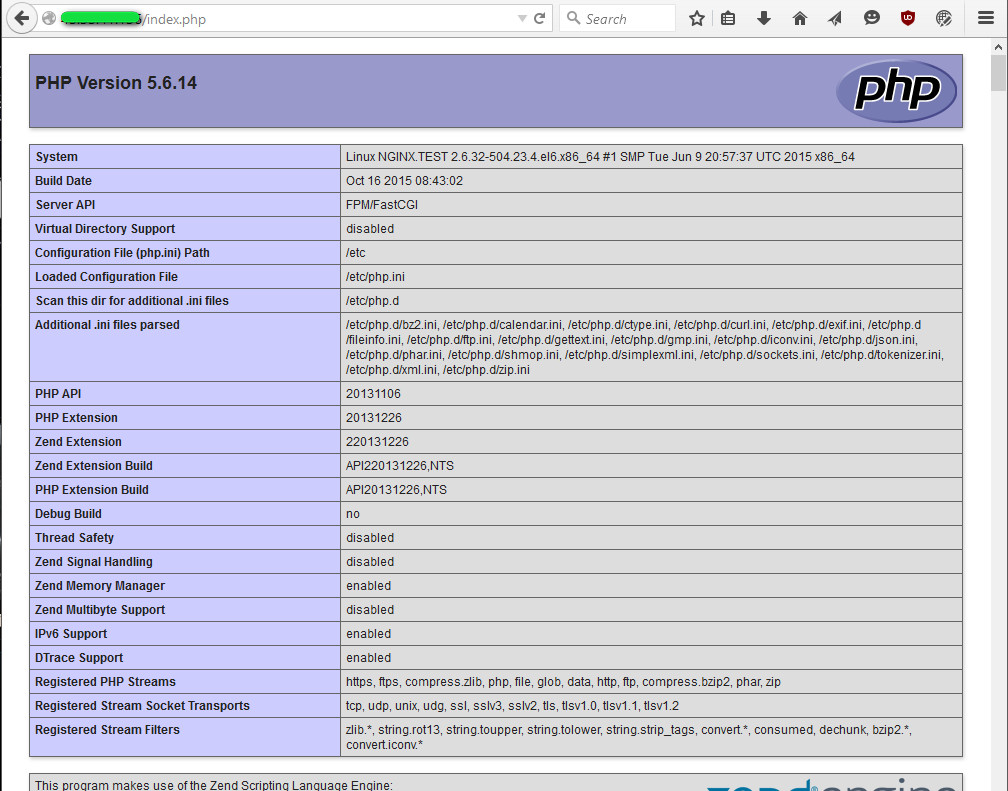
Create an IPTables firewall rule to allow access to port 80 (web server):
iptables -I INPUT 5 -p tcp -m tcp --dport 80 -j ACCEPT
service iptables save
yum install php56w-mbstring
yum install php56w-gd
yum install php56w-curl
yum install php56w-mysql
Done!
yum remove php*
yum remove php-*
yum remove php7
yum remove php70
yum remove php7.0
yum remove php-common
Install NGINX, PHP-FPM (5.6) on CentOS 6的更多相关文章
- [转载]How To Install Nginx And PHP-FPM On CentOS 6 Via Yum
http://www.lifelinux.com/how-to-install-nginx-and-php-fpm-on-centos-6-via-yum/ http://blog.csdn.net/ ...
- Install Nginx on CentOS 7
To set up the yum repository for RHEL/CentOS, create the file named /etc/yum.repos.d/nginx.repo with ...
- How To Install Linux, nginx, MySQL, PHP (LEMP) stack on CentOS 6
About Lemp LEMP stack is a group of open source software to get web servers up and running. The acro ...
- Centos 7下安装nginx,使用yum install nginx,提示没有可用的软件包
Centos 7下安装nginx,使用yum install nginx,提示没有可用的软件包. 18 (flaskApi) [root@67 flaskDemo]# yum -y install n ...
- How To Install Nginx on CentOS 7(转)
How To Install Nginx on CentOS 7 PostedJuly 22, 2014 427.4kviews NGINX CENTOS About Nginx Nginx is a ...
- Cenos7 编译安装 Mariadb Nginx PHP Memcache ZendOpcache (实测 笔记 Centos 7.0 + Mariadb 10.0.15 + Nginx 1.6.2 + PHP 5.5.19)
环境: 系统硬件:vmware vsphere (CPU:2*4核,内存2G,双网卡) 系统版本:CentOS-7.0-1406-x86_64-DVD.iso 安装步骤: 1.准备 1.1 显示系统版 ...
- 记录一次自己对nginx+fastcgi(fpm)+mysql压力测试结果
nginx + fastcgi(fpm) 压力测试: CentOS release 5.9 16核12G内存 静态页面: 并发1000,压测200秒,测试结果: 系统最大负载5.47 成功响应: 25 ...
- yum install nginx
先安装nginx的yum源 http://nginx.org/en/linux_packages.html#stable 找到链接,安装: rpm -ivh http://nginx.org/pack ...
- linux应用之nginx的安装及配置(centos)
Ubuntu/CentOS 系统上安装与配置Nginx 一.在线安装: Ubuntu:sudo apt-get install nginx CentOS: sudo yum install nginx ...
随机推荐
- 关于stickybroadcast
stickybroadcast顾名思义,粘性广播,从字面上我们可以联想到service的返回值中也有个一stick,在service中stick作用是当返回了之后服务被杀死,会重启服务. 但是这里的s ...
- 使用广播退出打开了多个activity的程序
新建一个父类,在父类里动态注册广播,在这个广播的onrecive方法中结束当前activity,让每个activity继承这个父类,在要关闭的activity中发送广播,搞定 下面是代码 父类 pro ...
- JVM实用参数(二)参数分类和即时(JIT)编译器诊断
JVM实用参数(二)参数分类和即时(JIT)编译器诊断 作者: PATRICK PESCHLOW 原文地址 译者:赵峰 校对:许巧辉 在这个系列的第二部分,我来介绍一下HotSpot J ...
- 第2章 构建springboot工程 2-1 构建SpringBoot第一个demo
以后的趋势肯定是以一个微服务为主导的, Spring-Boot的指导 Maven整个环境构建之前的整个项目其实是一个很普通的J2SE项目,它构建完之后会进行重构,重构为Maven的一个项目路径.可以看 ...
- 【总结整理】arcgis js api的Map类
关于ArcGis for javascrept之Map类 ArcGis for javascrept_ESRI_Map类: 1. 构造方法:esri.Map(); 参数: extent 如果设置 ...
- google的protocol buffers 对象的序列化 for java
前言: protobuf确实比JSON快很多倍,看下面的图就知道了. 环境: win7 x64 eclipse 4.3 protoc-2.5.0 安装包下载: https://code.google. ...
- 杭电ACM刷题(1):1002,A + B Problem II 标签: acmc语言 2017-05-07 15:35 139人阅读 评
最近忙于考试复习,没有多少可供自己安排的时间,所以我利用复习之余的空闲时间去刷刷杭电acm的题目,也当对自己编程能力的锻炼吧. Problem Description I have a very si ...
- Android 中的菜单 OptionsMenu的简单应用
OptionsMenu就是安卓手机中的菜单选项 首先 要实现对菜单的操作就要先重写OnCreateOptionsMenu(Menu menu)方法 通常有两种方法来实现对菜单中选项的添加 第一种是动态 ...
- [译]Javascript中的本地以及全局变量
本文翻译youtube上的up主kudvenkat的javascript tutorial播放单 源地址在此: https://www.youtube.com/watch?v=PMsVM7rjupU& ...
- GUID介绍
GUID介绍 GUID(Global unique identifier)全局唯一标识符,它是由网卡上的标识数字(每个网卡都有唯一的标识号)以及 CPU 时钟的唯一数字生成的的一个 16 字节的二进制 ...