
使用Microsoft.AspNetCore.TestHost进行完整的功能测试
简介
Microsoft.AspNetCore.TestHost是可以用于Asp.net Core 的功能测试工具。很多时候我们一个接口写好了,单元测试什么的也都ok了,需要完整调试一下,检查下单元测试未覆盖到的代码是否有bug。步骤为如下:程序打个断点->F5运行->通常需要登录个测试账号->查找要调试api的入口->获得断点开始调试=>代码报错?很多时候需要停止调试修改->回到第一步。如此反复循环,做着重复的工作,Microsoft.AspNetCore.TestHost正是为了解决这个问题,它可以让你使用xTest或者MSTest进行覆盖整个HTTP请求生命周期的功能测试。
进行一个简单的功能测试
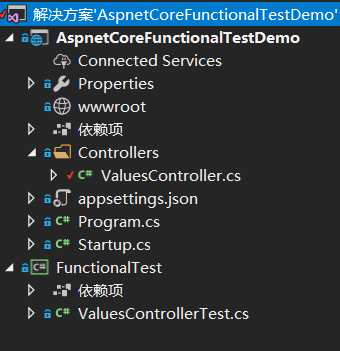
新建一个Asp.net Core WebApi和xUnit项目
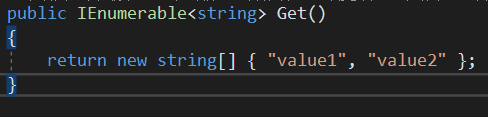
ValuesController里面自带一个Action
我们在xUnit项目里面模拟访问这个接口,首选安装如下nuget包:
- Microsoft.AspNetCore.TestHost
- Microsoft.AspNetCore.All(很多依赖懒得找的话直接安装这个集成包,百分之90涉及到AspNetCore的依赖都包含在里面)
然后需要引用被测试的AspnetCoreFunctionalTestDemo项目,新建一个测试类ValuesControllerTest
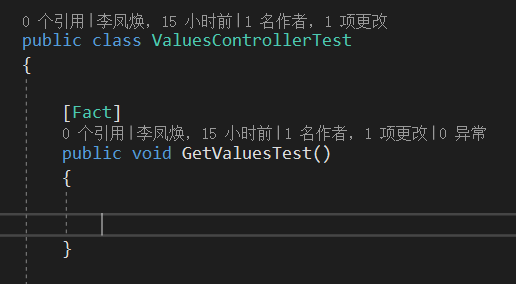
将GetValuesTest方法替换为如下代码,其中startup类是应用自AspnetCoreFunctionalTestDemo项目
        [Fact]

        public void GetValuesTest()

        {

            var client = new TestServer(WebHost

                .CreateDefaultBuilder()

                .UseStartup<Startup>())

                .CreateClient();

            string result = client.GetStringAsync("api/values").Result;

            Assert.Equal(result, JsonConvert.SerializeObject(new string[] { "value1", "value2" }));

        }
此时在ValueController打下断点
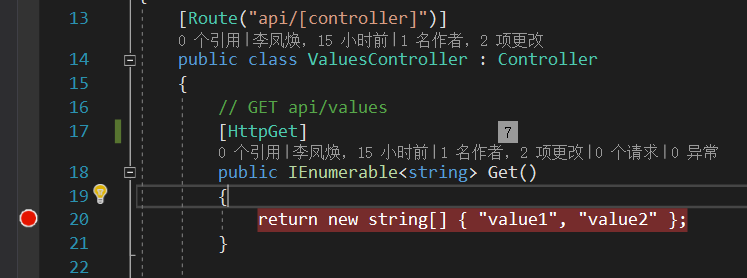
运行GetValuesTest调试测试
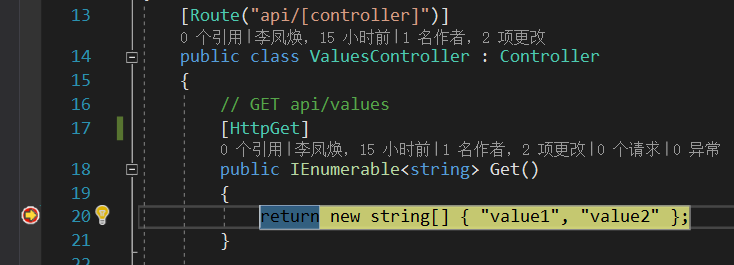
成功进入断点,我们不用启动浏览器,就可以进行完整的接口功能测试了。
修改内容目录与自动授权
上面演示了如何进行一个简单的功能测试,但是存在两个缺陷:
- webApi在测试的时候实际的运行目录是在FunctionalTest目录下
- 对需要授权的接口不能正常测试,会得到未授权的返回结果
1.内容目录
我们可以在Controller的Get方法输出当前的内容目录
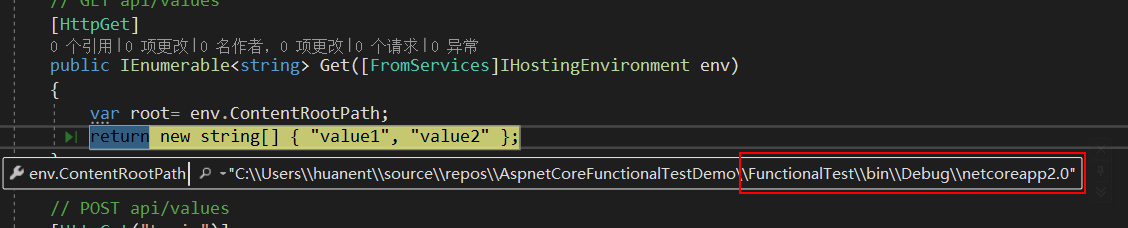
内容目录是在测试x项目下这与我们的预期不符,如果webapi项目对根目录下的文件有依赖关系例如appsetting.json则会找不到该文件,解决的办法是在webHost中手动指定运行根目录
[Fact]

public void GetValuesTest()

{

    var client = new TestServer(WebHost

        .CreateDefaultBuilder()

        .UseContentRoot(GetProjectPath("AspnetCoreFunctionalTestDemo.sln", "", typeof(Startup).Assembly))

        .UseStartup<Startup>())

        .CreateClient();

    string result = client.GetStringAsync("api/values").Result;

    Assert.Equal(result, JsonConvert.SerializeObject(new string[] { "value1", "value2" }));

}

/// <summary>

/// 获取工程路径

/// </summary>

/// <param name="slnName">解决方案文件名,例test.sln</param>

/// <param name="solutionRelativePath">如果项目与解决方案文件不在一个目录,例如src文件夹中,则传src</param>

/// <param name="startupAssembly">程序集</param>

/// <returns></returns>

private static string GetProjectPath(string slnName, string solutionRelativePath, Assembly startupAssembly)

{

      string projectName = startupAssembly.GetName().Name;

      string applicationBasePath = PlatformServices.Default.Application.ApplicationBasePath;

      var directoryInfo = new DirectoryInfo(applicationBasePath);

      do

      {

          var solutionFileInfo = new FileInfo(Path.Combine(directoryInfo.FullName, slnName));

          if (solutionFileInfo.Exists)

          {

              return Path.GetFullPath(Path.Combine(directoryInfo.FullName, solutionRelativePath, projectName));

          }

          directoryInfo = directoryInfo.Parent;

      }

      while (directoryInfo.Parent != null);

      throw new Exception($"Solution root could not be located using application root {applicationBasePath}.");
}
GetProjectPath方法采用递归的方式找到startup的项目所在路径,此时我们再运行

2.自动授权
每次测试时手动登录这是一件很烦人的事情,所以我们希望可以自动话,这里演示的时cookie方式的自动授权
首先在startup文件配置cookie认证
using System;

using System.Collections.Generic;

using System.Linq;

using System.Threading.Tasks;

using Microsoft.AspNetCore.Builder;

using Microsoft.AspNetCore.Hosting;

using Microsoft.Extensions.Configuration;

using Microsoft.Extensions.DependencyInjection;

using Microsoft.Extensions.Logging;

using Microsoft.Extensions.Options;

using Microsoft.AspNetCore.Authentication.Cookies;

namespace AspnetCoreFunctionalTestDemo

{

    public class Startup

    {

        public Startup(IConfiguration configuration)

        {

            Configuration = configuration;

        }

        public IConfiguration Configuration { get; }

        // This method gets called by the runtime. Use this method to add services to the container.

        public void ConfigureServices(IServiceCollection services)

        {

            services.AddMvc();

            services.AddAuthentication(o => o.DefaultScheme = CookieAuthenticationDefaults.AuthenticationScheme)

               .AddCookie(o =>

               {

                   o.ExpireTimeSpan = new TimeSpan(, , );

                   o.Events.OnRedirectToLogin = (context) =>

                   {

                       context.Response.StatusCode = ;

                       return Task.CompletedTask;

                   };

               });

        }

        // This method gets called by the runtime. Use this method to configure the HTTP request pipeline.

        public void Configure(IApplicationBuilder app, IHostingEnvironment env)

        {

            if (env.IsDevelopment())

            {

                app.UseDeveloperExceptionPage();

            }

            app.UseAuthentication();

            app.UseMvc();

        }

    }

}
这里覆盖了cookie认证失败的默认操作改为返回401状态码。
在valuesController新增登录的Action并配置Get的Action需要授权访问
using Microsoft.AspNetCore.Authentication;

using Microsoft.AspNetCore.Authentication.Cookies;

using Microsoft.AspNetCore.Authorization;

using Microsoft.AspNetCore.Hosting;

using Microsoft.AspNetCore.Mvc;

using System.Collections.Generic;

using System.Security.Claims;

namespace AspnetCoreFunctionalTestDemo.Controllers

{

    [Route("api/[controller]")]

    public class ValuesController : Controller

    {

        // GET api/values

        [HttpGet,Authorize]

        public IEnumerable<string> Get([FromServices]IHostingEnvironment env)

        {

            return new string[] { "value1", "value2" };

        }

        // POST api/values

        [HttpGet("Login")]

        public void Login()

        {

            var identity = new ClaimsIdentity(CookieAuthenticationDefaults.AuthenticationScheme);

            identity.AddClaim(new Claim(ClaimTypes.Name, "huanent"));

            var principal = new ClaimsPrincipal(identity);

            HttpContext.SignInAsync(CookieAuthenticationDefaults.AuthenticationScheme, principal).Wait();

        }

    }

}
此时我们使用测试项目测试Get方法
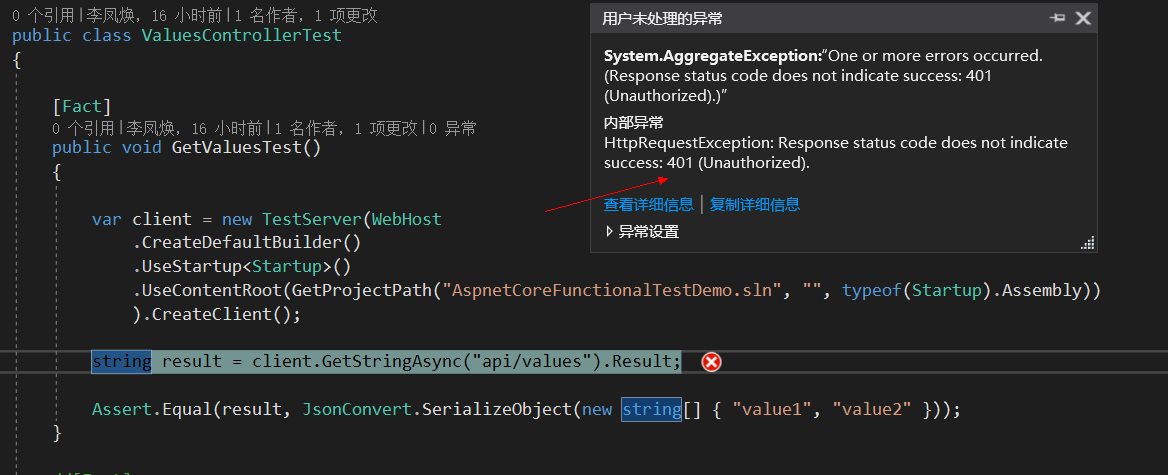
如我们预期,返回了401,说明未授权。我们修改下GetValuesTest
using AspnetCoreFunctionalTestDemo;

using Microsoft.AspNetCore;

using Microsoft.AspNetCore.Hosting;

using Microsoft.AspNetCore.TestHost;

using Microsoft.Extensions.PlatformAbstractions;

using Newtonsoft.Json;

using System;

using System.Collections.Generic;

using System.IO;

using System.Linq;

using System.Net;

using System.Net.Http;

using System.Reflection;

using System.Text;

using System.Threading.Tasks;

using Xunit;

using static Microsoft.AspNetCore.WebSockets.Internal.Constants;

namespace FunctionalTest

{

    public class ValuesControllerTest

    {

        [Fact]

        public void GetValuesTest()

        {

            var client = new TestServer(

                WebHost.CreateDefaultBuilder()

                       .UseStartup<Startup>()

                       .UseContentRoot(GetProjectPath("AspnetCoreFunctionalTestDemo.sln", "", typeof(Startup).Assembly))

                       ).CreateClient();

            var respone = client.GetAsync("api/values/login").Result;

            SetCookie(client, respone);

            var result = client.GetAsync("api/values").Result;

        }

        private static void SetCookie(HttpClient client, HttpResponseMessage respone)

        {

            string cookieString = respone.Headers.GetValues("Set-Cookie").First();

            string cookieBody = cookieString.Split(';').First();

            client.DefaultRequestHeaders.Add("Cookie", cookieBody);

        }

        /// <summary>

        /// 获取工程路径

        /// </summary>

        /// <param name="slnName">解决方案文件名,例test.sln</param>

        /// <param name="solutionRelativePath">如果项目与解决方案文件不在一个目录,例如src文件夹中,则传src</param>

        /// <param name="startupAssembly">程序集</param>

        /// <returns></returns>

        private static string GetProjectPath(string slnName, string solutionRelativePath, Assembly startupAssembly)

        {

            string projectName = startupAssembly.GetName().Name;

            string applicationBasePath = PlatformServices.Default.Application.ApplicationBasePath;

            var directoryInfo = new DirectoryInfo(applicationBasePath);

            do

            {

                var solutionFileInfo = new FileInfo(Path.Combine(directoryInfo.FullName, slnName));

                if (solutionFileInfo.Exists)

                {

                    return Path.GetFullPath(Path.Combine(directoryInfo.FullName, solutionRelativePath, projectName));

                }

                directoryInfo = directoryInfo.Parent;

            }

            while (directoryInfo.Parent != null);

            throw new Exception($"Solution root could not be located using application root {applicationBasePath}.");

        }

    }

}
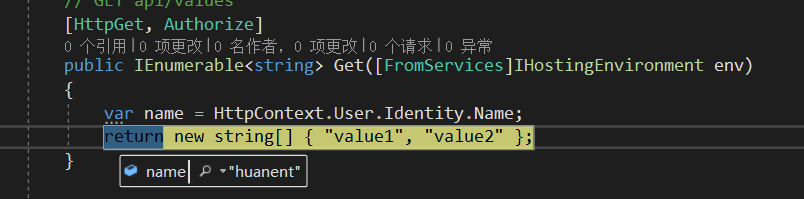
我们首先访问api/Values/Login,获取到Cookie,然后讲cookie附在httpclient的默认http头上,这样就能够成功访问需要授权的接口了
总结
通过上面演示,我们已经可以很大程度地模拟了整个api请求,让我们可以方便地一键调试目标接口,再也不用开浏览器或postman了。
附上演示项目地址:https://github.com/huanent/AspnetCoreFunctionalTestDemo
使用Microsoft.AspNetCore.TestHost进行完整的功能测试的更多相关文章
- ASP.NET Core 源码阅读笔记(5) ---Microsoft.AspNetCore.Routing路由
这篇随笔讲讲路由功能,主要内容在项目Microsoft.AspNetCore.Routing中,可以在GitHub上找到,Routing项目地址. 路由功能是大家都很熟悉的功能,使用起来也十分简单,从 ...
- ASP.NET Core 源码阅读笔记(3) ---Microsoft.AspNetCore.Hosting
有关Hosting的基础知识 Hosting是一个非常重要,但又很难翻译成中文的概念.翻译成:寄宿,大概能勉强地传达它的意思.我们知道,有一些病毒离开了活体之后就会死亡,我们把那些活体称为病毒的宿主. ...
- Microsoft.AspNetCore.Routing路由
Microsoft.AspNetCore.Routing路由 这篇随笔讲讲路由功能,主要内容在项目Microsoft.AspNetCore.Routing中,可以在GitHub上找到,Routing项 ...
- ABP 找不到版本为 (>= 1.0.0-preview1-27891) 的包 Microsoft.AspNetCore.SignalR 错误
错误描述: 下载ABP模板项目3.4.1的版本(当前最新版本),编译加载nuget包Microsoft.AspNetCore.SignalR时会报如下错误: 严重性 代码 说明 ...
- Asp.NetCore+Microsoft.AspNetCore.SignalR前后端分离
1.新建WebApi 2.安装Microsoft.AspNetCore.SignalR 3.新建一个集线器和消息类 using Microsoft.AspNetCore.SignalR; using ...
- InvalidOperationException: Unable to resolve service for type 'Microsoft.AspNetCore.Identity.UserManager`1[Microsoft.AspNetCore.Identity.IdentityUser]'
在新建asp.net core 应用后, 添加了自定义的ApplicationDbContext 和ApplicationUser ,并添加了Identity认证后, 会出现 InvalidOpera ...
- ASP.NET Core 中 HttpContext 详解与使用 | Microsoft.AspNetCore.Http 详解 (转载)
“传导体” HttpContext 要理解 HttpContext 是干嘛的,首先,看图 图一 内网访问程序 图二 反向代理访问程序 ASP.NET Core 程序中,Kestrel 是一个基于 li ...
- 通过Microsoft.AspNetCore.App元包简化程序集的引用
Asp.net core下提供默认提供了一些在.net core不能直接使用的库,如日志.依赖注入.选项.通用主机.EntityFramework等,虽然我们可以通过Nuget的方式手动加载这些包,但 ...
- Orchard Core 版本冲突 The type 'FormTagHelper' exists in both 'Microsoft.AspNetCore.Mvc.TagHelpers, Version=2.1.1.0, Culture=neutral, PublicKeyToken=adb9793829ddae60' and...
最近老大让我看Orchard Core,这是一个CMS系统.可以先参考大佬的文章:https://www.cnblogs.com/shanyou/archive/2018/09/25/9700422. ...
随机推荐
- Microsoft Offce 使用纪事:oneNote笔记本分区删除
OneNote 笔记本和分区删除 OneNote 目前无法在客户端和本地删除已有的笔记本和分区,只能通过OneDrive才能够从云端删除: step1 step2 step3 后记 由于需要登录One ...
- LArea插件的使用
楼主菜鸟一枚,开发微信端三级滑动遇到的N多技术问题,与大家分享,话不多说,先上效果图: LArea插件的使用,前端部分参考如下: 关于PHP插件使用,请往下看: 1.首先在前端页面引入js样式和插 ...
- 如何利用Oracle VM Templates 在几分钟内部署Oracle Real Application Clusters (RAC)
本文未经授权,禁止一切形式的转载.如果对本文有任何疑问可以通过以下方式和我交流: 邮箱: jiangxinnju@163.com 博客园地址: http://www.cnblogs.com/jiang ...
- hack查询地址
悲催的IE! http://browserhacks.com/
- javascript倒计时调转页面
<html><head><meta http-equiv="Content-Type" content="text/html; charse ...
- yii2之依赖注入与依赖注入容器
一.为什么需要依赖注入 首先我们先不管什么是依赖注入,先来分析一下没有使用依赖注入会有什么样的结果.假设我们有一个gmail邮件服务类GMail,然后有另一个类User,User类需要使用发邮件的功能 ...
- LeetCode 561. Array Partition I (数组分隔之一)
Given an array of 2n integers, your task is to group these integers into n pairs of integer, say (a1 ...
- Chrome 62 的大坑:修改密码后始终使用保存的旧密码登录
最近有用户向我们反馈,修改密码后,怎么也登录不了我们网站,总是提示密码错误.用户确认密码肯定没错,通过用户发给我们的操作截图看,用户修改密码的操作也没问题. 开始我们没能重现出这个问题,我们检查了相关 ...
- 【深度学习系列】手写数字识别卷积神经--卷积神经网络CNN原理详解(一)
上篇文章我们给出了用paddlepaddle来做手写数字识别的示例,并对网络结构进行到了调整,提高了识别的精度.有的同学表示不是很理解原理,为什么传统的机器学习算法,简单的神经网络(如多层感知机)都可 ...
- my dream
我的梦想(践踏一切可以践踏的,放弃一切必须放弃的,然后朝着自己认为的方向努力,只要自己认为对了就可以了(但是最好能考虑方面全一点,这就叫尽力了)我想要的生活怎么那么醉我想要的食物怎么那么碎我最爱的女孩 ...