
Hadoop - 国内各站点最高温度、气压和风速统计
版权说明: 本文章版权归本人及博客园共同所有,转载请标明原文出处(http://www.cnblogs.com/mikevictor07/),以下内容为个人理解,仅供参考。
一、简介
该实例统计国内各个站点的最高温度(为节省篇幅只以温度为例,可稍作修改即可统计气压与风速),数据来源于汇总在NCDC的天气气球数据集中(包含世界大量数据集,该实例只分析国内站点,数据对外公开,可下载)。
二、数据准备与预处理
从NCDC下载的天气气球数据集(ftp://ftp.ncdc.noaa.gov/pub/data/igra或http://www1.ncdc.noaa.gov/pub/data/igra/ , 压缩为gz包)如下,可见并不适合Hadoop的MR模块处理,需要进行预处理(本例下载数据gz包总大小为293MB,解压缩后为1.43GB):
#5928719630901009999   5

10 85000  1481B  202B-9999  190   20

10 70000  3139B  142B-9999  180   20

10 50000  5880B  -55B-9999   60   30

10 40000  7605B -142B-9999  100   40

10 30000  9750B -255B-9999  100   70

#5928719630901129999   7

10 85000  1481B  215B-9999  320   20

10 70000  3142B  132B-9999  300   10

10 50000  5889B  -35B-9999   50   30

10 40000  7620B -125B-9999  100   40

10 30000  9759B -275B-9999   70   60

10 20000 12561B -482B-9999   90  110

10 10000 16788B -785B-9999   90  100
首先需要阅读下载相关目录的readme.txt,才能站点相关字段的含义,温度数据已经*10(为了保留一位小数):
以该数据为例(其中的 9999一般代表数据缺失):
#5052719630901009999 5
10 85000 1314B 68B-9999-9999-9999
| 数据头部 | |||||
| 标识 | 站点编号 | 日期 | 观察起始时间 | 观察结束时间 | 记录数 |
| # | 50527 | 19630901 | 00 | 9999 | 5 |
| 数据记录 | ||||||||||
| Major Level | Minor Level | 气压(Pa)3-8 | 气压标识 | 位势高度(米)10-14 | 位势高度标识 | 温度*10(16- 20位) | 温度标识 | 露点下降 | 风力方向 | 风速(m/s) |
| 1 | 0 | 85000 | 空格 | 1314 | B | 68 | B | -9999 | -9999 | -9999 |
由于MapReduce一行行处理数据,而该数据记录部分依赖于数据头部,MR对数据进行分区时对它们分开的可能性非常大,所以每条数据记录部分必须加上头部的部分信息(根据需要确定),即预处理,对数据预处理的结果可输出到本地,然后再拷贝至HDFS。
在本例中,数据头部只关注<站点编号>、<日期>,数据头部与数据记录形成的新格式如下:
| 预处理后的数据格式 | ||||||||||||
| 505271963090110 85000 1314B 68B-9999-9999-9999 | ||||||||||||
| 站点编号 | 日期 | Major Level | Minor Level | 气压(Pa) | 气压标识 | 位势高度(米)10-14位 | 位势高度标识 | 温度*10 | 温度标识 | 露点下降 | 风力方向 | 风速(m/s) |
| 50527 | 19630901 | 1 | 0 | 85000 | 空格 | 1314 | B | 68 | B | -9999 | -9999 | -9999 |
即如下面格式的新格式:
592871963090110 85000  1481B  202B-9999  190   20

592871963090110 70000  3139B  142B-9999  180   20

592871963090110 50000  5880B  -55B-9999   60   30
三、数据拷贝至HDFS
数据从本地拷贝至HDFS可以通过编码,也可使用eclipse的hadoop插件进行(该插件目前一般需要根据自己的环境编译得到jar放入eclipse的plugins文件夹下,过程稍微繁琐),
当然也可以使用bin/hadoop工具copyFromLocal进行(不过需要先复制到集群中的任意一台机器),本例中把数据存放在HDFS的 /weatherballoon 目录下,以下代码可供参考:
core-site.xml:不同的配置文件方便本地测试和集群切换,在MR程序调试的时候很有用

<?xml version="1.0"?>

<?xml-stylesheet type="text/xsl" href="configuration.xsl"?>

<configuration>

     <property>

         <name>fs.default.name</name>

         <value>hdfs://hbase-01:9000</value>

     </property>

</configuration>
public class CopyFromLocalMain {

    private static Configuration config = new Configuration();

    public static void main(String[] args) throws Exception {

        config.addResource("core-site.xml");

        File inputDir = new File("d:/weatherballoon/input/");

        String hdfsDir = "/weatherballoon/input/";

        if (!inputDir.exists()) {

            System.err.println(inputDir.getAbsolutePath() + " directory not exist .");

            System.exit(-1);

        }

        File[] files = inputDir.listFiles();

        if (files == null) {

            System.err.println(inputDir.getAbsolutePath() + " directory is empty .");

            System.exit(-1);

        }

        for (File file : files) {

            copyFileToHdfs(file, hdfsDir + file.getName());

        }

        System.out.println("Copy finished, total: " + files.length);

    }

    public static void copyFileToHdfs(File local,String dest) throws IOException{

        InputStream in = new BufferedInputStream(new FileInputStream(local));

        FileSystem fs = FileSystem.get(config);

        FSDataOutputStream out = fs.create(new Path(dest));

        IOUtils.copyBytes(in, out, 4096, true);

        out.close();

    }

}
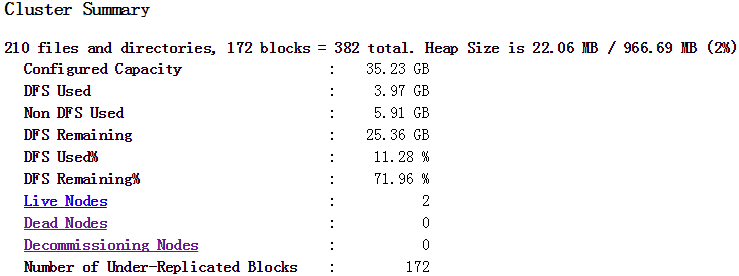
数据拷贝完毕后可访问HDFS的namenode查看状态(默认50070端口),本例状态如下图:
四、编写MapReduce程序
目前的数据格式已经每行之间无依赖性,首先编辑Mapper部分,该部分用于把站点ID作为key的数据集存入OutputCollector中:
public class MaxTemperatureMapper

    extends MapReduceBase implements Mapper<LongWritable, Text, Text, RecordValue>{

    public static final int DATA_LENGTH = 49; //预处理后的数据行长度

    @Override

    public void map(LongWritable key, Text value,

            OutputCollector<Text, RecordValue> output, Reporter reporter) throws IOException {

        //505271963090110 85000  1314B   68B-9999-9999-9999

        String line = value.toString();

        if (line.length() != DATA_LENGTH) {

            System.out.println("------------->Error record : " + line);

            return;

        }

        String stationId = line.substring(0, 5);

        String date = line.substring(5, 13);

        String temp = line.substring(28, 33);

        if (!missing(temp)) {

            int temperature = Integer.parseInt(temp.trim());

            output.collect(new Text(stationId), new RecordValue(date, temperature));

        }

    }

    private boolean missing(String temp) {

        return temp.equals("-9999");

    }

}
Mapper中输出的Value值为自定义的类型(即RecordValue),因为需要同时记录日期和温度,如果要自定义类型,则必须实现Writable(如Hadoop自带的LongWritable,IntWritable,Text等)。
实现该接口使得对象能够序列化在不同机器间传输(进程间采用RPC通信,Hadoop采用Avro序列化,其他比较流行的序列化框架有Apache Thrift和Google protocol buffers),
一般建议实现WritableComparable接口,该接口中有个compareTo 方法的实现对于MapReduce来说是比较重要的,用于基于键的中间结果排序。
也可以实现RawComparator ,即可在字节流中排序,而不需要反序列化,减小额外开销。
RecordValue的实现如下:
public class RecordValue implements WritableComparable<RecordValue>{

    private String date;

    private int temperature;

    public RecordValue(){}

    public RecordValue(String date, int temperature) {

        this.date = date;

        this.temperature = temperature;

    }

    @Override

    public void write(DataOutput out) throws IOException {

        out.write(date.getBytes());

        out.writeInt(temperature);

    }

    @Override

    public void readFields(DataInput in) throws IOException {

        byte[] buff = new byte[8];

        in.readFully(buff);

        date = new String(buff);

        temperature = in.readInt();

    }

    @Override

    public int compareTo(RecordValue o) {

        if (date.compareTo(o.getDate()) > 0 || temperature > o.getTemperature()) {

            return 1;

        }

        return -1;

    }

    @Override

    public String toString() {

        return " -- " + date + "," + temperature;

    }

    //省略setter getter

}
Mapper部分需要做单元测试,成功后接下面编写Reducer部分:
public class MaxTemperatureReducer extends MapReduceBase implements

        Reducer<Text, RecordValue, Text, RecordValue> {

    @Override

    public void reduce(Text key, Iterator<RecordValue> values,

            OutputCollector<Text, RecordValue> output, Reporter reporter)

            throws IOException {

        int maxValue = Integer.MIN_VALUE;

        String date = "00000000";

        while (values.hasNext()) {

            RecordValue record = values.next();

            int temp = record.getTemperature();

            if (temp > maxValue) {

                maxValue = temp;

                date = record.getDate();

            }

        }

        output.collect(key, new RecordValue(date, maxValue));

    }

}
当Reduce部分单元测试成功后即可编写驱动程序MaxTemperatureDriver,先用本地小数据集进行测试,配置文件切换为本地配置,如:
public static void main(String[] args) throws IOException {

        String inputPath = "file:///d:/weatherballoon/input/*";

        String outputPath = "file:///d:/weatherballoon/output";

        File out = new File("d:/weatherballoon/output");

        if (out.exists()) {

            FileUtils.forceDelete(out); //采用apache common io包

        }

        Configuration conf = new Configuration();

        conf.addResource("core-site-local.xml");

        JobConf job = new JobConf(conf);

        job.setJobName("Max Temperature(NCDC)");

        job.setMapperClass(MaxTemperatureMapper.class);

        job.setReducerClass(MaxTemperatureReducer.class);

        job.setOutputKeyClass(Text.class);

        job.setOutputValueClass(RecordValue.class);

        FileInputFormat.addInputPath(job, new Path(inputPath));

        FileOutputFormat.setOutputPath(job, new Path(outputPath));

        JobClient.runJob(job);

    }
运行程序,如果出错则在本地容易查出错误地方,查看输出结构是否如何预期,下面是本例小部分数据集的输出结果:
50527 -- 20040721,358
50557 -- 20100627,342
50603 -- 19730409,440
温度已经乘以10,故对应的结果如下表格:
| 站点ID | 日期 | 温度(摄氏度) |
| 50527 | 20040721 | 35.8 |
| 50557 | 20100627 | 34.2 |
| 50603 | 19730409 | 44.0 |
五、集群运行
测试成功后可切换至集群运行,更改MaxTemperatureDriver的main,如下:
public static void main(String[] args) throws IOException {

        String inputPath = "/weatherballoon/input/";

        String outputPath = "/weatherballoon/output";

        Configuration conf = new Configuration();

        JobConf job = new JobConf(conf);

        job.setJobName("Max Temperature(NCDC)");

        job.setMapperClass(MaxTemperatureMapper.class);

        job.setReducerClass(MaxTemperatureReducer.class);
        job.setJarByClass(MaxTemperatureDriver.class); //!important

        job.setOutputKeyClass(Text.class);

        job.setOutputValueClass(RecordValue.class);

        FileInputFormat.addInputPath(job, new Path(inputPath));

        FileOutputFormat.setOutputPath(job, new Path(outputPath));

        JobClient.runJob(job);

    }
然后程序打包(编写MANIFEST.MF):
Manifest-Version: 1.0

Class-Path: .

Main-Class: org.mike.hadoop.weatherballoon.MaxTemperatureDriver
eclipse->export->jar并选择MANIFEST.MF文件,把jar上传到集群任一节点,执行如下命令:
hadoop jar MaxTemperature.jar
运行如下图:

成功后即可从HDFS拷贝结果文件至本地查看(或者直接hadoop dfs -cat也可以),本例得到的结果如下(列出小部分):
    -- ,

    -- ,

    -- ,

    -- ,

    -- ,

    -- ,

    -- ,

    -- ,

    -- ,

    -- ,

    -- ,
根据NCDN中igra-stations.txt文件得到对应的站点整理后如下:
| 站点ID | 站点名称 | 日期 | 最高温度 |
| 50527 | HAILAR | 20040721 | 35.8 |
| 50557 | NENJIANG | 20100627 | 34.2 |
| 50603 | CHIN-BARAG | 19730409 | 44 |
| 50745 | CHICHIHAR | 19990413 | 38.6 |
| 50774 | YICHUN | 20100624 | 31.6 |
| 50834 | TA KO TAI | 19920428 | 42.6 |
| 50953 | HARBIN | 20010604 | 34.6 |
| 51076 | ALTAY | 19931031 | 50.6 |
| 51133 | TA CHENG | 19870716 | 60 |
| 51156 | HOBOG SAIR | 19860309 | 55.2 |
| 51232 | BORDER STATION | 19800802 | 22 |
Finished ..
Hadoop - 国内各站点最高温度、气压和风速统计的更多相关文章
- Hadoop的改进实验(中文分词词频统计及英文词频统计)(4/4)
声明: 1)本文由我bitpeach原创撰写,转载时请注明出处,侵权必究. 2)本小实验工作环境为Windows系统下的百度云(联网),和Ubuntu系统的hadoop1-2-1(自己提前配好).如不 ...
- 【Cloud Computing】Hadoop环境安装、基本命令及MapReduce字数统计程序
[Cloud Computing]Hadoop环境安装.基本命令及MapReduce字数统计程序 1.虚拟机准备 1.1 模板机器配置 1.1.1 主机配置 IP地址:在学校校园网Wifi下连接下 V ...
- hadoop自己写的最高温度程序源码
package com.teset; import java.io.IOException; import java.util.StringTokenizer; import org.apache.h ...
- Hadoop国内主要发行版本
Hadoop主要版本 目前国内使用的不收费的Hadoop版本主要包括以下3个: Apache hadoop Cloudera的CDH Hortonworks版本(Hortonworks Data Pl ...
- Linux系统国内镜像站点
一,更换说明 第一步 备份 如centos, mv /etc/yum.repos.d/CentOS-Base.repo /etc/yum.repos.d/CentOS-Base.repo.backup ...
- Maven国内下载站点
鉴于一些原因,从maven中央仓库download依赖包时,被各种折磨,下面就简单看下maven setting.xml的一些简单配置 先贴几个国内可用的maven repository连接: htt ...
- eclipse使用国内镜像站点安装插件
把eclipse 4.x的界面改为经典样式 打开eclipse,菜单栏>windows>preference>general>appearance>theme>cl ...
- Android studio & SDK的国内有效站点。
SDK.TOOLS的国内有效镜像节点: mirrors.zzu.edu.cn/android/repository/ 网上的地址只写了mirrors.zzu.edu.cn,有误,需要补齐后面的子目录才 ...
- Hadoop第8周练习—Pig部署及统计访问日志例子
:搭建Pig环境 :计算每个IP点击次数 内容 运行环境说明 1.1 硬软件环境 线程,主频2.2G,6G内存 l 虚拟软件:VMware® Workstation 9.0.0 build- ...
随机推荐
- mysqldump 用法总结
mysqldump 备份 备份数据库 my_database $ mysqldump -uUSER -pPASSWD my_database > my_database.sql 备份数据库 my ...
- [项目记录]一个.net下使用HAP实现的吉大校园通知网爬虫工具:OAWebScraping
第一章 简介 本文主要介绍了在.NET下利用优秀的HTML解析组件HtmlAgilityPack开发的一个吉林大学校内通知oa.jlu.edu.cn的爬取器.尽管.Net下解析HTML文件有很多种选择 ...
- 【Python3之面向对象进阶】
一.isinstance和issubclass 1.isinstance(obj,cls)检查是否obj是否是类 cls 的对象 class Foo(object): pass obj=Foo() p ...
- 谈谈Nancy中让人又爱又恨的Diagnostics【上篇】
前言 在Nancy中有个十分不错的功能-Diagnostics,可以说这个功能让人又爱又恨. 或许我们都做过下面这样的一些尝试: 记录某一个功能用到的相关技术信息 记录下网站的访问记录 全局配置某些框 ...
- Apple官方文档译文GitHub框架源码注解
引导
- phpexcl导出数据
<?php public function export_do_one(){ //excel 导出数据 import('ORG.Util.Page_new');// 导入分页类 ,修改了原来的P ...
- socket编程 做一回文抄公
socket接口是TCP/IP网络的API,socket接口定义了许多函数或例程,程序员能够用他们来研发TCP/IP网络上的应用程式.要学Internet上的TCP/IP网络编程,必须理解socket ...
- [leetcode-598-Range Addition II]
Given an m * n matrix M initialized with all 0's and several update operations. Operations are repre ...
- 【WPF】在新线程上打开窗口
当WPF应用程序运行时,默认会创建一个UI主线程(因为至少需要一个),并在该UI线程上启动消息循环.直到消息循环结束,应用程序就随即退出.那么,问题就来了,能不能创建新线程,然后在新线程上打开一个新窗 ...
- Struts2之初识篇(一)——与struts的区别和基本配置
Struts2资源下载地址: Struts官方地址:http://struts.apache.org/ 我这里下载了struts2的最新版本struts2-2.5.10.1-all.所有内容如下图: ...