
[读书笔记] 四、SpringBoot中使用JPA 进行快速CRUD操作
通过Spring提供的JPA Hibernate实现,进行快速CRUD操作的一个栗子~。
视图用到了SpringBoot推荐的thymeleaf来解析,数据库使用的Mysql,代码详细我会贴在下面文章中,请大家参考借鉴。
一、数据库表结构
CREATE TABLE `spring_jpa_test_table` (

    `id` INT(11) NOT NULL AUTO_INCREMENT,

    `message` TEXT NULL,

    INDEX `id` (`id`)

)

ENGINE=InnoDB

;
二、POM.xml
<project xmlns="http://maven.apache.org/POM/4.0.0" xmlns:xsi="http://www.w3.org/2001/XMLSchema-instance"

    xsi:schemaLocation="http://maven.apache.org/POM/4.0.0 http://maven.apache.org/xsd/maven-4.0.0.xsd">

    <modelVersion>4.0.0</modelVersion>

    <groupId>com.springboot</groupId>

    <artifactId>springboot_test1_1</artifactId>

    <version>0.0.1-SNAPSHOT</version>

    <packaging>jar</packaging>

    <name>springboot_test1_1</name>

    <url>http://maven.apache.org</url>

    <parent>

        <groupId>org.springframework.boot</groupId>

        <artifactId>spring-boot-starter-parent</artifactId>

        <version>1.5.2.RELEASE</version>

        <relativePath />

    </parent>

    <properties>

        <project.build.sourceEncoding>UTF-8</project.build.sourceEncoding>

    </properties>

    <dependencies>

        <dependency>

            <groupId>org.springframework.boot</groupId>

            <artifactId>spring-boot-starter-web</artifactId>

        </dependency>

        <dependency>

            <groupId>org.springframework.boot</groupId>

            <artifactId>spring-boot-starter-aop</artifactId>

        </dependency>

        <dependency>

            <groupId>org.springframework.boot</groupId>

            <artifactId>spring-boot-starter-data-jpa</artifactId>

        </dependency>

        <dependency>

            <groupId>mysql</groupId>

            <artifactId>mysql-connector-java</artifactId>

        </dependency>

        <dependency>

            <groupId>org.springframework.boot</groupId>

            <artifactId>spring-boot-starter-thymeleaf</artifactId>

        </dependency>

    </dependencies>

    <build>

        <finalName>my-spring-boot</finalName>

        <plugins>

            <plugin>

                <groupId>org.springframework.boot</groupId>

                <artifactId>spring-boot-maven-plugin</artifactId>

                <dependencies>

                    <dependency>

                        <groupId>org.springframework</groupId>

                        <artifactId>springloaded</artifactId>

                        <version>1.2.6.RELEASE</version>

                    </dependency>

                </dependencies>

            </plugin>

        </plugins>

    </build>

</project>
POM.xml
三、VO/PO
package core.vo;

import javax.persistence.Column;

import javax.persistence.Entity;

import javax.persistence.GeneratedValue;

import javax.persistence.GenerationType;

import javax.persistence.Id;

import javax.persistence.Table;

@Entity

@Table(name = "spring_jpa_test_table")

public class JpaTestTablePO {

    private int id;

    private String message;

    @Id

    @GeneratedValue(strategy = GenerationType.IDENTITY)

    public int getId() {

        return id;

    }

    public void setId(int id) {

        this.id = id;

    }

    @Column(name = "message")

    public String getMessage() {

        return message;

    }

    public void setMessage(String message) {

        this.message = message;

    }

}
JpaTestTablePO.java
四、DAO
package core.dao;

import java.io.Serializable;

import java.util.List;

import org.springframework.data.jpa.repository.JpaRepository;

import core.vo.JpaTestTablePO;

public interface JpaTestTableDao extends

        JpaRepository<JpaTestTablePO, Serializable> {

    public List<JpaTestTablePO> findByMessageContaining(String message);

}
JpaTestTableDao.java
五、Service
package core.service;

import java.util.List;

import org.springframework.beans.factory.annotation.Autowired;

import org.springframework.stereotype.Service;

import core.dao.JpaTestTableDao;

import core.vo.JpaTestTablePO;

@Service

public class TestService {

    @Autowired

    JpaTestTableDao jpaTestTableDao;

    // SpringBoot JPA 默认CRUD实现

    public void save(JpaTestTablePO po) {

        jpaTestTableDao.save(po);

    }

    public List<JpaTestTablePO> list() {

        return jpaTestTableDao.findAll();

    }

    public void delete(int id) {

        jpaTestTableDao.delete(id);

    }

    // SpringBoot JPA 简单查询

    public List<JpaTestTablePO> findByMessageContaining(String message) {

        return jpaTestTableDao.findByMessageContaining(message);

    }

}
TestService.java
六、Controller
package core;

import java.util.Map;

import org.springframework.beans.factory.annotation.Autowired;

import org.springframework.stereotype.Controller;

import org.springframework.web.bind.annotation.PathVariable;

import org.springframework.web.bind.annotation.RequestMapping;

import org.springframework.web.bind.annotation.RequestMethod;

import org.springframework.web.servlet.ModelAndView;

import core.service.TestService;

import core.vo.JpaTestTablePO;

@Controller

public class HomePageController {

    @Autowired

    TestService service;

    @RequestMapping(value = "/home", method = RequestMethod.GET)

    public String toIndex(Map<String, Object> model) {

        model.put("pos", service.list());

        return "index";

    }

    @RequestMapping(value = "/home", method = RequestMethod.POST)

    public String toIndex2(JpaTestTablePO po, Map<String, Object> model) {

        model.put("pos", service.findByMessageContaining(po.getMessage()));

        return "index";

    }

    @RequestMapping(value = "/save", method = RequestMethod.POST)

    public ModelAndView save(JpaTestTablePO po) {

        service.save(po);

        return new ModelAndView("redirect:/home");

    }

    @RequestMapping(value = "/delete/{id}", method = RequestMethod.GET)

    public ModelAndView delete(@PathVariable("id") String id) {

        service.delete(Integer.parseInt(id));

        return new ModelAndView("redirect:/home");

    }

}
HomePageController.java
七、application.properties
spring.datasource.url = jdbc:mysql://localhost:3306/test

spring.datasource.username = root

spring.datasource.password = root

spring.datasource.driverClassName = com.mysql.jdbc.Driver

# Specify the DBMS

spring.jpa.database = MYSQL

# Show or not log for each sql query

spring.jpa.show-sql = true

# Hibernate ddl auto (create, create-drop, update)

spring.jpa.hibernate.ddl-auto = update

# Naming strategy

spring.jpa.hibernate.naming-strategy = org.hibernate.cfg.ImprovedNamingStrategy

# stripped before adding them to the entity manager)

spring.jpa.properties.hibernate.dialect = org.hibernate.dialect.MySQL5Dialect

#spring.thymeleaf.prefix=classpath:/templates/

#spring.thymeleaf.suffix=.html

#spring.thymeleaf.mode=HTML5

#spring.thymeleaf.encoding=UTF-8

# ;charset=<encoding> is added

#spring.thymeleaf.content-type=text/html

# set to false for hot refresh

spring.thymeleaf.cache=false
application.properties
八、index.html
<!DOCTYPE html>
<html xmlns="http://www.w3.org/1999/xhtml"
xmlns:th="http://www.thymeleaf.org"
xmlns:sec="http://www.thymeleaf.org/thymeleaf-extras-springsecurity3">
<head>
<script
src="http://cdn.static.runoob.com/libs/angular.js/1.4.6/angular.min.js"></script>
<script type="text/javascript">
var app = angular.module('myApp', []);
app.controller('myCtrl', function($scope) {
$scope.txtChange = function() { }
});
</script>
</head>
<body>
<p th:text="${hello}"></p>
<!-- SEARCH TABLE -->
<form action="http://localhost:8080/home" method="post">
<p>
Search Condition: <input type="text" name="message"/> <input type="submit" value="Search" />
</p>
</form> <br />
<table border="1" width="400">
<tr>
<th colspan="3" align="center">Messages</th>
</tr>
<tr>
<td>Id</td>
<td>Message</td>
<td>Opt</td>
</tr>
<tr th:each="m,index: ${pos}">
<td th:text="${index.index}+1"></td>
<td th:text="${m.message}"></td>
<td><a th:href="'/delete/' + ${m.id }">delete</a></td>
</tr>
</table>
<br /> <div ng-app="myApp">
<div ng-controller="myCtrl">
<form action="http://localhost:8080/save" method="post">
<p>
Message: <input type="text" name="message" ng-model="message"
ng-blur="txtChange();" /> <input type="submit"
value="Save" />
</p>
</form>
</div>
</div>
</body> </html>
index.html
项目目录结构:
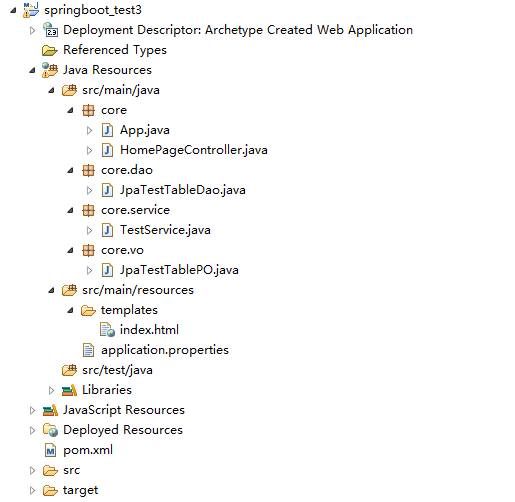
[读书笔记] 四、SpringBoot中使用JPA 进行快速CRUD操作的更多相关文章
- 【转】Verilog HDL常用建模方式——《Verilog与数字ASIC设计基础》读书笔记(四)
Verilog HDL常用建模方式——<Verilog与数字ASIC设计基础>读书笔记(四) Verilog HDL的基本功能之一是描述可综合的硬件逻辑电路.所谓综合(Synthesis) ...
- 【转载】MDX Step by Step 读书笔记(四) - Working with Sets (使用集合)
1. Set - 元组的集合,在 Set 中的元组用逗号分开,Set 以花括号括起来,例如: { ([Product].[Category].[Accessories]), ([Product].[ ...
- SpringBoot学习笔记(9)----SpringBoot中使用关系型数据库以及事务处理
在实际的运用开发中,跟数据库之间的交互是必不可少的,SpringBoot也提供了两种跟数据库交互的方式. 1. 使用JdbcTemplate 在SpringBoot中提供了JdbcTemplate模板 ...
- how tomcat works 读书笔记四 tomcat的默认连接器
事实上在第三章,就已经有了连接器的样子了,只是那仅仅是一个学习工具,在这一章我们会開始分析tomcat4里面的默认连接器. 连接器 Tomcat连接器必须满足下面几个要求 1 实现org.apache ...
- SpringBoot学习笔记(10)-----SpringBoot中使用Redis/Mongodb和缓存Ehcache缓存和redis缓存
1. 使用Redis 在使用redis之前,首先要保证安装或有redis的服务器,接下就是引入redis依赖. pom.xml文件如下 <dependency> <groupId&g ...
- 读书笔记《SpringBoot编程思想》
目录 一. springboot总览 1.springboot特性 2.准备运行环境 二.理解独立的spring应用 1.应用类型 2.@RestController 3.官网创建springboot ...
- 【记】《.net之美》之读书笔记(二) C#中的泛型
前言 上一篇读书笔记,很多小伙伴说这本书很不错,所以趁着国庆假期,继续我的读书之旅,来跟随书中作者一起温习并掌握第二章的内容吧. 一.理解泛型 1.为什么要使用泛型?-----通过使用泛型,可以极大地 ...
- SpringBoot学习笔记(4)----SpringBoot中freemarker、thymeleaf的使用
1. freemarker引擎的使用 如果你使用的是idea或者eclipse中安装了sts插件,那么在新建项目时就可以直接指定试图模板 如图: 勾选freeMarker,此时springboot项目 ...
- MyBatis-Plus学习笔记(1):环境搭建以及基本的CRUD操作
MyBatis-Plus是一个 MyBatis的增强工具,在 MyBatis 的基础上只做增强不做改变,使用MyBatis-Plus时,不会影响原来Mybatis方式的使用. SpringBoot+M ...
随机推荐
- 简单的.NET后台定时服务框架
后台服务只要是有一定经验的开发人员都接触过,其中离不开服务创建,调度逻辑处理,业务逻辑编写等环节.往往我们在新建一个后台服务项目的时候都会去拷贝以前的代码,再写一些线程等方式去完成,然后又去处理服务的 ...
- 动态rem与1px边框问题的理解
当我们在项目开发中,拿到设计师的设计图,满怀欣喜的准备按照设计图将页面实现出来的时候,我们通常会遇到这个问题: 如何将页面的内容按照在不同手机屏幕浏览的情况下,比例都是不变的呢?这个时候我们就需要使用 ...
- Android 性能测试——Heap Viewer 工具
Android 性能测试--Heap Viewer 工具 Heap Viewer能做什么? 实时查看App分配的内存大小和空闲内存大小 发现Memory Leaks Heap Viewer使用条件 5 ...
- inet_ntoa将客户端的IP和port写入M…
问题:inet_ntoa将客户端的IP和port写入MYSQL中的解决方法和遇到的问题
- 29. leetcode 167. Two Sum II - Input array is sorted
167. Two Sum II - Input array is sorted Given an array of integers that is already sorted in ascendi ...
- Uva 122 树的层次遍历 Trees on the level lrj白书 p149
是否可以把树上结点的编号,然后把二叉树存储在数组中呢?很遗憾如果结点在一条链上,那将是2^256个结点 所以需要采用动态结构 首先要读取结点,建立二叉树addnode()+read_input()承担 ...
- 倒水问题(Fill,UVA 10603) lrj白书 p202
看着lrj的代码自己敲了一遍,还没调试成功.... 有时间再进行完善 /* 状态start到各个状态u1,u2,u3..... 的倒水量分别为u1.dist,u2.dist,u3.dist.... * ...
- S2-032代码执行
Struts 2是Struts的下一代产品,是在 struts 1和WebWork的技术基础上进行了合并的全新的Struts 2框架.其全新的Struts 2的体系结构与Struts 1的体系结构差别 ...
- Linux下栈溢出导致的core dump
1 问题产生 前两天在干活的时候,写好的一个daemon程序,一跑就core,连main函数都进不去.从来没见过这阵势的职场新人被吓尿了,幸好不是在生产环境上测试.找来同事帮忙,看了好久也没看出问题, ...
- C#使用Xamarin开发可移植移动应用目录
Xamarin.Android系列 C#开发移动应用系列(1.环境搭建) C#开发移动应用系列(2.使用WebView搭建WebApp应用) C#开发移动应用系列(3.使用照相机扫描二维码+各种基础知 ...