
.NET:CLR via C# Primitive Thread Synchronization Constructs
User-Mode Constructs
The CLR guarantees that reads and writes to variables of the following data types are atomic: Boolean, Char, (S)Byte, (U)Int16, (U)Int32, (U)IntPtr, Single, and reference types. This means that all bytes within that variable are read from or written to all at once.
Although atomic access to variable guarantees that the read or write happens all at once, it does not guarantee when the read or write will happen due to compiler and CPU optimizations. The primitive user-mode constructs discussed in this section are used to enforce the timing of these atomic read and write operations. In addition, these constructs can also force atomic and timed access to variables of additional data types: (U)Int64 and Double.
There are two kinds of primitive user-mode thread synchronization constructs:
- Volatile constructs, which perform an atomic read or write operation on a variable containing a simple data type at a specific time
- Interlocked constructs, which perform an atomic read and write operation on a variable containing a simple data type at a specific time
C#’s Support for Volatile Fields
Making sure that programmers call the Volatile.Read and Volatile.Write methods correctly is a lot to ask. It’s hard for programmers to keep all of this in their minds and to start imagining what other threads might be doing to shared data in the background. To simplify this, the C# compiler has the volatile keyword, which can be applied to static or instance fields of any of these types: Boolean, (S)Byte, (U)Int16, (U)Int32, (U)IntPtr, Single, or Char. You can also apply the volatile keyword to reference types and any enum field as long as the enumerated type has an underlying type of (S)Byte, (U)Int16, or (U)Int32. The JIT compiler ensures that all accesses to a volatile field are performed as volatile reads and writes, so that it is not necessary to explicitly call Volatile's static Read or Write methods. Furthermore, the volatile keyword tells the C# and JIT compilers not to cache the field in a CPU register, ensuring that all reads to and from the field actually cause the value to be read from memory.
Interlocked Constructs
Volatile’s Read method performs an atomic read operation, and its Write method performs an atomic write operation. That is, each method performs either an atomic read operation or an atomic write operation. In this section, we look at the static System.Threading.Interlocked class’s methods. Each of the methods in the Interlocked class performs an atomic read and write operation. In addition, all the Interlocked methods are full memory fences. That is, any variable writes before the call to an Interlocked method execute before the Interlocked method, and any variable reads after the call execute after the call.
Kernel-Mode Constructs
Windows offers several kernel-mode constructs for synchronizing threads. The kernel-mode constructs are much slower than the user-mode constructs. This is because they require coordination from the Windows operating system itself. Also, each method call on a kernel object causes the calling thread to transition from managed code to native user-mode code to native kernel-mode code and then return all the way back. These transitions require a lot of CPU time and, if performed frequently, can adversely affect the overall performance of your application.
However, the kernel-mode constructs offer some benefits over the primitive user-mode constructs, such as:
- When a kernel-mode construct detects contention on a resource, Windows blocks the losing thread so that it is not spinning on a CPU, wasting processor resources.
- Kernel-mode constructs can synchronize native and managed threads with each other.
- Kernel-mode constructs can synchronize threads running in different processes on the same machine.
- Kernel-mode constructs can have security applied to them to prevent unauthorized accounts from accessing them.
- A thread can block until all kernel-mode constructs in a set are available or until any one kernel-mode construct in a set has become available.
- A thread can block on a kernel-mode construct specifying a timeout value; if the thread can’t have access to the resource it wants in the specified amount of time, then the thread is unblocked and can perform other tasks.
The two primitive kernel-mode thread synchronization constructs are events and semaphores. Other kernel-mode constructs, such as mutex, are built on top of the two primitive constructs.
The System.Threading namespace offers an abstract base class called WaitHandle. The WaitHandle class is a simple class whose sole purpose is to wrap a Windows kernel object handle. The FCL provides several classes derived from WaitHandle. All classes are defined in the System.Threading namespace. The class hierarchy looks like this.
- WaitHandle
- EventWaitHandle
- AutoResetEvent
- ManualResetEvent
- Semaphore
- Mutex
- EventWaitHandle
Internally, the WaitHandle base class has a SafeWaitHandle field that holds a Win32 kernel object handle. This field is initialized when a concrete WaitHandle-derived class is constructed.
There are a few things to note about WaitHandle's methods:
- You call WaitHandle’s WaitOne method to have the calling thread wait for the underlying kernel object to become signaled. Internally, this method calls the Win32 WaitForSingleObjectEx function. The returned Boolean is true if the object became signaled or false if a timeout occurs.
- You call WaitHandle’s static WaitAll method to have the calling thread wait for all the kernel objects specified in the WaitHandle[] to become signaled. The returned Boolean is true if all of the objects became signaled or false if a timeout occurs. Internally, this method calls the Win32 WaitForMultipleObjectsEx function, passing TRUE for the bWaitAll parameter.
- You call WaitHandle’s static WaitAny method to have the calling thread wait for any one of the kernel objects specified in the WaitHandle[] to become signaled. The returned Int32 is the index of the array element corresponding to the kernel object that became signaled, or WaitHandle.WaitTimeout if no object became signaled while waiting. Internally, this method calls the Win32 WaitForMultipleObjectsEx function, passing FALSE for the bWaitAll parameter.
- The array that you pass to the WaitAny and WaitAll methods must contain no more than 64 elements or else the methods throw a System.NotSupportedException.
- You call WaitHandle’s Dispose method to close the underlying kernel object handle. Internally, these methods call the Win32 CloseHandle function. You can only call Dispose explicitly in your code if you know for a fact that no other threads are using the kernel object. This puts a lot of burden on you as you write your code and test it. So, I would strongly discourage you from calling Dispose; instead, just let the garbage collector (GC) do the cleanup. The GC knows when no threads are using the object anymore, and then it will get rid of it. In a way, the GC is doing thread synchronization for you automatically!
Event Constructs
Events are simply Boolean variables maintained by the kernel. A thread waiting on an event blocks when the event is false and unblocks when the event is true. There are two kinds of events. When an auto-reset event is true, it wakes up just one blocked thread, because the kernel automatically resets the event back to false after unblocking the first thread. When a manual-reset event is true, it unblocks all threads waiting for it because the kernel does not automatically reset the event back to false; your code must manually reset the event back to false.
测试代码
 using System;

 using System.Collections.Generic;

 using System.Linq;

 using System.Text;

 using System.Threading.Tasks;

 using System.Threading;

 namespace SynchronizationStudy

 {

     class AutoResetEventTest

     {

         public static void Test()

         {

             var are = new AutoResetEvent(false);

             Task.Run(() => {

                 are.WaitOne();

                 Console.WriteLine("A");

             });

             Task.Run(() =>

             {

                 are.WaitOne();

                 Console.WriteLine("B");

             });

             are.Set();

             Thread.Sleep();

             are.Set();

             Console.ReadLine();

         }

     }

 }
输出结果
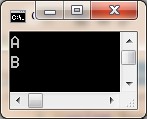
测试代码
 using System;

 using System.Collections.Generic;

 using System.Linq;

 using System.Text;

 using System.Threading.Tasks;

 using System.Threading;

 namespace SynchronizationStudy

 {

     class ManualResetEventTest

     {

         public static void Test()

         {

             var are = new ManualResetEvent(false);

             Task.Run(() => {

                 are.WaitOne();

                 Console.WriteLine("A");

             });

             Task.Run(() =>

             {

                 are.WaitOne();

                 Console.WriteLine("B");

             });

             are.Set();

             Console.ReadLine();

         }

     }

 }
输出结果
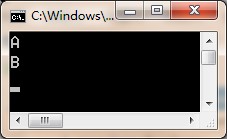
Semaphore Constructs
Semaphores are simply Int32 variables maintained by the kernel. A thread waiting on a semaphore blocks when the semaphore is 0 and unblocks when the semaphore is greater than 0. When a thread waiting on a semaphore unblocks, the kernel automatically subtracts 1 from the semaphore’s count. Semaphores also have a maximum Int32 value associated with them, and the current count is never allowed to go over the maximum count.
let me summarize how these three kernel-mode primitives behave:
- When multiple threads are waiting on an auto-reset event, setting the event causes only one thread to become unblocked.
- When multiple threads are waiting on a manual-reset event, setting the event causes all threads to become unblocked.
- When multiple threads are waiting on a semaphore, releasing the semaphore causes releaseCount threads to become unblocked (where releaseCount is the argument passed to Semaphore’s Release method).
Therefore, an auto-reset event behaves very similarly to a semaphore whose maximum count is 1. The difference between the two is that Set can be called multiple times consecutively on an auto-reset event, and still only one thread will be unblocked, whereas calling Release multiple times consecutively on a semaphore keeps incrementing its internal count, which could unblock many threads. By the way, if you call Release on a semaphore too many times, causing its count to exceed its maximum count, then Release will throw a SemaphoreFullException.
测试代码
 using System;

 using System.Collections.Generic;

 using System.Linq;

 using System.Text;

 using System.Threading.Tasks;

 using System.Threading;

 namespace SynchronizationStudy

 {

     class SemaphoreTest

     {

         public static void Test()

         {

             var sh = new Semaphore(, );

             Task.Run(() =>

             {

                 sh.WaitOne();

                 Thread.Sleep();

                 Console.WriteLine("A");

                 sh.Release();

             });

             Task.Run(() =>

             {

                 sh.WaitOne();

                 Thread.Sleep();

                 Console.WriteLine("B");

                 sh.Release();

             });

             sh.Release();

             Console.ReadLine();

         }

     }

 }
输出结果
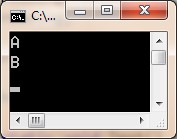
将 sh.Release(1) 变为 sh.Release(2) 后的输出结果

Mutex Constructs
A Mutex represents a mutual-exclusive lock. It works similar to an AutoResetEvent or a Semaphore with a count of 1 because all three constructs release only one waiting thread at a time.
Mutexes have some additional logic in them, which makes them more complex than the other constructs. First, Mutex objects record which thread obtained it by querying the calling thread’s Int32 ID. When a thread calls ReleaseMutex, the Mutex makes sure that the calling thread is the same thread that obtained the Mutex. If the calling thread is not the thread that obtained the Mutex, then the Mutex object’s state is unaltered and ReleaseMutex throws a System.ApplicationException. Also, if a thread owning a Mutex terminates for any reason, then some thread waiting on the Mutex will be awakened by having a System.Threading.AbandonedMutexException thrown. Usually, this exception will go unhandled, terminating the whole process. This is good because a thread acquired the Mutex and it is likely that the thread terminated before it finished updating the data that the Mutex was protecting. If a thread catches AbandonedMutexException, then it could attempt to access the corrupt data, leading to unpredictable results and security problems.
Second, Mutex objects maintain a recursion count indicating how many times the owning thread owns the Mutex. If a thread currently owns a Mutex and then that thread waits on the Mutex again, the recursion count is incremented and the thread is allowed to continue running. When that thread calls ReleaseMutex, the recursion count is decremented. Only when the recursion count becomes 0 can another thread become the owner of the Mutex.
.NET:CLR via C# Primitive Thread Synchronization Constructs的更多相关文章
- .NET:CLR via C# User-Mode Constructs
The CLR guarantees that reads and writes to variables of the following data types are atomic: Boolea ...
- .NET:CLR via C# The CLR’s Execution Model
The CLR’s Execution Model The core features of the CLR memory management. assembly loading. security ...
- [C#] 类型学习笔记一:CLR中的类型,装箱和拆箱
在学习.NET的时候,因为一些疑问,让我打算把.NET的类型篇做一个总结.总结以三篇博文的形式呈现. 这篇博文,作为三篇博文的第一篇,主要探讨了.NET Framework中的基本类型,以及这些类型一 ...
- Java:多线程,分别用Thread、Runnable、Callable实现线程
并发性(concurrency)和并行性(parallel)是两个概念,并行是指在同一时刻,有多条指令在多个处理器上同时执行:并发指在同一时刻只能有一条指令执行,但多个进程指令被快速轮换执行,使得宏观 ...
- “全栈2019”Java多线程第二章:创建多线程之继承Thread类
难度 初级 学习时间 10分钟 适合人群 零基础 开发语言 Java 开发环境 JDK v11 IntelliJ IDEA v2018.3 文章原文链接 "全栈2019"Java多 ...
- Thread Based Parallelism - Thread Synchronization With Lock
Thread Based Parallelism - Thread Synchronization With Lock import threading shared_resource_with_lo ...
- Thread Based Parallelism - Thread Synchronization With a Condition
Thread Based Parallelism - Thread Synchronization With a Condition from threading import Thread, Con ...
- .NET:CLR via C# Thread Basics
A thread is a Windows concept whose job is to virtualize the CPU. Thread Overhead Thread kernel obje ...
- Thread Synchronization Queue with Boost
介绍:当开发一个多线程程序时,同步是一个很大的问题.如果你的程序需要数据流包,那么用队列是个好办法. 你可以在 http://www.boost.org/ 发现 boost 库和文档,从它的网站可以看 ...
随机推荐
- HBase混布MapReduce集群学习记录
一.准备工作 1.1 部署环境 集群规模大概260多台,TSC10机型,机型参数如下: > 1个8核CPU(E5-2620v4) > 64G内存 > HBA,12*4T SATA,1 ...
- Html5和Css3扁平化风格网页
前言 扁平化概念的核心意义 去除冗余.厚重和繁杂的装饰效果.而具体表现在去掉了多余的透视.纹理.渐变以及能做出3D效果的元素,这样可以让“信息”本身重新作为核心被凸显出来.同时在设计元素上,则强调了抽 ...
- Rookey.Frame之实体表单验证
昨天给大家介绍了实体FluentValidation验证,今天继续给大家介绍表单验证,在Rookey.Frame框架中,表单验证有PrimaryKeyFields字段验证.唯一验证.必填验证.常用验证 ...
- Python全栈开发之14、Javascript
一.简介 前面我们学习了html和css,但是我们写的网页不能动起来,如果我们需要网页出现各种效果,那么我们就要学习一门新的语言了,那就是JavaScript,JavaScript是世界上最流行的脚本 ...
- Ubuntu16.04下Kylin的安装与配置
一.系统环境 kylin的安装配置并不像官方文档中描述的那样简单,复杂的原因在于hadoop,hive,hbase,kylin的版本一定要兼容,不然就会出现各种奇怪的错误.以下各软件版本可以成功运行k ...
- ref:Mysql授权远程登陆
ref:https://blog.csdn.net/qq_26710805/article/details/79776897 在Windows环境上操作.步骤如下: 1. 打开cmd窗口,登陆mysq ...
- Django一些开发经验
总结一些 Django 开发的小经验.先说一些最最基础的吧. 使用 virtualenv 隔离开发环境 使用 pip 管理项目依赖,主要就是一个小技巧,使用 pip freeze > requi ...
- [xsy2913]enos
题意:一棵树,点有$0,1,2$三种颜色,支持路径修改颜色和查询点所在同色连通块的大小 lcm太可怕了,于是去问了sk,得到一个优质做法 考虑lct维护子树信息,$vs_{x,i}$为$x$的虚儿子中 ...
- 详解Android基本布局
一.线性布局 LinearLayout又称为线性布局,是一种非常常用的布局.这个布局会将它包含的控件在线性方向上依次排列.我们可以通过指定它的orientation属性来决定它是垂直方向排列还是水平方 ...
- Markdown中如何插入视频 > iframe?
关于Markdown中如何插入视频这一问题 网上众说纷纭,一直也没找到一个确切的答案,想来也是,这些东西毕竟还不算成熟.各种以前提供过的方法现在来讲,可能在更新或是关闭大潮中又没了 而且,Ma ...