
ASP.net四则运算《《《策略模式
Calculator.cs
 using System;

 using System.Collections.Generic;

 using System.Linq;

 using System.Web;

   /// <summary>

   ///Calculator 的摘要说明

   /// </summary>

 public abstract class Calculator

 {

     public abstract double Cal(double x, double y);

 }

     public class Add : Calculator                //接口法运算

     {

         public override double Cal(double x, double y)     //重写

         {

             double result = ;

             result = x + y;

             return result;

         }

     }

     public class Sub : Calculator

     {

         public override double Cal(double x, double y)

         {

             double result = ;

             result = x - y;

             return result;

         }

     }

     public class Mul : Calculator

     {

         public override double Cal(double x, double y)

         {

             double result = ;

             result = x * y;

             return result;

         }

     }

     public class Div : Calculator

     {

         public override double Cal(double x, double y)

         {

             double result = ;

             result = x / y;

             return result;

         }

     }

     public class Opear           //定义运算符

     {

         private Calculator calculate = null;          //实例化一个基类的引用对象

         public Opear(Calculator calculator)         //calculator为派生类的一个对象

         {

             this.calculate = calculator;                  //把派生类的对象赋给基类的引用对象

         }

         public double Cal(double x, double y, String op)

         {

             return this.calculate.Cal(x, y);         //返回计算结果

         }

     }
ASP.net后台代码:
 using System;

 using System.Collections.Generic;

 using System.Linq;

 using System.Web;

 using System.Web.UI;

 using System.Web.UI.WebControls;

 public partial class Default2 : System.Web.UI.Page

 {

     protected void Page_Load(object sender, EventArgs e)

     {

     }

     protected void Button1_Click(object sender, EventArgs e)

     {

          string op = DropDownList1.SelectedItem.ToString();

          double x = Convert.ToDouble(TextBox1.Text);

          double y = Convert.ToDouble(TextBox2.Text);

          Opear opear =null;

          if (DropDownList1.SelectedIndex == )

          {

              opear = new Opear(new Add());

          }

          else if (DropDownList1.SelectedIndex == )

          {

            opear  = new Opear(new Sub());

          }

          else if (DropDownList1.SelectedIndex == )

          {

              opear = new Opear(new Mul());

          }

          else if (DropDownList1.SelectedIndex == )

          {

              opear = new Opear(new Div());

          }

          string answer = opear.Cal(x, y, op).ToString();

          string result = TextBox1.Text + DropDownList1.SelectedItem.ToString() + TextBox2.Text;

          if (TextBox4.Text == answer)

          {

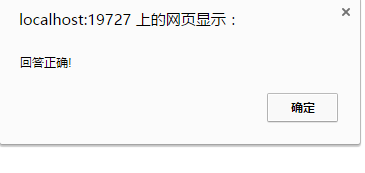
              Response.Write("<script>alert('回答正确!')</script>");

              ListBox1.Items.Add(result + "=" + TextBox4.Text.Trim());

          }

          else

          {

              Response.Write("<script>alert('答题错误!')</script>");

              ListBox1.Items.Add(result + "=" + TextBox4.Text.Trim());

          }

          TextBox1.Text = "";

          TextBox2.Text = "";

          TextBox4.Text = "";

      }

     }
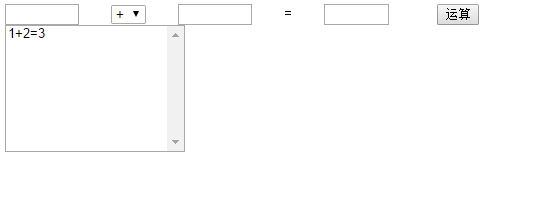
运行结果:
运行界面:

ASP.net四则运算《《《策略模式的更多相关文章
- ASP.NET四则运算--策略模式
在ASP.NET中实现四则运算,同样使用了类的封装,以及策略模式.只不过是把封装的类.前台代码以及后台的代码分离开来,但同样是要达到功能的实现. Calculator.cs using System; ...
- ASP.NET四则运算--工厂模式
这次是在ASP.NET上实现四则运算,之前用策略模式实现了,所以这次想着用工厂模式实现一下. Calculator.cs using System; using System.Collections. ...
- ASP.net之策略模式
设计思路: 用ASP.net设计,调用策略模式.在第一个数和第二个数的文本框中输入数值,单击录题按钮,数值保存在n1,n2文档中,把要做的题都保存完后,单击开始按钮,开始做题,做完单击判断按钮,进行判 ...
- 封装,策略模式,Asp换脸
1.简单封装 1>计算类 using System; using System.Collections.Generic; using System.Linq; using System.Text ...
- 计算器软件的代码实现 (策略模式+asp.net)
一 策略模式代码的编写 using System; using System.Collections.Generic; using System.Linq; using System.Web; /// ...
- 策略模式,ASP.NET实现
策略模式,ASP.NET实现 using System; using System.Collections.Generic; using System.Linq; using System.Web; ...
- 计算器软件实现系列(五)策略模式+asp.net
一 策略模式代码的编写 using System; using System.Collections.Generic; using System.Linq; using System.Web; /// ...
- asp.net core 集成JWT(二)token的强制失效,基于策略模式细化api权限
[前言] 上一篇我们介绍了什么是JWT,以及如何在asp.net core api项目中集成JWT权限认证.传送门:https://www.cnblogs.com/7tiny/p/11012035.h ...
- ASP.NET MVC 学习笔记-2.Razor语法 ASP.NET MVC 学习笔记-1.ASP.NET MVC 基础 反射的具体应用 策略模式的具体应用 责任链模式的具体应用 ServiceStack.Redis订阅发布服务的调用 C#读取XML文件的基类实现
ASP.NET MVC 学习笔记-2.Razor语法 1. 表达式 表达式必须跟在“@”符号之后, 2. 代码块 代码块必须位于“@{}”中,并且每行代码必须以“: ...
- asp.net—策略模式
一.什么是策略模式 定义:定义一系列算法,把一个个算法封装成独立类并实现同一个接口,使得它们之间可以相互替换. 二.怎么使用策略模式 首先模拟一个场景:有一个用户想买车. 可以有多种方式买车: (1 ...
随机推荐
- sql函数:开窗函数简介
与聚合函数一样,开窗函数也是对行集组进行聚合计算,但是普通聚合函数每组只能返回一个值,而开窗函数可以每组返回多个值. 实验一比如我们想查询每个工资小于5000元的员工信息(城市以及年龄),并且在每行中 ...
- BZOJ4033 [HAOI2015]树上染色
本来是考虑, $ f[x][i][0/1] $ 表示 $ x $ 子树中有$i$个黑点,且 $ x $ 是白点/黑点.但是这里的答案是要统计不同的子树的贡献的.所以就gg了. 看了题解. 应该是要设$ ...
- Oracle Data Provider for .NET – Microsoft .NET Core and Entity Framework Core
http://www.oracle.com/technetwork/topics/dotnet/tech-info/odpnet-dotnet-ef-core-sod-4395108.pdf Orac ...
- to improve sqlite performance
INSERT is really slow - I can only do few dozen INSERTs per second http://www.sqlite.org/faq.html#q1 ...
- JavaScript总结(七)
JavaScript表单编程 表单是Web上与用户进行交互的主要界面.则我们需要掌握如何访问用户输入的表单数据,校验用户输入的正确性显得至关重要. ♞ 对Form元素进行脚本编写 ✍ 获取表单的应用 ...
- maven 打 fatjar
备忘. 1. <plugins> <plugin> <artifactId>maven-assembly-plugin</artifactId> < ...
- [CF1027F]Session in BSU[最小基环树森林]
题意 有 \(n\) 门课程,每门课程可以选择在 \(a_i\) 或者 \(b_i\) 天参加考试,每天最多考一门,问最早什么时候考完所有课程. \(n\leq 10^6\). 分析 类似 [BZOJ ...
- SSISDB3:Package的执行实例
SSISDB 系列随笔汇总: SSISDB1:使用SSISDB管理Package SSISDB2:SSIS工程的操作实例 SSISDB3:Package的执行实例 SSISDB4:当前正在运行的Pac ...
- (转载)jQuery判断checkbox是否选中的3种方法(个人用第二种方法)
方法一: if ($("#checkbox-id")get(0).checked) { // do something } 方法二: if($('#checkbox-id' ...
- 如何为一个高负荷站点配置tomcat连接器(connector)【译文】(第一篇)
引言 最近正好要用到这些内容,因此就找了一篇比较有分量的文章,思来想去,还是尝试写一下译文吧.其实LZ的英语是非常烂的(四级没过的LZ眼泪掉下来),因此这篇文章翻译的水平LZ自己也不敢恭维.各位猿友大 ...