
Elasticsearch 安装head插件
一、简介
elasticsearch-head是一个界面化的集群操作和管理工具,可以对集群进行傻瓜式操作。你可以通过插件把它集成到es(首选方式),也可以安装成一个独立webapp。
Elasticsearch 5 以上版本已经不支持 site plugins 的方式安装head插件了,所以 head 需要作为一个单独的服务进行安装。
官方的文档:https://github.com/mobz/elasticsearch-head
- for Elasticsearch 5.x: site plugins are not supported. Run as a standalone server
- for Elasticsearch 2.x: sudo elasticsearch/bin/plugin install mobz/elasticsearch-head
- for Elasticsearch 1.x: sudo elasticsearch/bin/plugin -install mobz/elasticsearch-head/1.x
- for Elasticsearch 0.x: sudo elasticsearch/bin/plugin -install mobz/elasticsearch-head/0.9
二、安装环境
head下载:wget https://github.com/mobz/elasticsearch-head/archive/master.zip 或者github下载:https://github.com/mobz/elasticsearch-head
head插件是一个nodejs的项目,因此需要安装node环境,使用npm来安装依赖的包。地址:http://nodejs.org/dist/v8.1.4/node-v8.1.4-linux-x64.tar.gz
三、安装过程
1. 安装node
  # yum -y install gcc make gcc-c++ openssl-devel
  # tar -zxvf node-v8.1.4-linux-x64.tar.gz
  # vim /etc/profile
     export NODE_HOME=/opt/es/node/node-v8.1.4-linux-x64
     export PATH=$NODE_HOME/bin:$PATH
  # source /etc/profile
     验证是否安装成功
  # node -v && npm -v
    v8.1.4
    5.0.3
  也可以通过yum快捷安装node
  # yum install nodejs -y
2. 安装grunt
grunt 是一个很方便的构建工具,可以进行打包压缩、测试、执行等工作,es5里的head插件就是通过grunt启动的,因此需要安装 grunt。
  # unzip elasticsearch-head-master.zip
  # cd elasticsearch-head-master
  # npm install(此过程有可能nmp报错,需要取消ssl验证:npm config set strict-ssl false)
  # npm install grunt-cli(windows:npm install grunt-cli -g)
    安装完验证一下:
  # ./node_modules/grunt/bin/grunt -version
    grunt-cli v1.2.0
    grunt v1.0.1
3. 修改配置文件
# vim elasticsearch-head-master/Gruntfile.js(增加增加hostname属性,设置为*:hostname: '*',)
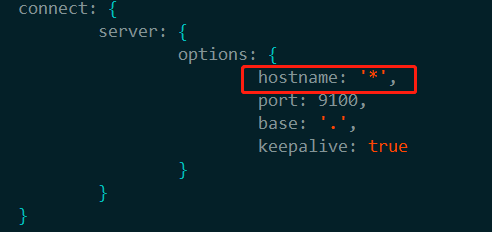
修改连接 Elasticsearch 的地址,elasticsearch-head-master/_site/app.js,修改 localhost:9200 为实际 Elasticsearch 的地址
# vim elasticsearch-head-master/_site/app.js(搜关键字9200找到位置)
this.base_uri = this.config.base_uri || this.prefs.get("app-base_uri") || "http://es真实地址:9200";
修改 Elasticsearch 配置文件elasticsearch.yml,增加下面两个配置:
http.cors.enabled: true
http.cors.allow-origin: "*"
四、启动head
启动 head 插件之前,需要先启动 Elasticsearch 服务
前台启动:./elasticsearch-head-master/node_modules/grunt/bin/grunt server
后台启动: nohup ./elasticsearch-head-master/node_modules/grunt/bin/grunt server &
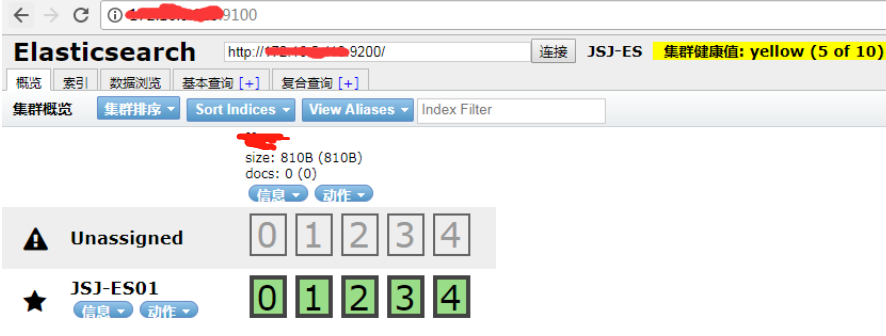
然后在浏览器输入地址 ip:9100 即可测试结果
Elasticsearch 安装head插件的更多相关文章
- ElasticSearch安装SQL插件
ElasticSearch安装SQL插件下载地址(中国大佬开发的,膜拜ing):https://github.com/NLPchina/elasticsearch-sql 1.记得选择和自己Elast ...
- Elasticsearch安装X-Pack插件
Elasticsearch安装X-Pack插件, 基于已经安装好的6.2.2版本的Elasticsearch, 安装6.2.2版本的X-Pack插件. 1.下载x-pack的zip包到本地 https ...
- elasticsearch安装head插件
安装Head插件 由于head插件本质上还是一个nodejs的工程,因此需要安装node,使用npm来安装依赖的包. <1>安装Node.js 下载解压 wget https://node ...
- ElasticSearch安装拼音插件 elasticsearch-analysis-pinyin
elasticsearch-analysis-pinyin 是 ElasticSearch的拼音插件.强大的功能支持拼音等的搜索 1.下载源代码 源码地址https://github.com/medc ...
- elasticsearch 安装 head插件
head插件 切换到Elasticsearch的安装目录 cd ~/demo/elasticsearch/es1 执行安装命令 [root@localhost es1]# bin/plugin ins ...
- Elasticsearch安装 + Head插件安装 + Bigdesk插件安装
一.Elasticsearch安装 1.官网下载zip包:https://www.elastic.co/downloads/elasticsearch 2.解压到自己指定的文件夹 3.运行\bin\e ...
- Elasticsearch 安装 Head 插件
引子:在上一篇文章Elasticsearch入门(一):CentOS 7.6 安装ES 7.0.0中,我们讲了如何在CentOS 7.6环境下安装 Elasticsearch 7.0.下面,我将讲一讲 ...
- elasticsearch安装marvel插件
Marvel插件要在Elasticsearch和Kibana中同时安装.Step 1: Install Marvel into Elasticsearch: bin/plugin install li ...
- ElasticSearch安装拼音插件(pinyin)
环境介绍 集群环境如下: Ubuntu14.04 ElasticSearch 2.3.1(3节点) JDK1.8.0_60 开发环境: Windows10 JDK 1.8.0_66 Maven 3.3 ...
随机推荐
- Delphi 常量
- SpringBoot打包成jar运行脚本
#!/bin/bash #这里可替换为你自己的执行程序,其他代码无需更改 APP_NAME=csadmin.jar #使用说明,用来提示输入参数 usage(){ echo "Usage: ...
- 367-基于zynq XC7Z100 FMC接口通用计算平台
基于zynq XC7Z100 FMC接口通用计算平台 一.板卡概述 本板卡基于Xilinx公司的FPGA XC7Z100 FFG 9000 芯片, 该平台为设计和验证应用程序提供了一个完整的开发平台. ...
- DevExpress Windows 10 v19.1新版亮点:UWP控件新功能全面解析
行业领先的.NET界面控件DevExpress 日前正式发布v19.1版本,本站将以连载的形式介绍各版本新增内容.在本系列文章中将为大家介绍DevExpress WPF v19.1中新增的一些控件及部 ...
- mysql 查询碎片的方法
mysql 查询碎片的方法 mysql length,engine,data_free,table_rows group by table_name order by table_rows asc; ...
- 【leetcode】Max Area of Island
国庆中秋长假过完,又要开始上班啦.先刷个题目找找工作状态. Given a non-empty 2D array grid of 0's and 1's, an island is a group o ...
- Type.GetType反射的对象创建Activator.CreateInstance
/// <summary> /// 获取对应类的实现 /// </summary> /// <param name="libname">< ...
- json.load(f)方法使用*.json备忘
在python中使用JSON,导入出现错误了,类型错误等. #!/usr/bin/python import json f = open('data.json', encoding='utf-8') ...
- react样式
https://www.jianshu.com/p/711c596571d6(copy)
- BZOJ 3162: 独钓寒江雪 树的同构 + 组合 + 计数
Description Input Output 求一棵树编号序列不同的方案数: 令 $f[u],g[u]$ 分别表示 $u$ 选/不选 的方案数. 则 $f[u]=\prod_{v\in son ...