
Windows服务 --- SqlDependency的使用
1 启用当前数据库的 SQL Server Service Broker
a 检查Service Broker 是否开启
SELECT is_broker_enabled FROM sys.databases WHERE name = 'WLZhuJianMes'
查询结果:is_broker_enabled de 结果是 0,代表数据库没有启动 Service Broker
解决办法:注:两句同时执行,单独执行显示:正在回滚不合法事务。估计回滚已完成: 100%。
b 开启 Service Broker
ALTER DATABASE WLZhuJianMes SET NEW_BROKER WITH ROLLBACK IMMEDIATE;

ALTER DATABASE WLZhuJianMes  SET ENABLE_BROKER;
再次查询is_broker_enabled状态,状态为1,数据库没有启动 Service Broker成功
光用ALTER DATABASE DBName SET ENABLE_BROKER;语句开启经常会死机卡住,解决这个问题的方法是,先停止其它正在使用数据库的程序,然后运行

ALTER DATABASE DBName SET NEW_BROKER WITH ROLLBACK IMMEDIATE;

ALTER DATABASE DBName SET ENABLE_BROKER;
在数据库中停用 Service Broker

将数据库改为设置 DISABLE_BROKER 选项。

示例

复制

USE master ;

GO

ALTER DATABASE AdventureWorks2008R2 SET DISABLE_BROKER ;

GO
2 新建 Windows 服务程序 ,设置服务的相关信息
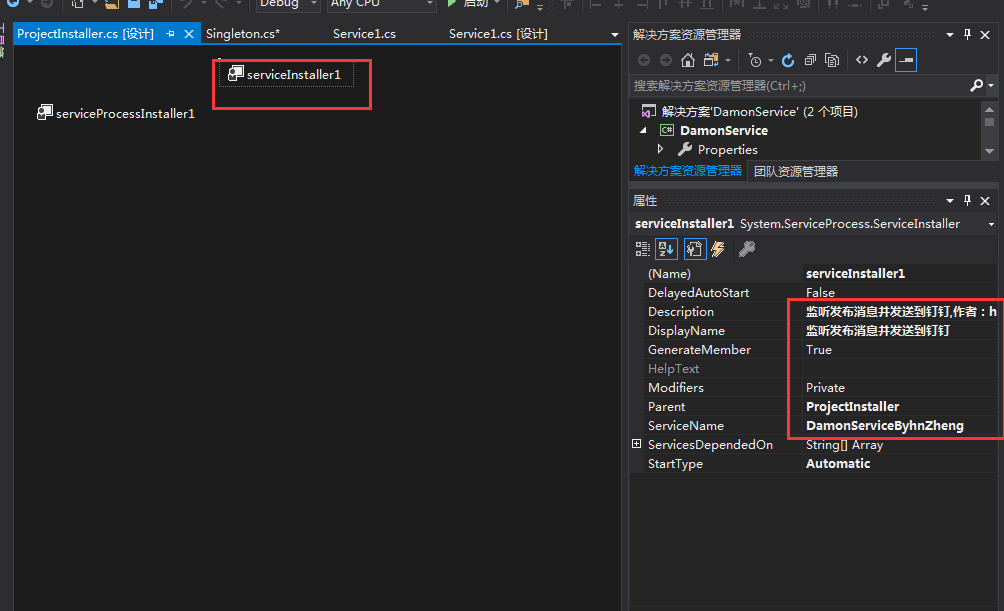
Code:
using System;

using System.Collections.Generic;

using System.ComponentModel;

using System.Configuration;

using System.Data;

using System.Data.SqlClient;

using System.Diagnostics;

using System.IO;

using System.Linq;

using System.ServiceProcess;

using System.Text;

using System.Threading.Tasks;

namespace DamonService

{

    public partial class Service1 : ServiceBase

    {

       static  string _connStr = ConfigurationManager.AppSettings["Connection"].ToString();

        public Service1()

        {

            InitializeComponent();

            this.WriteLog("初始化");

            this.WriteLog(_connStr);

            SqlDependency.Start(_connStr);//传入连接字符串,启动基于数据库的监听

            // 先手动启动一次

            UpdateGrid();

        }

        protected override void OnStart(string[] args)

        {

            this.WriteLog("服务开始启动");

        }

        protected override void OnStop()

        {

            this.WriteLog("服务停止");

        }

        private void UpdateGrid(int sync)

        {

            try

            {

                using (SqlConnection connection = new SqlConnection(_connStr))

                {

                    //依赖是基于某一张表的,而且查询语句只能是简单查询语句,

                    //不能带top或 *,同时必须指定所有者,即类似[dbo].[]

                    using (SqlCommand command = new SqlCommand(@"SELECT   [Mid]

                                                                 ,[MatTitle]

                                                                  FROM [dbo].[IPGMatter] where issend=0", connection))

                    {

                        command.CommandType = CommandType.Text;

                        connection.Open();

                        SqlDependency dependency = new SqlDependency(command);

                        dependency.OnChange += new OnChangeEventHandler(dependency_OnChange);

                        SqlDataReader sdr = command.ExecuteReader();

                        Console.WriteLine();

                        while (sdr.Read())

                        {

                            if (sync == )

                            {

                                // sdr.

                                string id = sdr["MatTitle"].ToString();

                                this.WriteLog(id);

                            }

                        }

                        sdr.Close();

                    }

                }

            }

            catch (Exception ex)

            {

                WriteLog("UpdateGrid:" + ex.StackTrace);

            }

        }

        #region  监听

        private void dependency_OnChange(object sender, SqlNotificationEventArgs e)

        {

            SqlDependency dependency = sender as SqlDependency;

            dependency.OnChange -= dependency_OnChange;

            if (e.Info == SqlNotificationInfo.Insert)

            {

                WriteLog("UpdateGrid:" + "Insert");

                UpdateGrid();

            }

            else if (e.Info == SqlNotificationInfo.Update)

            {

                UpdateGrid(-);

            }

            else if (e.Info == SqlNotificationInfo.Delete)

            {

                UpdateGrid();

            }

            else

            {

                UpdateGrid();

            }

        }

        #endregion

        #region  日志

        private void WriteLog(String message)

        {

            string path = Path.Combine(AppDomain.CurrentDomain.BaseDirectory, "serverLog.txt");

            FileInfo file = new FileInfo(path);

            if (!file.Exists)

            {

                using (FileStream fs = File.Create(path))

                {

                    fs.Close();

                }

            }

            using (FileStream fileStream = new FileStream(path, FileMode.Append, FileAccess.Write))

            {

                using (StreamWriter sw = new StreamWriter(fileStream))

                {

                    sw.WriteLine(DateTime.Now.ToString() + ":" + message);

                }

            }

        }

        #endregion

    }

}
安装和卸载服务的脚本
保存为bat文件,放在服务程序的根目录
C:\Windows\Microsoft.NET\Framework64\v4.0.30319\installutil.exe /i DamonService.exe
C:\Windows\Microsoft.NET\Framework64\v4.0.30319\installutil.exe /u DamonService.exe
Windows服务 --- SqlDependency的使用的更多相关文章
- C#曲线分析平台的制作(六,Sqldependency+Signalr+windows 服务)
在经过五天的学习和资料收集后,终于初步实现了利用sqldependency进行数据库变化监控,signalr进行前后台交互,数据实时更新.下面将源代码贴出进行初步分析: 1.系统整体框架构成: 2.具 ...
- C#曲线分析平台的制作(五,Sqldependency+Signalr+windows 服务 学习资料总结)
在前篇博客中,利用interval()函数,进行ajax轮询初步的实现的对数据的实时显示.但是在工业级别实时显示中,这并非是一种最好的解决方案.随着Html5 websocket的发展,这种全双工的通 ...
- 基于SignalR实现B/S系统对windows服务运行状态的监测
通常来讲一个BS项目肯定不止单独的一个BS应用,可能涉及到很多后台服务来支持BS的运行,特别是针对耗时较长的某些任务来说,Windows服务肯定是必不可少的,我们还需要利用B/S与windows服务进 ...
- C#创建、安装、卸载、调试Windows Service(Windows 服务)的简单教程
前言:Microsoft Windows 服务能够创建在它们自己的 Windows 会话中可长时间运行的可执行应用程序.这些服务可以在计算机启动时自动启动,可以暂停和重新启动而且不显示任何用户界面.这 ...
- 玩转Windows服务系列汇总
玩转Windows服务系列汇总 创建Windows服务 Debug.Release版本的注册和卸载及其原理 无COM接口Windows服务启动失败原因及解决方案 服务运行.停止流程浅析 Windows ...
- 玩转Windows服务系列——给Windows服务添加COM接口
当我们运行一个Windows服务的时候,一般情况下,我们会选择以非窗口或者非控制台的方式运行,这样,它就只是一个后台程序,没有界面供我们进行交互. 那么当我们想与Windows服务进行实时交互的时候, ...
- 玩转Windows服务系列——使用Boost.Application快速构建Windows服务
玩转Windows服务系列——创建Windows服务一文中,介绍了如何快速使用VS构建一个Windows服务.Debug.Release版本的注册和卸载,及其原理和服务运行.停止流程浅析分别介绍了Wi ...
- 玩转Windows服务系列——Debug、Release版本的注册和卸载,及其原理
Windows服务Debug版本 注册 Services.exe -regserver 卸载 Services.exe -unregserver Windows服务Release版本 注册 Servi ...
- C# 开发windows服务的一些心得
最近在做一个windows服务的项目,发现并解决了一些问题,拿出来和大家分享一下,以下windows服务简称“服务” 文章会在适合时间更新,因为朋友们在不断提出新的意见或思路,感谢-.- 1.服务如何 ...
随机推荐
- 线程join方法demo-模拟叫号看病
package cn.chapter4.test5; public class SicknessDemo { /** * 模拟叫号看病 * @param args * * 思路:把普通号看病写在主线程 ...
- 开源大数据生态下的 Flink 应用实践
过去十年,面向整个数字时代的关键技术接踵而至,从被人们接受,到开始步入应用.大数据与计算作为时代的关键词已被广泛认知,算力的重要性日渐凸显并发展成为企业新的增长点.Apache Flink(以下简称 ...
- Python基础教程(021)--Pycharm简介
前言 学习Pycharm开发工具 内容 项目:就是一个功能复杂的软件 目标 必须掌握的工具
- [HDU3117]Fibonacci Numbers
题目:Fibonacci Numbers 链接:http://acm.hdu.edu.cn/showproblem.php?pid=3117 分析: 1)后四位可以用矩阵快速幂解决.$T= \left ...
- (转)教你分分钟搞定Docker私有仓库Registry
转:https://www.cnblogs.com/Javame/p/7389093.html 一.什么是Docker私有仓库Registry 官方的Docker hub是一个用于管理公共镜像的好地方 ...
- appium desktop 定位弹出框时报错
今天在定位真机APP的时候,弹出框的内容死活定位不到,只能定位到背景的内容. 问题:appium desktop 定位弹出框时报错,定位不到,只能定位到背景的内容. 分析: 定位工具找不到弹出框的元素 ...
- Python中的浮点数原理与运算分析
Python中的浮点数原理与运算分析 本文实例讲述了Python中的浮点数原理与运算.分享给大家供大家参考,具体如下: 先看一个违反直觉的例子: >>> s = 0. > ...
- JetBrains.dotPeek
Free .NET Decompiler and Assembly Browser Decompile .NET assemblies to C# dotPeek is a free-of-charg ...
- CET-6 分频周计划生词筛选(Week 2)
点我阅读 Week 2 2016.09.04/05 p58 ongoing / forward p59 prosperity p60 rear p61 rival + segregation + se ...
- The Stream of Corning 2( 权值线段树/(树状数组+二分) )
题意: 有两种操作:1.在[l,r]上插入一条值为val的线段 2.问p位置上值第k小的线段的值(是否存在) 特别的,询问的时候l和p合起来是一个递增序列 1<=l,r<=1e9:1< ...