
【代码笔记】iOS-底下滚动,上面标题栏也会跟着变动
一,效果图。
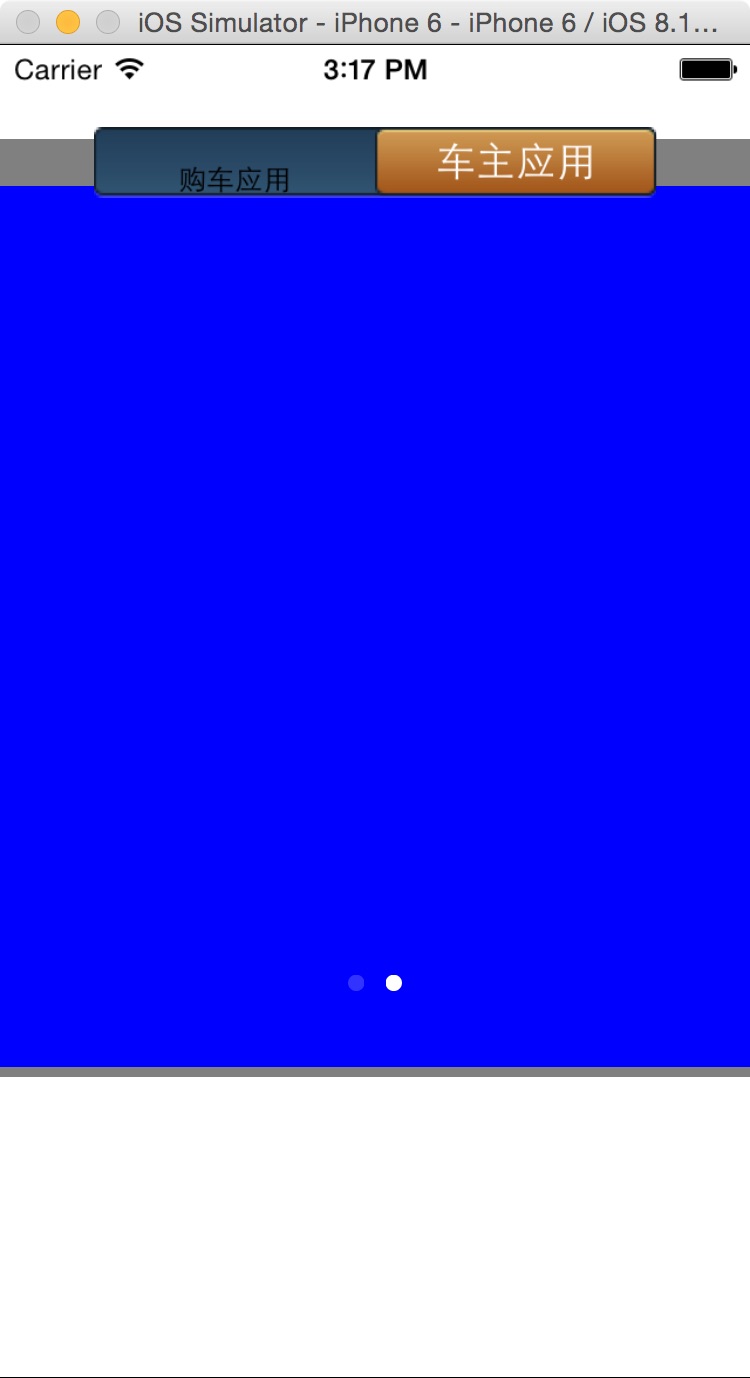
二,工程图。
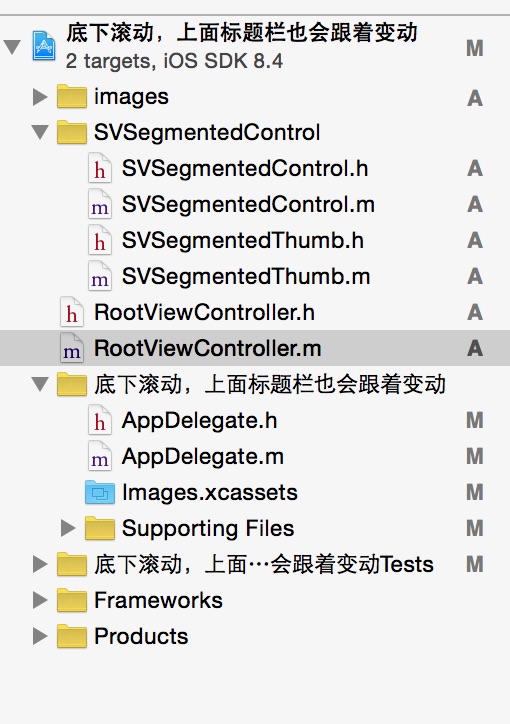
三,代码。
RootViewController.h

#import <UIKit/UIKit.h>

#import "SVSegmentedControl.h"

@interface RootViewController : UIViewController

<UIScrollViewDelegate>

{

    UIScrollView *scrollView1;

    UIScrollView *scrollView2;

    UIPageControl *pag;

    NSMutableArray *dataArray;

    SVSegmentedControl *options;

}

@end
RootViewController.m
#import "RootViewController.h"

@interface RootViewController ()

@end

@implementation RootViewController

- (id)initWithNibName:(NSString *)nibNameOrNil bundle:(NSBundle *)nibBundleOrNil

{

    self = [super initWithNibName:nibNameOrNil bundle:nibBundleOrNil];

    if (self) {

        // Custom initialization

    }

    return self;

}

- (void)viewDidLoad

{

    [super viewDidLoad];

    // Do any additional setup after loading the view.

    //初始化背景图

    [self initBackGroundView];

}

#pragma -mark -functions

-(void)initBackGroundView

{

    //隐藏导航条

    self.navigationController.navigationBarHidden=YES;

    //底部的滚动条

    scrollView1=[[UIScrollView alloc]init];

    scrollView1.frame=CGRectMake(0, 40, 320, 400);

    scrollView1.backgroundColor=[UIColor grayColor];

    scrollView1.delegate=self;

    scrollView1.pagingEnabled=YES;

    scrollView1.contentSize=CGSizeMake(320*2, 376);

    [self.view addSubview:scrollView1];

    //第一页的内容

    UIView *v1=[[UIView alloc]init];

    [v1 setFrame:CGRectMake(0, 0, 320, 376)];

    v1.backgroundColor=[UIColor redColor];

    [scrollView1 addSubview:v1];

    //第二页的内容

    UIView *v2=[[UIView alloc]init];

    v2.frame=CGRectMake(320, 0, 320, 376);

    v2.backgroundColor=[UIColor blueColor];

    [scrollView1 addSubview:v2];

    //下面指示页的圆点

    pag=[[UIPageControl alloc]initWithFrame:CGRectMake(160, 400, 0, 0)];

    pag.numberOfPages=2;

    pag.currentPage=0;

    [self.view addSubview:pag];

    //上面的滑动图标

    options = [[SVSegmentedControl alloc] initWithSectionTitles:[NSArray arrayWithObjects:@"购车应用",@"车主应用", nil]];

    [options addTarget:self action:@selector(actiBtClick:) forControlEvents:UIControlEventValueChanged];

    [options setBackgroundImage:[UIImage imageNamed:@"switchBg.png"]];

    options.center=CGPointMake(160, 50);

    options.crossFadeLabelsOnDrag=YES;

    options.selectedIndex=0;

    options.textColor=[UIColor blackColor];

    options.LKWidth=120;

    options.textShadowOffset=CGSizeMake(0, 0);

    options.textShadowColor=[UIColor clearColor];

    options.height=30;

    options.thumb.backgroundImage=[UIImage imageNamed:@"按钮-2.png"];

    options.thumb.highlightedBackgroundImage=[UIImage imageNamed:@"按钮-2.png"];

    options.thumb.textShadowColor=[UIColor clearColor];

    options.thumb.textShadowOffset=CGSizeMake(0, 0);

    [self.view addSubview:options];

}

#pragma -mark -doClickActions

- (void)actiBtClick:(SVSegmentedControl *)sender

{

    if(sender.selectedIndex==0)

    {

        [scrollView1 setContentOffset:CGPointMake(0, scrollView1.contentOffset.y) animated:YES];

        pag.currentPage=0;

    }

    else if(sender.selectedIndex==1)

    {

        [scrollView1 setContentOffset:CGPointMake(320, scrollView1.contentOffset.y) animated:YES];

        pag.currentPage=1;

    }

}

#pragma -mark -scrollViewDelegate

-(void)scrollViewDidEndDecelerating:(UIScrollView *)scrollView

{

    if(scrollView1.contentOffset.x==0)

    {

        pag.currentPage=0;

        [options moveThumbToIndex:0 animate:YES];

    }

    else if(scrollView1.contentOffset.x==320)

    {

        pag.currentPage=1;

        [options moveThumbToIndex:1 animate:YES];

    }

}

- (void)didReceiveMemoryWarning

{

    [super didReceiveMemoryWarning];

    // Dispose of any resources that can be recreated.

}
【代码笔记】iOS-底下滚动,上面标题栏也会跟着变动的更多相关文章
- IOS开发笔记 IOS如何访问通讯录
IOS开发笔记 IOS如何访问通讯录 其实我是反对这类的需求,你说你读我的隐私,我肯定不愿意的. 幸好ios6.0 以后给了个权限控制.当打开app的时候你可以选择拒绝. 实现方法: [plain] ...
- IOS在滚动的时候fixed消失
前段时间,除了apple发布了新的硬件之外,同步还发布了新的操作系统,IOS11,当大家都将注意力聚焦在那个奇怪的刘海该如何适配的时候,笔者的项目在适配IOS11却出现了其他的问题. 众所周知,I ...
- 【hadoop代码笔记】Mapreduce shuffle过程之Map输出过程
一.概要描述 shuffle是MapReduce的一个核心过程,因此没有在前面的MapReduce作业提交的过程中描述,而是单独拿出来比较详细的描述. 根据官方的流程图示如下: 本篇文章中只是想尝试从 ...
- 【hadoop代码笔记】hadoop作业提交之汇总
一.概述 在本篇博文中,试图通过代码了解hadoop job执行的整个流程.即用户提交的mapreduce的jar文件.输入提交到hadoop的集群,并在集群中运行.重点在代码的角度描述整个流程,有些 ...
- iOS 字体滚动效果 ScrollLabel
写了一个简单的字体滚动效果. 用了一种取巧的方式,传入两个一摸一样的Label(当然也可以是别的视图), 话不多说,代码里面讲解. SEScrollLabel.h #import <UIKit/ ...
- 【Hadoop代码笔记】目录
整理09年时候做的Hadoop的代码笔记. 开始. [Hadoop代码笔记]Hadoop作业提交之客户端作业提交 [Hadoop代码笔记]通过JobClient对Jobtracker的调用看详细了解H ...
- 笔记-iOS 视图控制器转场详解(上)
这是一篇长文,详细讲解了视图控制器转场的方方面面,配有详细的示意图和代码,为了使得文章在微信公众号中易于阅读,seedante 辛苦将大量长篇代码用截图的方式呈现,另外作者也在 Github 上附上了 ...
- jquery图片无缝滚动代码左右 上下无缝滚动图片
<!DOCTYPE html PUBLIC "-//W3C//DTD XHTML 1.0 Transitional//EN" "http://www.w3.org/ ...
- Jquery几行代码解决跟随屏幕滚动DIV
<!DOCTYPE html PUBLIC "-//W3C//DTD XHTML 1.0 Transitional//EN" "http://www.w3.org/ ...
随机推荐
- MVC学习之前必须掌握的c#基础知识
一.类自动属性 public class Person { //自动属性 public string Name { get; set; } private int _age; public int a ...
- ASP.NET MVC 使用Jquery Uploadify 在非IE浏览器下Http Error的解决方案
解决Uploadify上传控件在非IE浏览器中不工作,需要做如下2步修改: 1.Global.asax文件中,实现Application_BeginRequest函数: void Applicatio ...
- 编写高性能SQL
前言:系统优化中一个很重要的方面就是SQL语句的优化.对于海量数据,劣质SQL语句和优质SQL语句之间的速度差别可达到上百倍,可见对于一个系统不是简单的能实现其功能就可以了,而是要写出高质量的SQL语 ...
- iOS 阶段学习第八天笔记(指针)
iOS学习(C语言)知识点整理 一.指针 1)概念:存储变量的地址的一个变量. 2) 数据存储类型分析 1.text (代码段) :存储二进制的可执行代码 2.data(初始化的数据段) 存储初始化的 ...
- 使用MySQL WorkBench导入数据库
1. 在MySQL WorkBench的Server Administrator中双击要连接的数据库: 2. 点击左边的Data Import/Restore; 3. Import from Dump ...
- 新一代编程:scala泛函编程技术-唠叨
准备了半年后,终于决定在这里开始我的scala编程技术学习体验撰写之旅.初步打算在这里把我学习.体验.掌握scala编程的过程与有兴趣的朋友分享.我想,虽然我这不是正式论文或者教课书之类的,但写个开场 ...
- javascript--Object
概述 (1)定义 对象(object)是JavaScript的核心概念,也是最重要的数据类型.JavaScript的所有数据都可以被视为对象. 简单说,所谓对象,就是一种无序的数据集合,由若干个&qu ...
- windows下打包react-native应用程序
P.S.0:不截图了,上传图片太麻烦,每次只能上传一张.... 先生成签名文件,如果已有签名文件略过此步: keytool -genkey -v -keystore my-release-key.ke ...
- 《高可用MySQL》1 – Windows环境下压缩版MySQL安装
近日在读O’REILIY系列的<高可用MySQL>, 自然少不了主从(Master-Slave)配置和横向扩展相关的内容.Master-Slave这东西吧,在许多公司都是标配,开发中基本天 ...
- ANDROID 应用退出
在android中finish()和system(0)都只能退出单个activity.杀进程等的等方式都不行~~~解决问题: 在针对 多activity中退出整个程序,例如从A->B->C ...