
iOS 字体滚动效果 ScrollLabel
写了一个简单的字体滚动效果。
用了一种取巧的方式,传入两个一摸一样的Label(当然也可以是别的视图), 话不多说,代码里面讲解。
SEScrollLabel.h
#import <UIKit/UIKit.h>
/*! @brief 回调代码块
*
* 当滚动效果持续loopsDone次之后,isFinished值会变为YES,执行代码块
* @param loopsDone 滚动效果执行次数
* @param isFinished 是否已经结束
*/
typedef void (^PMAnimationFinished)(NSUInteger loopsDone, BOOL isFinished);
enum {
PMScrollDirectionFromLeft = 0, // Animation starts from left and continues to the right side
PMScrollDirectionFromRight = 1 // Animation starts from right and continues back to the left side
}; typedef NSUInteger PMScrollDirection;
@interface SEScrollLabel : UIScrollView
/*!
*
* @param frame 滚动视图的frame
* @param labels 存放UILabel数组,这个demo目前最多支持两个
* @param scrollDirection 滚动方向
* @param scrollSpeed 滚动速度,单位是 CGFloat/s
* @param loops 滚动执行次数
* @param completition 执行结束调用方法
* @return 返回SEScrollLabel对象
*/
-(instancetype)initWithFrame:(CGRect) frame labels:(NSArray *)labels
direction:(PMScrollDirection) scrollDirection
speed:(CGFloat) scrollSpeed
loops:(NSUInteger) loops
completition:(PMAnimationFinished) completition;
-(void)setText:(NSString *)text;
- (void) beginAnimation;
-(void)resetAnimation;
@end
SEScrollLabel.m
#import "SEScrollLabel.h"
#define LABEL_SPACING 30 //定义了字体滚动的间隙
@interface SEScrollLabel()
@property (nonatomic, assign) BOOL needAnimating; //是否需要滚动,label长度大于scrollLabel长度,设为YES,否则为NO
@property (nonatomic, assign) BOOL isAnimating; //是否正在滚动
@property (nonatomic, assign) CGFloat scrollSpeed; //滚动速度
@property (nonatomic, assign) NSInteger numberOfLoops; //滚动循环次数
@property (nonatomic, assign) NSInteger runningLoops; //当前已经执行过的滚动次数
@property (nonatomic, assign) PMScrollDirection scrollDirection; //滚动方向
@property (nonatomic, strong) PMAnimationFinished finishedBlock; //回调代码块
@end
@implementation SEScrollLabel
-(instancetype)initWithFrame:(CGRect) frame labels:(NSArray *)labels
direction:(PMScrollDirection) scrollDirection
speed:(CGFloat) scrollSpeed
loops:(NSUInteger) loops
completition:(PMAnimationFinished) completition
{
self = [super initWithFrame:frame];
if (self != nil)
{
UILabel *label = [labels firstObject];
CGRect labelFrame = label.frame;
if (label.frame.size.width <= frame.size.width) //如果第一个label宽度小于视图宽度,则判断不需要滚动显示
{
self.contentSize = CGSizeMake(labelFrame.size.width , labelFrame.size.height);
labelFrame.origin.x = frame.size.width - labelFrame.size.width;
labelFrame.origin.y = 0;
label.frame = labelFrame;
[self addSubview:label];
_needAnimating = NO;
}
else
{
self.contentSize = CGSizeMake(labelFrame.size.width *2 + LABEL_SPACING *2 , labelFrame.size.height);
labelFrame.origin.x = 0;
labelFrame.origin.y = 0;
label.frame = labelFrame;
[self addSubview:label];
if (scrollDirection == PMScrollDirectionFromRight)
{
labelFrame.origin.x += LABEL_SPACING + labelFrame.size.width;
}
else if (scrollDirection == PMScrollDirectionFromLeft)
{
labelFrame.origin.x -= LABEL_SPACING + labelFrame.size.width;
}
UILabel *sameLabel = [labels lastObject];
sameLabel.frame = labelFrame;
[self addSubview:sameLabel];
self.scrollDirection = scrollDirection;
self.scrollSpeed = scrollSpeed;
self.numberOfLoops = loops;
self.finishedBlock = completition;
self.needAnimating = YES;
}
}
return self;
}
- (void) beginAnimation
{
//所做的动画非常简单,就是让scrollView的conentOffset从0开始到contentSize.width/2的距离内不断循环,这里需要注意contentSize是怎么设置才能达到想要的效果
if (!self.needAnimating) return;
if (self.isAnimating) return;
[self setContentOffset:CGPointZero];
self.isAnimating = YES;
NSTimeInterval animationDuration = (self.contentSize.width/self.scrollSpeed);
[UIView animateWithDuration:animationDuration
delay:0
options:UIViewAnimationOptionCurveLinear
animations:^{
CGPoint finalPoint = CGPointZero;
if (self.scrollDirection == PMScrollDirectionFromRight)
finalPoint = CGPointMake(self.contentSize.width/2, 0);
else if (self.scrollDirection == PMScrollDirectionFromLeft)
finalPoint = CGPointMake(-self.contentSize.width/2, 0);
self.contentOffset = finalPoint;
} completion:^(BOOL finished) {
if (finished) {
self.isAnimating = NO;
BOOL restartAnimation = (self.numberOfLoops == 0 || self.runningLoops <= self.numberOfLoops);
if (self.finishedBlock)
{
self.finishedBlock((self.runningLoops+1),!restartAnimation);
}
if (restartAnimation)
[self beginAnimation];
else
[self endAnimation:NO];
self.runningLoops++;
}
}];
}
-(void)resetAnimation
{
//重置循环,将计数变为0,然后重新开始滚动
self.isAnimating = NO;
self.runningLoops = 0;
[self beginAnimation];
}
- (void) endAnimation:(BOOL) animated {
if (!self.isAnimating) return;
self.isAnimating = NO;
[self setContentOffset:CGPointZero animated:NO];
}
-(void)setText:(NSString *)text
{
//改变文字,这里我偷了个懒,没有重新去修改contentSize和label的frame, 所以运行效果可能有些问题,根据自己想要的效果进行修改吧
for (UIView *view in self.subviews)
{
if ([view isKindOfClass:[UILabel class]])
{
[(UILabel *)view setText:text];
}
}
}
@end
用法实例:
SEScrollLabel *scrollLabel = [[SEScrollLabel alloc] initWithFrame:CGRectMake(0, 0, 80, 30) labels:@[label, sameLabel] direction:PMScrollDirectionFromRight speed:15 loops:3 completition:^(NSUInteger loopsDone, BOOL isFinished) {
NSLog(@"已经运行了%ld次,循环%@结束", (unsigned long)loopsDone, isFinished ? @"已经": @"尚未");
}];
[self.view addSubview:scrollLabel];
[scrollLabel beginAnimation];
附上效果图一枚:
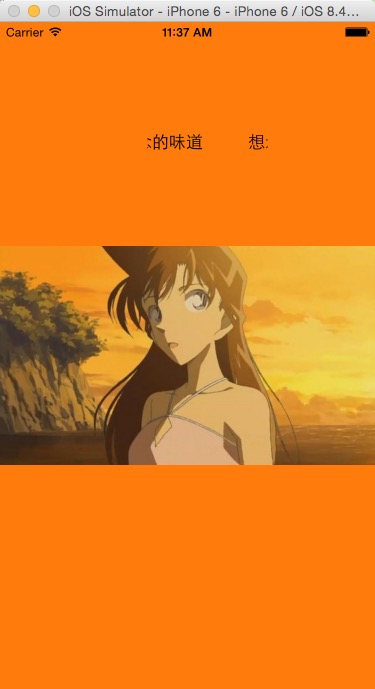
具体源码请访问 http://www.cnblogs.com/sely-ios/p/4552134.html
iOS 字体滚动效果 ScrollLabel的更多相关文章
- IOS UIScrollView + UIButton 实现segemet页面和顶部标签页水平滚动效果
很长一段时间没有写博客了,最近在学习iOS开发,看了不少的代码,自己用UIScrollView和UIButton实现了水平滚动的效果,有点类似于今日头条的主界面框架,效果如下: 代码如下: MyScr ...
- IOS设备上网页中的页面滚动效果模拟
可能咋一看不知道我说的是个啥,因为iOS本来就用这功能的啊,还模拟它干啥?先听我说下项目背景哈 我现在开发的是一个webapp,主要是用在ipad上,这个app的大小是固定大小的,为了防止触摸它出现弹 ...
- iOS UIWebView 获取内容实际高度,关闭滚动效果
本文转载至 http://my.oschina.net/Khiyuan/blog/341535 iOS UIWebView 获取内容实际高度,关闭滚动效果 近期做东西,将 UIWebView 嵌套 ...
- [ios]新手笔记-。-UIPickerView 关于伪造循环效果和延时滚动效果
查找了网上资料,循环效果绝大部分都是增加行数来制造循环的错觉,延时滚动就是利用NSTimer间隔出发滚动事件来制造滚动效果. 代码: #import <UIKit/UIKit.h>#imp ...
- [Swift通天遁地]九、拔剑吧-(13)创建页面的景深视差滚动效果
★★★★★★★★★★★★★★★★★★★★★★★★★★★★★★★★★★★★★★★★➤微信公众号:山青咏芝(shanqingyongzhi)➤博客园地址:山青咏芝(https://www.cnblogs. ...
- [Swift通天遁地]九、拔剑吧-(14)创建更美观的景深视差滚动效果
★★★★★★★★★★★★★★★★★★★★★★★★★★★★★★★★★★★★★★★★➤微信公众号:山青咏芝(shanqingyongzhi)➤博客园地址:山青咏芝(https://www.cnblogs. ...
- 全屏滚动效果H5FullscreenPage.js
前提: 介于现在很多活动都使用了 类似全屏滚动效果 尤其在微信里面 我自己开发了一个快速构建 此类项目的控件 与市面上大部分控件不同的是此控件还支持元素的动画效果 并提供多种元素效果 基于zepto. ...
- marquee 实现首尾相连循环滚动效果
<marquee></marquee>可以实现多种滚动效果,无需js控制.使用marquee标签不仅可以滚动文字,也可以滚动图片,表格等 marquee标签不是HTML3.2 ...
- fullPage教程 -- 整屏滚动效果插件 fullpage详解
1.引用文件 [html] view plain copy print?在CODE上查看代码片派生到我的代码片 <link rel="stylesheet" href=&qu ...
随机推荐
- 【VxWorks系列】任务间同步与通信之共享内存
在开始之前先说明三个概念,任务间的同步,互斥,通信. 同步,是指一个任务等待某个条件发生,而另外一个任务引发这个条件后,等待的任务会被触发执行相应的处理.这就是一个任务与另一任务之间的同步控制. 互斥 ...
- contiki-main.c 一 打印观察 <contiki学习之五>
说明: 本文依赖于 contiki/platform/native/contiki-main.c 文件. 在项目工程目录下的hello-world.c 文件里面,有许多的宏,但没有最关键的main() ...
- 关于struts2 验证框架在联网的时候可以用,不联网不起作用的问题
这是一个让我很头痛的问题,我是在一个其他的项目框架的基础上来开发新的项目. 当使用struts验证框架时,突然发现这个验证不起作用了,我就纳闷了之前用这个开发的项目好好的怎么到我这就不能用了呢? xm ...
- Swift学习笔记六
集合类型(Collection Type) Swift提供三种主要的集合类型:数组(array).集合(set).字典(dictionary).数组是有序的值序列,集合是无序的值序列,字典是无序的键值 ...
- Mouse_event 鼠标点击
//这样就是左键单击 mouse_event( MOUSEEVENTF_LEFTDOWN, 0, 0, 0, 0 );// 按下mouse_event( MOUSEEVENTF_LEFTUP, 0, ...
- iOS开发——设备篇&ios8文件路径
ios8文件路径 1,之前版本的(比如iOS7)的文件路径如下: app路径 /var/mobile/Applications/59C84B75-0900-43D6-AD6F-AB9731F064 ...
- iOS10全新推送功能的实现
从iOS8.0开始推送功能的实现在不断改变,功能也在不断增加,iOS10又出来了一个推送插件的开发(见最后图),废话不多说直接上代码: 在开始之前需要打开一个推送开关,不然无法获取deviceToke ...
- SandBox+NSBundle
1.iOS的文件系统 1.1.SandBox(沙箱.沙盒) 在iOS中,任何一个App都存放在自己的一个称之为SandBox中 1)SandBox的组成 a.Bundle Container:放应用程 ...
- 为Google Reader守夜。。。
Google的阅读器快要关闭了... 立刻截图留恋呢,以后就没机会了. 唉,真是令人惋惜. 虽然我接触Google Reader还不到一年,但是我已经习惯当连上WiFi时马上更新一下手机上的gRead ...
- [Oracle AR]Territory Flexfield
You can use the Territory Flexfield for recording and customized reporting on your territory informa ...