
Stream Player control
- Download WPF demo - 11 MB
- Download WinForms demo - 11 MB
- Download WPF sources - 11 MB
- Download WinForms sources - 11 MB
- Download FFmpeg facade sources - 16.8 KB
Introduction
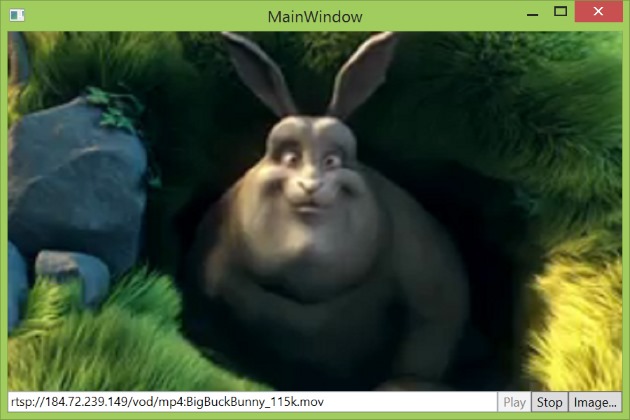
This article is a sort of continuation of my previous article, which shows an implementation of a web camera control. Recently I created another control and would like to share my experience with community. It is a FFmpeg-based stream player control, which can do the following:
- Play a RTSP/RTMP video stream or local video file
- Retrieve the current frame being displayed by the control
The control has no additional dependencies and a minimalistic interface.
Requirements
- The WinForms version of the control is implemented using .NET Framework 2.0
- The WPF version of the control is implemented using .NET Framework 4 Client Profile
The control supports both x86 and x64 platform targets.
Background
Streaming audio, video and data over the Internet is a very usual thing these days. However, when I tried to find a .NET control to play a video stream sent over the network, I found almost nothing. This project tries to fill up that gap.
Implementation details
If you are not interested in implementation details, then you can skip this section.
The implementation is divided into three layers.
- The bottom layer is implemented as a native DLL module, which forwards our calls to the FFmpeg framework.
- For distribution convenience, the native DLL module is embedded into the control’s assembly as a resource. On the runtime stage, the DLL module will be extracted to a temporary file on disk and used via late binding technique. Once the control is disposed, the temporary file will be deleted. In other words, the control is distributed as a single file. All those operations are implemented by the middle layer.
- The top layer implements the control class itself.
The following diagram shows a logical structure of the implementation.
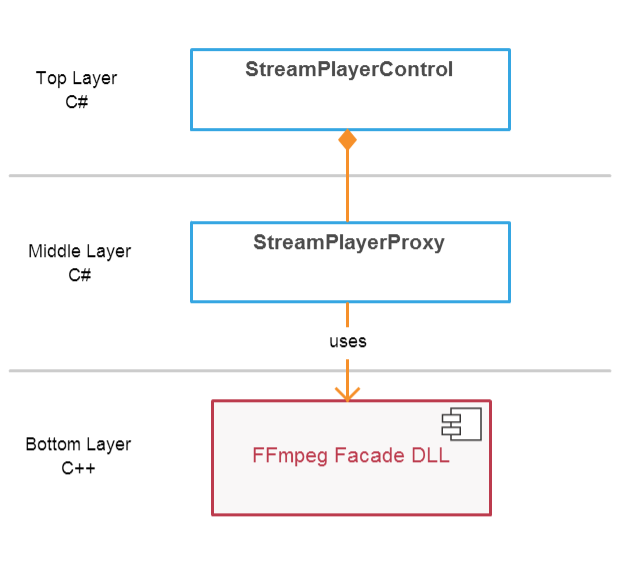
Only the top layer is supposed to be used by clients.
The Bottom Layer
The bottom layer uses the facade pattern to provide a simplified interface to the FFmpeg framework. The facade consists of three classes: the StreamPlayer class, which implements a stream playback functionality
 Copy Code
/// <summary>
/// The StreamPlayer class implements a stream playback functionality.
/// </summary>
class StreamPlayer : private boost::noncopyable
{
public: /// <summary>
/// Initializes a new instance of the StreamPlayer class.
/// </summary>
StreamPlayer(); /// <summary>
/// Initializes the player.
/// </summary>
/// <param name="playerParams">The StreamPlayerParams object that contains the information that is used to initialize the player.</param>
void Initialize(StreamPlayerParams playerParams); /// <summary>
/// Asynchronously plays a stream.
/// </summary>
/// <param name="streamUrl">The url of a stream to play.</param>
void StartPlay(std::string const& streamUrl); /// <summary>
/// Retrieves the current frame being displayed by the player.
/// </summary>
/// <param name="bmpPtr">Address of a pointer to a byte that will receive the DIB.</param>
void GetCurrentFrame(uint8_t **bmpPtr); /// <summary>
/// Retrieves the unstretched frame size, in pixels.
/// </summary>
/// <param name="widthPtr">A pointer to an int that will receive the width.</param>
/// <param name="heightPtr">A pointer to an int that will receive the height.</param>
void GetFrameSize(uint32_t *widthPtr, uint32_t *heightPtr); /// <summary>
/// Uninitializes the player.
/// </summary>
void Uninitialize();
};
the Stream class, which converts a video stream into series of frames
/// <summary>

/// A Stream class converts a stream into series of frames.

/// </summary>

class Stream : private boost::noncopyable

{

public:

    /// <summary>

    /// Initializes a new instance of the Stream class.

    /// </summary>

    /// <param name="streamUrl">The url of a stream to decode.</param>

    Stream(std::string const& streamUrl);

    /// <summary>

    /// Gets the next frame in the stream.

    /// </summary>

    /// <returns>The next frame in the stream.</returns>

    std::unique_ptr<Frame> GetNextFrame();

    /// <summary>

    /// Gets an interframe delay, in milliseconds.

    /// </summary>

    int32_t InterframeDelayInMilliseconds() const;

    /// <summary>

    /// Releases all resources used by the stream.

    /// </summary>

    ~Stream();

};
and the Frame class, which is a set of frame related utilities.
Copy Code/// <summary>
/// The Frame class implements a set of frame-related utilities.
/// </summary>
class Frame : private boost::noncopyable
{
public:
/// <summary>
/// Initializes a new instance of the Frame class.
/// </summary>
Frame(uint32_t width, uint32_t height, AVPicture &avPicture); /// <summary>
/// Gets the width, in pixels, of the frame.
/// </summary>
uint32_t Width() const { return width_; } /// <summary>
/// Gets the height, in pixels, of the frame.
/// </summary>
uint32_t Height() const { return height_; } /// <summary>
/// Draws the frame.
/// </summary>
/// <param name="window">A container window that frame should be drawn on.</param>
void Draw(HWND window); /// <summary>
/// Converts the frame to a bitmap.
/// </summary>
/// <param name="bmpPtr">Address of a pointer to a byte that will receive the DIB.</param>
void ToBmp(uint8_t **bmpPtr); /// <summary>
/// Releases all resources used by the frame.
/// </summary>
~Frame();
};
These tree classes form a heart of the FFmpeg Facade DLL module.
The Middle Layer
The middle layer is implemented by the StreamPlayerProxy class, which serves as a proxy to the FFmpeg Facade DLL module.
First, what we should do is extract the FFmpeg Facade DLL module from the resources and save it to a temporary file.
_dllFile = Path.GetTempFileName();

using (FileStream stream = new FileStream(_dllFile, FileMode.Create, FileAccess.Write))

{

    using (BinaryWriter writer = new BinaryWriter(stream))

    {

        writer.Write(Resources.StreamPlayer);

    }

}
Then we load our DLL module into the address space of the calling process.
_hDll = LoadLibrary(_dllFile);

if (_hDll == IntPtr.Zero)

{

    throw new Win32Exception(Marshal.GetLastWin32Error());

}
And bind the DLL module functions to the class instance methods.
private delegate Int32 StopDelegate();

private StopDelegate _stop;

// ...

IntPtr procPtr = GetProcAddress(_hDll, "Stop");

_stop =

    (StopDelegate)Marshal.GetDelegateForFunctionPointer(procPtr,

     typeof(StopDelegate));
When the control is being disposed, we unload the DLL module and delete it.
private void Dispose()

{

    if (_hDll != IntPtr.Zero)

    {

        FreeLibrary(_hDll);

        _hDll = IntPtr.Zero;

    }

    if (File.Exists(_dllFile))

    {

        File.Delete(_dllFile);

    }

}
The Top Layer
The top layer is implemented by the StreamPlayerControl class with the following interface.
Copy Code/// <summary>
/// Asynchronously plays a stream.
/// </summary>
/// <param name="uri">The url of a stream to play.</param>
/// <exception cref="ArgumentException">An invalid string is passed as an argument.</exception>
/// <exception cref="Win32Exception">Failed to load the FFmpeg facade dll.</exception>
/// <exception cref="StreamPlayerException">Failed to play the stream.</exception>
public void StartPlay(Uri uri) /// <summary>
/// Retrieves the image being played.
/// </summary>
/// <returns>The current image.</returns>
/// <exception cref="InvalidOperationException">The control is not playing a video stream.</exception>
/// <exception cref="StreamPlayerException">Failed to get the current image.</exception>
public Bitmap GetCurrentFrame(); /// <summary>
/// Stops a stream.
/// </summary>
/// <exception cref="InvalidOperationException">The control is not playing a stream.</exception>
/// <exception cref="StreamPlayerException">Failed to stop a stream.</exception>
public void Stop(); /// <summary>
/// Gets a value indicating whether the control is playing a video stream.
/// </summary>
public Boolean IsPlaying { get; } /// <summary>
/// Gets the unstretched frame size, in pixels.
/// </summary>
public Size VideoSize { get; } /// <summary>
/// Occurs when the first frame is read from a stream.
/// </summary>
public event EventHandler StreamStarted; /// <summary>
/// Occurs when there are no more frames to read from a stream.
/// </summary>
public event EventHandler StreamStopped; /// <summary>
/// Occurs when the player fails to play a stream.
/// </summary>
public event EventHandler StreamFailed;
Usage
First, we need to add the control to the Visual Studio Designer Toolbox, using a right-click and then the "Choose Items..." menu item. Then we place the control on a form at the desired location and with the desired size. The default name of the control instance variable will be streamPlayerControl1.
The following code asynchronously plays a stream using the supplied address.
streamPlayerControl1.StartPlay(new Uri("rtsp://184.72.239.149/vod/mp4:BigBuckBunny_115k.mov"));
To get a frame being played just call the GetCurrentFrame() method. The resolution and quality of the frame depend on the stream quality.
using (Bitmap image = streamPlayerControl1.GetCurrentFrame())

{

    // image processing...

}
To stop the stream the Stop() method is used.
streamPlayerControl1.Stop();
You can always check the playing state using the following code.
if (streamPlayerControl1.IsPlaying)

{

    streamPlayerControl1.Stop();

}
Also, the StreamStarted, StreamStopped and StreamFailed events can be used to monitor the playback state.
To report errors, exceptions are used, so do not forget to wrap your code in a try/catch block. That is all about using it. To see a complete example please check the demo application sources.
WPF version
The FFmpeg facade expects a WinAPI window handle (HWND) in order to use it as a render target. The issue is that in the WPF world windows do not have handles anymore. The VideoWindow class workarounds this issue.
<UserControl x:Class="WebEye.StreamPlayerControl"

             xmlns="http://schemas.microsoft.com/winfx/2006/xaml/presentation"

             xmlns:x="http://schemas.microsoft.com/winfx/2006/xaml"

             xmlns:mc="http://schemas.openxmlformats.org/markup-compatibility/2006"

             xmlns:d="http://schemas.microsoft.com/expression/blend/2008"

             mc:Ignorable="d"

             d:DesignHeight="300" d:DesignWidth="300"

             xmlns:local="clr-namespace:WebEye">

    <local:VideoWindow x:Name="_videoWindow"

                       HorizontalAlignment="Stretch" VerticalAlignment="Stretch"/>

</UserControl>
GitHub
The project has a GitHub repository available on the following page.
https://github.com/jacobbo/WebEye/tree/master/StreamPlayerControl
Any questions, remarks, and comments are welcome.
Licensing
- The FFmpeg facade sources, the same as the FFmpegframework, are licensed under The LGPL license.
- The .NET controls' sources and demos' sources are licensed under The Code Project Open License (CPOL).
You can use the control in your commercial product, the only thing is that you should mention that your product uses the FFmpeg library, here are the details.
History
- March 19th, 2015 - The initial version.
- August 22nd, 2015 - Added the x64 platform support.
- October 25th, 2015 - Added asyncronous stream start and stream status events.
- November 8th, 2015 - Added support for local files playback.
- November 30th, 2015 - Added stream connection timeout.
License
This article, along with any associated source code and files, is licensed under The Code Project Open License (CPOL)
Stream Player control的更多相关文章
- [Winform]Media Player组件全屏播放的设置
摘要 在设置程序开始运行时,让视频全屏播放时,直接设置 windowsMediaPlay.fullScreen = true; 会报错,代码如下 windowsMediaPlay.URL = _vid ...
- 关于 datasnap Stream的英文博客能容
转载:http://blogs.embarcadero.com/jimtierney/2009/04/06/31461/ DataSnap Server Method Stream Parameter ...
- 使用Quicktime 实现视频直播(Live video using Quicktime) (转)
Quicktime是一个跨浏览器的播放插件,可以实现RTSP视频直播,可用于电视直播或视频监控平台.本文主要讲了关于播放器如何实现直播.事件响应.播放器全屏.动态修改播放路径等问题. 需要准备的软件: ...
- Unity3D 第一人称控制器 C#脚本
CharacterMotor.cs using UnityEngine; using System.Collections; /** * @Author : www.xuanyusong.com */ ...
- http2协议翻译(转)
超文本传输协议版本 2 IETF HTTP2草案(draft-ietf-httpbis-http2-13) 摘要 本规范描述了一种优化的超文本传输协议(HTTP).HTTP/2通过引进报头字段压缩以及 ...
- Cisco IOS Debug Command Reference I through L
debug iapp through debug ip ftp debug iapp : to begin debugging of IAPP operations(in privileged EXE ...
- The Brain as a Universal Learning Machine
The Brain as a Universal Learning Machine This article presents an emerging architectural hypothesis ...
- PhysX
[PhysX] 1.施加力: ))) { //施加一个力,X轴方向力度为1000,Y轴方向力度为1000 addFrceObj.rigidbody.AddForce (, , ); } ))) { / ...
- (史上最全的ios源码汇总)
按钮类 按钮 Drop Down Control http://www.apkbus.com/android-106661-1-1.html 按钮-Circular M ...
随机推荐
- JDBC学习1:详解JDBC使用
什么是JDBC JDBC(Java Database Connectivity),即Java数据库连接,是一种用于执行SQL语句的Java API,可以为多种关系数据库提供同一访问,它由一组用Java ...
- How to fix updating ubuntu apt-get problem
It's my new PC with a new os of ubuntu. every time when I want to install software or update apt-get ...
- 机械革命 USB装系统各种坑
买了个号称超强性价比的游戏本- 机械革命, i7+ssd+hd+4G RAM+ GTX850M, 很直接, 直接出厂就一个DOS系统,回来要自己装机. 好吧, 先下了个大白菜软件,用来刻录ISO系统到 ...
- Atitit 混合叠加俩张图片的处理 图像处理解决方案 javafx blend
Atitit 混合叠加俩张图片的处理 图像处理解决方案 javafx blend 1.1. Jhlabs 好像有了可以叠加算法,但是没有找到doc1 1.2. 自己算法叠加1 1.3. 使用javaf ...
- paip.java 架构师之路以及java高级技术
paip.java 架构师之路以及java高级技术 1. Annotation 设计模式... 概念满天飞.ORM,IOC,AOP. Validator lambda4j memcache. 对 ...
- JS 脚本最后加载
有些脚本执行,为了不影响页面其他脚本执行,需要放在最后 <script type="text/javascript"> function addLoadEvent(fu ...
- ASP.NET MVC 拦截器IResultFilter
在ASP.NET MVC中,有一个Result拦截器,实现ResultFilter需要继承一个类(System.Web.Mvc.FilterAttribute)和实现一个类(System.Web.Mv ...
- KnockoutJS 3.X API 第三章 计算监控属性(3) KO如何实现依赖追踪
KO是如何实现自动更新的 初学者可以掠过该篇,如果你是一个刨根问底的开发者,那本节将告诉你KO是如何实现依赖追踪和UI自动更新的. 其实很简单,KO的依赖追踪算法如下: 当你声明一个计算监控属性,KO ...
- iOS $299刀企业证书申请的过程以及细节补充(二)
上篇博客写的过程中,没有图,也没有相应的说明.这次再补充一些信息: 1.从 https://developer.apple.com/ios/enroll/dunsLookupForm.action 申 ...
- 深入理解javascript函数系列第三篇——属性和方法
× 目录 [1]属性 [2]方法 前面的话 函数是javascript中的特殊的对象,可以拥有属性和方法,就像普通的对象拥有属性和方法一样.甚至可以用Function()构造函数来创建新的函数对象.本 ...