
sharepoint 2010 自定义页面布局
在sharepoint开发中经常遇到 自定义网站栏、内容类型,页面布局和模板页也会遇到,遇到机会就相对比较小。
首先新建一个空的sharepoint项目:
1)创建网站兰:
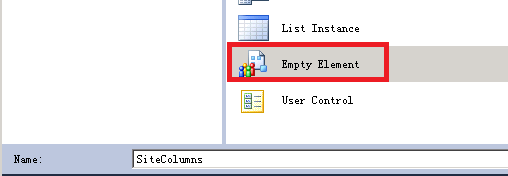
修改SiteColumns\Elements.xml文件如下:
<?xml version="1.0" encoding="utf-8"?>

<Elements xmlns="http://schemas.microsoft.com/sharepoint/">

  <Field ID="{76C140E1-D827-433B-AD38-257F9594B846}"

         Name="BenefitProvider"

         DisplayName="Provider Name"

         Group="Human Resources"

         Type="Text"

         Required="FALSE"/>

  <Field ID="{A1758D70-B479-469C-90BB-C3038ED42B15}"

         Name="BenefitProviderLogo"

         DisplayName="Provder Logo"

         Group="Human Resources"

         Type="Image"

         Required="FALSE"/>

  <Field ID="{5F516D92-969C-4661-81B9-C9210E2A2FDC}"

         Name="BenefitType"

         DisplayName="Benefit Category"

         Group="Human Resources"

         Type="Choice"

         Required="FALSE">

    <CHOICES>

      <CHOICE>Medical</CHOICE>

      <CHOICE>Dental</CHOICE>

      <CHOICE>Vision</CHOICE>

      <CHOICE>Insurance</CHOICE>

    </CHOICES>

  </Field>

  <Field ID="{521D5F12-16BC-4E82-997C-F28933ABE59E}"

         Name="BenefitDescription"

         DisplayName="Benefit Description"

         Group="Human Resources"

         Type="HTML" RichText="TRUE" RichTextMode="FullHtml"

         Required="FALSE"/>

</Elements>
2)创建内容内型

修改ContentTypes\Elements.xml文件如下:
<?xml version="1.0" encoding="utf-8"?>

<Elements xmlns="http://schemas.microsoft.com/sharepoint/">

  <!-- Parent ContentType: 文章页面 (0x010100C568DB52D9D0A14D9B2FDCC96666E9F2007948130EC3DB064584E219954237AF3900242457EFB8B24247815D688C526CD44D) -->

  <ContentType ID="0x010100C568DB52D9D0A14D9B2FDCC96666E9F2007948130EC3DB064584E219954237AF3900242457EFB8B24247815D688C526CD44D0086e87a8467684813ad2d89881b6da33d"

               Name="Benefits Information Page"

               Group="Human Resources"

               Description="Benefits Information page layout content type"

               Inherits="TRUE"

               Version="0">

    <FieldRefs>

      <FieldRef ID="{76C140E1-D827-433B-AD38-257F9594B846}" Name="BenefitProvider"/>

      <FieldRef ID="{A1758D70-B479-469C-90BB-C3038ED42B15}" Name="BenefitProviderLogo"/>

      <FieldRef ID="{5F516D92-969C-4661-81B9-C9210E2A2FDC}" Name="BenefitType"/>

      <FieldRef ID="{521D5F12-16BC-4E82-997C-F28933ABE59E}" Name="BenefitDescription"/>

    </FieldRefs>

  </ContentType>

</Elements>
注意这里的<FieldRef ID="{76C140E1-D827-433B-AD38-257F9594B846}" Name="BenefitProvider"/>是刚才创建网站栏的ID。
3)创建自定义 页面布局
我这里推荐大家在sharepoint Designer把页面布局的内容创建好,然后再用feature在部署。
在sharepoint Designe中:

在用sharepoint designer导出改文件
在VS中
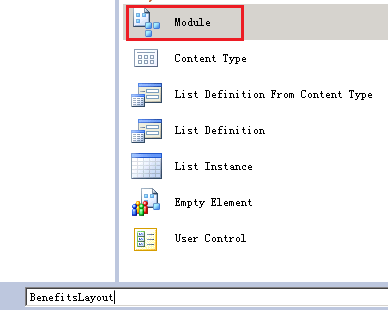
把那个文本文件从命名为BenefitsInformation.aspx,把先前sharepoint designer导出文件的内容拷贝到这个文件上来。
<%@ Page language="C#"   Inherits="Microsoft.SharePoint.Publishing.PublishingLayoutPage,Microsoft.SharePoint.Publishing,Version=14.0.0.0,Culture=neutral,PublicKeyToken=71e9bce111e9429c" meta:webpartpageexpansion="full" meta:progid="SharePoint.WebPartPage.Document" %>

<%@ Register Tagprefix="SharePointWebControls" Namespace="Microsoft.SharePoint.WebControls" Assembly="Microsoft.SharePoint, Version=14.0.0.0, Culture=neutral, PublicKeyToken=71e9bce111e9429c" %>

<%@ Register Tagprefix="WebPartPages" Namespace="Microsoft.SharePoint.WebPartPages" Assembly="Microsoft.SharePoint, Version=14.0.0.0, Culture=neutral, PublicKeyToken=71e9bce111e9429c" %>

<%@ Register Tagprefix="PublishingWebControls" Namespace="Microsoft.SharePoint.Publishing.WebControls" Assembly="Microsoft.SharePoint.Publishing, Version=14.0.0.0, Culture=neutral, PublicKeyToken=71e9bce111e9429c" %>

<%@ Register Tagprefix="PublishingNavigation" Namespace="Microsoft.SharePoint.Publishing.Navigation" Assembly="Microsoft.SharePoint.Publishing, Version=14.0.0.0, Culture=neutral, PublicKeyToken=71e9bce111e9429c" %>

<asp:Content ContentPlaceholderID="PlaceHolderPageTitle" runat="server">

    <SharePointWebControls:FieldValue id="PageTitle" FieldName="Title" runat="server"/>

</asp:Content>

<asp:Content ContentPlaceholderID="PlaceHolderMain" runat="server">

<SharePointWebControls:TextField FieldName="76c140e1-d827-433b-ad38-257f9594b846" runat="server"></SharePointWebControls:TextField>

<PublishingWebControls:RichImageField FieldName="a1758d70-b479-469c-90bb-c3038ed42b15" runat="server"></PublishingWebControls:RichImageField>

<SharePointWebControls:DropDownChoiceField FieldName="5f516d92-969c-4661-81b9-c9210e2a2fdc" runat="server"></SharePointWebControls:DropDownChoiceField>

<PublishingWebControls:RichHtmlField FieldName="521d5f12-16bc-4e82-997c-f28933abe59e" runat="server"></PublishingWebControls:RichHtmlField>

</asp:Content>
修改BenefitsLayout\Elements.xml 文件:
<?xml version="1.0" encoding="utf-8"?>

<Elements xmlns="http://schemas.microsoft.com/sharepoint/">

  <Module Name="BenefitsLayout"  Url="_catalogs/masterpage" RootWebOnly="TRUE">

    <File Path="BenefitsLayout\BenefitsInformation.aspx" Url="BenefitsInformation.aspx" Type="GhostableInLibrary">

      <Property Name="Title" Value="Benefits Information Page" />

      <Property Name="MasterPageDescription" Value="Use benefits page to publish content related to benefits information" />

      <Property Name="ContentType" Value="$Resources:cmscore,contenttype_pagelayout_name;" />

      <Property Name="PublishingAssociatedContentType" Value=";#Benefits Information Page;#0x010100C568DB52D9D0A14D9B2FDCC96666E9F2007948130EC3DB064584E219954237AF3900242457EFB8B24247815D688C526CD44D0086e87a8467684813ad2d89881b6da33d;#" />

    </File>

  </Module>

</Elements>
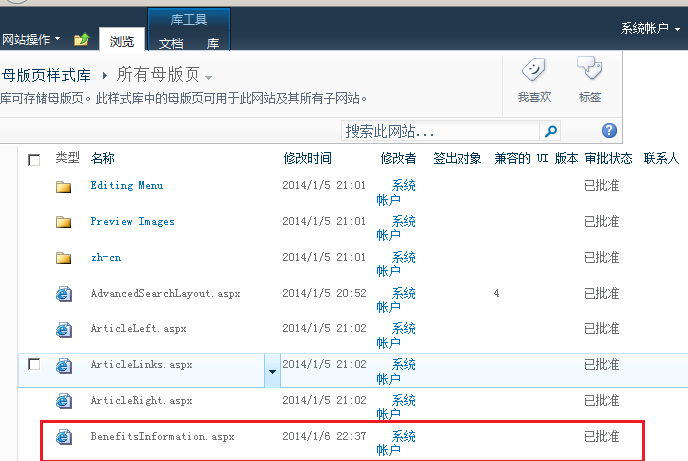
注意这里的 <Property Name="PublishingAssociatedContentType" Value=";#Benefits Information Page;#0x010100C568DB52D9D0A14D9B2FDCC96666E9F2007948130EC3DB064584E219954237AF3900242457EFB8B24247815D688C526CD44D0086e87a8467684813ad2d89881b6da33d;#" />中间这一长串就是我们先前定义的内容类型的ID。
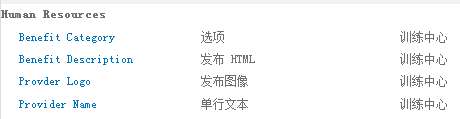
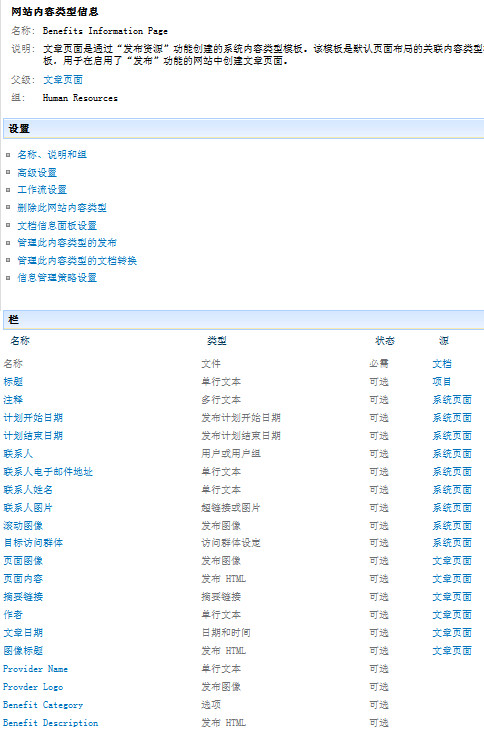
最后发布,发布结果如下:
网站栏:
内容类型:

自定义页面布局:
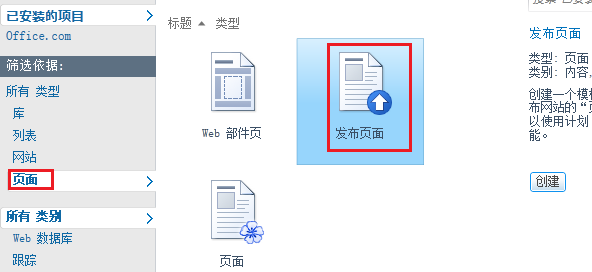
用我们自己的页面布局来创建一个页面
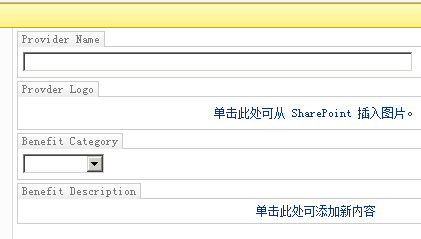 bianjia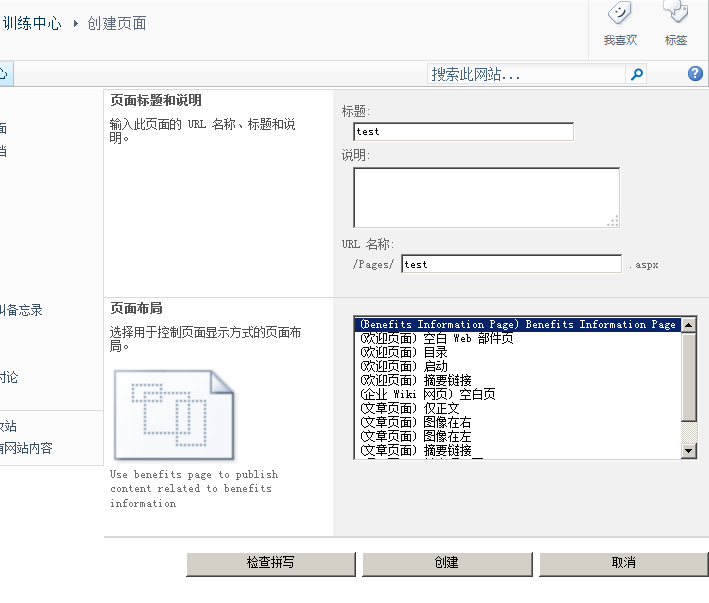
编辑信息如下:
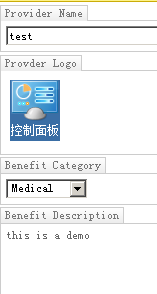
最后签入:
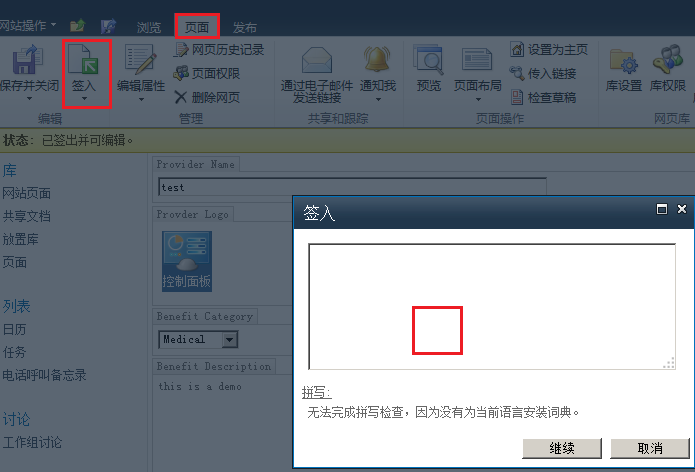

sharepoint 2010 自定义页面布局的更多相关文章
- SharePoint 2010 自定义页面出现“项目可能已被其他用户删除或重命名”问题跟踪
异常详细信息: Microsoft.SharePoint.SPException: 位置 http://portal/Pages/ShowArticle.aspx?id=19&mylist=8 ...
- SharePoint 2010 ——自定义上传页面与多文件上传解决方案
最近项目遇到一个很麻烦的问题,原以为很容易解决,结果搞了那么久,先开个头,再慢慢写 SharePoint 2010 ——自定义上传页面与多文件上传解决方案 1.创建Sharepoint空白项目,创建应 ...
- [SharePoint 2010] 自定义字段类型开发(二)
在SharePoint 2010中实现View Action Button效果. http://www.sharepointblogs.be/blogs/vandest/archive/2008/06 ...
- SharePoint开发 - 自定义页面(错误页、登出页)
博客地址 http://blog.csdn.net/foxdave 本文叙述如何自定义SharePoint的固有页面,比较简单,用一句话说就是"做个页面,写一句代码." 创建Sha ...
- sharepoint 2010自定义访问日志列表设置移动终端否和客户端访问系统等计算列的公式
上个月本人开发和上线了一个在SharePoint 2010上基于HTML5的移动OA网站,后端服务采用自定义的基于AgilePoint工作流引擎的Sharepoint Web服务,前端主要采用Jque ...
- SharePoint 2010自定义母版页小技巧——JavaScript和CSS引用
通常在我们的项目中,都会涉及到母版页的定制.并且必不可少的,需要配合以一套自己的JavaScript框架和CSS样式.你有没有遇到过这样的情况呢,在开发环境和UAT时都还算顺利,但是当最终部署到生产服 ...
- SharePoint 2010 自定义 字段 类型--------省市区联动
转:http://www.cnblogs.com/sp007/p/3384310.html 最近有几个朋友问到了有关自定义字段类型的问题,为了让更多的人了解自定义字段类型的方法,特写一篇博客与大家分享 ...
- Sharepoint 2010 自定义WebService 找不到网站应用程序
错误描述:Net 开发WebService调用Microsoft.SharePoint.dll的服务器端对象模型,出现找不到网站的应用程序,或者出现500错误. 错误截图: [Webservice调用 ...
- 转载:SharePoint 2010 自定义 字段 类型--------省市区联动
最近有几个朋友问到了有关自定义字段类型的问题,为了让更多的人了解自定义字段类型的方法,特写一篇博客与大家分享,首先看一下解决方案目录 创建自定义类型分以下几个步骤: 第一步:添加SharePoint映 ...
随机推荐
- Eclipse从SVN检出maven项目后的一些配置
Eclipse从SVN检出maven项目后,会发现它只是一个普通的java project,如图: 这里我们需要把它转成maven-webapp,并调整相关属性,设置运行环境,关联相关jar目录等. ...
- Android-Binder(一)
Android-Binder(一) 学习自 <Android开发艺术探索> https://www.jianshu.com/p/bdef9e3178c9 https://blog.csdn ...
- Gift动图分解小工具
gif 动图分解小工具 Overview 因为自己有时候需要将一些gif图片分解,但是没有在网上找到合适的工具,所有就自己写了一个,在这里与大家分享,其实实现很简单,是通过C#实现的.文章下方有下载链 ...
- 用yum安装JDK
用yum安装JDK 1.查看yum库中都有哪些jdk版本(暂时只发现了openjdk) [root@localhost ~]# yum search java|grep jdkldapjdk-java ...
- Ubuntu 安装Chrome
apt方式安装Chrome 1.添加密匙 wget -q -O - https://dl.google.com/linux/linux_signing_key.pub | sudo apt-key a ...
- 使用 IntraWeb (5) - 页面布局之 TFrame
IW 对 TFrame(还是之前那个), 这在页面布局中很有用. 如果多个页面都有一个共同的部分(譬如页眉.页脚.菜单.边栏等), 可以将这些共同的部分放在一个 TFrame 中, 从而方便统一与修改 ...
- 用Docker下搭建GitLab
最近试了一下Docker,发现用它搭建服务十分方便,就用它搭建了一个gitlab练练手. 首先下载gitlab镜像: docker image pull gitlab/gitlab-c ...
- STM32F4: Generating parallel signals with the FSMC
STM32F4: Generating parallel signals with the FSMC The goal: The memory controller can be used to ge ...
- 解决SVN CONNOT VERIFY LOCK ON PATH NO MATCHING LOCK-TOKEN AVAILABLE
最近使用SVN,开发项目的时候,璞玉遇到一个问题.就是: connot verify lock on path no matching lock-token available connot v ...
- GPG入门教程
原文地址:http://www.ruanyifeng.com/blog/2013/07/gpg.html 作者: 阮一峰 日期: 2013年7月12日 前两篇文章,我介绍了RSA算法. 今天,就接着来 ...