
python 安装 scapy windows 10 64bit
简介:
前段时间装的pypcap做嗅探。打包受阻。因为我都是在windows做的。也要打包到exe给别人用。
所以尝试了一下scapy,也可以嗅探,貌似功能更强大。先用sniff吧。
这个也不是在venv中点鼠标就能装上的。
看下官方提示:
You need the following software packages in order to install Scapy on Windows:
- Python: Python 2.7.X or 3.3+. After installation, add the Python installation directory and its Scripts subdirectory to your PATH. Depending on your Python version, the defaults would be
C:\Python27andC:\Python27\Scriptsrespectively.- Npcap: the latest version. Default values are recommanded. Scapy will also work with Winpcap.
- Scapy: latest development version from the Git repository. Unzip the archive, open a command prompt in that directory and run “python setup.py install”.
把python加入系统PATH
安装Npcap,没说Npcap SDN。不过我电脑上装的有。也不知道不装可以不可以。
git 源码, 运行python setup.py install
再讲一下怎么图形安装它。
pycharm打开源码包。
打开setup.py,随便运行一下。不管报什么错。
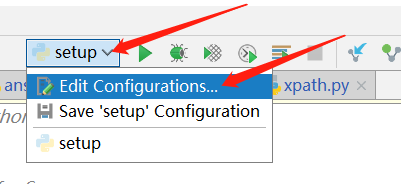
点setup旁边的小箭头,打开 Edit Configurations

Script path : 这是setup.py的路径,刚才忽视错误运行一下,就是为了让它自动生成。
Parameters: 扩展命令 参数 填 install
Python interpreter :所用的环境,也就是要选venv。选你准备运行scapy的环境。安装到这个环境里面。
scapy示例代码:没有解包。乱码一样。
from scapy.all import sniff

pkts = sniff(prn=lambda x:x.sprintf("{IP:%IP.src% -> %IP.dst%\n}{Raw:%Raw.load%\n}"))

print(pkts)
python 安装 scapy windows 10 64bit的更多相关文章
- windows 10 64bit下安装Tensorflow+Keras+VS2015+CUDA8.0 GPU加速
原文地址:http://www.jianshu.com/p/c245d46d43f0 写在前面的话 2016年11月29日,Google Brain 工程师团队宣布在 TensorFlow 0.12 ...
- tensor搭建--windows 10 64bit下安装Tensorflow+Keras+VS2015+CUDA8.0 GPU加速
windows 10 64bit下安装Tensorflow+Keras+VS2015+CUDA8.0 GPU加速 原文见于:http://www.jianshu.com/p/c245d46d43f0 ...
- python安装在windows server2008,故障排除
python安装在windows server2008,故障排除 我也在虚拟机上的win2008安装python2.7.9多次回滚了.搜了一通 Windows Server 2003/2008无法 ...
- 【python安装】Windows上安装和创建python开发环境
1. 在 windows10 上安装python开发环境 Linux和Mac OS都自带python环境,但是Windows没有,所以需要自行安装. 第1步:访问 python官网,下载Windows ...
- 如何完全卸载OneDrive (Windows 10 64bit)
原文参考 http://lifehacker.com/how-to-completely-uninstall-onedrive-in-windows-10-1725363532 To complete ...
- [原][工具][windows10安装][0x800F081F]windows 10 如何离线安装.net framework3.5 || 安装出现错误代码0x800F081F时如何解决
参考解决方案:https://zhidao.baidu.com/question/1896669183365806820.html?fr=iks&word=win10%B0%B2%D7%B0+ ...
- 用Visual Studio 2015 编译张帆的第一个WDM驱动,并且成功安装到Windows 10里面!!!
开发工具:Visual Studio 2015 企业版 目 标 机:Windows 10 X86 前提:我们已经成功安装了Visual Studio 2015以及WDK,而且更重要一点是一定要SDK版 ...
- windows下安装python、环境设置、多python版本的切换、pyserial与多版本python安装、windows命令行下切换目录
1.windows下安装python 官网下载安装即可 2.安装后的环境设置 我的电脑--属性--高级--设置path的地方添加python安装目录,如C:\Python27;C:\Python33 ...
- 新安装的windows 10无法更新报0x80240fff错误的解决方案
如果windows 10的安装文件比较老,可能会报0x80240fff错误导致无法更新. 网络上说的方法是选择推迟更新,因为这样貌似能让windows选择另外的更新服务器. 但实际上在我遇到的情况问题 ...
随机推荐
- 织梦dedecms多选checkbox字段值独立输出样式调用方法
在做织梦网站时发现dedecms的自建字段的checkboxcook输出是一段证不能把每个标签分开写样式,在晚上查了好多没页没有好的,最终用中方式来做会好 {dede:field.fyuantese ...
- 如何在windows中部署Gitblit
1.安装Java环境 2.下载Gitblit压缩包 http://gitblit.com/ 3.解压后进行配置 编辑gitblit-1.8.0\data\gitblit.properties文件 gi ...
- dp问题 -挑战例题 2017-7-24
01 背包 题意: 在N件物品取出若干件放在容量为W的背包里,每件物品的体积为W1,W2……Wn(Wi为整数),与之相对应的价值为P1,P2……Pn(Pi为整数).求背包能够容纳的最大价值. f[i] ...
- c#传统SqlTransaction事务和TransactionScope事务
事务有很多种,看了一些关于事务的问题,这里做下笔记····· 事务时单个的工作单位.如果某一事务成功,则在该事务中进行的所有数据更改均会提交,成为数据库中永久的组成部分.若果事务遇到错误,则必须取消或 ...
- 非[无]root权限 服务器 下安装perl以及perl模块--转载
转载自http://www.zilhua.com 在本博客中,所有的软件安装都在服务器上,且无root权限.理论上适合所有的用户. 我的安装目录 cd /home/zilhua/software 1. ...
- 【BZOJ】 3238: [Ahoi2013]差异
题目链接:http://www.lydsy.com/JudgeOnline/problem.php?id=3238 求:$${\sum _{i=1}^{n-1}\sum _{j=i+1}^{n}len ...
- python ros 创建节点订阅robot_pose
建立文件夹hello_rospy,再在该目录下建立子目录src,cd到该src目录,运行如下命令创建工作包 catkin_create_pkg beginner_tutorials std_msgs ...
- Ubuntu 14.04 编写service 服务
有时我们需要将特定操作封装成服务,通过服务启动停止,例如nginx的启动停止,service nginx start 或者service nginx stop 下面我们将编写一个demo cd /et ...
- java 使用正则判断是不是一个数字
public class Numeric { public static void main(String[] args) { String string = "-1234.15" ...
- c++ 二分法查找(binary_search)
#include <iostream> // cout #include <algorithm> // binary_search, sort #include <vec ...