
Simple2D-24 Sprite 渲染树
如果要开发游戏,单单使用 Painter 绘制图片会变得十分复杂。如果使用 Sprite 对象进行显示,可以简单地实现图片的位移、旋转和缩放,结合 Action 对象可以实现复杂的动画效果。最重要的是,Sprite 对象间可以存在父子关系,子 Sprite 的仿变换回受到父 Sprite 的影响。
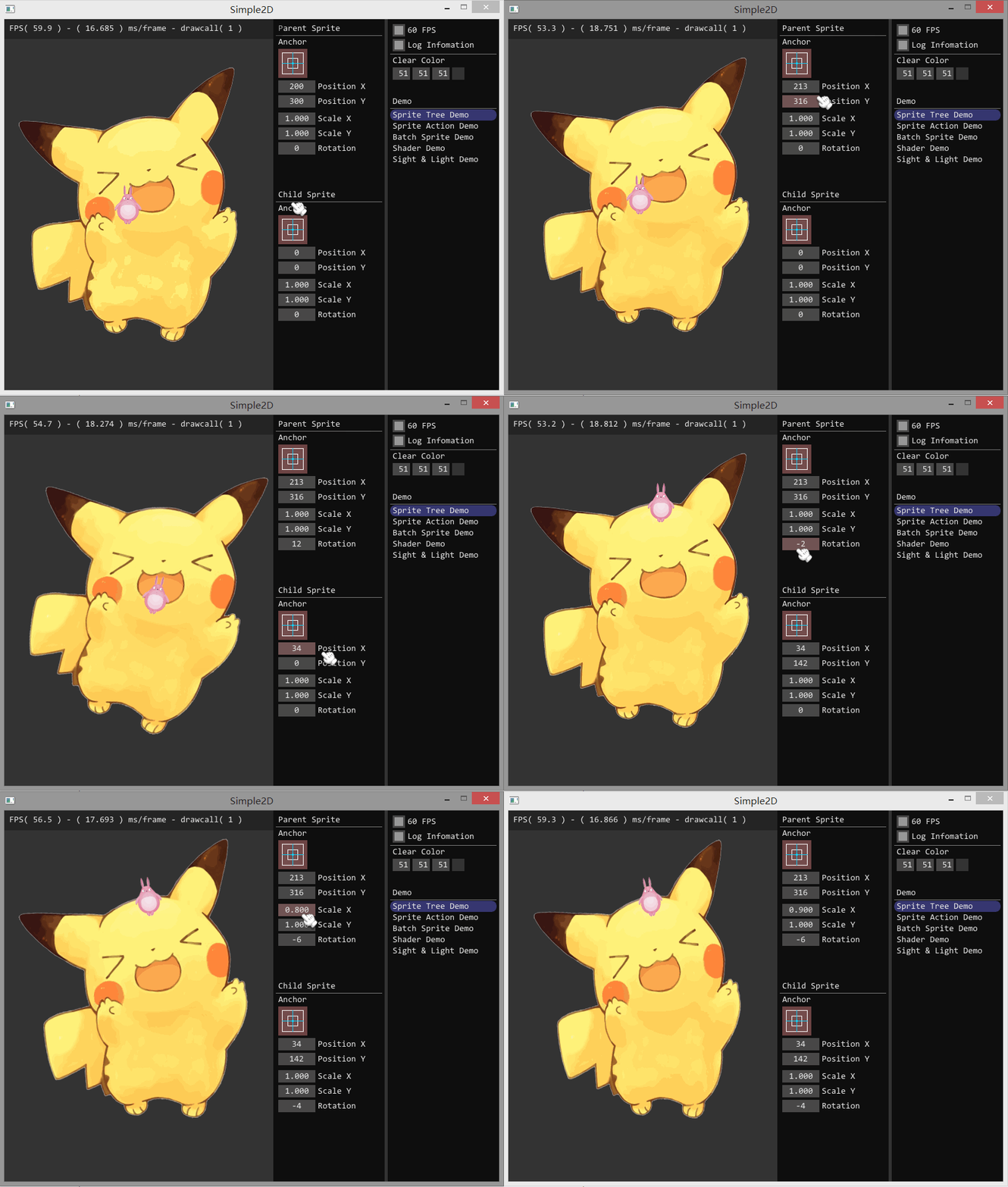
实现
RectTransform 是节点对象,RectTransform 间可以通过 SetParent( ) 函数来组成结点树,使用 Visit( ) 函数来递归遍历子节点,再通过 Draw( ) 函数来执行渲染的操作,从而实现整颗渲染树的渲染。
    void RectTransform::Visit(GraphicsContext* gc)

    {

        if ( !bVisible ) return;

        this->UpdateTransform();

        this->Draw(gc);

        for ( auto& ele : vChildList ) {

            ele->Visit(gc);

        }

    }

    void RectTransform::Draw(GraphicsContext* gc)

    {

        // Nothing to do

    }
其中,RectTransform 有一个十分重要的属性:
Matrix4 mMatrix;
这是一个 4 x 4 的变换矩阵,用于实现精灵的位移、旋转和缩放变换。为什么不使用 3 个不同的属性来实现精灵的位移、旋转和缩放呢?因为精灵存在父子关系,如动图所示,小的那个精灵对象的位移、旋转和缩放是建立在大精灵的变换之上。使用矩阵就可以简单地将父精灵变换传递给子精灵:
    void RectTransform::UpdateTransform()

    {

        mMatrix = Matrix4::makeTransform(vPosition, Vec3(vScale.x, vScale.y, 1.0), fDegrees);

        if ( pParent ) {

            mMatrix = pParent->mMatrix * mMatrix;

        }

    }
在执行绘制操作前,会进行更新变换的操作,这样确保变换在渲染树中层层传递。
Sprite 的实现
Sprite 继承于 RectTransform,Sprite 只需重写 Draw( ) 函数即可。但由于还存在按钮精灵 ButtonSprite,所以将他们相同的渲染操作放到父类 RenderSprite 中,RenderSprite 只提供渲染操作:
void RenderSprite::RenderTexture(Texture2D* texture, Vec2& size, Matrix4& mat, Color& color, Anchor& anchor, GraphicsContext* gc)

    {

        static Vec2 blPos;

        float w0 = , h0 = , w1 = size.w, h1 = size.h;

        float w2 = w1 * 0.5f, h2 = h1 * 0.5f;

        switch ( anchor ) {

        case Anchor::Anchor_TopLeft:        blPos.set( w0, -h1); break;

        case Anchor::Anchot_TopCenter:      blPos.set(-w2, -h1); break;

        case Anchor::Anchor_TopRight:       blPos.set(-w1, -h1); break;

        case Anchor::Anchor_CenterLeft:     blPos.set( w0, -h2); break;

        case Anchor::Anchor_Center:         blPos.set(-w2, -h2); break;

        case Anchor::Anchor_CenterRight:    blPos.set(-w1, -h2); break;

        case Anchor::Anchor_BottomLeft:     blPos.set( w0,  h0); break;

        case Anchor::Anchor_BottomCenter:   blPos.set(-w2,  h0); break;

        case Anchor::Anchor_BottomRight:    blPos.set(-w1,  h0); break;

        }

        if ( pProgramEffect ) {

            /* 设置顶点数据 */

            vCustomTexrureVertices[].position = mat * Vec3(blPos.x + w0, blPos.y + h0, );

            vCustomTexrureVertices[].position = mat * Vec3(blPos.x + w0, blPos.y + h1, );

            vCustomTexrureVertices[].position = mat * Vec3(blPos.x + w1, blPos.y + h1, );

            vCustomTexrureVertices[].position = mat * Vec3(blPos.x + w1, blPos.y + h0, );

            vCustomTexrureVertices[].texcoord = texture->uv[];

            vCustomTexrureVertices[].texcoord = texture->uv[];

            vCustomTexrureVertices[].texcoord = texture->uv[];

            vCustomTexrureVertices[].texcoord = texture->uv[];

            vCustomTexrureVertices[].color = color;

            vCustomTexrureVertices[].color = color;

            vCustomTexrureVertices[].color = color;

            vCustomTexrureVertices[].color = color;

            pProgramEffect->GetUniform("Texture0")->SetTexture(texture->textureUnique->id);

            gc->SetProgramEffect(pProgramEffect);

            gc->SetBlendMode(SBM_AlphaTexture);

            gc->GetRenderer()->AppendRenderData(vCustomTexrureVertices, , vTextureIndices, , PrimType::PT_Triangles);

        }

        else {

            /* 设置顶点数据 */

            vTextureVertices[].position = mat * Vec3(blPos.x + w0, blPos.y + h0, );

            vTextureVertices[].position = mat * Vec3(blPos.x + w0, blPos.y + h1, );

            vTextureVertices[].position = mat * Vec3(blPos.x + w1, blPos.y + h1, );

            vTextureVertices[].position = mat * Vec3(blPos.x + w1, blPos.y + h0, );

            vTextureVertices[].texcoord = texture->uv[];

            vTextureVertices[].texcoord = texture->uv[];

            vTextureVertices[].texcoord = texture->uv[];

            vTextureVertices[].texcoord = texture->uv[];

            vTextureVertices[].color = color;

            vTextureVertices[].color = color;

            vTextureVertices[].color = color;

            vTextureVertices[].color = color;

            gc->SetProgram(SPT_Sprite);

            gc->SetBlendMode(SBM_AlphaTexture);

            gc->GetRenderer()->AppendRenderData(vTextureVertices, , vTextureIndices, , texture->textureUnique->id, PrimType::PT_Triangles);

        }

    }
计算出图片 4 个顶点,设置着色程序和混合,再将渲染的顶点数据传递给 Renderer 即可。Sprite 的 Draw( ) 函数只需简单的调用 RenderTexture( ) 函数即可:
    void Sprite::Draw(GraphicsContext* gc)

    {

        if ( pTexture == nullptr ) return;

        this->RenderTexture(pTexture, vSize, mMatrix, color, anchor, gc);

    }
ButtonSprite
除了普通的精灵,还需要一些控件精灵。如 ButtonSprite,它能实现按钮的功能,并添加到精灵渲染树中,实现游戏中的交互操作。ButtonSprite 继承于鼠标事件监听器 MouseEventListener,从而接受鼠标事件。但 ButtonSprite 接受到一个点击事件,它先判断点击坐标是否落在 ButtonSprite 的区域内。
思路是将光标坐标变换到坐标原点,在判断坐标是否在 ButtonSprite 大小的区域内:
    bool RectTransform::AccectEvent(int x, int y)

    {

        Vec3 pos(x, y, );

        pos = mMatrix.inverse() * pos;

        float hw = vSize.w * 0.5f;

        float hh = vSize.h * 0.5f;

        return (pos.x >= -hw && pos.x <= hw && pos.y >= -hh && pos.y <= hh);

    }
将坐标乘以变换矩阵的逆矩阵得到新的坐标,执行左边变换。如果按钮被点击了,通过信号对象传递点击信息:
Signal<void()> SigButtonClicked;
    void ButtonSprite::MouseReleased(const MouseEvent& event)

    {

        if ( bMousePressed ) {

            bMousePressed = false;

            /* 信号:按钮点击 */

            SigButtonClicked();

        }

    }
Signal-Slot 在前面的文章讲过,通过使用 Signal-Slot 可以实现 ButtonSprite 和其他对象的解耦。
源码下载:Simple2D-20.rar
Simple2D-24 Sprite 渲染树的更多相关文章
- 【浏览器渲染原理】渲染树构建之渲染树和DOM树的关系(转载 学习中。。。)
在DOM树构建的同时,浏览器会构建渲染树(render tree).渲染树的节点(渲染器),在Gecko中称为frame,而在webkit中称为renderer.渲染器是在文档解析和创建DOM节点后创 ...
- 探索未知种族之osg类生物---状态树与渲染树以及节点树之间的关系
节点树 首先我们来看一个场景构建的实例,并通过它来了解一下“状态节点”StateGraph 和“渲染叶”RenderLeaf 所构成的状态树,“渲染台”RenderStage 和“渲染元”Render ...
- RenderTree渲染树
RenderTree渲染树对类中的静态成员有很重要的关系,这个和多态是有很重要的关系,举个简单的例子,在游戏中,马里奥需要渲染,蘑菇也需要渲染,怪兽也需要渲染,其是串在一个树上的,但是不同的类型怎么将 ...
- [js] 渲染树构建、布局及绘制
渲染树构建.布局及绘制
- 渲染树render tree
CSSOM树和DOM树连接在一起形成一个render tree,渲染树用来计算可见元素的布局并且作为将像素渲染到屏幕上的过程的输入. DOM树和CSSOM树连接在一起形成render tree . r ...
- 学习opengl第一步
有两个地址一个是学习opengl基础知识的网站, 一个是博客园大牛分享的特别好的文章. 记录一下希望向坚持做俯卧撑一样坚持下去. 学习网站:http://learnopengl-cn.readthed ...
- css加载是否会阻塞dom树渲染
这里说的是头部引入css的情况 首先,我们都知道:css是由单独的下载线程异步下载的. 咱们先分析下css加载会影响什么,刚才的问题太笼统了,咱们需要细化一下. 会影响什么呢? 一个就是DOM树解析, ...
- 页面渲染机制(一、DOM和CSSOM树的构建)
1.HTML的加载 HTML是一个网页的基础,下载完成后解析 2.其他静态资源加载 解析HTML时,发现其中有其他外部资源链接比如CSS.JS.图片等,会立即启用别的线程下载. 但当外部资源是JS时, ...
- CoreAnimation1-图层树、寄宿图以及图层几何学
(一)图层的树状结构 Core Animation其实是一个令人误解的命名.你可能认为它只是用来做动画的,但实际上它是从一个叫做Layer Kit这么一个不怎么和动画有关的名字演变而来,所以做动画这只 ...
随机推荐
- FastAdmin 绑定的模块禁用路由
为了安全,将后台入口隐藏. 这里出一个问题,因为装了 CMS 插件,使用入口登录后显示的是 CMS 的首页. 这个问题已经修复. https://gitee.com/karson/fastadmin/ ...
- JUC集合之 CopyOnWriteArrayList
CopyOnWriteArrayList介绍 它相当于线程安全的ArrayList.和ArrayList一样,它是个可变数组:但是和ArrayList不同的时,它具有以下特性: 它最适合于具有以下特征 ...
- idea新用法
https://blog.csdn.net/linsongbin1/article/details/80211919
- mysql explicit_defaults_for_timestamp参数
在mysql中:- timestamp列如果没有显式定义为null,默认会被设置为not null属性.(其它的数据类型如果没有显式定义为not null,默认是可以为null的).设置timesta ...
- C# DateTime 月第一天和最后一天 取法
取得某月和上个月第一天和最后一天的方法 /// <summary> /// 取得某月的第一天 /// </summary> /// <param name="d ...
- dede模块管理一片空白或没有列表内容的解决办法
为什么dede后台模块管理,打开之后一片空白,又或者没有列表,插件与其他模块的使用也是正常的. 这主要是因为我们在安装模块,然后又卸载模块,卸载的时候选择了删除安装文件,就会出这个问题. 这里面分为两 ...
- Mysql 性能优化1 硬件设备的选择
--------------------------------------------目录------------------------------------------------- • 我们 ...
- java 静态导入
- 第4章 NumPy基础
NumPy是高性能科学计算和数据分析的基础包. 主要功能: 1.ndarray,一个具有矢量算术运算和复杂广播能力的快速且节省空间的多维数组. 2.用于对整组数据进行快速运算的标准数学函数(无需编写循 ...
- bzoj1293 生日礼物
Description 小西有一条很长的彩带,彩带上挂着各式各样的彩珠.已知彩珠有N个,分为K种.简单的说,可以将彩带考虑为x轴,每一个彩珠有一个对应的坐标(即位置).某些坐标上可以没有彩珠,但多个彩 ...