
springboot自定义消息转换器HttpMessageConverter
在SpringMVC中,可以使用@RequestBody和@ResponseBody两个注解,分别完成请求报文到对象和对象到响应报文的转换,底层这种灵活的消息转换机制就是利用HttpMessageConverter来实现的,Spring内置了很多HttpMessageConverter,比如MappingJackson2HttpMessageConverter,StringHttpMessageConverter等,下面我们来自定义自己的消息转换器来满足自己特定的需求,有两种方式:1、使用spring或者第三方提供的现成的HttpMessageConverter,2、自己重写一个HttpMessageConverter。
配置使用FastJson插件返回json数据
在springboot项目里当我们在控制器类上加上@RestController注解或者其内的方法上加入@ResponseBody注解后,默认会使用jackson插件来返回json数据,下面我们利用fastjson为我们提供的FastJsonHttpMessageConverter来返回json数据。
首先要引入fastjson的依赖:
     <dependency>

            <groupId>com.alibaba</groupId>

            <artifactId>fastjson</artifactId>

            <version>1.2.31</version>

        </dependency>
接下来通过实现WebMvcConfigurer接口来配置FastJsonHttpMessageConverter,springboot2.0版本以后推荐使用这种方式来进行web配置,这样不会覆盖掉springboot的一些默认配置。配置类如下:
package com.example.demo;

import java.util.List;

import org.springframework.context.annotation.Bean;

import org.springframework.context.annotation.Configuration;

import org.springframework.http.converter.HttpMessageConverter;

import org.springframework.web.servlet.config.annotation.WebMvcConfigurer;

import com.alibaba.fastjson.serializer.SerializerFeature;

import com.alibaba.fastjson.support.config.FastJsonConfig;

import com.alibaba.fastjson.support.spring.FastJsonHttpMessageConverter;

@Configuration

public class MyWebmvcConfiguration implements WebMvcConfigurer{

    @Override

    public void extendMessageConverters(List<HttpMessageConverter<?>> converters) {

        FastJsonHttpMessageConverter fjc = new FastJsonHttpMessageConverter();

        FastJsonConfig fj = new FastJsonConfig();

        fj.setSerializerFeatures(SerializerFeature.DisableCircularReferenceDetect);

        fjc.setFastJsonConfig(fj);

        converters.add(fjc);

    }

}
fastJson配置实体调用setSerializerFeatures方法可以配置多个过滤方式,常用的如下:
2、WriteNullStringAsEmpty : 字符类型字段如果为null,输出为"",而非null
3、DisableCircularReferenceDetect :消除对同一对象循环引用的问题,默认为false(如果不配置有可能会进入死循环)
4、WriteNullBooleanAsFalse:Boolean字段如果为null,输出为false,而非null
5、WriteMapNullValue:是否输出值为null的字段,默认为false。
package com.example.demo;

import java.util.ArrayList;

import java.util.List;

import org.springframework.web.bind.annotation.RequestBody;

import org.springframework.web.bind.annotation.RequestMapping;

import org.springframework.web.bind.annotation.RequestMethod;

import org.springframework.web.bind.annotation.ResponseBody;

import org.springframework.web.bind.annotation.RestController;

@RestController

public class UserController {

    @RequestMapping(value="/get",method=RequestMethod.GET)

    public Object getList(){

        List<UserEntity> list= new ArrayList<UserEntity>();

        UserEntity u1 = new UserEntity(null, "shanghai");

        list.add(u1);

        return list;

    }

}
package com.example.demo;

import lombok.AllArgsConstructor;

import lombok.Data;

@Data

@AllArgsConstructor

public class UserEntity {

    private String name;

    private String address;

}
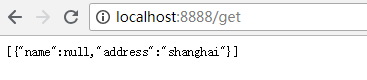
设置端口为8888,启动项目访问http://localhost:8888/get,我们代码中没有配置WriteMapNullValue,所以如果返回结果中有null值则不显示,结果如下:

我们注释掉fastjson配置,重新启动项目并访问,从结果可以看出我们配置的消息转换器起作用了。
重写HttpMessageConverter
接下来我们继承AbstractHttpMessageConverter来实现一个自己的消息转换器,示例如下:
package com.example.demo;

import org.springframework.http.HttpInputMessage;

import org.springframework.http.HttpOutputMessage;

import org.springframework.http.MediaType;

import org.springframework.http.converter.AbstractHttpMessageConverter;

import org.springframework.http.converter.HttpMessageNotReadableException;

import org.springframework.http.converter.HttpMessageNotWritableException;

import org.springframework.util.StreamUtils;

import java.io.IOException;

import java.nio.charset.Charset;

public class MyMessageConverter extends AbstractHttpMessageConverter<UserEntity> {

    public MyMessageConverter() {

        // 新建一个我们自定义的媒体类型application/xxx-junlin

        super(new MediaType("application", "xxx-junlin", Charset.forName("UTF-8")));

    }

    @Override

    protected boolean supports(Class<?> clazz) {

        // 表明只处理UserEntity类型的参数。

        return UserEntity.class.isAssignableFrom(clazz);

    }

    /**

     * 重写readlntenal 方法,处理请求的数据。代码表明我们处理由“-”隔开的数据,并转成 UserEntity类型的对象。

     */

    @Override

    protected UserEntity readInternal(Class<? extends UserEntity> clazz,

            HttpInputMessage inputMessage) throws IOException,

            HttpMessageNotReadableException {

        String temp = StreamUtils.copyToString(inputMessage.getBody(), Charset.forName("UTF-8"));

        String[] tempArr = temp.split("-");

        return new UserEntity(tempArr[0],tempArr[1]);

    }

    /**

     * 重写writeInternal ,处理如何输出数据到response。

     */

    @Override

    protected void writeInternal(UserEntity userEntity,

            HttpOutputMessage outputMessage)

            throws IOException, HttpMessageNotWritableException {

        String out = "hello: " + userEntity.getName() + "-" + userEntity.getAddress();

        outputMessage.getBody().write(out.getBytes());

    }

}
将自定义的消息转换器加入到springmvc容器中,以便被使用。
package com.example.demo;

import java.util.List;

import org.springframework.context.annotation.Bean;

import org.springframework.context.annotation.Configuration;

import org.springframework.http.converter.HttpMessageConverter;

import org.springframework.web.servlet.config.annotation.WebMvcConfigurer;

import com.alibaba.fastjson.serializer.SerializerFeature;

import com.alibaba.fastjson.support.config.FastJsonConfig;

import com.alibaba.fastjson.support.spring.FastJsonHttpMessageConverter;

@Configuration

public class MyWebmvcConfiguration implements WebMvcConfigurer{

    @Override

    public void extendMessageConverters(List<HttpMessageConverter<?>> converters) {

        FastJsonHttpMessageConverter fjc = new FastJsonHttpMessageConverter();

        FastJsonConfig fj = new FastJsonConfig();

        fj.setSerializerFeatures(SerializerFeature.DisableCircularReferenceDetect);

        fjc.setFastJsonConfig(fj);

        converters.add(fjc);

        converters.add(converter());

    }

    @Bean

    public MyMessageConverter converter() {

        return new MyMessageConverter();

    }

}
UserController中加入测试的代码
package com.example.demo;

import java.util.ArrayList;

import java.util.List;

import org.springframework.web.bind.annotation.RequestBody;

import org.springframework.web.bind.annotation.RequestMapping;

import org.springframework.web.bind.annotation.RequestMethod;

import org.springframework.web.bind.annotation.ResponseBody;

import org.springframework.web.bind.annotation.RestController;

@RestController

public class UserController {

    @RequestMapping(value="/get",method=RequestMethod.GET)

    public Object getList(){

        List<UserEntity> list= new ArrayList<UserEntity>();

        UserEntity u1 = new UserEntity(null, "shanghai");

        list.add(u1);

        return list;

    }

    @RequestMapping(method = RequestMethod.POST, value = "/convert")

    public @ResponseBody UserEntity converter(@RequestBody UserEntity user) {

        return user;

    }

}
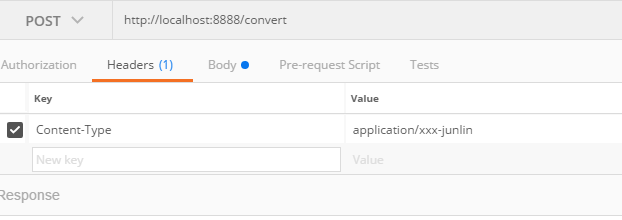
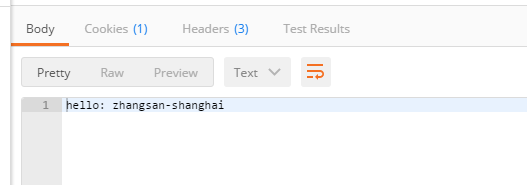
启动项目,使用postman来测试,从响应来看我们的消息转换器已经起作用了,如下:

springboot自定义消息转换器HttpMessageConverter的更多相关文章
- springboot自定义消息转换器HttpMessageConverter Spring Boot - 使用Gson替换Jackson
Jackson一直是springframework默认的json库,从4.1开始,springframework支持通过配置GsonHttpMessageConverter的方式使用Gson. 在典型 ...
- SpringBoot 消息转换器 HttpMessageConverter
1.简介: Spring在处理请求时,由合适的消息转换器将请求报文绑定为方法中的形参对象,在这里,同一个对象就有可能出现多种不同的消息形式,比如json和xml.同样,当响应请求时,方法的返回值也同样 ...
- 【Spring学习笔记-MVC-1.3】消息转换器HttpMessageConverter
作者:ssslinppp 参考链接: SpringMVC源码剖析(五)-消息转换器HttpMessageConverter: http://my.oschina.net/lichhao/b ...
- SpringBoot添加自定义消息转换器
首先我们需要明白一个概念:springboot中很多配置都是使用了条件注解进行判断一个配置或者引入的类是否在容器中存在,如果存在会如何,如果不存在会如何. 也就是说,有些配置会在springboot中 ...
- JavaEE开发之SpringMVC中的自定义消息转换器与文件上传
上篇博客我们详细的聊了<JavaEE开发之SpringMVC中的静态资源映射及服务器推送技术>,本篇博客依然是JavaEE开发中的内容,我们就来聊一下SpringMVC中的自定义消息转发器 ...
- SpringMVC——消息转换器HttpMessageConverter(转)
文章转自http://blog.csdn.net/cq1982/article/details/44101293 概述 在SpringMVC中,可以使用@RequestBody和@ResponseBo ...
- SpringMVC源码剖析(五)-消息转换器HttpMessageConverter
原文链接:https://my.oschina.net/lichhao/blog/172562 #概述 在SpringMVC中,可以使用@RequestBody和@ResponseBody两个注解,分 ...
- SpringMVC源码剖析5:消息转换器HttpMessageConverter与@ResponseBody注解
转自 SpringMVC关于json.xml自动转换的原理研究[附带源码分析] 本系列文章首发于我的个人博客:https://h2pl.github.io/ 欢迎阅览我的CSDN专栏:Spring源码 ...
- springboot/springmvc转换器
常用的转换器 String转Date转换器(用于接受日期参数自动转换成Date类型便于后台数据处理) /** * 全局handler前日期统一处理 * @author zhanghang * @dat ...
随机推荐
- REST-assured 2发送消息代码重构
将获取token的方法封装到公共类 #java package date811; import io.restassured.response.Response; import org.testng. ...
- [UE4]关闭自动曝光
向光移动,屏幕会慢慢变亮:背光移动,屏幕会慢慢变暗. 关闭自动曝光: 编辑->项目设置->搜索Auto exposure
- php multicast多播实现详解
什么是多播? 网络中存在3中传播形式,单播,广播,多播. 1. 单播 : 就是1->1 2. 广播 : 1->多(广播域内) 3. 多播 : 1->组(一组ip) 1 2 3 4 5 ...
- time,sys,os 模块
import time# 时间戳时间,格林威治时间,float数据类型 给机器用的 # 英国伦敦的时间 1970.1.1 0:0:0 # 北京时间 1970.1.1 8:0:0 # 153369312 ...
- 异常处理的设计与重构 pdf
百度网盘: https://pan.baidu.com/s/1hsQIEGk
- web安全深度剖析 pdf
扫加公众号,回复“web安全深度剖析",免费获取此书.
- Java面向对象之抽象类
内容: 1.抽象类的产生 2.抽象类和抽象方法的定义与使用 3.抽象类和抽象方法的注意事项 4.实例分析 1.抽象类的产生 当编写一个类时,我们往往会为该类定义一些方法,这些方法是用来描述该类的功能具 ...
- 网络层-IP地址
以下内容是IPv4 IP地址长度32位,Java里面一个int的长度,总共分为5类IP地址 1:分类编址 A类IP地址0开头: A类有31个位置可以变化,总数是2^31个, [(0 ...
- json和java bean的相互转换(使用fastjson)
<dependency> <groupId>com.alibaba</groupId> <artifactId>fastjson</artifac ...
- oracle 数据字典
select * from dictionary; --数据字典 数据字典是Oracle存放有关数据库信息的地方,其用途是用来描述数据的. 比如一个表的创建者信息,创建时间信息,所属表空间信息,用户访 ...