
http://www.gasi.ch/blog/inside-deep-zoom-1/
In March 2007 Blaise Aguera y Arcas presented Seadragon & Photosynth at TED that created quite some buzz around the web. About a year later, in March 2008, Microsoft released Deep Zoom (formerly Seadragon) as a «killer feature» of their Silverlight 2 (Beta) launch at Mix08. Following this event, there was quite some back andforth in the blogosphere (damn, I hate that word) about the true innovation behind Microsoft's Deep Zoom.
Today, I don't want to get into the same kind of discussion but rather start a series that will give you a «behind the scenes» of Microsoft's Deep Zoom and similar technologies.
This first part of «Inside Deep Zoom» introduces the main ideas & concepts behind Deep Zoom. In part two, I'll talk about some of the mathematics involved and finally, part three will feature a discussion of the possibilities of this kind of technology and a demo of something you probably haven't seen yet.
Background
As part of my awesome internship at Zoomorama in Paris, I was working on some amazing things (of which you'll hopefully hear soon) and in my spare time, I've decided to have a closer look at Deep Zoom (formerly Seadragon.) This is when I did a lot of research around this topic and where I had the idea for this series in which I wanted to share my knowledge.
Introduction
Let's begin with a quote from Blaise Aguera y Arcas demo of Seadragon at the TED conference[1]:…the only thing that ought to limit the performance of a system like this one is the number of pixels on your screen at any given moment.
What is this supposed to mean? See, I have a 24" screen with a maximum resolution of 1920 x 1200 pixels. Now let's take a photo from my digital camera which shoots at 12 megapixel. The photo's size is typically 3872 x 2592 pixels. When I get the photo onto my computer, I roughly end with something that looks like this:
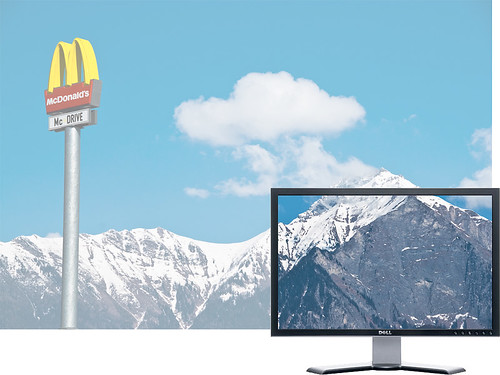
No matter how I put it, I'll never be able to see the entire 12 megapixel photo at 100% magnification on my 2.3 megapixel screen. Although this might seem obvious, let's take the time and look at it from another angle: With this in mind we don't care anymore if an image has 10 megapixel (that is 10'000'000 pixels) or 10 gigapixel (10'000'000'000 pixels) since the number of pixels we can see at any moment is limited by the resolution of our screen. This again means, looking at a 10 megapixel image and 10 gigapixel image on the same computer screen should have the same performance. The same should hold for looking at the same two images on a mobile device such as the iPhone. However, important to note is that with reference to the quote above we might experience a performance difference between the two devices since they differ in the number of pixels they can display.
So how do we manage to make the performance of displaying image data independent of its resolution? This is where the concept of an image pyramid steps in.
The Image Pyramid
Deep Zoom, or for that matter any other similar technology such asZoomorama, Zoomify, Google Maps etc., uses something called animage pyramid as a basic building block for displaying large images in an efficient way:
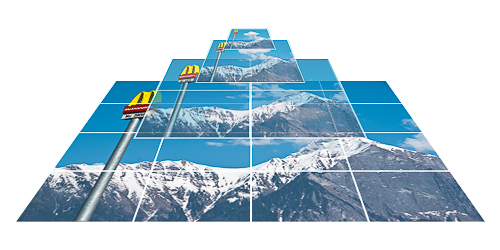
The picture above illustrates the layout of such of an image pyramid. The two purposes of a typical image pyramid are to store an image of any size at many different resolutions (hence the term multi-scale) as well as these different resolutions sliced up in many parts, referred to as tiles.
Because the pyramid stores the original image (redundantly) at different resolutions we can display the resolution that is closest to the one we need and in a case where not the entire image fits on our screen, only the parts of the image (tiles) that are actually visible. Setting the parameter values for our pyramid such as number of levels and tile size allows us to control the required data transfer.
Image pyramids are the result of a space vs. bandwidth trade-off, often found in computer science. The image pyramid obviously has a bigger file size than its single image counterpart (for finding out how much exactly, be sure to come back for part two) but as you see in the illustration below, regarding bandwidth it's much more efficient at displaying high-resolution images where most parts of the image are typically not visible anyway (grey area):
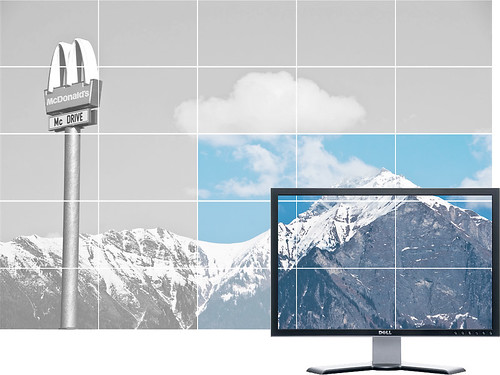
As you can see in the picture above, there is still more data loaded (colored area) than absolutely necessary to display everything that is visible on the screen. This is where the image pyramid parameters I mentioned before come into play: Tile size and number of levels determine the relationship between amount of storage, number of network connections and bandwidth required for displaying high-resolution images.
Next
Well, this was it for part one of Inside Deep Zoom. I hope you enjoyed this short introduction to image pyramids & multi-scale imaging. If you want to find out more, as usual, I've collected some links in theFurther Reading section. Other than that, be sure to come back, as the next part of this series – part two – will discuss the characteristics of the Deep Zoom image pyramid and I will show you some of the mathematics behind it.
Further Reading
- Wikipedia: Pyramid (image processing)
- Wikipedia: Gaussian Pyramid
- Wikipedia: Mipmap
- Paper: Pyramid Methods in Image Processing (PDF)
- Video: Seadragon Tech Demo (prior to Microsoft acquisition)
References
http://www.gasi.ch/blog/inside-deep-zoom-1/的更多相关文章
- http://www.gasi.ch/blog/inside-deep-zoom-2/
Inside Deep Zoom – Part II: Mathematical Analysis Welcome to part two of Inside Deep Zoom. In part o ...
- [WPF系列]-Deep Zoom
参考 Deep Zoom in Silverlight
- openseadragon.js与deep zoom java实现艺术品图片展示
openseadragon.js 是一款用来做图像缩放的插件,它可以用来做图片展示,做展示的插件很多,也很优秀,但大多数都解决不了图片尺寸过大的问题. 艺术品图像展示就是最简单的例子,展示此类图片一般 ...
- A SIMPLE LIBRARY TO BUILD A DEEP ZOOM IMAGE
My current project requires a lot of work with Deep Zoom images. We recently received some very high ...
- 零元学Expression Blend 4 - Chapter 23 Deep Zoom Composer与Deep Zoom功能
原文:零元学Expression Blend 4 - Chapter 23 Deep Zoom Composer与Deep Zoom功能 最近有机会在工作上用到Deep Zoom这个功能,我就顺便介绍 ...
- 论文笔记之:Dueling Network Architectures for Deep Reinforcement Learning
Dueling Network Architectures for Deep Reinforcement Learning ICML 2016 Best Paper 摘要:本文的贡献点主要是在 DQN ...
- What are some good books/papers for learning deep learning?
What's the most effective way to get started with deep learning? 29 Answers Yoshua Bengio, ...
- Life of an Oracle I/O: tracing logical and physical I/O with systemtap
https://db-blog.web.cern.ch/blog/luca-canali/2014-12-life-oracle-io-tracing-logical-and-physical-io- ...
- RNN and LSTM saliency Predection Scene Label
http://handong1587.github.io/deep_learning/2015/10/09/rnn-and-lstm.html //RNN and LSTM http://hando ...
随机推荐
- Recyclerview 出现 java.lang.IndexOutOfBoundsException: Inconsistency detected 异常
使用 RecyclerView 的时候报错 java.lang.IndexOutOfBoundsException: Inconsistency detected. Invalid view hold ...
- 浏览器中beforeunload的使用
打开一些慢的网站的时候只见浏览器在不停转圈,但是页面还停留在当前页面的,有些网站的效果是你点击链接要跳到另一个页面的时候,在当前页面弹出一个框提示“正在加载中....”, 用到了浏览器的beforeu ...
- ios 精简日历
网上其他人写的日历类功能都很齐全,比较繁杂,对于想看看日历基础实现然后自己绘制日历的我来说不太方便,就自己整理了一个极精简的日历出来,大家看了之后应该能多少理解日历该怎么自定义,很简单. 我的小dem ...
- [svc][cpu][jk]cpu的核心查看及什么是cpu的负载
监控的时候我们会监控cpu的负载,那么什么是负载? 编程时候有多核多线程的概念,那么cpu内部如何运作的? 搞清多少bit cpu? 有几个物理cpu?每个cpu是几核的? 之前购买内存条时候,需要关 ...
- PostgreSQL 保存json,jsonb类型
PostgresQL 字符串隐式转换JSON脚本: -- 隐式将varchar转换为json CREATE OR REPLACE FUNCTION json_in_varchar(varchar) R ...
- 《Android源代码设计模式解析》读书笔记——Android中你应该知道的设计模式
断断续续的,<Android源代码设计模式解析>也看了一遍.书中提到了非常多的设计模式.可是有部分在开发中见到的几率非常小,所以掌握不了也没有太大影响. 我认为这本书的最大价值有两点,一个 ...
- Word实用教程——五分钟教你如何在任意页开始添加页码
最近在写一篇论文,但是在排版上遇到一点小问题,就是要加入页码,而且页码是从目录的下一页开始计数,于是我就在网上找如何在任意页添加页码.后来辗转终于搞定,真心觉得这一个小功能让微软做的如此的麻烦,真是活 ...
- angular学习笔记(三十)-指令(8)-scope
本篇讲解指令的scope属性: scope属性值可以有三种: 一.scope:false 默认值,这种情况下,指令的作用域就是指令元素当前所在的作用域. 二.scope:true 创建一个继承了父作用 ...
- 【转】Linux mysql停止失败的解决办法 Stopping MySQL database server mysqld [fail]
root@ubuntu:/# /etc/init.d/mysql stop * Stopping MySQL database server mysqld [fail] root@ubuntu:/# ...
- Natural Language Processing, 2017, Mar.29, Weekly Report
Distributed Representations of Words and Phrases and their Compositionality T Mikolov, I Sutskever, ...