
Django 添加应用
一个项目可以添加多个应用,可以使用以下两种方法来添加应用:
[root@localhost web]$ python manage.py startapp blog

[root@localhost web]$ django-admin.py startapp blog
[root@localhost web]$ ll blog

-rw-r--r--. 1 root root 63 Jan 26 08:47 admin.py       # 应用的后台管理站点配置

-rw-r--r--. 1 root root  0 Jan 26 08:47 __init__.py    # 表明这是一个包

-rw-r--r--. 1 root root 57 Jan 26 08:47 models.py      # 模型,负责业务对象与数据库的映射

-rw-r--r--. 1 root root 60 Jan 26 08:47 tests.py       # 用于开发测试,编写单元测试

-rw-r--r--. 1 root root 63 Jan 26 08:47 views.py       # 视图,负责与用户的交互,定义url
在项目的配置文件中添加该应用:
[root@localhost web]$ vim web/settings.py

INSTALLED_APPS = (

    ......

    'blog',

)
在项目的视图文件中添加应用的URL:
[root@localhost web]$ vim web/urls.py

urlpatterns = patterns('',

    ......

    url(r'^blog/$', 'blog.views.index'),    # 表明当我访问 http://192.168.216.128:8000/blog 时,会去访问blog应用目录下的views文件里的index函数

)
[root@localhost web]$ cat blog/views.py    # 在views文件中定义index函数

from django.shortcuts import render

from django.http import HttpResponse

# Create your views here.

def index(request):                                  # request表示用户对页面的请求

    return HttpResponse("<h1> Hello World </h1>")    # HttpResponse()方法用于返回信息给用户请求
启动项目并访问应用:
[root@localhost web]$ python manage.py runserver 0.0.0.0:8000

如下,我们是直接把HTML写在视图文件中,但实际中我们会用一个目录来保存这些HTML文件
[root@localhost web]$ cat blog/views.py

from django.shortcuts import render

from django.http import HttpResponse

def index(request):

    return HttpResponse("<h1> Hello World </h1>")
首先创建一个模板目录,使用该目录来存放HTML文件,目录名固定是 templates:
[root@localhost web]$ mkdir blog/templates
[root@localhost web]$ cat blog/templates/index.html

<html>

<head>

<title>我的第一个HTML页面</title>

</head>

<body>

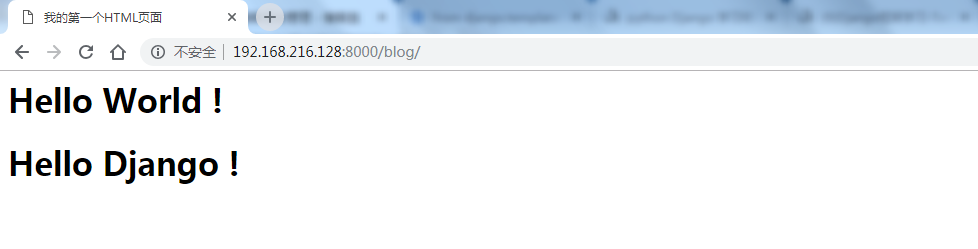
<h1> Hello World ! </h1>

<h1> Hello Django ! </h1>

</body>

</html>
改写视图文件:
[root@localhost web]$ cat blog/views.py

from django.shortcuts import render

from django.http import HttpResponse

from django.template import loader, Context    # loader()方法用来导入模板的HTML文件

                                               # Context()方法用来解析模板的HTML文件

def index(request):

    t = loader.get_template('index.html')    # 加载HTML文件,创建一个模板对象

    c = Context({})                          # 解析上下文,因为HTML文件中没有定义变量,所以不需要解析

    return HttpResponse(t.render(c))         # 最后返回渲染的模板
启动项目并访问应用:
[root@localhost web]$ python manage.py runserver 0.0.0.0:8000
Django 添加应用的更多相关文章
- django 添加comments app
django 添加comments app 参看 django comments 文档 安装和配置comments 1.安装comments,运行:pip install django-contrib ...
- django 添加动态表格的方法
传统方法(基于方法的视图):http://stellarchariot.com/blog/2011/02/dynamically-add-form-to-formset-using-javascrip ...
- Django添加Last-Modified和ETag
用Django REST Framework做的REST API,其中有个API有这样的需求: APP端请求这个API,服务器端从数据库读数据,返回json.返回的数据量稍微有些大,但是可能一年才修改 ...
- django添加静态文件
最近做了一个todolist webapp,需要稍微添加css时候又忘记django的添加方法了,查看了以前的项目才想起来,所以记录一下. 1.settings.py 将以下代码放到最下面 STATI ...
- Django添加ckeditor富文本编辑器
源码 https://github.com/django-ckeditor/django-ckeditor 通过pip安装. pip3 install django-ckeditor pip3 ins ...
- django添加装饰器
引入模块: from django.utils.decorators import method_decorator 添加:@method_decorator(func) from django.ut ...
- Django添加tinyMCE编辑器
tinymce的使用方法很简单,只需要在html页面中包含如下: <!-- Place inside the <head> of your HTML --> <scrip ...
- Python - Django - 添加首页尾页上一页下一页
添加首页和尾页: views.py: from django.shortcuts import render from app01 import models def book_list(reques ...
- Python - Django - 添加作者
在 book_list.html 的页面下方加上 “添加作者” 的链接 <!DOCTYPE html> <html lang="en"> <head& ...
随机推荐
- 扫描二维码或其他操作情况下返回界面,onActivityResult()不执行的问题
在使用第三方zxing扫描时,部分手机(好像都是4.4及以下版本的手机)扫描后不调用onActivityResult()返回结果. 调试发现zxing的扫描界面CaptureActivity 在注册时 ...
- linux刻录iso到u盘
需要的工具:Linux系统.U盘.ISO镜像文件.首先在Linux系统中打开终端,使用dd命令,格式如下:sudo dd if=xxx.iso of=/dev/sdb命令中xxx.iso是你的ISO镜 ...
- js 获取单选框和复选框的值和js dom方法给单选框和多选框赋值
获取单选框框值的方法 function getRadioRes(Name){ var rdsObj = document.getElementsByName(Name); var checkVal = ...
- (笔记)Mysql命令select from:查询表中的数据(记录)
select from命令用来查询表中的数据. 1) 查询所有行命令格式: select <字段1, 字段2, ...> from < 表名 > where < 表达式 ...
- SpringBoot系列三:SpringBoot基本概念(统一父 pom 管理、SpringBoot 代码测试、启动注解分析、配置访问路径、使用内置对象、项目打包发布)
声明:本文来源于MLDN培训视频的课堂笔记,写在这里只是为了方便查阅. 1.了解SpringBoot的基本概念 2.具体内容 在之前所建立的 SpringBoot 项目只是根据官方文档实现的一个基础程 ...
- 详细分析Java中断机制[转]
1. 引言 当我们点击某个杀毒软件的取消按钮来停止查杀病毒时,当我们在控制台敲入quit命令以结束某个后台服务时……都需要通过一个线程去取消另一个线程正在执行的任务.Java没有提供一种安全直接的方法 ...
- ZooKeeper在分布式应用中的作用
作者:陈叶皓(携程邮轮研发部软件架构师) 是不是要在标题的“作用”之前加上“重要”两个字,我犹豫了一下,zookeeper提供的功能是如此的重要,以至于如果你在应用中不使用它,早晚也会在你的应用中去实 ...
- TI单节电量计基本介绍及常见问题解答
电量计(gas gauge /fuel gauge)是用来计量显示电池电量,通常包括mAh剩余容量(RM),满充容量(FCC),百分比容量(SOC),电压,电流,温度等,部分电量计还包含放空,充满时间 ...
- topK 算法
搜索引擎热门查询统计 题目描述: 搜索引擎会通过日志文件把用户每次检索使用的所有检索串都记录下来,每个查询串的长度为1-255字节. 假设目前有一千万个记录(这些查询串的重复度比较高,虽然 ...
- 每天一个linux命令:cat 命令
cat命令的用途是连接文件或标准输入并打印.这个命令常用来显示文件内容,或者将几个文件连接起来显示,或者从标准输入读取内容并显示,它常与重定向符号配合使用. 1.命令格式: cat [选项] [文件] ...