
Tomcat企业级应用
简介
软件版本选择
JDK下载:http://www.oracle.com/technetwork/java/javase/downloads/jdk8-downloads-2133151.html、
Tomcat下载:http://tomcat.apache.org/
说明:在生产环境下,使用Tomcat安装版本需要同开发协商,Tomcat和JDK版本必须并行(tomcat8<=>jdk8)
Tomcat安装
安装JDK(以后所有涉及到java应用的都需要安装)
JDK->JAVA虚拟机(jvm)>一处编译,处处使用
[root@cairui software]# tar xf jdk-8u161-linux-x64.tar.gz

[root@cairui software]# ls

jdk1.8.0_161

jdk-8u161-linux-x64.tar.gz

[root@cairui software]# mv  jdk1.8.0_161/ /opt/jdk1.8

[root@cairui opt]# ln -s jdk1.8/ jdk

[root@cairui opt]# ll

total 4

lrwxrwxrwx 1 root root    7 Mar 23 12:14 jdk -> jdk1.8/

drwxr-xr-x 8 uucp  143 4096 Dec 20 08:24 jdk1.8

[root@cairui opt]# sed -i.ori '$a export JAVA_HOME=/opt/jdk\nexport PATH=$JAVA_HOME/bin:$JAVA_HOME/jre/bin:$PATH\nexport CLASSPATH=.:$JAVA_HOME/lib:$JAVA_HOME/jre/lib:$JAVA_HOME/lib/tools.jar' /etc/profile

[root@cairui opt]# source /etc/profile

[root@cairui opt]# java -version

java version "1.8.0_161"

Java(TM) SE Runtime Environment (build 1.8.0_161-b12)

Java HotSpot(TM) 64-Bit Server VM (build 25.161-b12, mixed mode)

[root@cairui opt]# tail -4 /etc/profile

unset -f pathmunge

export JAVA_HOME=/opt/jdk

export PATH=$JAVA_HOME/bin:$JAVA_HOME/jre/bin:$PATH

export CLASSPATH=.:$JAVA_HOME/lib:$JAVA_HOME/jre/lib:$JAVA_HOME/lib/tools.jar
安装Tomcat
[root@cairui software]# tar xf apache-tomcat-8.0.50.tar.gz

[root@cairui software]# ls

apache-tomcat-8.0.50  apache-tomcat-8.0.50.tar.gz  jdk-8u161-linux-x64.tar.gz

[root@cairui software]# mv apache-tomcat-8.0.50 /opt/tomcat-8.0.50

[root@cairui opt]# ln -s tomcat-8.0.50/ tomcat

[root@cairui opt]# ll

total 8

lrwxrwxrwx 1 root root    7 Mar 23 12:14 jdk -> jdk1.8/

drwxr-xr-x 8 uucp  143 4096 Dec 20 08:24 jdk1.8

lrwxrwxrwx 1 root root   14 Mar 23 12:41 tomcat -> tomcat-8.0.50/

drwxr-xr-x 9 root root 4096 Mar 23 12:40 tomcat-8.0.50

[root@cairui opt]# echo 'export TOMCAT_HOME=/opt/tomcat'>>/etc/profile

[root@cairui opt]# source /etc/profile

[root@cairui opt]# useradd tomcat -s /sbin/nologin -M

[root@cairui opt]# chown -R tomcat.tomcat /opt/jdk /opt/tomcat

[root@cairui opt]# ll

total 8

lrwxrwxrwx 1 tomcat tomcat    7 Mar 23 12:14 jdk -> jdk1.8/

drwxr-xr-x 8 uucp      143 4096 Dec 20 08:24 jdk1.8

lrwxrwxrwx 1 tomcat tomcat   14 Mar 23 12:41 tomcat -> tomcat-8.0.50/

drwxr-xr-x 9 root   root   4096 Mar 23 12:40 tomcat-8.0.50
出现下述结果表明配置成功
[root@cairui opt]# /opt/tomcat/bin/version.sh

Using CATALINA_BASE:   /opt/tomcat

Using CATALINA_HOME:   /opt/tomcat

Using CATALINA_TMPDIR: /opt/tomcat/temp

Using JRE_HOME:        /opt/jdk

Using CLASSPATH:       /opt/tomcat/bin/bootstrap.jar:/opt/tomcat/bin/tomcat-juli.jar

Server version: Apache Tomcat/8.0.50

Server built:   Feb 7 2018 20:06:05 UTC

Server number:  8.0.50.0

OS Name:        Linux

OS Version:     2.6.32-696.6.3.el6.x86_64

Architecture:   amd64

JVM Version:    1.8.0_161-b12

JVM Vendor:     Oracle Corporation
Tomcat目录结构
[root@cairui tomcat]# tree -L 2

.

├── bin  #用以启动和关闭Tomcat或者其它功能脚本

│   ├── bootstrap.jar

│   ├── catalina.bat

│   ├── catalina.sh  #核心

│   ├── catalina-tasks.xml

│   ├── commons-daemon.jar

│   ├── commons-daemon-native.tar.gz

│   ├── configtest.bat

│   ├── configtest.sh

│   ├── daemon.sh

│   ├── digest.bat

│   ├── digest.sh

│   ├── setclasspath.bat

│   ├── setclasspath.sh

│   ├── shutdown.bat

│   ├── shutdown.sh  #关闭脚本

│   ├── startup.bat

│   ├── startup.sh  #启动脚本

│   ├── tomcat-juli.jar

│   ├── tomcat-native.tar.gz

│   ├── tool-wrapper.bat

│   ├── tool-wrapper.sh

│   ├── version.bat

│   └── version.sh

├── conf  #用以配置Tomcat的XML文件

│   ├── catalina.policy

│   ├── catalina.properties

│   ├── context.xml

│   ├── logging.properties

│   ├── server.xml  #主配置文件

│   ├── tomcat-users.xml  #管理用户配置文件

│   ├── tomcat-users.xsd

│   └── web.xml

├── lib

│   ├── annotations-api.jar

│   ├── catalina-ant.jar

│   ├── catalina-ha.jar

│   ├── catalina.jar

│   ├── catalina-storeconfig.jar

│   ├── catalina-tribes.jar

│   ├── ecj-4.6.3.jar

│   ├── el-api.jar

│   ├── jasper-el.jar

│   ├── jasper.jar

│   ├── jsp-api.jar

│   ├── servlet-api.jar

│   ├── tomcat-api.jar

│   ├── tomcat-coyote.jar

│   ├── tomcat-dbcp.jar

│   ├── tomcat-i18n-es.jar

│   ├── tomcat-i18n-fr.jar

│   ├── tomcat-i18n-ja.jar

│   ├── tomcat-jdbc.jar

│   ├── tomcat-jni.jar

│   ├── tomcat-util.jar

│   ├── tomcat-util-scan.jar

│   ├── tomcat-websocket.jar

│   └── websocket-api.jar

├── LICENSE

├── logs  #web应用程序的日志文件

├── NOTICE

├── RELEASE-NOTES

├── RUNNING.txt

├── temp  #临时目录

│   └── safeToDelete.tmp

├── webapps  #web网页应用程序根目录

│   ├── docs  #Tomcat帮助文档

│   ├── examples  #web应用实例

│   ├── host-manager  #管理

│   ├── manager  #管理

│   └── ROOT  #默认网站根目录

└── work
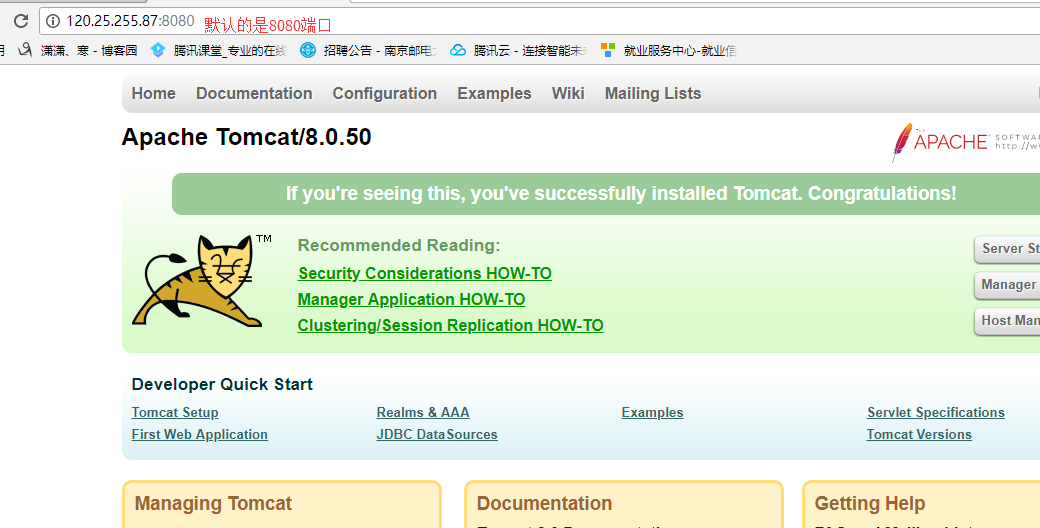
[root@cairui tomcat]# /opt/tomcat/bin/startup.sh

Using CATALINA_BASE:   /opt/tomcat

Using CATALINA_HOME:   /opt/tomcat

Using CATALINA_TMPDIR: /opt/tomcat/temp

Using JRE_HOME:        /opt/jdk

Using CLASSPATH:       /opt/tomcat/bin/bootstrap.jar:/opt/tomcat/bin/tomcat-juli.jar

Tomcat started.

[root@cairui tomcat]# lsof -i:8080  #默认的是8080端口

COMMAND  PID USER   FD   TYPE DEVICE SIZE/OFF NODE NAME

java    1955 root   48u  IPv4  15539      0t0  TCP *:webcache (LISTEN)
查看日志文件
[root@cairui tomcat]# cd /opt/tomcat/logs/

[root@cairui logs]# ll

total 24

-rw-r--r-- 1 root root 6406 Mar 23 13:19 catalina.2018-03-23.log

-rw-r--r-- 1 root root 6406 Mar 23 13:19 catalina.out  #实时记录Tomcat的运行信息(文件越来越大,需要定时清理)

-rw-r--r-- 1 root root    0 Mar 23 13:19 host-manager.2018-03-23.log

-rw-r--r-- 1 root root  459 Mar 23 13:19 localhost.2018-03-23.log

-rw-r--r-- 1 root root  755 Mar 23 13:21 localhost_access_log.2018-03-23.txt

-rw-r--r-- 1 root root    0 Mar 23 13:19 manager.2018-03-23.log

[root@cairui logs]# tail catalina.out

23-Mar-2018 13:19:04.226 INFO [localhost-startStop-1] org.apache.catalina.startup.HostConfig.deployDirectory Deployment of web application directory /opt/tomcat-8.0.50/webapps/manager has finished in 100 ms

23-Mar-2018 13:19:04.226 INFO [localhost-startStop-1] org.apache.catalina.startup.HostConfig.deployDirectory Deploying web application directory /opt/tomcat-8.0.50/webapps/host-manager

23-Mar-2018 13:19:04.303 INFO [localhost-startStop-1] org.apache.catalina.startup.HostConfig.deployDirectory Deployment of web application directory /opt/tomcat-8.0.50/webapps/host-manager has finished in 77 ms

23-Mar-2018 13:19:04.308 INFO [localhost-startStop-1] org.apache.catalina.startup.HostConfig.deployDirectory Deploying web application directory /opt/tomcat-8.0.50/webapps/examples

23-Mar-2018 13:19:05.000 INFO [localhost-startStop-1] org.apache.catalina.startup.HostConfig.deployDirectory Deployment of web application directory /opt/tomcat-8.0.50/webapps/examples has finished in 692 ms

23-Mar-2018 13:19:05.000 INFO [localhost-startStop-1] org.apache.catalina.startup.HostConfig.deployDirectory Deploying web application directory /opt/tomcat-8.0.50/webapps/docs

23-Mar-2018 13:19:05.037 INFO [localhost-startStop-1] org.apache.catalina.startup.HostConfig.deployDirectory Deployment of web application directory /opt/tomcat-8.0.50/webapps/docs has finished in 37 ms

23-Mar-2018 13:19:05.048 INFO [main] org.apache.coyote.AbstractProtocol.start Starting ProtocolHandler ["http-nio-8080"]

23-Mar-2018 13:19:05.078 INFO [main] org.apache.coyote.AbstractProtocol.start Starting ProtocolHandler ["ajp-nio-8009"]

23-Mar-2018 13:19:05.098 INFO [main] org.apache.catalina.startup.Catalina.start Server startup in 2793 ms
通过web管理Tomcat
定义web页面用户名以及密码
[root@cairui logs]# tail -4 /opt/tomcat/conf/tomcat-users.xml

<role rolename="manager-gui"/>

<role rolename="admin-gui"/>

<user username="tomcat" password="tomcat" roles="manager-gui,admin-gui"/>

</tomcat-users>

重启:

[root@cairui logs]# /opt/tomcat/bin/shutdown.sh

Using CATALINA_BASE:   /opt/tomcat

Using CATALINA_HOME:   /opt/tomcat

Using CATALINA_TMPDIR: /opt/tomcat/temp

Using JRE_HOME:        /opt/jdk

Using CLASSPATH:       /opt/tomcat/bin/bootstrap.jar:/opt/tomcat/bin/tomcat-juli.jar

[root@cairui logs]# /opt/tomcat/bin/startup.sh

Using CATALINA_BASE:   /opt/tomcat

Using CATALINA_HOME:   /opt/tomcat

Using CATALINA_TMPDIR: /opt/tomcat/temp

Using JRE_HOME:        /opt/jdk

Using CLASSPATH:       /opt/tomcat/bin/bootstrap.jar:/opt/tomcat/bin/tomcat-juli.jar

Tomcat started.

[root@cairui logs]# lsof -i|grep java

java      7947 root   48u  IPv4  20525      0t0  TCP *:webcache (LISTEN)

java      7947 root   53u  IPv4  20529      0t0  TCP *:8009 (LISTEN)

java      7947 root   68u  IPv4  20540      0t0  TCP localhost:mxi (LISTEN)
Tomcat主配置文件
[root@cairui logs]# cat /opt/tomcat/conf/server.xml

<?xml version='1.0' encoding='utf-8'?>

<!--

  Licensed to the Apache Software Foundation (ASF) under one or more

  contributor license agreements.  See the NOTICE file distributed with

  this work for additional information regarding copyright ownership.

  The ASF licenses this file to You under the Apache License, Version 2.0

  (the "License"); you may not use this file except in compliance with

  the License.  You may obtain a copy of the License at

      http://www.apache.org/licenses/LICENSE-2.0

  Unless required by applicable law or agreed to in writing, software

  distributed under the License is distributed on an "AS IS" BASIS,

  WITHOUT WARRANTIES OR CONDITIONS OF ANY KIND, either express or implied.

  See the License for the specific language governing permissions and

  limitations under the License.

-->

<!-- Note:  A "Server" is not itself a "Container", so you may not

     define subcomponents such as "Valves" at this level.

     Documentation at /docs/config/server.html

 -->

<Server port="8005" shutdown="SHUTDOWN">

  <Listener className="org.apache.catalina.startup.VersionLoggerListener" />

  <!-- Security listener. Documentation at /docs/config/listeners.html

  <Listener className="org.apache.catalina.security.SecurityListener" />

  -->

  <!--APR library loader. Documentation at /docs/apr.html -->

  <Listener className="org.apache.catalina.core.AprLifecycleListener" SSLEngine="on" />

  <!-- Prevent memory leaks due to use of particular java/javax APIs-->

  <Listener className="org.apache.catalina.core.JreMemoryLeakPreventionListener" />

  <Listener className="org.apache.catalina.mbeans.GlobalResourcesLifecycleListener" />

  <Listener className="org.apache.catalina.core.ThreadLocalLeakPreventionListener" />

  <!-- Global JNDI resources

       Documentation at /docs/jndi-resources-howto.html

  -->

  <GlobalNamingResources>

    <!-- Editable user database that can also be used by

         UserDatabaseRealm to authenticate users

    -->

    <Resource name="UserDatabase" auth="Container"

              type="org.apache.catalina.UserDatabase"

              description="User database that can be updated and saved"

              factory="org.apache.catalina.users.MemoryUserDatabaseFactory"

              pathname="conf/tomcat-users.xml" />

  </GlobalNamingResources>

  <!-- A "Service" is a collection of one or more "Connectors" that share

       a single "Container" Note:  A "Service" is not itself a "Container",

       so you may not define subcomponents such as "Valves" at this level.

       Documentation at /docs/config/service.html

   -->

  <Service name="Catalina">

    <!--The connectors can use a shared executor, you can define one or more named thread pools-->

    <!--

    <Executor name="tomcatThreadPool" namePrefix="catalina-exec-"

        maxThreads="150" minSpareThreads="4"/>

    -->

    <!-- A "Connector" represents an endpoint by which requests are received

         and responses are returned. Documentation at :

         Java HTTP Connector: /docs/config/http.html (blocking & non-blocking)

         Java AJP  Connector: /docs/config/ajp.html

         APR (HTTP/AJP) Connector: /docs/apr.html

         Define a non-SSL/TLS HTTP/1.1 Connector on port 8080

    -->

    <Connector port="8080" protocol="HTTP/1.1"

               connectionTimeout="20000"

               redirectPort="8443" />

    <!-- A "Connector" using the shared thread pool-->

    <!--

    <Connector executor="tomcatThreadPool"

               port="8080" protocol="HTTP/1.1"

               connectionTimeout="20000"

               redirectPort="8443" />

    -->

    <!-- Define a SSL/TLS HTTP/1.1 Connector on port 8443

         This connector uses the NIO implementation that requires the JSSE

         style configuration. When using the APR/native implementation, the

         OpenSSL style configuration is required as described in the APR/native

         documentation -->

    <!--

    <Connector port="8443" protocol="org.apache.coyote.http11.Http11NioProtocol"

               maxThreads="150" SSLEnabled="true" scheme="https" secure="true"

               clientAuth="false" sslProtocol="TLS" />

    -->

    <!-- Define an AJP 1.3 Connector on port 8009 -->

    <Connector port="8009" protocol="AJP/1.3" redirectPort="8443" />

    <!-- An Engine represents the entry point (within Catalina) that processes

         every request.  The Engine implementation for Tomcat stand alone

         analyzes the HTTP headers included with the request, and passes them

         on to the appropriate Host (virtual host).

         Documentation at /docs/config/engine.html -->

    <!-- You should set jvmRoute to support load-balancing via AJP ie :

    <Engine name="Catalina" defaultHost="localhost" jvmRoute="jvm1">

    -->

    <Engine name="Catalina" defaultHost="localhost">

      <!--For clustering, please take a look at documentation at:

          /docs/cluster-howto.html  (simple how to)

          /docs/config/cluster.html (reference documentation) -->

      <!--

      <Cluster className="org.apache.catalina.ha.tcp.SimpleTcpCluster"/>

      -->

      <!-- Use the LockOutRealm to prevent attempts to guess user passwords

           via a brute-force attack -->

      <Realm className="org.apache.catalina.realm.LockOutRealm">

        <!-- This Realm uses the UserDatabase configured in the global JNDI

             resources under the key "UserDatabase".  Any edits

             that are performed against this UserDatabase are immediately

             available for use by the Realm.  -->

        <Realm className="org.apache.catalina.realm.UserDatabaseRealm"

               resourceName="UserDatabase"/>

      </Realm>

      <Host name="localhost"  appBase="webapps"

            unpackWARs="true" autoDeploy="true">

        <!-- SingleSignOn valve, share authentication between web applications

             Documentation at: /docs/config/valve.html -->

        <!--

        <Valve className="org.apache.catalina.authenticator.SingleSignOn" />

        -->

        <!-- Access log processes all example.

             Documentation at: /docs/config/valve.html

             Note: The pattern used is equivalent to using pattern="common" -->

        <Valve className="org.apache.catalina.valves.AccessLogValve" directory="logs"

               prefix="localhost_access_log" suffix=".txt"

               pattern="%h %l %u %t "%r" %s %b" />

      </Host>

    </Engine>

  </Service>

</Server>
[root@cairui logs]# cat /opt/tomcat/conf/server.xml | egrep -v "^$| <\!|<\!"

<?xml version='1.0' encoding='utf-8'?>

  Licensed to the Apache Software Foundation (ASF) under one or more

  contributor license agreements.  See the NOTICE file distributed with

  this work for additional information regarding copyright ownership.

  The ASF licenses this file to You under the Apache License, Version 2.0

  (the "License"); you may not use this file except in compliance with

  the License.  You may obtain a copy of the License at

      http://www.apache.org/licenses/LICENSE-2.0

  Unless required by applicable law or agreed to in writing, software

  distributed under the License is distributed on an "AS IS" BASIS,

  WITHOUT WARRANTIES OR CONDITIONS OF ANY KIND, either express or implied.

  See the License for the specific language governing permissions and

  limitations under the License.

-->

     define subcomponents such as "Valves" at this level.

     Documentation at /docs/config/server.html

 -->

<Server port="8005" shutdown="SHUTDOWN">

  <Listener className="org.apache.catalina.startup.VersionLoggerListener" />

  <Listener className="org.apache.catalina.security.SecurityListener" />

  -->

  <Listener className="org.apache.catalina.core.AprLifecycleListener" SSLEngine="on" />

  <Listener className="org.apache.catalina.core.JreMemoryLeakPreventionListener" />

  <Listener className="org.apache.catalina.mbeans.GlobalResourcesLifecycleListener" />

  <Listener className="org.apache.catalina.core.ThreadLocalLeakPreventionListener" />

       Documentation at /docs/jndi-resources-howto.html

  -->

  <GlobalNamingResources>

         UserDatabaseRealm to authenticate users

    -->

    <Resource name="UserDatabase" auth="Container"

              type="org.apache.catalina.UserDatabase"

              description="User database that can be updated and saved"

              factory="org.apache.catalina.users.MemoryUserDatabaseFactory"

              pathname="conf/tomcat-users.xml" />

  </GlobalNamingResources>

       a single "Container" Note:  A "Service" is not itself a "Container",

       so you may not define subcomponents such as "Valves" at this level.

       Documentation at /docs/config/service.html

   -->
#<Service服务组件>

  <Service name="Catalina">

    <Executor name="tomcatThreadPool" namePrefix="catalina-exec-"

        maxThreads="150" minSpareThreads="4"/>

    -->

         and responses are returned. Documentation at :

         Java HTTP Connector: /docs/config/http.html (blocking & non-blocking)

         Java AJP  Connector: /docs/config/ajp.html

         APR (HTTP/AJP) Connector: /docs/apr.html

         Define a non-SSL/TLS HTTP/1.1 Connector on port 8080

    -->

    <Connector port="8080" protocol="HTTP/1.1"  #connector接收用户请求,类似于httpd的listen配置监听端口,port指定服务器需要创建的端口

               connectionTimeout="20000"

               redirectPort="8443" />

    <Connector executor="tomcatThreadPool"

               port="8080" protocol="HTTP/1.1"

               connectionTimeout="20000"

               redirectPort="8443" />

    -->

         This connector uses the NIO implementation that requires the JSSE

         style configuration. When using the APR/native implementation, the

         OpenSSL style configuration is required as described in the APR/native

         documentation -->

    <Connector port="8443" protocol="org.apache.coyote.http11.Http11NioProtocol"

               maxThreads="150" SSLEnabled="true" scheme="https" secure="true"

               clientAuth="false" sslProtocol="TLS" />

    -->

    <Connector port="8009" protocol="AJP/1.3" redirectPort="8443" />

         every request.  The Engine implementation for Tomcat stand alone

         analyzes the HTTP headers included with the request, and passes them

         on to the appropriate Host (virtual host).

         Documentation at /docs/config/engine.html -->

    <Engine name="Catalina" defaultHost="localhost" jvmRoute="jvm1">

    -->

    <Engine name="Catalina" defaultHost="localhost">

          /docs/cluster-howto.html  (simple how to)

          /docs/config/cluster.html (reference documentation) -->

      <Cluster className="org.apache.catalina.ha.tcp.SimpleTcpCluster"/>

      -->

           via a brute-force attack -->

      <Realm className="org.apache.catalina.realm.LockOutRealm">  #realm表示存放用户名,密码以及role的数据库

             resources under the key "UserDatabase".  Any edits

             that are performed against this UserDatabase are immediately

             available for use by the Realm.  -->

        <Realm className="org.apache.catalina.realm.UserDatabaseRealm"

               resourceName="UserDatabase"/>

      </Realm>
#host表示一个虚拟机,name指定主机名,appbase应用程序目录

      <Host name="localhost"  appBase="webapps"

            unpackWARs="true" autoDeploy="true">

             Documentation at: /docs/config/valve.html -->

        <Valve className="org.apache.catalina.authenticator.SingleSignOn" />

        -->

             Documentation at: /docs/config/valve.html

             Note: The pattern used is equivalent to using pattern="common" -->

        <Valve className="org.apache.catalina.valves.AccessLogValve" directory="logs"

               prefix="localhost_access_log" suffix=".txt"

               pattern="%h %l %u %t "%r" %s %b" />

      </Host>

    </Engine>

  </Service>

</Server>
web站点部署
方法一:即直接将程序目录放在webapps下
方法二:即用开发工具将程序打包成war包。然后上传到webapps下
搭建Jpress->java版本的wordpress
下载地址:https://github.com/JpressProjects/jpres
安装配置数据库
[root@cairui opt]# rpm -qa | grep mysql*

[root@cairui opt]# yum install mysql -y

[root@cairui opt]# yum install mysql-server -y

[root@cairui opt]# yum install mysql-devel -y

[root@cairui opt]# /etc/init.d/mysqld start

Initializing MySQL database:  Installing MySQL system tables...

OK

Filling help tables...

OK

To start mysqld at boot time you have to copy

support-files/mysql.server to the right place for your system

PLEASE REMEMBER TO SET A PASSWORD FOR THE MySQL root USER !

To do so, start the server, then issue the following commands:

/usr/bin/mysqladmin -u root password 'new-password'

/usr/bin/mysqladmin -u root -h cairui password 'new-password'

Alternatively you can run:

/usr/bin/mysql_secure_installation

which will also give you the option of removing the test

databases and anonymous user created by default.  This is

strongly recommended for production servers.

See the manual for more instructions.

You can start the MySQL daemon with:

cd /usr ; /usr/bin/mysqld_safe &

You can test the MySQL daemon with mysql-test-run.pl

cd /usr/mysql-test ; perl mysql-test-run.pl

Please report any problems with the /usr/bin/mysqlbug script!

                                                           [  OK  ]

Starting mysqld:                                           [  OK  ]

[root@cairui opt]# /usr/bin/mysqladmin -u root password '123456'

[root@cairui opt]# source /etc/profile

[root@cairui opt]# mysql -uroot -p123456
mysql> create database jpress default character set utf8;

Query OK, 1 row affected (0.00 sec)

mysql> grant all on jpress.* to jpress@'localhost' identified by 'jpress';

Query OK, 0 rows affected (0.00 sec)

mysql> flush privileges;

Query OK, 0 rows affected (0.00 sec)
Tomcat企业级应用的更多相关文章
- 项目实战8—tomcat企业级Web应用服务器配置与会话保持
tomcat企业级Web应用服务器配置与实战 环境背景:公司业务经过长期发展,有了很大突破,已经实现盈利,现公司要求加强技术架构应用功能和安全性以及开始向企业应用.移动APP等领域延伸,此时原来开发w ...
- 项目实战8.1—tomcat企业级Web应用服务器配置与会话保持
分类: Linux架构篇 tomcat企业级Web应用服务器配置与实战 环境背景:公司业务经过长期发展,有了很大突破,已经实现盈利,现公司要求加强技术架构应用功能和安全性以及开始向企业应用.移动A ...
- Jenkins+Maven+Gitlab+Tomcat 自动化构建打包、部署
一.环境需求 本帖针对的是Linux环境,Windows或其他系统也可借鉴.具体只讲述Jenkins配置以及整个流程的实现. 1.JDK(或JRE)及Java环境变量配置,我用的是JDK1.8.0_1 ...
- 16.2--Jenkins+Maven+Gitlab+Tomcat 自动化构建打包、部署
分类: Linux服务篇,Linux架构篇 一.环境需求 本帖针对的是Linux环境,Windows或其他系统也可借鉴.具体只讲述Jenkins配置以及整个流程的实现. 1.JDK(或JRE)及J ...
- Linux运维项目实战系列
Linux运维项目实战系列 项目实战1-LNMP的搭建.nginx的ssl加密.权限控制的实现 项目实战2-项目实战2-实现基于LVS负载均衡集群的电商网站架构 2.1项目实战2.1-nginx 反向 ...
- Linux运维企业架构实战系列
Linux运维企业架构项目实战系列 项目实战1-LNMP的搭建.nginx的ssl加密.权限控制的实现 项目实战2-LVS.nginx实现负载均衡系列 2.1 项目实战2.1-实现基于LVS负载均衡集 ...
- Linux运维企业架构项目实战系列
Linux运维企业架构项目实战系列 项目实战1—LNMP的搭建.nginx的ssl加密.权限控制的实现 项目实战2—LVS.nginx实现负载均衡系列2.1 项目实战2.1—实现基于LVS负载均衡集群 ...
- JAVA企业级应用服务器之TOMCAT实战
JAVA企业级应用服务器之TOMCAT实战 链接:https://pan.baidu.com/s/1c6pZjLeMQqc9t-OXvUM66w 提取码:uwak 复制这段内容后打开百度网盘手机App ...
- linux中级-JAVA企业级应用TOMCAT实战
1. Tomcat简介 Tomcat是Apache软件基金会(Apache Software Foundation)的Jakarta 项目中的一个核心项目,由Apache.Sun和其他一些公司及个人共 ...
随机推荐
- 【BZOJ4566】找相同字符【后缀自动机】
题意 给定两个字符串,求两个字符串相同子串的方案数. 分析 那么将字符串s1建SAM,然后对于s2的每个前缀,都在SAM中找出来,并且计数就行. 我一开始的做法是,建一个u和len,顺着s2跑SAM, ...
- Nginx源码完全注释(4)ngx_queue.h / ngx_queue.c
队列头文件ngx_queue.h #include <ngx_config.h> #include <ngx_core.h> #ifndef _NGX_QUEUE_H_INCL ...
- Gson 是google解析Json的一个开源框架,同类的框架fastJson,JackJson
Gson 是google解析Json的一个开源框架,同类的框架fastJson,JackJson等等 本人fastJson用了两年,也是从去年才开始接触Gson,希望下面的总结会对博友有用,至于Gso ...
- HTTP协议简析(二)
HTTP响应也包含四部分内容: 响应行: 协议版本:HTTP/1.1 状态码:200 状态描述:对状态码的说明 响应头:用来规范数据,常用的有: server:服务器信息 date:响应的时间 las ...
- 万能头文件#include<bits/stdc++.h>
最近在打cf时赛后翻阅别人的代码总是会发现一个陌生而奇怪的头文件#include<bits/stdc++.h> 奇怪之处就在于基本上所有的代码只要用了这个头文件就不再写其他头文件了. 百度 ...
- Setuptool+pip安装
https://pypi.python.org/pypi/setuptools 1. 下载ez_setup.py文件,cmd进入安装目录: 2. python setup.py install htt ...
- JVM垃圾回收算法及回收器详解
引言 本文主要讲述JVM中几种常见的垃圾回收算法和相关的垃圾回收器,以及常见的和GC相关的性能调优参数. GC Roots 我们先来了解一下在Java中是如何判断一个对象的生死的,有些语言比如Pyth ...
- 十万个为什么:现在还没发现“虚函数virtual”和多态性的优点,估计是因为我还没有编程序吧。
十万个为什么:现在还没发现“虚函数virtual”和多态性的优点,估计是因为我还没有编程序吧.
- HUST数媒1501班第2周作业成绩公布
说明 本次公布的成绩对应的作业为: 第2周个人作业:WordCount编码和测试 如果同学对作业成绩存在异议,在成绩公布的72小时内(截止日期4月26日0点)可以进行申诉,方式如下: 毕博平台的第二周 ...
- 1700 Crossing River
题目链接: http://poj.org/problem?id=1700 1. 当1个人时: 直接过河 t[0]. 2. 当2个人时: 时间为较慢的那个 t[1]. 3. 当3个人时: 时间为 t[0 ...