
axis2 webService开发指南(2)
1 Axis2的简单WebService示例
1.1 新建一个web工程,创建一个类Greeting,用于当作webservice服务
代码如下:
package amyservices;

import java.text.SimpleDateFormat;

import java.util.ArrayList;

import java.util.Calendar;

import java.util.Date;

import java.util.List;

import Com.WebService.Model.Person;

public class Greeting {

    public String getGreeting(String name){

        return "你好:" + name;

    }

    public int getPrice()

    {

        return new java.util.Random().nextInt(1000);

    }

    public List<Person> GetPersonList()

    {

        List<Person> list = new ArrayList<Person>();

        Person model = new Person();

        model.setKeyID("1214324234234234324");

        model.setName("張三");

        Calendar birth = Calendar.getInstance();

        birth.set(1990, 11, 22);

        model.setBirth(birth);

        list.add(model);

        model = new Person();

        model.setKeyID("1214324234234234324");

        model.setName("李四");

        birth = Calendar.getInstance();

        birth.set(1990, 11, 22);

        model.setBirth(birth);

        System.out.println(birth.toString());

        list.add(model);

        for(Person item : list)

        {

            System.out.println(item.getName());

        }

        return list;

    }

    public String PrintNow()

    {

        Calendar cale = Calendar.getInstance();

        Date tasktime=cale.getTime();

        SimpleDateFormat df=new SimpleDateFormat("yyyy-MM-dd HH:mm:ss");

        System.out.println(df.format(tasktime));

        return  df.format(tasktime);

    }

}
.classpath文件如下:
<?xml version="1.0" encoding="UTF-8"?>

<classpath>

    <classpathentry kind="src" path="src"/>

    <classpathentry kind="con" path="org.eclipse.jdt.launching.JRE_CONTAINER/org.eclipse.jdt.internal.debug.ui.launcher.StandardVMType/JavaSE-1.7">

        <attributes>

            <attribute name="owner.project.facets" value="java"/>

        </attributes>

    </classpathentry>

    <classpathentry kind="con" path="com.genuitec.runtime.library/com.genuitec.generic_7.0">

        <attributes>

            <attribute name="owner.project.facets" value="jst.web"/>

        </attributes>

    </classpathentry>

    <classpathentry kind="con" path="org.eclipse.jst.j2ee.internal.web.container"/>

    <classpathentry kind="con" path="org.eclipse.jst.j2ee.internal.module.container"/>

    <classpathentry kind="con" path="com.genuitec.runtime.library/com.genuitec.jstl_1.2.2">

        <attributes>

            <attribute name="org.eclipse.jst.component.dependency" value="WEB-INF/lib"/>

            <attribute name="owner.project.facets" value="jst.web.jstl"/>

        </attributes>

    </classpathentry>

    <classpathentry kind="output" path="WebRoot/WEB-INF/classes"/>

</classpath>
1.2 点击File-->New-->other,选择Axis2 Service Archiver
配置Class File Location,配置路径到工程的WEB-INF\classess目录下,同时将下图的复选框勾选去掉,继续根据向导完成创建。
创建成功,在axis2的工程目录下,多了我们刚配置好的文件
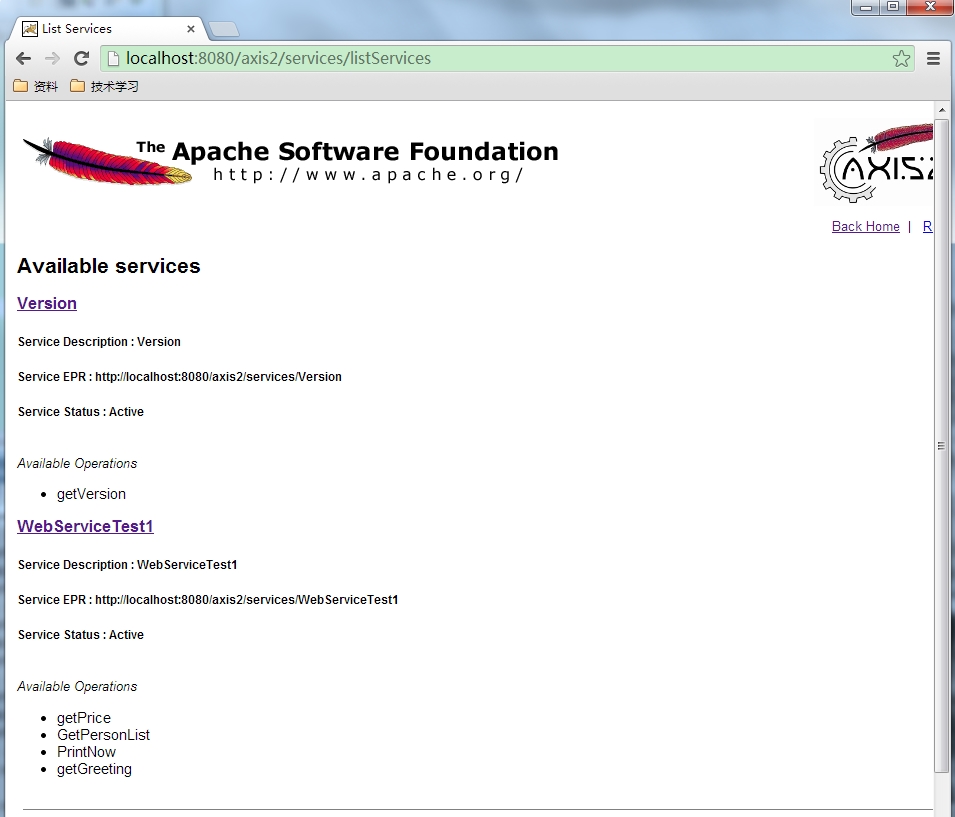
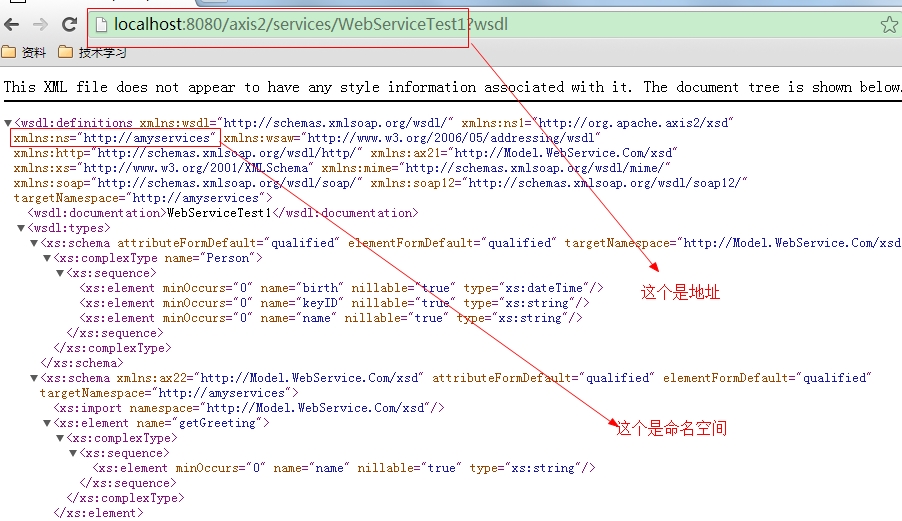
输入网址http://localhost:8080/axis2/services/listServices,会发现增加了我们刚创建的服务。
2 创建客户端
2.1 创建一个java项目
2.2 新建一个WsClient测试类
代码如下:
package com.amy.client;

import javax.xml.namespace.QName;

import org.apache.axis2.AxisFault;

import org.apache.axis2.addressing.EndpointReference;

import org.apache.axis2.client.Options;

import org.apache.axis2.rpc.client.RPCServiceClient;

public class WsClient {

    private RPCServiceClient serviceClient;

    private Options options;

    private EndpointReference targetERP;

    public WsClient(String endpoint) throws AxisFault{

        this.serviceClient = new RPCServiceClient();

        this.options = this.serviceClient.getOptions();

        this.targetERP = new EndpointReference(endpoint);

        this.options.setTo(this.targetERP);

    }

    public Object[] invokeOp(String targetNamespace, String opName,Object[] opArgs, Class<?>[]opReturnType) throws AxisFault, ClassNotFoundException{

        QName opQName = new QName(targetNamespace, opName);

        return this.serviceClient.invokeBlocking(opQName, opArgs, opReturnType);

    }

    public static void main(String args[])

    {

        final String endpointReference = "http://localhost:8080/axis2/services/WebServiceTest1";

        final String targetNamesPace = "http://amyservices";

        try {

            WsClient client = new WsClient(endpointReference);

            String opName = "GetPersonList";

            Object[] opArgs = new Object[]{};

            Class<?>[] opReturnType = new Class[]{Person.class};

            Object[] response = client.invokeOp(targetNamesPace, opName, opArgs, opReturnType);

            if (response != null && response.length > 0)

            {

                System.out.println(response.length);

                for(Object obj : response)

                {

                    Person model = (Person)obj;

                    System.out.println(model.getName());

                }

            }

        } catch (AxisFault e) {

            // TODO Auto-generated catch block

            e.printStackTrace();

        } catch (ClassNotFoundException e) {

            // TODO Auto-generated catch block

            e.printStackTrace();

        }

    }

}
2.3 要引用的jar包有
.classpath文件如下:
<?xml version="1.0" encoding="UTF-8"?>

<classpath>

    <classpathentry kind="src" path="src"/>

    <classpathentry kind="con" path="org.eclipse.jdt.launching.JRE_CONTAINER/org.eclipse.jdt.internal.debug.ui.launcher.StandardVMType/JavaSE-1.7"/>

    <classpathentry kind="lib" path="lib/axiom-impl-1.2.13.jar"/>

    <classpathentry kind="lib" path="lib/axis2-adb-1.6.2.jar"/>

    <classpathentry kind="lib" path="lib/axis2-kernel-1.6.2.jar" sourcepath="C:/Users/zhujinrong/.m2/repository/org/apache/axis2/axis2-kernel/1.6.2/axis2-kernel-1.6.2-sources.jar"/>

    <classpathentry kind="lib" path="lib/axis2-transport-http-1.6.2.jar"/>

    <classpathentry kind="lib" path="lib/axis2-transport-local-1.6.2.jar"/>

    <classpathentry kind="lib" path="lib/commons-codec-1.3.jar"/>

    <classpathentry kind="lib" path="lib/commons-httpclient-3.1.jar"/>

    <classpathentry kind="lib" path="lib/commons-logging-1.1.1.jar"/>

    <classpathentry kind="lib" path="lib/httpcore-4.0.jar"/>

    <classpathentry kind="lib" path="lib/neethi-3.0.2.jar"/>

    <classpathentry kind="lib" path="lib/wsdl4j-1.6.2.jar"/>

    <classpathentry kind="lib" path="lib/XmlSchema-1.4.7.jar"/>

    <classpathentry kind="lib" path="lib/axiom-api-1.2.13.jar"/>

    <classpathentry kind="lib" path="lib/activation-1.1.jar"/>

    <classpathentry kind="lib" path="lib/axis2-adb-codegen-1.6.2.jar"/>

    <classpathentry kind="lib" path="lib/axis2-java2wsdl-1.6.2.jar"/>

    <classpathentry kind="lib" path="lib/mail-1.4.jar"/>

    <classpathentry kind="lib" path="lib/woden-api-1.0M9.jar"/>

    <classpathentry kind="lib" path="lib/woden-impl-commons-1.0M9.jar"/>

    <classpathentry kind="lib" path="lib/woden-impl-dom-1.0M9.jar"/>

    <classpathentry kind="lib" path="lib/wstx-asl-3.2.9.jar"/>

    <classpathentry kind="lib" path="lib/xmlbeans-2.3.0.jar"/>

    <classpathentry kind="output" path="bin"/>

</classpath>
3 执行结果
3.1 查看服务器启动
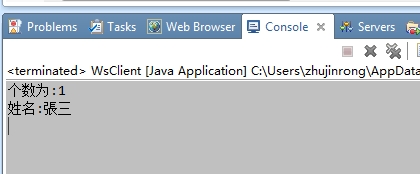
3.2 客户端
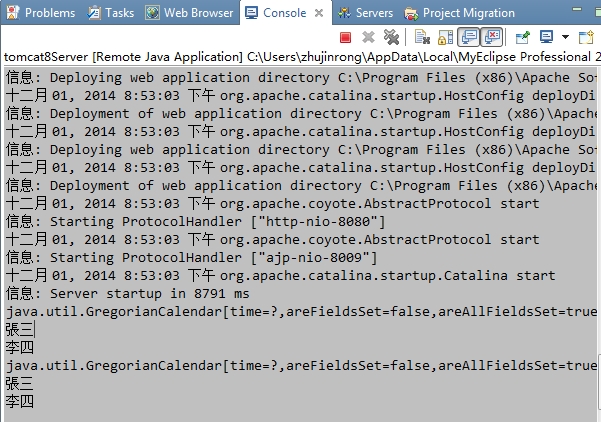
3.3 服务端情况
3.4 直接查询
axis2 webService开发指南(2)的更多相关文章
- axis2 webService开发指南(1)
参考文件:blog.csdn.net/IBM_hoojo http://hoojo.cnblogs.com/ 1 WebService简介 WebService让一个程序可以透明的调用互联网的程序,不 ...
- axis2 webService开发指南(3)
复杂对象类型的WebService 这次我们编写复杂点的WebService方法,返回的数据是我们定义属性带getter.setter方法JavaBean,一维数组.二维数组等 1.服务源代码 新建一 ...
- eclipse+axis2+webservice开发实例
myeclipse10安装axis2插件 第一步:下载axis2-1.6的插件压缩包,axis2-eclipse-codegen-plugin-1.6.2.zip 和 axis2-eclipse-se ...
- WebService开发指南
WebServiceInAurora Web Service Web Service是一种面向服务的架构的技术,通过标准的Web协议提供服务,目的是保证不同平台的应用服务可以互操作.在Aurora框架 ...
- 基于Myeclipse+Axis2的WebService开发实录
最近开始学习了下在Myeclipse开发工具下基于WebSerivce的开发,下面将相关相关关键信息予以记录 Myeclipse的安装,本文以Myeclipse2014-blue为开发环境,相关配置执 ...
- Axis2 webservice入门--写个简单的webservice
上一篇介绍了webservice开发前的准备.下面开始写webservice.如果不了解axis2请看上一篇,如果是新手:建议一边看一边写代码,自己动手完成这个过程. 一.新建一个web项目 二.新建 ...
- axis1,xfire,jUnit 测试案列+开Web Service开发指南+axis1.jar下载 代码
axis1,xfire,jUnit 测试案列+Web Service开发指南(中).pdf+axis1.jar下载 代码 项目和资源文档+jar 下载:http://download.csdn. ...
- Webservice开发概念
一.Web Service基本概念 Web Service由两部分组成 SOAP--Web Service之间的基本通信协议. WSDL--Web Service描述语言,它定义了Web Servic ...
- ASP.NET Aries 开源开发框架:开发指南(一)
前言: 上周开源了Aries开发框架后,好多朋友都Download了源码,在运行过程里,有一些共性的问题会问到. 所以本篇打算写一下简单的开发指南,照顾一下不是太看的懂源码的同学,同时也会讲解一下框架 ...
随机推荐
- 使用C#和Java发送邮件(转载)
using System.Net.Mail; using System.Net; public class EmailEntity { private MailMessage mm; /// < ...
- LG1343 地震逃生
题意 汶川地震发生时,四川**中学正在上课,一看地震发生,老师们立刻带领x名学生逃跑,整个学校可以抽象地看成一个有向图,图中有n个点,m条边.1号点为教室,n号点为安全地带,每条边都只能容纳一定量的学 ...
- Mysql-Proxy 读写分离的各种坑,特别是复制延迟时
延迟问题读写分离不能回避的问题之一就是延迟,可以考虑Google提供的SemiSyncReplicationDesign补丁. 端口问题MySQL-Proxy缺省使用的是4040端口,如果你想透明的把 ...
- curl 错误 [globbing] illegal character in range specification at pos
现象 在使用curl 进行ipv6请求的时候 curl -v "http://[1:1::1]/test.html" 发生了一个错误,报错是 [globbing] illegal ...
- Word动态替换文本
public class WordTest2 { public static void main(String[] args) { /** 此Map存放动态替换的内容,key-Word中定义的变量,v ...
- keil 赋值之后再声明变量提示错误error: #268: declaration may not appear after executable statement in block
勾选 C99 Mode 即可 假如没有C99 Mode的选项,那么我们可以用大括号将代码括起来,这样编译也不会报错 if( (! bMemAddrAllowAccess(checkAddr) )) { ...
- 【转】如何将FLAC格式转为MP3格式
原文网址:http://jingyan.baidu.com/ae/3aed632e65708470108091ca.html FLAC全称为无损音频压缩编码,FLAC格式又称无损格式 不会破坏原有的音 ...
- win10下安装并启动zookeeper
下载直接到zk的官网(zookeeper.apache.org)即可,点击右边的Releases,在Download下再点Download进入镜像下载页面,在给出的链接列表里选择一个镜像地址,进去后选 ...
- 搭建基于hyperledger fabric的联盟社区(二) --环境配置
接下来讲一下在本地测试区块链网络的过程.我要部署的是2peer+1orderer架构,所以需要准备三台虚拟机,为了方便起见可以先把一台配置好,然后复制出剩余两台即可.搭建虚拟机我用的是virtualb ...
- Js中常用的字符串,数组,函数扩展
由于最近辞职在家,自己的时间相对多一点.所以就根据prototytpeJS的API,结合自己正在看的司徒大神的<javascript框架设计>,整理了下Js中常用一些字符串,数组,函数扩展 ...