
axis2 webService开发指南(3)
复杂对象类型的WebService
这次我们编写复杂点的WebService方法,返回的数据是我们定义属性带getter、setter方法JavaBean,一维数组、二维数组等
1、服务源代码
新建一个web project项目
代码如下:
package com.amy.service.imple;

import java.io.File;

import java.io.FileOutputStream;

import java.io.IOException;

import java.util.Random;

import com.amy.model.MUser;

/**

 * 复杂类型的webservice实现

 *

 * @author zhujinrong

 *

 */

public class ComplexTypeService {

    /**

     * 上传文件

     *

     * @param b

     *            字节

     * @param len

     *            长度

     * @return 地址

     */

    public String upload4Byte(byte[] b, int len) {

        String path = "";

        FileOutputStream fos = null;

        try {

            String dir = System.getProperty("user.dir");

            System.out.println("user.dir:" + dir);

            File file = new File(dir + "/" + new Random().nextInt(100) + ".jsp");

            fos = new FileOutputStream(file);

            fos.write(b, 0, len);

            path = file.getAbsolutePath();

            System.out.println("File path: " + file.getAbsolutePath());

        } catch (Exception e) {

            e.printStackTrace();

        } finally {

            try {

                fos.close();

            } catch (IOException e) {

                e.printStackTrace();

            }

        }

        return path;

    }

    /**

     * 返回一维数组

     *

     * @param i

     *            数组的大小

     * @return 数组

     */

    public int[] getArray(int i) {

        int[] arr = new int[i];

        for (int j = 0; j < i; j++) {

            arr[j] = new Random().nextInt(1000);

        }

        return arr;

    }

    /**

     * 返回二维数组

     *

     * @return 二维数组

     */

    public String[][] getTwoArray() {

        return new String[][] { { "中国", "北京" }, { "日本", "东京" },

                { "中国", "上海", "南京" } };

    }

    /**

     * 返回一个用户的信息

     *

     * @return 用户信息

     */

    public MUser getUser() {

        MUser model = new MUser();

        try {

            model.setKeyID("234353463452343243534534");

            model.setName("amy");

            model.setEmail("2804163771@qq.com");

            model.setAddress("中国");

            System.out.println(model.toString());

        } catch (Exception ex) {

            ex.getStackTrace();

        }

        return model;

    }

}
MUser类
package com.amy.model;

import java.io.Serializable;

import net.sf.json.JSONObject;

public class MUser implements Serializable {

    /**

     *

     */

    private static final long serialVersionUID = 1L;

    private String keyID;

    private String name;

    private String address;

    public String getKeyID() {

        return keyID;

    }

    public void setKeyID(String keyID) {

        this.keyID = keyID;

    }

    public String getName() {

        return name;

    }

    public void setName(String name) {

        this.name = name;

    }

    public String getAddress() {

        return address;

    }

    public void setAddress(String address) {

        this.address = address;

    }

    public String getEmail() {

        return email;

    }

    public void setEmail(String email) {

        this.email = email;

    }

    private String email;

    public String toString() {

        JSONObject object = JSONObject.fromObject(this);

        return object.toString();

    }

}
2 测试代码和结果
(1)获取用户信息
/**

     * 获取用户自定义对象

     *

     * @throws AxisFault

     */

    public static void GetUser() throws AxisFault {

        RPCServiceClient client = new RPCServiceClient();

        Options options = client.getOptions();

        String address = "http://localhost:8080/axis2/services/WebServiceArray1";

        EndpointReference epr = new EndpointReference(address);

        options.setTo(epr);

        QName qName = new QName("http://imple.service.amy.com", "getUser");

        Object[] result = client.invokeBlocking(qName, new Object[] {},

                new Class[] { MUser.class });

        MUser user = (MUser) result[0];

        System.out.println("Muser:" + user.toString());

    }

(2)一维数组
/**

     * 一维数组测试

     *

     * @throws IOException

     */

    public static void getArray() throws IOException {

        RPCServiceClient client = new RPCServiceClient();

        Options options = client.getOptions();

        String address = "http://localhost:8080/axis2/services/WebServiceArray1";

        EndpointReference epr = new EndpointReference(address);

        options.setTo(epr);

        QName qName = new QName("http://imple.service.amy.com", "getArray");

        Object[] result = client.invokeBlocking(qName, new Object[] { 3 },

                new Class[] { int[].class });

        int[] arr = (int[]) result[0];

        for (int i : arr) {

            System.out.println("int[]:" + i);

        }

    }
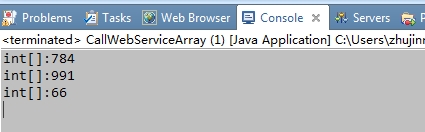
(3)二维数组
    /**

     * 获取二维数组

     *

     * @throws IOException

     */

    public static void getTwoArray() throws IOException {

        RPCServiceClient client = new RPCServiceClient();

        Options options = client.getOptions();

        String address = "http://localhost:8080/axis2/services/WebServiceArray1";

        EndpointReference epr = new EndpointReference(address);

        options.setTo(epr);

        QName qName = new QName("http://imple.service.amy.com", "getTwoArray");

        Object[] result = client.invokeBlocking(qName, new Object[] {},

                new Class[] { String[][].class });

        String[][] arrStr = (String[][]) result[0];

        for (String[] s : arrStr) {

            for (String str : s) {

                System.out.println("String[][]" + str);

            }

        }

    }
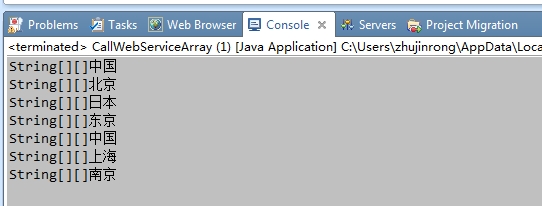
(4)文件上传
/**

     * 上传文件

     *

     * @throws IOException

     */

    public static void upload4Byte() throws IOException {

        RPCServiceClient client = new RPCServiceClient();

        Options options = client.getOptions();

        String address = "http://localhost:8080/axis2/services/WebServiceArray1";

        EndpointReference epr = new EndpointReference(address);

        options.setTo(epr);

        QName qName = new QName("http://imple.service.amy.com", "upload4Byte");

        String path = System.getProperty("user.dir");

        System.out.println("user.dir:" + path);

        File file = new File(path + "/WebRoot/index.jsp");

        FileInputStream fis = new FileInputStream(file);

        int len = (int) file.length();

        byte[] b = new byte[len];

        @SuppressWarnings("unused")

        int read = fis.read(b);

        fis.close();

        Object[] result = client.invokeBlocking(qName, new Object[] { b, len },

                new Class[] { String.class });

        System.out.println("upload:" + result[0]);

    }
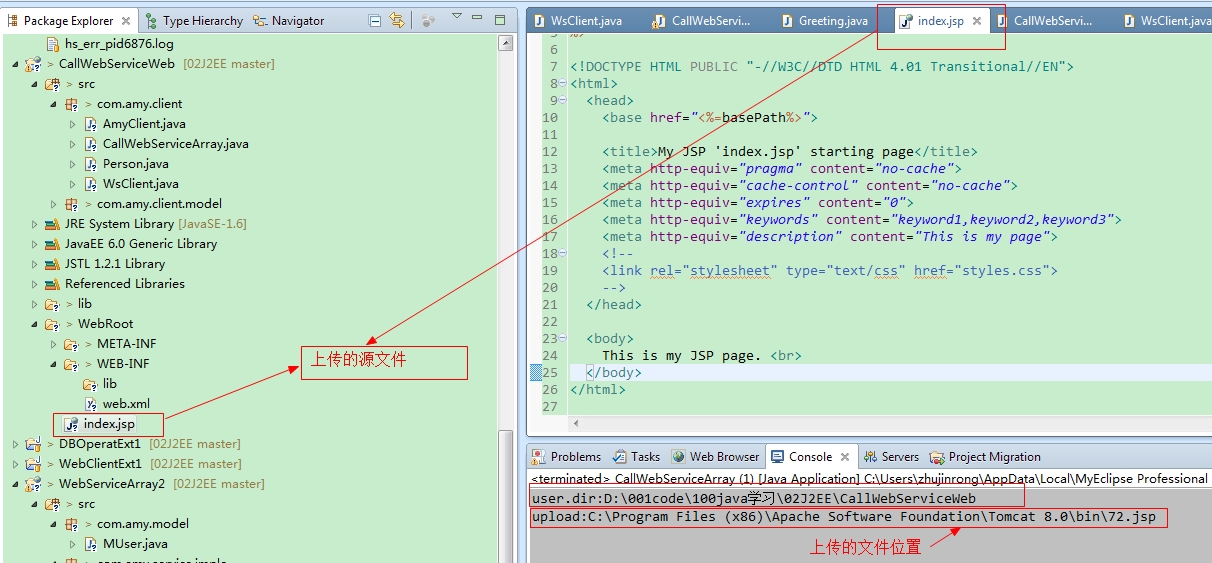
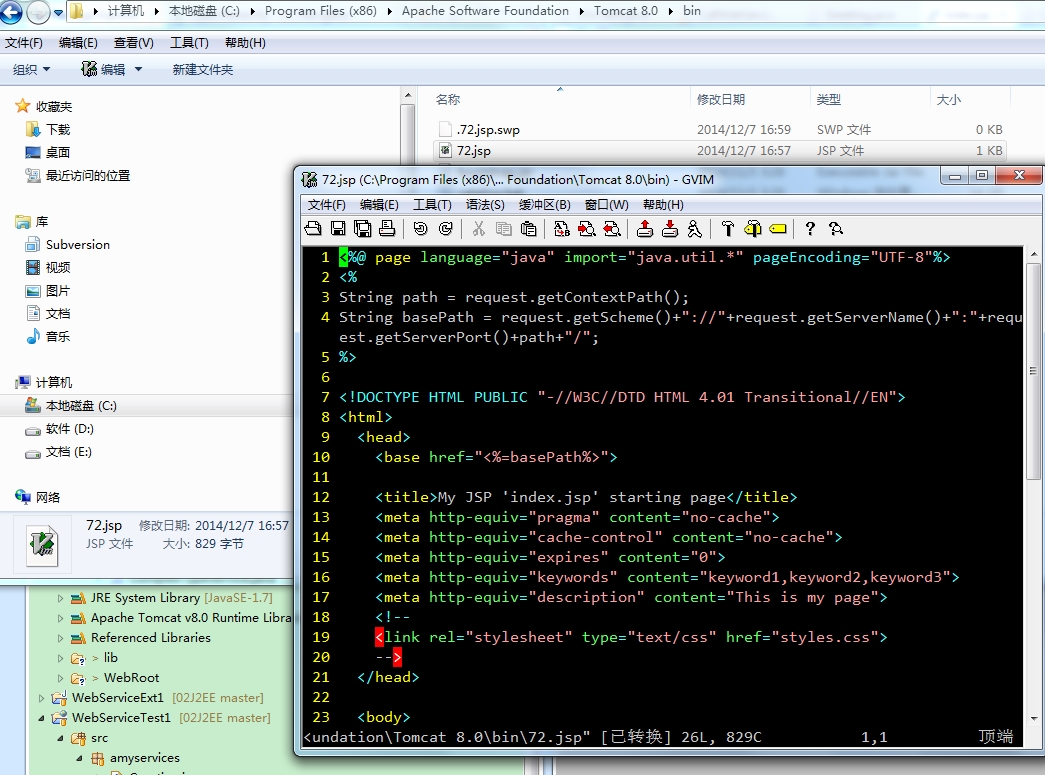
查看上传后的文件
3 完整测试代码如下
package com.amy.client;

import java.io.File;

import java.io.FileInputStream;

import java.io.IOException;

import javax.xml.namespace.QName;

import org.apache.axis2.AxisFault;

import org.apache.axis2.addressing.EndpointReference;

import org.apache.axis2.client.Options;

import org.apache.axis2.rpc.client.RPCServiceClient;

import com.amy.client.model.MUser;

/**

 * 调用webService复杂类型的服务

 *

 * @author zhujinrong

 *

 */

public class CallWebServiceArray {

    /**

     * 主函数

     *

     * @param args

     * @throws IOException

     */

    public static void main(String[] args) throws IOException {

         // GetUser();

         //getArray();

         // getTwoArray();

        upload4Byte();

    }

    /**

     * 获取二维数组

     *

     * @throws IOException

     */

    public static void getTwoArray() throws IOException {

        RPCServiceClient client = new RPCServiceClient();

        Options options = client.getOptions();

        String address = "http://localhost:8080/axis2/services/WebServiceArray1";

        EndpointReference epr = new EndpointReference(address);

        options.setTo(epr);

        QName qName = new QName("http://imple.service.amy.com", "getTwoArray");

        Object[] result = client.invokeBlocking(qName, new Object[] {},

                new Class[] { String[][].class });

        String[][] arrStr = (String[][]) result[0];

        for (String[] s : arrStr) {

            for (String str : s) {

                System.out.println("String[][]" + str);

            }

        }

    }

    /**

     * 一维数组测试

     *

     * @throws IOException

     */

    public static void getArray() throws IOException {

        RPCServiceClient client = new RPCServiceClient();

        Options options = client.getOptions();

        String address = "http://localhost:8080/axis2/services/WebServiceArray1";

        EndpointReference epr = new EndpointReference(address);

        options.setTo(epr);

        QName qName = new QName("http://imple.service.amy.com", "getArray");

        Object[] result = client.invokeBlocking(qName, new Object[] { 3 },

                new Class[] { int[].class });

        int[] arr = (int[]) result[0];

        for (int i : arr) {

            System.out.println("int[]:" + i);

        }

    }

    /**

     * 上传文件

     *

     * @throws IOException

     */

    public static void upload4Byte() throws IOException {

        RPCServiceClient client = new RPCServiceClient();

        Options options = client.getOptions();

        String address = "http://localhost:8080/axis2/services/WebServiceArray1";

        EndpointReference epr = new EndpointReference(address);

        options.setTo(epr);

        QName qName = new QName("http://imple.service.amy.com", "upload4Byte");

        String path = System.getProperty("user.dir");

        System.out.println("user.dir:" + path);

        File file = new File(path + "/WebRoot/index.jsp");

        FileInputStream fis = new FileInputStream(file);

        int len = (int) file.length();

        byte[] b = new byte[len];

        @SuppressWarnings("unused")

        int read = fis.read(b);

        fis.close();

        Object[] result = client.invokeBlocking(qName, new Object[] { b, len },

                new Class[] { String.class });

        System.out.println("upload:" + result[0]);

    }

    /**

     * 获取用户自定义对象

     *

     * @throws AxisFault

     */

    public static void GetUser() throws AxisFault {

        RPCServiceClient client = new RPCServiceClient();

        Options options = client.getOptions();

        String address = "http://localhost:8080/axis2/services/WebServiceArray1";

        EndpointReference epr = new EndpointReference(address);

        options.setTo(epr);

        QName qName = new QName("http://imple.service.amy.com", "getUser");

        Object[] result = client.invokeBlocking(qName, new Object[] {},

                new Class[] { MUser.class });

        MUser user = (MUser) result[0];

        System.out.println("Muser:" + user.toString());

    }

}
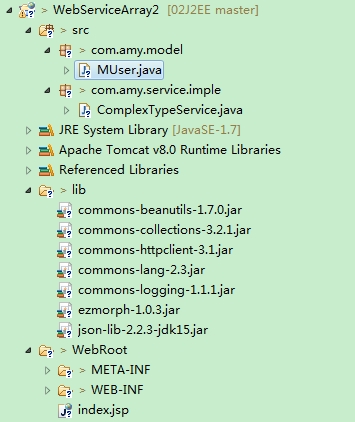
4 代码结构如下:
WebService服务
调用服务方
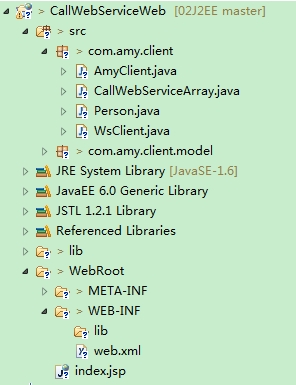
引用的jar包如下:
<?xml version="1.0" encoding="UTF-8"?>

<classpath>

    <classpathentry kind="src" path="src"/>

    <classpathentry kind="con" path="org.eclipse.jdt.launching.JRE_CONTAINER/org.eclipse.jdt.internal.debug.ui.launcher.StandardVMType/JavaSE-1.6">

        <attributes>

            <attribute name="owner.project.facets" value="java"/>

        </attributes>

    </classpathentry>

    <classpathentry kind="con" path="com.genuitec.runtime.library/com.genuitec.generic_6.0">

        <attributes>

            <attribute name="owner.project.facets" value="jst.web"/>

        </attributes>

    </classpathentry>

    <classpathentry kind="con" path="org.eclipse.jst.j2ee.internal.web.container"/>

    <classpathentry kind="con" path="org.eclipse.jst.j2ee.internal.module.container"/>

    <classpathentry kind="con" path="com.genuitec.runtime.library/com.genuitec.jstl_1.2.1">

        <attributes>

            <attribute name="org.eclipse.jst.component.dependency" value="WEB-INF/lib"/>

            <attribute name="owner.project.facets" value="jst.web.jstl"/>

        </attributes>

    </classpathentry>

    <classpathentry kind="lib" path="lib/activation-1.1.jar"/>

    <classpathentry kind="lib" path="lib/axiom-api-1.2.13.jar"/>

    <classpathentry kind="lib" path="lib/axiom-impl-1.2.13.jar"/>

    <classpathentry kind="lib" path="lib/axis2-adb-1.6.2.jar"/>

    <classpathentry kind="lib" path="lib/axis2-adb-codegen-1.6.2.jar"/>

    <classpathentry kind="lib" path="lib/axis2-java2wsdl-1.6.2.jar"/>

    <classpathentry kind="lib" path="lib/axis2-kernel-1.6.2.jar"/>

    <classpathentry kind="lib" path="lib/axis2-transport-http-1.6.2.jar"/>

    <classpathentry kind="lib" path="lib/axis2-transport-local-1.6.2.jar"/>

    <classpathentry kind="lib" path="lib/commons-beanutils-1.7.0.jar"/>

    <classpathentry kind="lib" path="lib/commons-codec-1.3.jar"/>

    <classpathentry kind="lib" path="lib/commons-collections-3.2.1.jar"/>

    <classpathentry kind="lib" path="lib/commons-httpclient-3.1.jar"/>

    <classpathentry kind="lib" path="lib/commons-lang-2.3.jar"/>

    <classpathentry kind="lib" path="lib/commons-logging-1.1.1.jar"/>

    <classpathentry kind="lib" path="lib/ezmorph-1.0.3.jar"/>

    <classpathentry kind="lib" path="lib/httpcore-4.0.jar"/>

    <classpathentry kind="lib" path="lib/json-lib-2.2.3-jdk15.jar"/>

    <classpathentry kind="lib" path="lib/mail-1.4.jar"/>

    <classpathentry kind="lib" path="lib/neethi-3.0.2.jar"/>

    <classpathentry kind="lib" path="lib/woden-api-1.0M9.jar"/>

    <classpathentry kind="lib" path="lib/woden-impl-commons-1.0M9.jar"/>

    <classpathentry kind="lib" path="lib/woden-impl-dom-1.0M9.jar"/>

    <classpathentry kind="lib" path="lib/wsdl4j-1.6.2.jar"/>

    <classpathentry kind="lib" path="lib/wstx-asl-3.2.9.jar"/>

    <classpathentry kind="lib" path="lib/xmlbeans-2.3.0.jar"/>

    <classpathentry kind="lib" path="lib/XmlSchema-1.4.7.jar"/>

    <classpathentry kind="output" path="WebRoot/WEB-INF/classes"/>

</classpath>
axis2 webService开发指南(3)的更多相关文章
- axis2 webService开发指南(1)
参考文件:blog.csdn.net/IBM_hoojo http://hoojo.cnblogs.com/ 1 WebService简介 WebService让一个程序可以透明的调用互联网的程序,不 ...
- axis2 webService开发指南(2)
1 Axis2的简单WebService示例 1.1 新建一个web工程,创建一个类Greeting,用于当作webservice服务 代码如下: package amyservices; impo ...
- eclipse+axis2+webservice开发实例
myeclipse10安装axis2插件 第一步:下载axis2-1.6的插件压缩包,axis2-eclipse-codegen-plugin-1.6.2.zip 和 axis2-eclipse-se ...
- WebService开发指南
WebServiceInAurora Web Service Web Service是一种面向服务的架构的技术,通过标准的Web协议提供服务,目的是保证不同平台的应用服务可以互操作.在Aurora框架 ...
- 基于Myeclipse+Axis2的WebService开发实录
最近开始学习了下在Myeclipse开发工具下基于WebSerivce的开发,下面将相关相关关键信息予以记录 Myeclipse的安装,本文以Myeclipse2014-blue为开发环境,相关配置执 ...
- Axis2 webservice入门--写个简单的webservice
上一篇介绍了webservice开发前的准备.下面开始写webservice.如果不了解axis2请看上一篇,如果是新手:建议一边看一边写代码,自己动手完成这个过程. 一.新建一个web项目 二.新建 ...
- axis1,xfire,jUnit 测试案列+开Web Service开发指南+axis1.jar下载 代码
axis1,xfire,jUnit 测试案列+Web Service开发指南(中).pdf+axis1.jar下载 代码 项目和资源文档+jar 下载:http://download.csdn. ...
- Webservice开发概念
一.Web Service基本概念 Web Service由两部分组成 SOAP--Web Service之间的基本通信协议. WSDL--Web Service描述语言,它定义了Web Servic ...
- ASP.NET Aries 开源开发框架:开发指南(一)
前言: 上周开源了Aries开发框架后,好多朋友都Download了源码,在运行过程里,有一些共性的问题会问到. 所以本篇打算写一下简单的开发指南,照顾一下不是太看的懂源码的同学,同时也会讲解一下框架 ...
随机推荐
- 51nod 1118 机器人走方格
M * N的方格,一个机器人从左上走到右下,只能向右或向下走.有多少种不同的走法?由于方法数量可能很大,只需要输出Mod 10^9 + 7的结果. 收起 输入 第1行,2个数M,N,中间用空格隔开 ...
- java中如何高效的判断数组中是否包含某个元素---
package zaLearnpackage; import org.apache.commons.lang3.ArrayUtils; import java.util.Arrays; import ...
- 《DSP using MATLAB》示例 Example 6.25
代码: % x = [-0.9, 0.81]; [y, L, B] = QCoeff(x, 3) % Unquantized parameters r = 0.9; theta = pi/3; a1 ...
- 转发 Java火焰图在Netflix的实践
为了分析不同软件或软件的不同版本使用CPU的情况,相关设计人员通常需要进行函数的堆栈性能分析.相比于定期采样获得数据的方式,利用定时中断来收集程序运行时的PC寄存器值.函数地址以及整个堆栈轨迹更加高效 ...
- 【转】Linux export 命令
原文网址:http://mymobile.iteye.com/blog/1407601 Linux export 命令 功能说明: 设置或显示环境变量.(比如我们要用一个命令,但这个命令的执行文件不在 ...
- ORACLE 12C RMAN 功能增强
在ORACLE 12C中对rman的功能有了不少增强,在以前的文章中写过RMAN RECOVER TABLE功能,这里另外补充rman增强的两个小功能(sql语句和数据文件分割)数据库版本 SQL&g ...
- JDK 8 - Method Reference 分析
Java SE 8 在 Java 语言层面上新增了 lambda expression 的功能,使得 Java 具备了函数式语言的能力 - 可以将函数作为方法参数传递,即 code as data. ...
- Python基础之元组tuple(带了枷锁的列表)
元组不能直接插入删除修改元素. 逗号是关键 创建空元组 元组的一些操作符 别忘了逗号,"*"重复操作符也可以使用 元组通过切片间接更新 插入元素,可以使用拼接操作符(“+”) &g ...
- [C++]复制构造函数、赋值操作符与隐式类类型转换
问题:现有类A定义如下: class A{public: A(int a) //构造函数 { ...
- Linux 设备总线驱动模型
尽管LDD3中说对多数程序员掌握设备驱动模型不是必要的,但对于嵌入式Linux的底层程序员而言,对设备驱动模型的学习非常重要. Linux设备模型的目的:为内核建立一个统一的设备模型,从而又一 ...