
仿知乎日报App
1、6.Error:Execution failed for task ':app:buildInfoDebugLoader'.
> Exception while doing past iteration backup : Source G:\project\***\app\build\intermediates\builds\debug\37215488613481\classes.dex and destination G:\project\***\app\build\intermediates\builds\debug\37215488613481\classes.dex must be different
这种问题不知道怎么出现的,clean一下即可。
2、Imageview加载网络图片,要用Handler。
3、ImageView设置图片的比例问题。http://blog.csdn.net/hhbgk/article/details/8101676
4、取消标题栏,只要设置一下Theme即可。
第一步是爬取相关的文章标题,图片,以及地址。
用的是普通的java写的,还有用了htmlunit的库比较方便,为什么要这样,还得学下css
源网址:http://daily.zhihu.com
出来的效果大概是这样
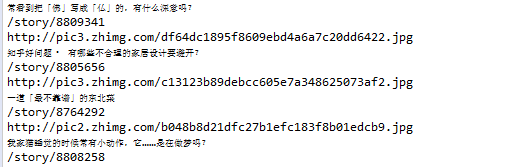
代码:
import java.io.IOException;

import java.net.MalformedURLException;

import com.gargoylesoftware.htmlunit.BrowserVersion;

import com.gargoylesoftware.htmlunit.FailingHttpStatusCodeException;

import com.gargoylesoftware.htmlunit.WebClient;

import com.gargoylesoftware.htmlunit.html.DomNode;

import com.gargoylesoftware.htmlunit.html.DomNodeList;

import com.gargoylesoftware.htmlunit.html.HtmlAnchor;

import com.gargoylesoftware.htmlunit.html.HtmlImage;

import com.gargoylesoftware.htmlunit.html.HtmlPage;

public class main {

    public static void main(String args[]) throws FailingHttpStatusCodeException, MalformedURLException, IOException{

         String url = "http://daily.zhihu.com";

         WebClient webClient = new WebClient(BrowserVersion.CHROME);

         //把警告弄掉的

         webClient.getOptions().setJavaScriptEnabled(false);

         webClient.getOptions().setCssEnabled(false);

         HtmlPage page = webClient.getPage(url);

        //System.out.println(page.asXml());

         //DomNode content = page.querySelector(".main-wrap.content-wrap");

         //System.out.println(content.asXml());

         //找到所有wrap的类

         DomNodeList<DomNode> iList = page.querySelectorAll(".wrap");

         for(DomNode i: iList){

                 HtmlAnchor a = (HtmlAnchor)i.querySelector("a");

                 HtmlImage img = (HtmlImage)i.querySelector("img");

                // 获取 a 标签的属性 href ,就是帖子详情的地址啦!!

                String href = a.getAttribute("href");

                String src = img.getAttribute("src");

                String title = i.asText();

                System.out.println(title);

                System.out.println(href);

                System.out.println(src);

         }//end for

    }

}
第二步:怎么处理获得的数据?
就是UI的问题,这个暂时没有设计好- -
就是网上的图片获取之后弄成bitmap,然后在handleMessage里面设置到ImageView里面
还有就是涉及网络的任务必须新开一个线程,不能在主线程执行
代码:
public class MainActivity extends AppCompatActivity {

    WebView webView;

    ImageView imageView;

    Bitmap bitmap;

    Handler handler;

    @Override

    protected void onCreate(Bundle savedInstanceState) {

        super.onCreate(savedInstanceState);

        setContentView(R.layout.activity_main);

        handler = new Handler(){

            @Override

            public void handleMessage(Message msg) {

                super.handleMessage(msg);

                Log.d("TAG","getMessage");

                imageView.setImageBitmap(bitmap);

            }

        };

        /*

        webView = (WebView)findViewById(R.id.webView);

        webView.loadUrl("http://daily.zhihu.com/story/8746558");

        */

        imageView = (ImageView)findViewById(R.id.imageview1);

        new Thread(new Runnable() {

            @Override

            public void run() {

                try {

                    getImageViewInputStream();

                } catch (IOException e) {

                    e.printStackTrace();

                }

                    Message message = new Message();

                    handler.sendMessage(message);

            }

        }).start();

        }

    public void getImageViewInputStream() throws IOException {

                InputStream inputStream = null;

                 URL url = new URL("http://pic1.zhimg.com/96b31814276e24e991064920567ed9e4.jpg");                    //服务器地址

                 if (url != null) {

                         //打开连接

                         HttpURLConnection httpURLConnection = (HttpURLConnection)url.openConnection();

                         //httpURLConnection.setConnectTimeout(3000);//设置网络连接超时的时间为3秒

                         httpURLConnection.setRequestMethod("GET");        //设置请求方法为GET

                         httpURLConnection.setDoInput(true);                //打开输入流

                         httpURLConnection.connect();

                     int responseCode = httpURLConnection.getResponseCode();    // 获取服务器响应值

                         if (responseCode == HttpURLConnection.HTTP_OK) {        //正常连接

                                 inputStream = httpURLConnection.getInputStream();        //获取输入流

                                 bitmap = BitmapFactory.decodeStream(inputStream);

                                inputStream.close();

                             Log.d("TAG","getOK");

                             }

                     }

             }

}
第三步:怎么处理文章?
当时还在纠结一堆html格式的怎么解析,后来想到可以用WebView偷懒。直接把文章的网址放在WebView里面就好了
仿知乎日报App的更多相关文章
- 微信小程序开发日记——高仿知乎日报(下)
本人对知乎日报是情有独钟,看我的博客和github就知道了,写了几个不同技术类型的知乎日报APP 要做微信小程序首先要对html,css,js有一定的基础,还有对微信小程序的API也要非常熟悉 我将该 ...
- 微信小程序开发日记——高仿知乎日报(中)
本人对知乎日报是情有独钟,看我的博客和github就知道了,写了几个不同技术类型的知乎日报APP要做微信小程序首先要对html,css,js有一定的基础,还有对微信小程序的API也要非常熟悉 我将该教 ...
- 微信小程序开发日记——高仿知乎日报(上)
本人对知乎日报是情有独钟,看我的博客和github就知道了,写了几个不同技术类型的知乎日报APP 要做微信小程序首先要对html,css,js有一定的基础,还有对微信小程序的API也要非常熟悉 我将该 ...
- 学习笔记-Kuaihu(仿知乎日报)
本文目的:由于第一次学习较为完整的项目,故作记录以系统地整理APP开发知识 先看看整个项目结构: activity, fragment, 不用说了.可以看做MVC中的controller db, 存储 ...
- 使用Vue前端框架实现知乎日报app
这是:主页代码 <template> <view class="content"> <view class="uni-list"& ...
- 【完全开源】知乎日报UWP版(上篇):界面设计、官方API分析
目录 说明 使用Fiddler分析android版API 部分效果图 关于源码 说明 在做博客园UWP版的时候其实就有做知乎日报的打算了,前段时间一直出差,在酒店里用Fiddler简单的分析了一下An ...
- 基于MVVM的知乎日报应用安卓源码
使用data binding , dagger2 , retrofit2和rxjava实现的,基于MVVM的知乎日报APP运行效果: <ignore_js_op> 使用说明: 项目结构 a ...
- 【完全开源】知乎日报UWP版(下篇):商店APP、github源码、功能说明。Windows APP 良心出品。
目录 说明 功能 截图+视频 关于源码和声明 说明 陆陆续续大概花了一个月的时间,APP算是基本完成了.12月份一直在外出差,在出差期间进行了两次功能完善,然后断断续续修补了一些bug,到目前为止,我 ...
- 仿知乎app登录界面(Material Design设计框架拿来就用的TexnInputLayout)
在我脑子里还没有Material Design这种概念,就我个人而言,PC端应用扁平化设计必须成为首选,手当其冲的两款即时通讯旺旺和QQ早就完成UI扁平化的更新,然而客户端扁平化的设计本身就存在天生的 ...
随机推荐
- 数据交换格式 —— JSON(JavaScript Object Notation)
当请求 headers 中,添加一个name为 Accept,值为 application/json 的 header(也即"我"(浏览器)接收的是 json 格式的数据),这样, ...
- Zabbix server 3.2安装部署
zabbix server 前提环境: CentOS 6 Lnmp php需要的包(bcmath,mbstring,sockets,gd,libxml,xmlwriter,xmlreader,ctyp ...
- 51Nod 1439:互质对(用莫比乌斯来容斥)
有n个数字,a11,a22,…,ann.有一个集合,刚开始集合为空.然后有一种操作每次向集合中加入一个数字或者删除一个数字.每次操作给出一个下标x(1 ≤ x ≤ n),如果axx已经在集合中,那么就 ...
- jQuery轮播插件SuperSlide【2016-10-14】
[一.页面实现轮播效果] (1)效果下图可以自动轮播 (2)代码 autoPlay控制是否轮播 //banner轮播 $(".banner").slide({mainCell:& ...
- BZOJ4552 Tjoi2016&Heoi2016排序 【二分+线段树】*
Description 在2016年,佳媛姐姐喜欢上了数字序列.因而他经常研究关于序列的一些奇奇怪怪的问题,现在他在研究一个难题,需要你来帮助他.这个难题是这样子的:给出一个1到n的全排列,现在对这个 ...
- js中怎么去掉数组的空值
for(var i = 0 ;i<array.length;i++) { if(array[i] == "" || typeof(array[i] ...
- 《DSP using MATLAB》示例Example 8.7
%% ------------------------------------------------------------------------ %% Output Info about thi ...
- 《DSP using MATLAB》示例Example7.25
今天清明放假的第二天,早晨出去吃饭时天气有些阴,十点多开始“清明时节雨纷纷”了. 母亲远在他乡看孙子,挺劳累的.父亲照顾生病的爷爷…… 我打算今天把<DSP using MATLAB>第7 ...
- centos安装 node.js
curl --silent --location https://rpm.nodesource.com/setup_8.x | sudo bash - yum clean all yum makeca ...
- winform 控件随页面大小进行自适应
这个功能网上很多人在问,也有不少人给出过答案,经过实际使用,觉得网上这段代码实现的效果比较好,记录一下 核心代码就是下面这个类 using System; using System.Collectio ...