
基于nginx搭建yum源服务器
1、首先关闭防护墙或者设置规则通过且关闭selinux
停止firewall
systemctl stop firewalld
禁止firewall开机启动
systemctl disable firewalld
或设置firewall规则
firewall-cmd --permanent --zone=public --add-service=http

firewall-cmd --reload
修改SELINUX=enforce行为SELINUX=disabled
sed -i 's/SELINUX=setenforce 0/SELINUX=disabled/' /etc/sysconfig/selinux
2、nginx-1.14.2版本(编译安装)-自定义安装路径
安装路径:/usr/local/nginx
1.前期准备
安装编译需要的gcc和gcc-c++
yum install -y gcc gcc-c++
安装nginx依赖pcre-devel、openssl-devel、zlib-devel
yum install -y pcre pcre-devel openssl openssl-devel zlib zlib-devel
下载nginx源码包并解压到当前目录
wget http://nginx.org/download/nginx-1.14.2.tar.gz

tar zxvf nginx-1.14..tar.gz
2.nginx编译安装
生成Makefile文件
cd nginx-1.14.

./configure --user=nginx \

--group=nginx \

--prefix=/usr/local/nginx/ \

--with-http_v2_module \

--with-http_ssl_module \

--with-http_sub_module \

--with-http_stub_status_module \

--with-http_gzip_static_module \

--with-pcre
编译源代码并安装
make && make install
3.后期结尾
创建用户
useradd nginx
添加环境变量,创建nginx命令软链接到环境变量
ln -s /usr/local/nginx/sbin/* /usr/local/sbin/
4.配置nginx开启php支持(仅参考)
在server段中开启php支持
找到如下内容,删除注释字符,并将倒数第二行的 /scripts 替换为 $document_root
修改前
#location ~ \.php$ {
# root html;
# fastcgi_pass 127.0.0.1:9000;
# fastcgi_index index.php;
# fastcgi_param SCRIPT_FILENAME /scripts$fastcgi_script_name;
# include fastcgi_params;
#}
修改后
location ~ \.php$ {
root html;
fastcgi_pass 127.0.0.1:9000;
fastcgi_index index.php;
fastcgi_param SCRIPT_FILENAME $document_root$fastcgi_script_name;
include fastcgi_params;
}
该段代码在server中的位置:
server {
listen 80;
server_name localhost;
location / {
root html;
index index.php index.html index.htm;
}
location ~ \.php$ {
root html;
fastcgi_pass 127.0.0.1:9000;
fastcgi_index index.php;
fastcgi_param SCRIPT_FILENAME $document_root$fastcgi_script_name;
include fastcgi_params;
}
}
注意:location ~ \.php$ {}块中root的值和location / {}块中root的值需要一致
3、开启nginx目录浏览
vim /usr/local/nginx/conf/nginx.conf
添加如下内容:
location / {

        root /usr/local/nginx/html/pack/    //指定实际目录绝对路径;

        autoindex on;                       //开启目录浏览功能;

        autoindex_exact_size off;           //关闭详细文件大小统计,让文件大小显示MB,GB单位,默认为b;

        autoindex_localtime on;             //开启以服务器本地时区显示文件修改日期!

}

还有一个问题是这里开启的是全局的目录浏览功能,那么如何实现具体目录浏览功能呢?(仅参考)
2. 只打开网站部分目录浏览功能
只打开http://www.******.com/soft 目录浏览
vi /usr/local/nginx/conf/nginx.conf #编辑配置文件,在server {下面添加以下内容:
location /soft {
autoindex on;
autoindex_exact_size off;
autoindex_localtime on;
}
:wq! #保存,退出
4、创建目录
在web根目录下创建centosplus、extras、updates、os四个目录
mkdir centosplus extras updates os
#这四个目录用来区分类型(仅参考)
for DIR in $(ls); do cd $DIR; mkdir Packages; cd ..; done
#分别在四个目录下创建存储rpm包的目录
5、利用rsync同步至本地
rsync -avz --delete rsync://mirrors.ustc.edu.cn/centos/6/os/x86_64/Packages/ /usr/local/nginx/html/pack/centos/6/os/x86_64/Packages/

rsync -avz --delete rsync://mirrors.ustc.edu.cn/centos/6/extras/x86_64/Packages/ /usr/local/nginx/html/pack/centos/6/extras/x86_64/Packages/

rsync -avz --delete rsync://mirrors.ustc.edu.cn/centos/6/updates/x86_64/Packages/ /usr/local/nginx/html/pack/centos/6/updates/x86_64/Packages/

rsync -avz --delete rsync://mirrors.ustc.edu.cn/centos/6/centosplus/x86_64/Packages/ /usr/local/nginx/html/pack/centos/6/centosplus/x86_64/Packages/
rsync -avz --delete rsync://mirrors.ustc.edu.cn/centos/7/os/x86_64/Packages/ /usr/local/nginx/html/pack/centos/7/os/x86_64/Packages/

rsync -avz --delete rsync://mirrors.ustc.edu.cn/centos/7/extras/x86_64/Packages/ /usr/local/nginx/html/pack/centos/7/extras/x86_64/Packages/

rsync -avz --delete rsync://mirrors.ustc.edu.cn/centos/7/updates/x86_64/Packages/ /usr/local/nginx/html/pack/centos/7/updates/x86_64/Packages/

rsync -avz --delete rsync://mirrors.ustc.edu.cn/centos/7/centosplus/x86_64/Packages/ /usr/local/nginx/html/pack/centos/7/centosplus/x86_64/Packages/
或者同步全部数据(数据量较大不推荐,大小约136G)
rsync -avz --delete rsync://mirrors.ustc.edu.cn/centos/ /usr/local/nginx/html/pack/centos/
提供几个支持rsync同步的网站
mirrors.tuna.tsinghua.edu.cn
mirrors.ustc.edu.cn
mirrors.kernel.org
mirrors.neusoft.edu.cn
6、创建仓库
对三个目录使用createrepo创建仓库(生成repodata目录),供client端检索使用
yum install -y createrepo
createrepo /usr/local/nginx/html/pack/centos//os/x86_64/

createrepo /usr/local/nginx/html/pack/centos//extras/x86_64/

createrepo /usr/local/nginx/html/pack/centos//updates/x86_64/

createrepo /usr/local/nginx/html/pack/centos//centosplus/x86_64/
createrepo /usr/local/nginx/html/pack/centos//os/x86_64/

createrepo /usr/local/nginx/html/pack/centos//extras/x86_64/

createrepo /usr/local/nginx/html/pack/centos//updates/x86_64/

createrepo /usr/local/nginx/html/pack/centos//centosplus/x86_64/
#-o 指定repodata生成的目录
此时yum服务器已经搭建完成
7、创建计划任务
vim /etc/crontab
添加以下内容:
* * root rsync -avz --delete rsync://mirrors.ustc.edu.cn/centos/ /usr/local/nginx/html/pack/centos/ >/dev/null 2>&1 #每周一5点执行同步命令
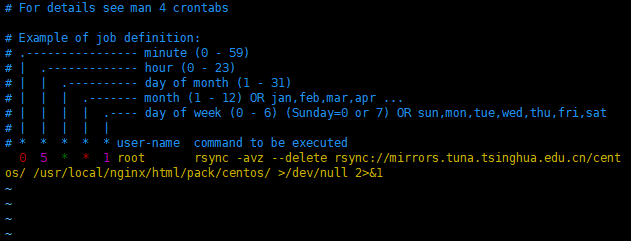
同步完成后需要更新仓库
createrepo --update /usr/local/nginx/html/pack/centos//os/x86_64/

createrepo --update /usr/local/nginx/html/pack/centos//extras/x86_64/

createrepo --update /usr/local/nginx/html/pack/centos//updates/x86_64/

createrepo --update /usr/local/nginx/html/pack/centos//centosplus/x86_64/

createrepo --update /usr/local/nginx/html/pack/centos//os/x86_64/

createrepo --update /usr/local/nginx/html/pack/centos//extras/x86_64/

createrepo --update /usr/local/nginx/html/pack/centos//updates/x86_64/

createrepo --update /usr/local/nginx/html/pack/centos//centosplus/x86_64/
8、客户端配置
mv /etc/yum.repos.d/CentOS-Base.repo /etc/yum.repos.d/CentOS-Base.repo.bak
cat >> /etc/yum.repos.d/CentOS-Base.repo << eof

[base]

name=CentOS-$releasever - Base

baseurl=http://mirrors.yryun.com/centos/$releasever/os/$basearch/

enabled=

gpgcheck=

#released updates

[updates]

name=CentOS-$releasever - Updates

baseurl=http://mirrors.yryun.com/centos/$releasever/updates/$basearch/

enabled=

gpgcheck=

#additional packages that may be useful

[extras]

name=CentOS-$releasever - Extras

baseurl=http://mirrors.yryun.com/centos/$releasever/extras/$basearch/

enabled=

gpgcheck=

#additional packages that extend functionality of existing packages

[centosplus]

name=CentOS-$releasever - Plus

baseurl=http://mirrors.yryun.com/centos/$releasever/centosplus/$basearch/

enabled=

gpgcheck=

eof
#清除所有缓存
yum clean all
#建立缓存
yum makecache
#查看yum源列表
yum repolist
#当yum服务器内容修改了之后或者修改了yum源文件,客户机需要重新建立缓存
#baseurl指向仓库(repodata)所在的目录
基于nginx搭建yum源服务器的更多相关文章
- 基于http方式搭建YUM源服务器
基于http方式搭建YUM源服务器 (2012-09-21 11:59:14) 转载▼ 标签: yum linux lnmp lamp http 分类: Linux 为了方便公司80多台Linux服务 ...
- CentOS6下基于Nginx搭建mp4/flv流媒体服务器
CentOS6下基于Nginx搭建mp4/flv流媒体服务器(可随意拖动)并支持RTMP/HLS协议(含转码工具) 1.先添加几个RPM下载源 1.1)安装RPMforge的CentOS6源 [roo ...
- FTP搭建YUM源服务器
一.FTP搭建YUM源服务器 1.服务器 挂载centos镜像[root@localhost ~]#yum install vsftpd[root@localhost ~]#systemctl sta ...
- Ubuntu 14.10下基于Nginx搭建mp4/flv流媒体服务器(可随意拖动)并支持RTMP/HLS协议(含转码工具)
Ubuntu 14.10下基于Nginx搭建mp4/flv流媒体服务器(可随意拖动)并支持RTMP/HLS协议(含转码工具) 最近因为项目关系,收朋友之托,想制作秀场网站,但是因为之前一直没有涉及到这 ...
- windows环境下基于nginx搭建rtmp服务器
基于nginx搭建rtmp服务器需要引入rtmp模块,引入之后需重新编译nginx linux环境几个命令行就能实现编译,笔者未尝试,网上有很多教程. windows环境还需要安装一系列的编译环境,例 ...
- 基于nginx搭建简易的基于wcf集群的复杂均衡
很多情况下基于wcf的复杂均衡都首选zookeeper,这样可以拥有更好的控制粒度,但zk对C# 不大友好,实现起来相对来说比较麻烦,实际情况下,如果 你的负载机制粒度很粗糙的话,优先使用nginx就 ...
- 在centos中搭建基于nginx的apt源服务器,整合yum源和apt源在一台服务器
1.首先关闭防护墙或者设置规则通过且关闭selinux 2.nginx-1.14.2版本(编译安装)-自定义安装路径 3.开启nginx目录浏览 以上步骤请参考前文:https://www.cnblo ...
- RedHat7搭建yum源服务器
1.新建目录 # mkdir -p /content/rhel7/x86_64/{isos,dvd}/ 2.上传RedHat安装光盘镜像,上传后的路径为 /content/rhel7/x86_64/i ...
- CentOS6.4下基于Nginx搭建mp4/flv流媒体服务器
我的步骤如下:1. 安装依赖包: yum install glibc.i686#yum –y update#yum -y install gcc glibc glibc-devel make nasm ...
随机推荐
- windows server 2012 r2打造工作站链接 和 RTSS画面防止撕裂方法(包括笔记本独显撕裂,视频撕裂等)
听说 windows server 2008 基于windows vista ,windows server 2008 R2基于win7 , windows server 2012 基于windows ...
- PLC
https://www.cnblogs.com/dathlin/p/7469679.html C#读写三菱PLC和西门子PLC数据 使用TCP/IP 协议https://blog.csdn.net/x ...
- TCP三次握手和四次挥手的全过程
三次握手: 第一次握手:客户端发送syn包(syn=x)到服务器,并进入SYN_SEND状态,等待服务器确认:第二次握手:服务器收到syn包,必须确认客户的SYN(ack=x+1),同时自己也发送一个 ...
- linux 下搭建php环境
linux 下搭建php环境 1.下载apache (http://httpd.apache.org/download.cgi) 下载php组件 ( http://cn2.php.net/get/ph ...
- android客户端向服务器发送请求中文乱码的问
android客户端向服务器发送请求的时候,并将参数保存到数据库时遇到了中文乱码的问题: 解决方法: url = "http://xxxx.com/Orders/saveorder.html ...
- 搞懂Redis到底快在哪里
前言 Redis是一种基于键值对(Key-Value)的NoSQL数据库,Redis的Value可以由String,hash,list,set,zset,Bitmaps,HyperLogLog等多种数 ...
- stream,file,filestream,memorystream简单的整理
一.Stream 什么是stream?(https://www.cnblogs.com/JimmyZheng/archive/2012/03/17/2402814.html#no8) 定义:提供字节序 ...
- AJAX发送PUT请求引发的血案
如果直接发送ajax=put形式的请求 是拿不到请求体中的数据的. Tomcat: 1.将请求体中的数据,封装一个map ...
- npm --save-dev --save 的区别
我们在使用npm install 安装模块或插件的时候,有两种命令把他们写入到 package.json 文件里面去,比如: --save-dev(-D) --save(-S) 在 package.j ...
- 20190421-那些年使用过的CSS预处理器(CSS Preprocessor)之Sass and Less
写在前面乱七八糟的前言: emmm,还是决定把Sass与Less单独出来写成一篇,可能会稍微好辣么一丢丢?TAT语法特性是真的香,通篇下来能吸收个10%自我感觉已经很nice了,毕竟渣渣的我有渣渣的自 ...