
Android:触屏事件
Android触屏事件包含两种:
1)屏幕触屏事件:重写onTouchEvent(MotionEvent event);
2)控件触屏事件:给控件注册触屏事件,setOnTouchEventListener(...)。
屏幕触屏事件
效果:
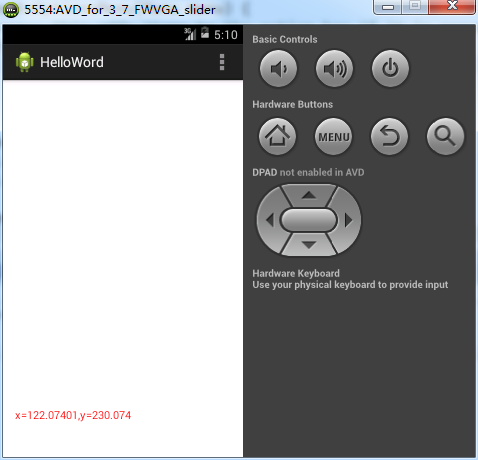
代码:
res/values/colors.xml
<?xml version="1.0" encoding="utf-8"?>

<resources>

    <color name="red">#FF0000</color>

</resources>
res/layout/activity_main.xml
<RelativeLayout xmlns:android="http://schemas.android.com/apk/res/android"

    xmlns:tools="http://schemas.android.com/tools"

    android:layout_width="match_parent"

    android:layout_height="match_parent"

    android:paddingBottom="@dimen/activity_vertical_margin"

    android:paddingLeft="@dimen/activity_horizontal_margin"

    android:paddingRight="@dimen/activity_horizontal_margin"

    android:paddingTop="@dimen/activity_vertical_margin"

    tools:context=".MainActivity" >

    <TextView

        android:id="@+id/tvPosition"

        android:layout_width="match_parent"

        android:layout_height="wrap_content"

        android:layout_alignParentBottom="true"

        android:layout_centerHorizontal="true"

        android:layout_marginBottom="30dp"

        android:textColor="@color/red" />

</RelativeLayout>
MainActivity.java
package com.example.helloword;

import android.app.Activity;

import android.app.AlertDialog;

import android.content.DialogInterface;

import android.content.DialogInterface.OnClickListener;

import android.os.Bundle;

import android.util.Log;

import android.view.KeyEvent;

import android.view.Menu;

import android.view.MotionEvent;

import android.widget.TextView;

public class MainActivity extends Activity {

    private TextView tvPosition;

    @Override

    protected void onCreate(Bundle savedInstanceState) {

        super.onCreate(savedInstanceState);

        setContentView(R.layout.activity_main);

        this.tvPosition = (TextView) this.findViewById(R.id.tvPosition);

    }

    @Override

    public boolean onCreateOptionsMenu(Menu menu) {

        // Inflate the menu; this adds items to the action bar if it is present.

        getMenuInflater().inflate(R.menu.main, menu);

        return true;

    }

    @Override

    public boolean onTouchEvent(MotionEvent event) {

        float x = event.getX();

        float y = event.getY();

        switch (event.getAction()) {

        case MotionEvent.ACTION_DOWN:

            Log.i("Test", "fired onTouchEvent: DOWN. x=" + x + ",y=" + y);

            break;

        case MotionEvent.ACTION_MOVE:

            Log.i("Test", "fired onTouchEvent: MOVE. x=" + x + ",y=" + y);

            this.tvPosition.setText("x=" + x + ",y=" + y);

            break;

        case MotionEvent.ACTION_UP:

            Log.i("Test", "fired onTouchEvent: UP. x=" + x + ",y=" + y);

            break;

        }

        // 默认:返回值为false,表示该事件还未触发完成,将继续向上执行。

        return super.onTouchEvent(event);

    }

    @Override

    public boolean onKeyUp(int keyCode, KeyEvent event) {

        // 当点击回退时,弹出该窗口(也就相当于关闭操作)

        if (keyCode == KeyEvent.KEYCODE_BACK) {

            new AlertDialog.Builder(this).setTitle("是否退出?")

                    .setPositiveButton("确定", new OnClickListener() {

                        @Override

                        public void onClick(DialogInterface arg0, int arg1) {

                            finish();

                        }

                    }).setNegativeButton("取消", null).show();

            return true;

        }

        return super.onKeyUp(keyCode, event);

    }

}
备注:
1)监听触屏事件包含三个Action:Up/Down/Move;
2)默认覆盖屏幕事件返回值为false,表示该事件还未结束,将会继续向上触发。
控件触屏事件
1)只有在注册了setOnTouchEventListener事件的空间上触发事件时,才能响应触屏事件;
2)效果:
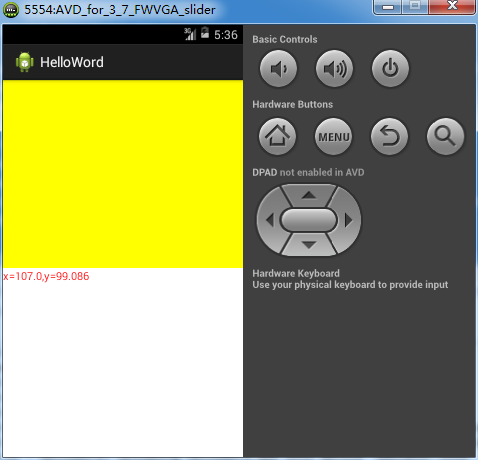
3)代码:
res/values/colors.xml
<?xml version="1.0" encoding="utf-8"?>

<resources>

    <color name="red">#FF0000</color>

    <color name="yellow">#FFFF00</color>

</resources>
res/layout/activity_viewcontrollerontouchevent.xml
<?xml version="1.0" encoding="utf-8"?>

<LinearLayout xmlns:android="http://schemas.android.com/apk/res/android"

    android:layout_width="match_parent"

    android:layout_height="match_parent"

    android:orientation="vertical" >

    <View

        android:id="@+id/vTouchPanel"

        android:layout_width="wrap_content"

        android:layout_height="250dp"

        android:background="@color/yellow" />

    <TextView

        android:id="@+id/textViewPosition"

        android:layout_width="match_parent"

        android:layout_height="wrap_content"

        android:textColor="@color/red" />

</LinearLayout>
/AndroidManifest.xml,将首页activity_main.xml修改为activity_viewcontrollerontouchevent.xml
<?xml version="1.0" encoding="utf-8"?>

<manifest xmlns:android="http://schemas.android.com/apk/res/android"

    package="com.example.helloword"

    android:versionCode="1"

    android:versionName="1.0" >

    <uses-sdk

        android:minSdkVersion="8"

        android:targetSdkVersion="18" />

    <application

        android:allowBackup="true"

        android:icon="@drawable/ic_launcher"

        android:label="@string/app_name"

        android:theme="@style/AppTheme" >

        <activity

            android:name="com.example.helloword.ViewControllerOnTouchEventActivity"

            android:label="@string/app_name" >

            <intent-filter>

                <action android:name="android.intent.action.MAIN" />

                <category android:name="android.intent.category.LAUNCHER" />

            </intent-filter>

        </activity>

    </application>

</manifest>
ViewControllerOnTouchEventActivity.java
 package com.example.helloword;

 import android.app.Activity;

 import android.os.Bundle;

 import android.view.MotionEvent;

 import android.view.View;

 import android.widget.TextView;

 public class ViewControllerOnTouchEventActivity extends Activity {

     private TextView textViewPosition;

     private View vTouchPanel;

     @Override

     protected void onCreate(Bundle savedInstanceState) {

         super.onCreate(savedInstanceState);

         setContentView(R.layout.activity_viewcontrollerontouchevent);

         this.textViewPosition = (TextView) this

                 .findViewById(R.id.textViewPosition);

         this.vTouchPanel = this.findViewById(R.id.vTouchPanel);

         this.vTouchPanel.setOnTouchListener(new View.OnTouchListener() {

             @Override

             public boolean onTouch(View view, MotionEvent motionEvent) {

                 if (motionEvent.getAction() == MotionEvent.ACTION_MOVE) {

                     textViewPosition.setText("x=" + motionEvent.getX() + ",y="

                             + motionEvent.getY());

                 }

                 // 离开该空间范围就完成事件,不再向上触发。

                 return true;

             }

         });

     }

 }
Android:触屏事件的更多相关文章
- 转:Android随笔之——使用Root权限实现后台模拟全局按键、触屏事件方法(类似按键精灵)
本文转载自CSDN的jzj1993,原文连接:http://blog.csdn.net/jzj1993/article/details/39158865 有时我们需要使用安卓实现在后台模拟系统按键,比 ...
- (转)js的左右滑动触屏事件
原文:http://blog.sina.com.cn/s/blog_6a0a183f0100zsfk.html (2012-01-20 08:55:53) 转载▼ 标签: 移动设备 触屏事件 杂谈 分 ...
- Android: 触屏fling/scroll/drag的区别及其详细过程
Google了一下,终于搞清了touch screen下的几种操作模式(对应的是事件). 对于一个view, 常用的操作有点击(click)和长按(long press)二种.实际上,这些操作类型是A ...
- js触屏事件
js的左右滑动触屏事件,主要有三个事件:touchstart,touchmove,touchend.这三个事件最重要的属性是 pageX和 pageY,表示X,Y坐标. touchstart在触摸开始 ...
- 移动端touch触屏滑动事件、滑动触屏事件监听!
一.触摸事件 ontouchstart.ontouchmove.ontouchend.ontouchcancel 目前移动端浏览器均支持这4个触摸事件,包括IE.由于触屏也支持MouseEvent,因 ...
- HTML5学习总结-09 拖放和手机触屏事件
一 拖放 拖放(Drag 和 drop)是 HTML5 标准的组成部分.拖放是一种常见的特性,即抓取对象以后拖到另一个位置.在 HTML5 中,拖放是标准的一部分,任何元素都能够拖放. 课程参考 ht ...
- [IOS]自定义长触屏事件
写一个Demo来自定义一个长触屏事件,自定义长按手势. 实现步骤: 1.创建一个自定义手势类,命名为LongPressGestureRecognizer,在创建的时候继承UIGestureRecogn ...
- cocos2d-x触屏事件(单点触屏)
转自:http://blog.csdn.net/onerain88/article/details/7550009 一般经常用到的触屏的情况有两种:一种是Layer统一接收触屏消息,然后由程序根据需要 ...
- 从零开始学 Web 之 移动Web(二)JD移动端网页,移动触屏事件
大家好,这里是「 从零开始学 Web 系列教程 」,并在下列地址同步更新...... github:https://github.com/Daotin/Web 微信公众号:Web前端之巅 博客园:ht ...
随机推荐
- iTerm2设置及使用
1. 安装 iTerm2 下载地址:https://www.iterm2.com/downloads.html 下载的是压缩文件,解压后是执行程序文件,你可以直接双击,或者直接将它拖到 Applica ...
- 关于embed的一些使用兼容
因公司需求,要做一个扫描语音播报的功能,所以用到一些音频/视频标签 考虑到 <embed> 标签对于ie的兼容性更好一些所以,我在这采用了 <embed> 标签 ...
- 初识mango DB
换工作了,第一次接触到mango数据库,有点云里雾里,整理一篇最基本的增删该查语句 百度百科说mango DB是一个基于分布式文件存储的数据库.由C++语言编写.旨在为WEB应用提供可扩展的高性能数据 ...
- 纯CSS制作网页图标
三角形 <div class="box"></div> <style>.box{ width: 0; height: 0; border-top ...
- Java多线程:线程池
一. 背景 线程是稀缺资源,如果无限制的创建,不仅会消耗系统资源,还会降低系统的稳定性,合理的使用线程池可以对线程进行统一的分配.调优和监控,并有以下好处: 第一:降低资源消耗.通过重复利用已 ...
- [poj-2985]The k-th Largest Group_Treap+并查集
The k-th Largest Group poj-2985 题目大意:给你n只猫,有两种操作:1.将两只猫所在的小组合并.2.查询小组数第k大的小组的猫数. 注释:1<=n,m<=20 ...
- djangoueditor 集成xadmin
1.安装Python3兼容版本 https://github.com/twz915/DjangoUeditor3/ 2.model加入字段 from DjangoUeditor.models impo ...
- Oracle查询用户权限
Oracle查询用户权限 -- 确定角色的权限select * from role_tab_privs ; 包含了授予角色的对象权限select * from role_ro ...
- mongodb 数据备份与恢复
备份 语法 mongodump -h dbhost -d dbname -o dbdirectory -h:服务器地址,也可以指定端口号 -d:需要备份的数据库名称 -o:备份的数据存放位置,此目录中 ...
- Python习题(第一课)
想了想其他的太简单了,还是不放了,剩三题吧. 一.完美立方 编写一个程序,对任给的正整数N (N≤100),寻找所有的四元组(a, b, c, d),使得a^3= b^3 + c^3 + d^3,其中 ...