
Linux学习之CentOS(五)--CentOS下VMware-Tools安装
已经进入到了Linux学习之CentOS的第六篇随笔了,所以这里就介绍一下VMware-Tools的安装。
VMware-Tools的安装
VMware-Tools 主要的功能就是让用户在虚拟机和真实系统之间实现无缝切换,这个功能很方便。当然VMware-Tools最主要是实现linux和windows的文件共享。在上一篇随笔中已经写到,在虚拟机的Linux系统中,如果需要将windows上的一些文件上传至Linux系统中,通常有三种方法,①安装VMware-Tools②将文件制作成ISO文件,然后挂载到Linux系统上③通过共享文件夹的方式(这个需要先安装VMware-Tools,否则无法实现)。若虚拟机中安装的是windows操作系统,安装就非常简单,直接双击点击安装即可。如图:
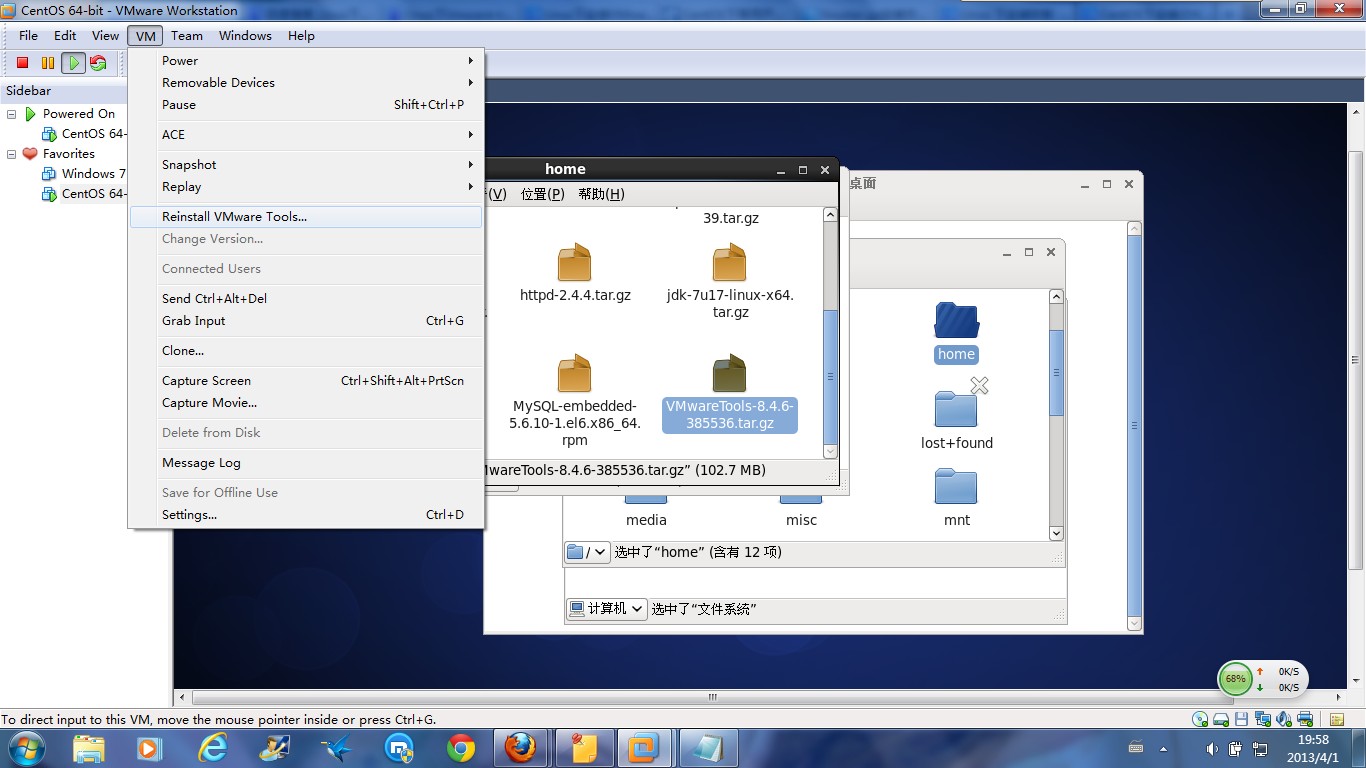
直接选择上方的VM -> Install VMware Tools(因为虚拟机启动了CentOS,并且已经安装好了VMware Tools,所以图片显示的可能和你们安装时不一样)
在Linux系统中,当启动完Linux系统以后,VM虚拟机的下方会弹出一个提醒框,提示用户是否需要在虚拟的Linux系统上安装VMware-Tools。此时我们可以选择OK,如果没有出现提示,则按照上图提示,自己手动选择安装即可。
此时,我们会发现Linux的桌面上加载了一个虚拟的光驱,打开以后里面就是我们需要安装的VMware-Tools版本软件,我的是(VMwareTools-8.4.6-385536.tar.gz)通过cp命令将该文件复制到/home目录下,然后输入一下命令:
[root@qdy ~]# mount /dev/cdrom /mnt/cdrom  # 加载光驱

[root@qdy ~]# cd /mnt/cdrom #进入光驱

[root@qdy cdrom]# ll

总用量 60608

-r--r--r--. 1 root root     1989 6月   7 2011 manifest.txt

-r--r--r--. 1 root root 62059831 6月   7 2011 VMwareTools-8.6.0-425873.tar.gz

[root@qdy cdrom]# cp VMwareTools-8.6.0-425873.tar.gz /home/xiaoming #复制文件至 home/xiaoming 目录下

[root@qdy cdrom]#
[root@xiaoluo /]#  tar -zxvf /home/VMwareTools-8.4.6-385536.tar.gz  #解压到当前目录
// 这个命令就是linux系统的解压缩命令,大部分软件在linux系统中是以.tar.gz、.bin、.rpm结尾的,对以.tar.gz格式文件我们只需用tar -zxvf命令对其解压即可
解压以后我们可以在 /home 目录下面发现一个文件夹 vmware-tools-distrib ,这个就是我们通过以上那个命令解压以后的文件夹。

[root@xiaoluo /]# cd /home/vmware-tools-distrib/    // 进入到刚解压的VMware-Tools文件夹下

[root@xiaoluo vmware-tools-distrib]# ls -l

总用量 568

drwxr-xr-x.  2 root root   4096 3月  26 2011 bin

drwxr-xr-x.  2 root root   4096 3月  26 2011 doc

drwxr-xr-x.  3 root root   4096 3月  26 2011 etc

-r--r--r--.  1 root root 557757 3月  26 2011 FILES

lrwxrwxrwx.  1 root root     13 3月  31 21:20 INSTALL -> ./doc/INSTALL

drwxr-xr-x.  2 root root   4096 3月  26 2011 installer

drwxr-xr-x. 17 root root   4096 3月  26 2011 lib

lrwxrwxrwx.  1 root root     31 3月  31 21:20 vmware-install.pl -> ./bin/vmware-uninstall-tools.pl  // 我们需要执行的文件
然后我们输入:
[root@xiaoluo vmware-tools-distrib]# ./vmware-install.pl // 安装vm-tools (在linux系统中,【./】命令就是安装、执行软件)
这样我们就进入到了vm-tools安装界面,此时界面会出现一大堆的文件安装代码,我们只需要一直按着 enter 键即可。
下面的选项就按照默认值。一直回车就可以:

In which directory do you want to install the binary files?

[/usr/bin]

What is the directory that contains the init directories (rc0.d/ to rc6.d/)?

[/etc/rc.d]

What is the directory that contains the init scripts?

[/etc/rc.d/init.d]

In which directory do you want to install the daemon files?

[/usr/sbin]

In which directory do you want to install the library files?

[/usr/lib/vmware-tools]

The path “/usr/lib/vmware-tools” does not exist currently. This program is goingto create it, including needed parent directories. Is this what you want?

[yes]

In which directory do you want to install the documentation files?

[/usr/share/doc/vmware-tools]

The path “/usr/share/doc/vmware-tools” does not exist currently. This program isgoing to create it, including needed parent directories. Is this what you want?

[yes]

The installation of VMware Tools 5.5.1 build-19175 for Linux completed

successfully. You can decide to remove this software from your system at any

time by invoking the following command: “/usr/bin/vmware-uninstall-tools.pl”.

Before running VMware Tools for the first time, you need to configure it by

invoking the following command: “/usr/bin/vmware-config-tools.pl”. Do you want

this program to invoke the command for you now? [yes]

Stopping VMware Tools services in the virtual machine:

Guest operating system daemon: [ 确定 ]

Trying to find a suitable vmhgfs module for your running kernel.

The module bld-2.6.9-5.EL-i686-RHEL4 loads perfectly in the running kernel.

pcnet32 30153 0

Unloading pcnet32 module

Trying to find a suitable vmxnet module for your running kernel.

The module bld-2.6.9-5.EL-i686-RHEL4 loads perfectly in the running kernel.

Detected X.org version 6.8.

关闭控制台鼠标服务: [ 确定 ]

启动控制台鼠标服务: [ 确定 ]

Please choose one of the following display sizes (1 – 13):

# 显示分辨率,这里是以 1024×768 为例

# VMware Tools 安装的时候,会自动修改 X server 的配置文件

[1] ”640×480″

[2]< “800×600″

[3] ”1024×768″

[4] ”1152×864″

[5] ”1280×800″

[6] ”1152×900″

[7] ”1280×1024″

[8] ”1376×1032″

[9] ”1400×1050″

[10] ”1680×1050″

[11] ”1600×1200″

[12] ”1920×1200″

[13] ”2364×1773″

Please enter a number between 1 and 13:

[2] 3

X Window System Version 6.8.2

Release Date: 9 February 2005

X Protocol Version 11, Revision 0, Release 6.8.2

Build Operating System: Linux 2.6.9-34.EL i686 [ELF]

Current Operating System: Linux rd01.domain 2.6.9-34.EL #1 Wed Mar 8 00:07:35 CST 2006 i686

Build Date: 04 May 2006

Build Host: x8664-build.centos.org

Before reporting problems, check [url]http://wiki.X.Org[/url]

to make sure that you have the latest version.

Module Loader present

OS Kernel: Linux version 2.6.9-34.EL (buildcentos@build-i386) (gcc version 3.4.5 20051201 (Red Hat 3.4.5-2)) #1 Wed Mar 8 00:07:35 CST 2006 P

Markers: (–) probed, (**) from config file, (==) default setting,

(++) from command line, (!!) notice, (II) informational,

(WW) warning, (EE) error, (NI) not implemented, (??) unknown.

(++) Log file: “/tmp/vmware-config0/XF86ConfigLog.3131″, Time: Mon Jun 12 20:57:34 2006

(++) Using config file: “/tmp/vmware-config0/XF86Config.3131″

(WW) VMWARE(0): Failed to set up write-combining range (0xf0000000,0×1000000)

X is running fine with the new config file.

Starting VMware Tools services in the virtual machine:

Switching to guest configuration: [ 确定   ]

Guest filesystem driver:             [ 确定   ]

DMA setup:                        [ 确定   ]

Guest operating system daemon:                         [ 确定   ]

The configuration of VMware Tools 5.5.1 build-19175 for Linux for this running

kernel completed successfully.

You must restart your X session before any mouse or graphics changes take

effect.

You can now run VMware Tools by invoking the following command:

“/usr/bin/vmware-toolbox” during an XFree86 session.

To use the vmxnet driver, restart networking using the following commands:

/etc/init.d/network stop

rmmod pcnet32

rmmod vmxnet

depmod -a

modprobe vmxnet

/etc/init.d/network start

Enjoy,

–the VMware team
最后,VMware-Tools安装成功了,咱们重启一下Linux系统,会发现VMware-Tools已经安装成功了,此时不但可以直接在windows界面将需要的文件或者文件夹直接复制到虚拟机的Linux系统中,而且可以通过文件共享来与windows系统建立无缝衔接:

至此,在Linux系统上安装VMware-Tools就成功告一段落了!!!!!
Linux学习之CentOS(五)--CentOS下VMware-Tools安装的更多相关文章
- CentOS 6.3下源码安装LAMP(Linux+Apache+Mysql+Php)环境【转载】
本文转载自 园友David_Tang的博客,如有侵权请联系本人及时删除,原文地址: http://www.cnblogs.com/mchina/archive/2012/11/28/2778779.h ...
- CentOS 7.0下使用yum安装MySQL
CentOS7默认数据库是mariadb,配置等用着不习惯,因此决定改成mysql,但是CentOS7的yum源中默认好像是没有mysql的.为了解决这个问题,我们要先下载mysql的repo源. 1 ...
- CentOS 6.5 下HeartBeat的安装与配置
CentOS 6.5 下HeartBeat的安装与配置 参考网站: http://wenku.baidu.com/link?url=BvqJatdx1m12PLil-7YA1zkM0yUOEO8OnN ...
- CentOS 6.7下配置 yum 安装 Nginx
CentOS 6.7下配置 yum 安装 Nginx. 转载:http://www.linuxidc.com/Linux/2016-07/133283.htm 第一步,在/etc/yum.repos. ...
- VMware,win7与linux centos6.4文件互传,linux下挂载windows共享文件夹,vmware tools安装方法
本方法是以win7,VMware9.0.1 ,centos6.4为基础实验的. 对于linux的初级使用阶段,都会Windows中使用linux虚拟机VMWare或者其它的.在Windows与linu ...
- Linux从入门到放弃、零基础入门Linux(第三篇):在虚拟机vmware中安装linux(二)超详细手把手教你安装centos6分步图解
一.继续在vmware中安装centos6.9 本次安装是进行最小化安装,即没有图形化界面的安装,如果是新手,建议安装带图形化界面的centos, 具体参考Linux从入门到放弃.零基础入门Linux ...
- Linux VMware tools安装步骤
Linux VMware tools安装步骤: 1.安装环境介绍 #虚拟机版本:VMware-workstation-full-10 #linux分发版本:CentOS-6.4-i386-LiveCD ...
- VMware里Ubuntukylin-14.04-desktop的VMware Tools安装图文详解
不多说,直接上干货! 总的来说,根据分为三个步骤. 步骤一: 点击 :虚拟机—–>安装VM tools 然后发现桌面会跳出如下问题: 客户机操作系统已将 CD-ROM 门锁定,并且可能正在使用 ...
- VMware Tools安装教程
安装依赖: sudo yum install eject 步骤: 确保 Linux 虚拟机已打开电源. 如果正在运行 GUI 界面,请打开命令 shell. 注意:以 root 用户身份登录,或使用 ...
随机推荐
- 爬虫小探-Python3 urllib.request获取页面数据
使用Python3 urllib.request中的Requests()和urlopen()方法获取页面源码,并用re正则进行正则匹配查找需要的数据. #forex.py#coding:utf-8 ' ...
- 深度学习之 seq2seq 进行 英文到法文的翻译
深度学习之 seq2seq 进行 英文到法文的翻译 import os import torch import random source_path = "data/small_vocab_ ...
- istio入门(05)istio的架构概念2
- Groovy入门(2-2)Groovy的eclipse插件安装
1.安装eclipse插件 启动eclipse,点击help -> Install New Software... 在弹出的窗口中点击:Add... Groovy插件的地址:http://dis ...
- maven入门(8)maven的依赖管理
我们项目中用到的jar包可以通过依赖的方式引入,构建项目的时候从Maven仓库下载即可. 1. 依赖配置 依赖可以声明如下: <project> ... <dependenci ...
- 2.x与3.x差异、条件语句、数据类型、其他
一.输入(raw_input)=====>python2.x版本 #!/usr/bin/env python # -*- coding: utf-8 -*- # 将用户输入的内容赋值给 name ...
- SpringBoot 分布式session
SpringBoot 分布式session实现 1. 什么是分布式session 在集群环境中,不得不考虑的一个问题是用户访问产生的session如何处理.如过不做任何处理,用户将出现频繁俸禄的现象, ...
- CSS属性操作
CSS属性操作 1 属性选择器 Elenment(元素) E[att] 匹配所有具有att属性的E元素,不考虑它的值.(注意:E在此处可以省略)(推荐使用) 例如:[po]{ font-size: 5 ...
- Java-Maven(二):Maven常用命令
Maven命令简介 Maven提供了一套命令可以用来创建java工程.编译.打包等操作.通过这些命令来处理工作变得更方便.简洁. Maven工程结构和内容被定义在pom.xml文件中,全称projec ...
- POJ-2421 Constructing Roads---确定部分边的MST
题目链接: https://vjudge.net/problem/POJ-2421 题目大意: 还是给你n个点,然后求最小生成树.特殊之处在于有一些点之间已经连上了边. 思路: 和POJ-1751一样 ...