
android Window(一)从setConetView说起
Activity的源码
首先从setContentView这里调用的mWindow的 setConetView()
private Window mWindow;

public void setContentView(View view) {

        getWindow().setContentView(view);

        initWindowDecorActionBar();

    }

public Window getWindow() {

    return mWindow;

}
那么这mWindow什么时候初始化?
final void attach(...) {

        attachBaseContext(context);

        mFragments.attachHost(null /*parent*/);

        mWindow = new PhoneWindow(this, window, activityConfigCallback);

        mWindow.setWindowControllerCallback(this);

        mWindow.setCallback(this);

        mWindow.setOnWindowDismissedCallback(this);

        mWindow.getLayoutInflater().setPrivateFactory(this);

        if (info.softInputMode != WindowManager.LayoutParams.SOFT_INPUT_STATE_UNSPECIFIED) {

            mWindow.setSoftInputMode(info.softInputMode);

        }

        if (info.uiOptions != 0) {

            mWindow.setUiOptions(info.uiOptions);

        }

        //...

        //给window设置windowManger

        mWindow.setWindowManager(

           (WindowManager)context.getSystemService(Context.WINDOW_SERVICE),

                mToken, mComponent.flattenToString(),

                (info.flags & ActivityInfo.FLAG_HARDWARE_ACCELERATED) != 0);

        if (mParent != null) {

            mWindow.setContainer(mParent.getWindow());

        }

        mWindowManager = mWindow.getWindowManager();

        mCurrentConfig = config;

        mWindow.setColorMode(info.colorMode);

    }
可以看到这个mWindow 其实是一个PhoneWindow的实例,那么phoneWindow干了什么
可以查看PhoneWindow的源码
152    // This is the view in which the window contents are placed. It is either

153    // mDecor itself, or a child of mDecor where the contents go.

154    private ViewGroup mContentParent;

390    @Override

391    public void setContentView(View view, ViewGroup.LayoutParams params) {

392        // Note: FEATURE_CONTENT_TRANSITIONS may be set in the process of installing the window

393        // decor, when theme attributes and the like are crystalized. Do not check the feature

394        // before this happens.

395        if (mContentParent == null) {

396            installDecor();

397        } else if (!hasFeature(FEATURE_CONTENT_TRANSITIONS)) {

398            mContentParent.removeAllViews();

399        }

400

401        if (hasFeature(FEATURE_CONTENT_TRANSITIONS)) {

402            view.setLayoutParams(params);

403            final Scene newScene = new Scene(mContentParent, view);

404            transitionTo(newScene);

405        } else {

406            mContentParent.addView(view, params);

407        }

408        final Callback cb = getCallback();

409        if (cb != null && !isDestroyed()) {

410            cb.onContentChanged();

411        }

412    }
这里setContentView 主要是 先判断mContentParent是否初始化如果没有初始化调用installDecor 。然后将view添加到mContentParent的ViewGroup中
那么 installDecor 做了些什么
        private DecorView mDecor;

3551    private void installDecor() {

3552        if (mDecor == null) {

3553            mDecor = generateDecor();

3554            mDecor.setDescendantFocusability(ViewGroup.FOCUS_AFTER_DESCENDANTS);

3555            mDecor.setIsRootNamespace(true);

3556            if (!mInvalidatePanelMenuPosted && mInvalidatePanelMenuFeatures != 0) {

3557                mDecor.postOnAnimation(mInvalidatePanelMenuRunnable);

3558            }

3559        }

3560        if (mContentParent == null) {

3561            mContentParent = generateLayout(mDecor);

3562

3563            // Set up decor part of UI to ignore fitsSystemWindows if appropriate.

3564            mDecor.makeOptionalFitsSystemWindows();

3565

3566            final DecorContentParent decorContentParent = (DecorContentParent) mDecor.findViewById(

3567                    R.id.decor_content_parent);

3568

3569            if (decorContentParent != null) {

3570                mDecorContentParent = decorContentParent;

3571                mDecorContentParent.setWindowCallback(getCallback());

3572                if (mDecorContentParent.getTitle() == null) {

3573                    mDecorContentParent.setWindowTitle(mTitle);

3574                }

3575

3576                final int localFeatures = getLocalFeatures();

3577                for (int i = 0; i < FEATURE_MAX; i++) {

3578                    if ((localFeatures & (1 << i)) != 0) {

3579                        mDecorContentParent.initFeature(i);

3580                    }

3581                }

3582

3583                mDecorContentParent.setUiOptions(mUiOptions);

3584

            //setIcon,setLogo ...

3608            } else {

            //setTitle ...3627

             }

             //...

             }

3686    }
installDecor 主要干两件事情
- 如果mDecor没有初始化generateDecor()初始化
- 如果mContentParent 没有初始化generateLayout()初始化
generateDecor 就是返回一个新的DecorView
3199    protected DecorView generateDecor() {

3200        return new DecorView(getContext(), -1);

3201    }
这里实例化了DecorView,而DecorView则是PhoneWindow类的一个内部类,继承于FrameLayout,由此可知它也是一个ViewGroup。
那么DecroView到底充当了什么样的角色呢?
其实,DecorView是整个ViewTree的最顶层View,它是一个FrameLayout布局,代表了整个应用的界面。在该布局下面,有标题view和内容view这两个子元素,而内容view则是上面提到的mContentParent

DecorView
 private final class DecorView extends FrameLayout implements RootViewSurfaceTaker{

//...

}
generateLayout()给activity的根布设置各种属性
protected ViewGroup generateLayout(DecorView decor) {

        // Apply data from current theme.

        // 从主题文件中获取样式信息

        TypedArray a = getWindowStyle();

        //...

        if (a.getBoolean(R.styleable.Window_windowNoTitle, false)) {

            requestFeature(FEATURE_NO_TITLE);

        } else if (a.getBoolean(R.styleable.Window_windowActionBar, false)) {

            // Don't allow an action bar if there is no title.

            requestFeature(FEATURE_ACTION_BAR);

        }

        if(...){

            ...

        }

        // Inflate the window decor.

        // 加载窗口布局

        int layoutResource;

        int features = getLocalFeatures();

        // System.out.println("Features: 0x" + Integer.toHexString(features));

        if ((features & (1 << FEATURE_SWIPE_TO_DISMISS)) != 0) {

            layoutResource = R.layout.screen_swipe_dismiss;

        } else if(...){

            ...

        }

        View in = mLayoutInflater.inflate(layoutResource, null);    //加载layoutResource

        decor.addView(in, new ViewGroup.LayoutParams(MATCH_PARENT, MATCH_PARENT)); //往DecorView中添加子View,即mContentParent

        mContentRoot = (ViewGroup) in;

        ViewGroup contentParent = (ViewGroup)findViewById(ID_ANDROID_CONTENT); // 这里获取的就是mContentParent

        if (contentParent == null) {

            throw new RuntimeException("Window couldn't find content container view");

        }

        if ((features & (1 << FEATURE_INDETERMINATE_PROGRESS)) != 0) {

            ProgressBar progress = getCircularProgressBar(false);

            if (progress != null) {

                progress.setIndeterminate(true);

            }

        }

        if ((features & (1 << FEATURE_SWIPE_TO_DISMISS)) != 0) {

            registerSwipeCallbacks();

        }

        // Remaining setup -- of background and title -- that only applies

        // to top-level windows.

        //...

        return contentParent;

    }
根据设置的主题样式来设置DecorView的风格,比如说有没有titlebar之类的,接着为DecorView添加子View,而这里的子View则是上面提到的mContentParent,如果上面设置了FEATURE_NO_ACTIONBAR,那么DecorView就只有mContentParent一个子View,所以mContentParent是DecorView本身或者是DecorView的一个子元素。
用一幅图来表示DecorView的结构如下:
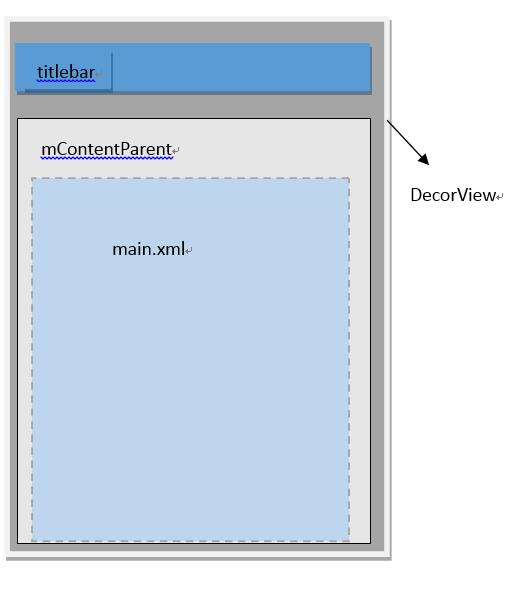
小结:DecorView是顶级View,内部有titlebar和contentParent两个子元素,contentParent的id是content,而我们设置的main.xml布局则是contentParent里面的一个子元素。
setConetViewz就是把view 添加到顶层的DecorView里面的contentParent里面
将DecorView添加至Window
每一个Activity组件都有一个关联的Window对象,用来描述一个应用程序窗口。每一个应用程序窗口内部又包含有一个View对象,用来描述应用程序窗口的视图。上文分析了创建DecorView的过程,现在则要把DecorView添加到Window对象中。而要了解这个过程,我们首先要简单先了解一下Activity的创建过程:
首先,在ActivityThread#handleLaunchActivity中启动Activity,在这里面会调用到Activity#onCreate方法,从而完成上面所述的DecorView创建动作,当onCreate()方法执行完毕,在handleLaunchActivity方法会继续调用到ActivityThread#handleResumeActivity方法,我们看看这个方法的源码:
final void handleResumeActivity(IBinder token, boolean clearHide, boolean isForward) {

    //...

    ActivityClientRecord r = performResumeActivity(token, clearHide); // 这里会调用到onResume()方法

    if (r != null) {

        final Activity a = r.activity;

        //...

        if (r.window == null && !a.mFinished && willBeVisible) {

            r.window = r.activity.getWindow(); // 获得window对象

            View decor = r.window.getDecorView(); // 获得DecorView对象

            decor.setVisibility(View.INVISIBLE);

            ViewManager wm = a.getWindowManager(); // 获得windowManager对象

            WindowManager.LayoutParams l = r.window.getAttributes();

            a.mDecor = decor;

            l.type = WindowManager.LayoutParams.TYPE_BASE_APPLICATION;

            l.softInputMode |= forwardBit;

            if (a.mVisibleFromClient) {

                a.mWindowAdded = true;

                wm.addView(decor, l); // 调用addView方法

            }

            //...

        }

    }

}
android Window(一)从setConetView说起的更多相关文章
- Android Window 9问9答
1.简述一下window是什么?在android体系里 扮演什么角色? 答:window就是一个抽象类,他的实现类是phoneWindow.我们一般通过windowManager 来访问window. ...
- android window(二)从getSystemService到WindowManagerGlobal
在Activity调用getSystemService(WINDOW_SERVICE) 调用的是父类ContextThemeWrapper package android.view; public c ...
- android window类
Android的Window类(一) Android的GUI层并不复杂.它的复杂度类似于WGUI这类基于布局和对话框的GUI,与MFC.QT等大型框架没有可比性,甚至飞漫魏永明的MiniGUI都比它复 ...
- android window(四)WindowToken
在WindowManagerService中有两种常见的Token,WindowToken,和AppWindowToken. WindowToken http://androidxref.com/6. ...
- android window(三)lWindow添加流程
http://androidxref.com/6.0.1_r10/xref/frameworks/base/services/core/java/com/android/server/wm/Windo ...
- JS判断请求来自Android手机还是iPhone手机,根据不同的手机跳转到不同的链接。
<script type="text/javascript">var browser = {versions: function () {var u = navigat ...
- 判断iPhone/android手机
JS判断请求来自Android手机还是iPhone手机,根据不同的手机跳转到不同的链接. var browser = {versions: function () {var u = navigator ...
- 一个二维码-->网址-->iOS/Android跳转
view-source:https://dpx.shopo.com.cn/down.html lmxmn117:~ will.wei$ curl https://dpx.shopo.com.cn/do ...
- Android KITKAT 以上实现沉浸式状态栏
extends:http://www.jianshu.com/p/f8374d6267ef 代码未行,效果先上 Flyme4.2 Android4.4.4上运行效果 如何实现 在 KITKAT 之后, ...
随机推荐
- svn冲突问题详解 SVN版本冲突解决详解
svn冲突问题详解 SVN版本冲突解决详解 (摘自西西软件园,原文链接http://www.cr173.com/html/46224_1.html) 解决版本冲突的命令.在冲突解决之后,需要使用svn ...
- 数据结构_Search
问题描述 可怜的 Bibi 刚刚回到家,就发现自己的手机丢了,现在他决定回头去搜索自己的手机.现在我们假设 Bibi 的家位于一棵二叉树的根部.在 Bibi 的心中,每个节点都有一个权值 x,代表他心 ...
- 《Maven实战》笔记-9-版本管理
一.理想的发布版本,在项目构建时需要满足以下条件: 1.所有自动化测试应当全部通过: 2.项目没有配置任何快照版本的依赖: 3.项目没有任何快照版本的插件: 4.项目所包含的代码已经全部提交到版本控制 ...
- Java的post请求-----接口测试
本次主要是对登陆的接口测试post请求,希望记录在博客里面,一点一点的成长. package com.ju.Login; import java.io.BufferedReader; import j ...
- web.xml 注册中央调度器Url-pattern 要注意的地方(五)
一.url-pattern 里面不能用/* 二.最好不要写成杠,如果使用“/”,中央调度器会把静态资源拦截掉,比如图片会不显示,或者css不能用. 但,如果地址栏传参数的时候比如是/del ...
- Sublime Text PHP Mac系统环境配置
Mac系统对于PHP运行非常友好,我们只需要进行简单的配置便可以开始进行使用,本篇文章将一步一步地介绍Apache.PHP和MySQL的安装与配置,为开始进行开发铺好路 Apache 启动Apache ...
- ASP.NET MVC Razor语法及实例
1.混合HTML与Razor脚本 知识点:(1).cshtml怎样引用访问数据, (2).if for 与html嵌套 @using System.Data @using CIIC.TCP.Enti ...
- NOIp2018提高&普及游记
(这篇文章是去年写的) day0 今天上了两节课后就出发了,大概是一点左右到达了宾馆,感觉宾馆条件是相当好的,然后两点出发,两点二十左右到达了考场,看到一群julao已经守候在了大门口,比如GZYju ...
- SSH—网上商城之商品图片文件上传
前言 网上商城中的淘宝图片要显示在页面的前提是图片应该已经在数据库里面,那么怎么实现图片的上传功能呢,这就是今天要说的主题. 内容 需求: 商城后台需要添加图片文件,用来图片显示 解决方式: Stru ...
- java webservices 以Axis1.4方式 调用sap webservice接口.
1. 首先需要下载Axis1.4 jar包,这个必应搜索大把,下载下来后把jar包加入eclipse工程项目路径中即可. 2. 下载mail.jar和activation.jar 俩个包.下载地址:h ...