
python flask豆瓣微信小程序案例
项目步骤
定义首页模板index.html

<!DOCTYPE html>
<html lang="en">
<head>
    <meta charset="UTF-8">
    <title>豆瓣微信小程序</title>
    <style>
        *{
            margin: 0;
            padding: 0;
            list-style: none;
            text-decoration: none;
        }
        .container{
            width: 375px;
            height:600px;
            background: pink;
        }
    </style>
</head>
<body>
    <div class="container">

    </div>
</body>
</html>
app.py
from flask import Flask,render_template

app = Flask(__name__)
#模板改完后自动加载
app.config['TEMPLATES_AUTO_RELOAD']=True

@app.route('/')
def hello_world():
    return render_template('index.html')

if __name__ == '__main__':
    app.run()
运行效果
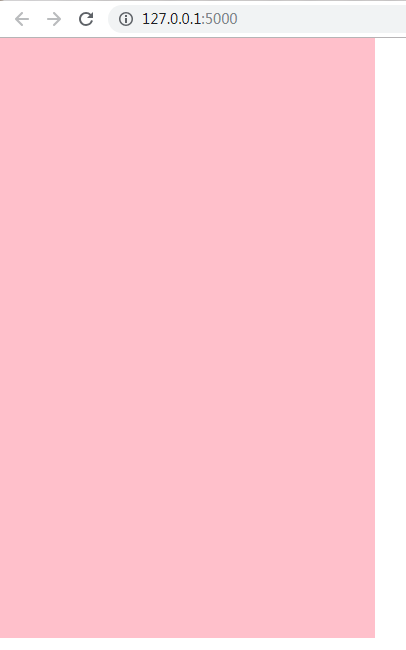
完整的一个例子
index.html
<!DOCTYPE html>
<html lang="en">
<head>
    <meta charset="UTF-8">
    <title>豆瓣微信小程序</title>
    <style>
        *{
            margin: 0;
            padding: 0;
            list-style: none;
            text-decoration: none;
        }
        .container{
            width: 375px;
            height:600px;
            background: pink;
        }
        .search-group{
            padding: 14px 8px;
            background: #41be57;
        }
        .search-group .search-input{
            display: block;
            height: 30px;
            width: 100%;
            box-sizing: border-box;
            background: #fff;
            border: none;
            outline: none;
            border-radius: 5px;
        }
        .item-list-group .item-list-top{
            overflow: hidden;
            padding: 10px;
        }
        .item-list-top .module-title{
            float: left;
        }
        .item-list-top .more-btn{
            float: right;
        }
        .list-group{
            overflow: hidden;
        }
        .list-group .item-group{
            float: left;
            margin-right: 10px;
        }
        .item-group .thumbnail{
            display: block;
            padding-left: 10px;
            width: 100px;
        }
        .item-group .item-title{
            font-size: 12px;
            text-align: center;
        }
        .item-group .item-rating{
            font-size: 12px;
            text-align: center;
        }
        .item-rating img{
            width: 10px;
            height: 10px;
        }
    </style>
</head>
<body>
    <div class="container">
        <div class="search-group">
            <input type="text" class="search-input" placeholder="搜索...">
        </div>

    <div class="item-list-group">
        <div class="item-list-top">
            <span class="module-title">电影</span>
            <a href="#" class="more-btn">更多</a>
        </div>
        <div class="list-group">
            <div class="item-group">
                <img src="https://img3.doubanio.com/view/photo/s_ratio_poster/public/p2537158013.webp" alt="" class="thumbnail">
                <p class="item-title">毒液</p>
                <p class="item-rating">
                    {% set rating=7.3 %}
                    <!--全亮星星-->
                    {% set lights=((rating|int)/2)|int %}
                    <!--半亮星星-->
                    {% set halfs=(rating|int)%2 %}
                    <!--不亮星星-->
                    {% set grays=5-lights-halfs %}
                    {% for light in range(0,lights) %}
                        <img src="{{ url_for("static",filename='images/rate_light.png') }}" alt="">
                    {% endfor %}

                    {% for half in range(0,halfs) %}
                         <img src="{{ url_for("static",filename='images/rate_half.jpg') }}" alt="">
                    {% endfor %}

                    {% for gray in range(0,grays) %}
                         <img src="{{ url_for("static",filename='images/rate_gray.png') }}" alt="">
                    {% endfor %}
                    {{ rating }}
                </p>
            </div>

          <div class="item-group">
                <img src="https://img3.doubanio.com/view/photo/s_ratio_poster/public/p2537158013.webp" alt="" class="thumbnail">
                <p class="item-title">毒液</p>
                <p class="item-rating">
                    {% set rating=7.3 %}
                    <!--全亮星星-->
                    {% set lights=((rating|int)/2)|int %}
                    <!--半亮星星-->
                    {% set halfs=(rating|int)%2 %}
                    <!--不亮星星-->
                    {% set grays=5-lights-halfs %}
                    {% for light in range(0,lights) %}
                        <img src="{{ url_for("static",filename='images/rate_light.png') }}" alt="">
                    {% endfor %}

                    {% for half in range(0,halfs) %}
                         <img src="{{ url_for("static",filename='images/rate_half.jpg') }}" alt="">
                    {% endfor %}

                    {% for gray in range(0,grays) %}
                         <img src="{{ url_for("static",filename='images/rate_gray.png') }}" alt="">
                    {% endfor %}
                    {{ rating }}
                </p>
            </div>

          <div class="item-group">
                <img src="https://img3.doubanio.com/view/photo/s_ratio_poster/public/p2537158013.webp" alt="" class="thumbnail">
                <p class="item-title">毒液</p>
                <p class="item-rating">
                    {% set rating=7.3 %}
                    <!--全亮星星-->
                    {% set lights=((rating|int)/2)|int %}
                    <!--半亮星星-->
                    {% set halfs=(rating|int)%2 %}
                    <!--不亮星星-->
                    {% set grays=5-lights-halfs %}
                    {% for light in range(0,lights) %}
                        <img src="{{ url_for("static",filename='images/rate_light.png') }}" alt="">
                    {% endfor %}

                    {% for half in range(0,halfs) %}
                         <img src="{{ url_for("static",filename='images/rate_half.jpg') }}" alt="">
                    {% endfor %}

                    {% for gray in range(0,grays) %}
                         <img src="{{ url_for("static",filename='images/rate_gray.png') }}" alt="">
                    {% endfor %}
                    {{ rating }}
                </p>
            </div>
        </div>
    </div>
        </div>
</body>
</html>
app.py
from flask import Flask,render_template

app = Flask(__name__)
#模板改完后自动加载
app.config['TEMPLATES_AUTO_RELOAD']=True

@app.route('/')
def hello_world():
    return render_template('index.html')

if __name__ == '__main__':
    app.run()
运行app.py
效果如下:
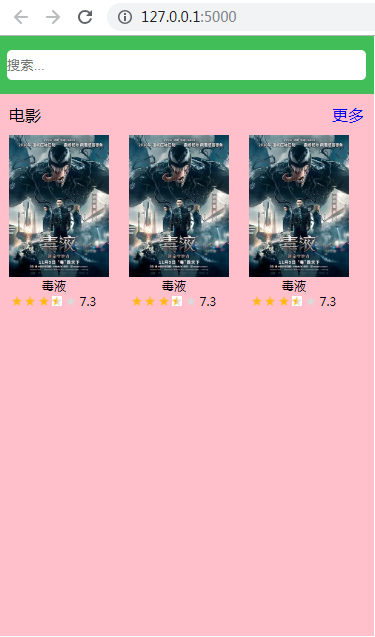
重构上面的代码
index.html
<!DOCTYPE html>
<html lang="en">
<head>
    <meta charset="UTF-8">
    <title>豆瓣微信小程序</title>
    <style>
        *{
            margin: 0;
            padding: 0;
            list-style: none;
            text-decoration: none;
        }
        .container{
            width: 375px;
            height:600px;
            background: pink;
        }
        .search-group{
            padding: 14px 8px;
            background: #41be57;
        }
        .search-group .search-input{
            display: block;
            height: 30px;
            width: 100%;
            box-sizing: border-box;
            background: #fff;
            border: none;
            outline: none;
            border-radius: 5px;
        }
        .item-list-group .item-list-top{
            overflow: hidden;
            padding: 10px;
        }
        .item-list-top .module-title{
            float: left;
        }
        .item-list-top .more-btn{
            float: right;
        }
        .list-group{
            overflow: hidden;
        }
        .list-group .item-group{
            float: left;
            margin-right: 10px;
        }
        .item-group .thumbnail{
            display: block;
            padding-left: 10px;
            width: 100px;
        }
        .item-group .item-title{
            font-size: 12px;
            text-align: center;
        }
        .item-group .item-rating{
            font-size: 12px;
            text-align: center;
        }
        .item-rating img{
            width: 10px;
            height: 10px;
        }
    </style>
</head>
<body>
    <!--定义宏-->
    {% macro itemGroup(thumbnail,title,rating) %}
        <div class="item-group">
                <img src="{{ thumbnail }}" alt="" class="thumbnail">
                <p class="item-title">{{ title }}</p>
                <p class="item-rating">
                    <!--全亮星星-->
                    {% set lights=((rating|int)/2)|int %}
                    <!--半亮星星-->
                    {% set halfs=(rating|int)%2 %}
                    <!--不亮星星-->
                    {% set grays=5-lights-halfs %}
                    {% for light in range(0,lights) %}
                        <img src="{{ url_for("static",filename='images/rate_light.png') }}" alt="">
                    {% endfor %}

                    {% for half in range(0,halfs) %}
                         <img src="{{ url_for("static",filename='images/rate_half.jpg') }}" alt="">
                    {% endfor %}

                    {% for gray in range(0,grays) %}
                         <img src="{{ url_for("static",filename='images/rate_gray.png') }}" alt="">
                    {% endfor %}
                    {{ rating }}
                </p>
            </div>
    {% endmacro %}

    {% macro listGroup(module_title,items)%}
        <div class="item-list-group">
            <div class="item-list-top">
                <span class="module-title">{{ module_title }}</span>
                <a href="#" class="more-btn">更多</a>
            </div>
            <div class="list-group">
                {% for item in items[0:3] %}
                    {{ itemGroup(item.thumbnail,item.title,item.rating) }}
                {% endfor %}
            </div>
    </div>
    {% endmacro %}

    <div class="container">
        <div class="search-group">
            <input type="text" class="search-input" placeholder="搜索...">
        </div>
        {{ listGroup('电影',movies) }}
        {{ listGroup('电视剧',tvs) }}
    </div>
</body>
</html>
app.py
from flask import Flask,render_template

app = Flask(__name__)
#模板改完后自动加载
app.config['TEMPLATES_AUTO_RELOAD']=True

# 电影
movies = [
    {
        ',
        'thumbnail': 'https://img3.doubanio.com/view/movie_poster_cover/lpst/public/p2499792043.webp',
        'title': u'王牌特工2:黄金圈',
        'rating': u'7.3',
        'comment_count': 12000,
        'authors': u'科林·费尔斯 / 塔伦·埃格顿 / 朱丽安·摩尔'
    },
    {
        ',
        'title': u'羞羞的铁拳',
        'thumbnail': u'https://img1.doubanio.com/view/movie_poster_cover/lpst/public/p2499793218.webp',
        'rating': u'7.6',
        'comment_count': 39450,
        'authors': u'艾伦/马丽/沈腾'
    },
    {
        ',
        'title': u'情圣',
        'thumbnail': u'https://img3.doubanio.com/view/movie_poster_cover/mpst/public/p2409022364.jpg',
        'rating': u'6.3',
        'comment_count': 38409,
        'authors': u'肖央 / 闫妮 / 小沈阳'
    },
    {
        ',
        'title': u'全球风暴',
        'thumbnail': u'https://img3.doubanio.com/view/movie_poster_cover/lpst/public/p2501863104.webp',
        'rating': u'7.4',
        'comment_count': 4555,
        'authors': u'杰拉德·巴特勒/吉姆·斯特'
    },
    {
        ',
        'title': u'大卫贝肯之倒霉特工熊',
        'thumbnail': u'https://img3.doubanio.com/view/movie_poster_cover/mpst/public/p2408893200.jpg',
        'rating': u'4.3',
        'comment_count': 682,
        'authors': u'汤水雨 / 徐佳琪 / 杨默'
    },
    {
        ',
        'title': u'追龙',
        'thumbnail': u'https://img3.doubanio.com/view/movie_poster_cover/lpst/public/p2499052494.webp',
        'rating': u'7.5',
        'comment_count': 33060,
        'authors': u'查理兹·塞隆 / 阿特·帕金森 / 拉尔夫·费因斯'
    }
]

# 电视剧
tvs = [
    {
        ',
        'title': u'鬼吹灯之精绝古城',
        'thumbnail': u'https://img3.doubanio.com/view/movie_poster_cover/lpst/public/p2404604903.jpg',
        'rating': u'8.4',
        'comment_count': 49328,
        'authors': u'靳东 / 陈乔恩 / 赵达 / 付枚 / 金泽灏 /'
    },
    {
        ',
        'title': u'孤芳不自赏',
        'thumbnail': u'https://img1.doubanio.com/view/movie_poster_cover/lpst/public/p2407425119.jpg',
        'rating': u'3.7',
        'comment_count': 8493,
        'authors': u'钟汉良 / 杨颖 / 甘婷婷 / 孙艺洲 / 亓航 /'
    },
    {
        ',
        'title': u'全球风暴',
        'thumbnail': u'https://img3.doubanio.com/view/movie_poster_cover/lpst/public/p2501769525.webp',
        'rating': u'8.2',
        'comment_count': 345,
        'authors': u' 卢克·崔德威 / 琼安·弗洛加特 / 露塔·格德米纳斯 / 安东尼·海德 / 卡罗琳·古多尔 /'
    },
    {
        ',
        'title': u'其他人',
        'thumbnail': u'https://img3.doubanio.com/view/movie_poster_cover/lpst/public/p2371503632.jpg',
        'rating': u'7.6',
        'comment_count': 25532,
        'authors': u'杰西·普莱蒙 / 莫莉·香侬 / 布莱德利·惠特福德 / Maude Apatow / 麦迪逊·贝蒂 /'
    },
    {
        ',
        'title': u'全员单恋',
        'thumbnail': u'https://img1.doubanio.com/view/movie_poster_cover/lpst/public/p2367986708.jpg',
        'rating': u'6.4',
        'comment_count': 2483,
        'authors': u'伊藤沙莉 / 中川大志 / 上原实矩 / 森绘梨佳 / 樱田通 /'
    },
    {
        ',
        'title': u'废纸板拳击手',
        'thumbnail': u'https://img1.doubanio.com/view/movie_poster_cover/lpst/public/p2380194237.jpg',
        'rating': u'8.2',
        'comment_count': 23456,
        'authors': u'托马斯·哈登·丘奇 / 泰伦斯·霍华德 / 波伊德·霍布鲁克 / 瑞斯·维克菲尔德 / 马尔洛·托马斯 /'
    }
]

@app.route('/')
def hello_world():
    context={
        'movies':movies,
        'tvs':tvs
    }
    return render_template('index.html',**context)

if __name__ == '__main__':
    app.run()
运行app.py
访问效果如下:
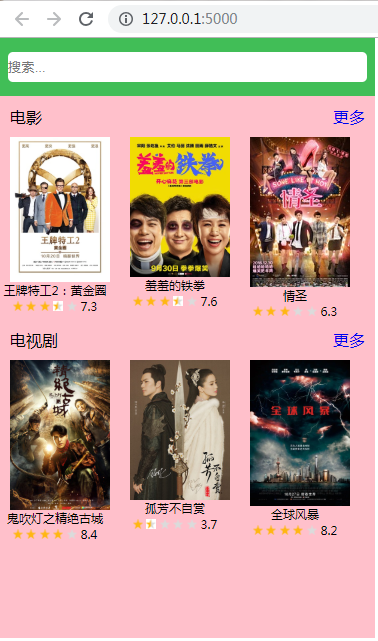
python flask豆瓣微信小程序案例的更多相关文章
- Python flask构建微信小程序订餐系统
第1章 <Python Flask构建微信小程序订餐系统>课程简介 本章内容会带领大家通览整体架构,功能模块,及学习建议.让大家在一个清晰的开发思路下,进行后续的学习.同时领着大家登陆ht ...
- Python flask构建微信小程序订餐系统☝☝☝
Python flask构建微信小程序订餐系统☝☝☝ 一.Flask MVC框架结构 1.1实际项目结构 1.2application.py 项目配置文件 Flask之flask-script模块使 ...
- Python flask构建微信小程序订餐系统✍✍✍
Python flask构建微信小程序订餐系统 整个课程都看完了,这个课程的分享可以往下看,下面有链接,之前做java开发也做了一些年头,也分享下自己看这个视频的感受,单论单个知识点课程本身没问题, ...
- python flask框架学习(三)——豆瓣微信小程序案例(一)templates的使用,宏的使用,前端后台传数据,前端写python语句
目录 一.templates的使用 (1)在templates里创建一个index.html (2)再在app.py里写 (3)展示效果 二.构建第一个电影评分 (1)准备好素材放进static里的i ...
- python flask框架学习(三)——豆瓣微信小程序案例(二)整理封装block,模板的继承
我们所要实现的效果: 点击电影的更多,跳转到更多的电影页面:点击电视剧的更多,跳转到更多的电视剧页面. 三个页面的风格相同,可以设置一个模板,三个页面都继承这个模板 1.在指定模板之前,把css放在一 ...
- Python Flask构建微信小程序订餐系统 学习 资源
一.Flask MVC框架结构 1.1实际项目结构 1.2application.py 项目配置文件Flask之flask-script模块使用 static.py 文件(部署到生成环境不需 ...
- python爬取微信小程序(实战篇)
python爬取微信小程序(实战篇) 本文链接:https://blog.csdn.net/HeyShHeyou/article/details/90452656 展开 一.背景介绍 近期有需求需要抓 ...
- Python爬取微信小程序(Charles)
Python爬取微信小程序(Charles) 本文链接:https://blog.csdn.net/HeyShHeyou/article/details/90045204 一.前言 最近需要获取微信小 ...
- Flask与微信小程序登录(后端)
开发微信小程序时,接入小程序的授权登录可以快速实现用户注册登录的步骤,是快速建立用户体系的重要一步.这篇文章将介绍 python + flask + 微信小程序实现用户快速注册登录方案(本文主要进行后 ...
随机推荐
- Chrome浏览器正常,IE下界面却乱了
背景:项目实战中总会遇到一些小问题,IE特别多 Chrome浏览器页面正常,IE下界面就乱了 原因分析 1.首先想到的是代码有米有问题呢?主要指的是兼容性 2.兼容性没有问题,那我们打开IE的开发工具 ...
- ActiveMQ实例2--Spring JMS发送消息
参考文章:http://my.oschina.net/xiaoxishan/blog/381209#OSC_h3_7 一,步骤参照参考文献 二.新建的项目 三.补充 web.xml <?xml ...
- jQuery(四)(DOM一)
jQuery把复杂的代码简单化. 如果我们通过AJAX获取到数据之后然后才能确定结构的话,这种情况就需要动态的处理节点了 一.DOM节点的创建:创建div节点元素的属性和创建div节点元素的样式doc ...
- .NET 自动内存管理(垃圾收集GC)
自动内存管理(垃圾收集GC) 在面向对象的环境里, 要使用资源,必须为响应 的类型分配一定 的内存空间.下面是访问一个资源所需要的几个步骤: 1. 调用中间语言(IL)的newobj 指令.当我们用N ...
- 笨办法学Python(五)
习题 5: 更多的变量和打印 我们现在要键入更多的变量并且把它们打印出来.这次我们将使用一个叫“格式化字符串(format string)”的东西. 每一次你使用 " 把一些文本引用起来,你 ...
- 【CSS古话今说】-- 01.神奇的CSS-BFC在实战中的应用
文章首发于掘金 BFC(Block Formatting Context)是Web页面中盒模型布局的CSS渲染模式.它的定位体系属于常规文档流. 想要实现一个BFC布局需要满足以下条件之一: 1.fl ...
- jrtplib源码分析 第一篇 jthread的编译与分析
第一篇 jthread的编译与分析 jrtplib代码依赖库jthread,因此先从jthread开始jrtplib的学习.首先从以下链接下载jthread的源代码http://research.ed ...
- STM32开发-MDK新建工程及配置
本人也是接触stm32没多久,之前用的MDK是5.1,现在用的是5.13,MDK5.0之前的版本(本人简称旧版)和之后的版本(本人简称新版)新建工程有很大区别.对于刚开始用学stm32的新手来说,基本 ...
- Windows聚焦转为图片
1.windows聚焦图片目录路径: C:\Users\Er\AppData\Local\Packages\Microsoft.Windows.ContentDeliveryManager_cw5n1 ...
- Android(java)学习笔记97:使用GridView以及重写BaseAdapter
1. BaseAdapter: 对于ListView.GridView.Gallery.Spinner等等,它是它们的适配器,直接继承自接口类Adapter的,使用BaseAdapter时需要重写很多 ...