
tomcat下的公共jar包配置
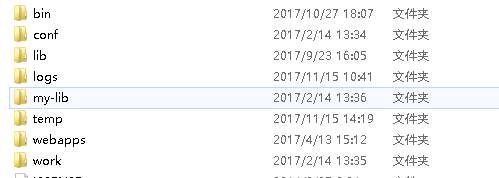
1。创建my-lib文件夹
.
在conf文件中的catalina.properties中配置如下
 # Licensed to the Apache Software Foundation (ASF) under one or more

 # contributor license agreements.  See the NOTICE file distributed with

 # this work for additional information regarding copyright ownership.

 # The ASF licenses this file to You under the Apache License, Version 2.0

 # (the "License"); you may not use this file except in compliance with

 # the License.  You may obtain a copy of the License at

 #

 #     http://www.apache.org/licenses/LICENSE-2.0

 #

 # Unless required by applicable law or agreed to in writing, software

 # distributed under the License is distributed on an "AS IS" BASIS,

 # WITHOUT WARRANTIES OR CONDITIONS OF ANY KIND, either express or implied.

 # See the License for the specific language governing permissions and

 # limitations under the License.

 #

 # List of comma-separated packages that start with or equal this string

 # will cause a security exception to be thrown when

 # passed to checkPackageAccess unless the

 # corresponding RuntimePermission ("accessClassInPackage."+package) has

 # been granted.

 package.access=sun.,org.apache.catalina.,org.apache.coyote.,org.apache.tomcat.,org.apache.jasper.

 #

 # List of comma-separated packages that start with or equal this string

 # will cause a security exception to be thrown when

 # passed to checkPackageDefinition unless the

 # corresponding RuntimePermission ("defineClassInPackage."+package) has

 # been granted.

 #

 # by default, no packages are restricted for definition, and none of

 # the class loaders supplied with the JDK call checkPackageDefinition.

 #

 package.definition=sun.,java.,org.apache.catalina.,org.apache.coyote.,org.apache.tomcat.,org.apache.jasper.

 #

 #

 # List of comma-separated paths defining the contents of the "common"

 # classloader. Prefixes should be used to define what is the repository type.

 # Path may be relative to the CATALINA_HOME or CATALINA_BASE path or absolute.

 # If left as blank,the JVM system loader will be used as Catalina's "common"

 # loader.

 # Examples:

 #     "foo": Add this folder as a class repository

 #     "foo/*.jar": Add all the JARs of the specified folder as class

 #                  repositories

 #     "foo/bar.jar": Add bar.jar as a class repository

 common.loader=${catalina.base}/lib,${catalina.base}/lib/*.jar,${catalina.home}/lib,${catalina.home}/lib/*.jar

 #

 # List of comma-separated paths defining the contents of the "server"

 # classloader. Prefixes should be used to define what is the repository type.

 # Path may be relative to the CATALINA_HOME or CATALINA_BASE path or absolute.

 # If left as blank, the "common" loader will be used as Catalina's "server"

 # loader.

 # Examples:

 #     "foo": Add this folder as a class repository

 #     "foo/*.jar": Add all the JARs of the specified folder as class

 #                  repositories

 #     "foo/bar.jar": Add bar.jar as a class repository

 server.loader=

 #

 # List of comma-separated paths defining the contents of the "shared"

 # classloader. Prefixes should be used to define what is the repository type.

 # Path may be relative to the CATALINA_BASE path or absolute. If left as blank,

 # the "common" loader will be used as Catalina's "shared" loader.

 # Examples:

 #     "foo": Add this folder as a class repository

 #     "foo/*.jar": Add all the JARs of the specified folder as class

 #                  repositories

 #     "foo/bar.jar": Add bar.jar as a class repository

 # Please note that for single jars, e.g. bar.jar, you need the URL form

 # starting with file:.

 shared.loader=${catalina.base}/my-lib,${catalina.base}/my-lib/*.jar

 # List of JAR files that should not be scanned using the JarScanner

 # functionality. This is typically used to scan JARs for configuration

 # information. JARs that do not contain such information may be excluded from

 # the scan to speed up the scanning process. This is the default list. JARs on

 # this list are excluded from all scans. Scan specific lists (to exclude JARs

 # from individual scans) follow this. The list must be a comma separated list of

 # JAR file names.

 # The JARs listed below include:

 # - Tomcat Bootstrap JARs

 # - Tomcat API JARs

 # - Catalina JARs

 # - Jasper JARs

 # - Tomcat JARs

 # - Common non-Tomcat JARs

 # - Test JARs (JUnit, Cobertura and dependencies)

 tomcat.util.scan.DefaultJarScanner.jarsToSkip=\

 bootstrap.jar,commons-daemon.jar,tomcat-juli.jar,\

 annotations-api.jar,el-api.jar,jsp-api.jar,servlet-api.jar,websocket-api.jar,\

 catalina.jar,catalina-ant.jar,catalina-ha.jar,catalina-tribes.jar,\

 jasper.jar,jasper-el.jar,ecj-*.jar,\

 tomcat-api.jar,tomcat-util.jar,tomcat-coyote.jar,tomcat-dbcp.jar,\

 tomcat-jni.jar,tomcat-spdy.jar,\

 tomcat-i18n-en.jar,tomcat-i18n-es.jar,tomcat-i18n-fr.jar,tomcat-i18n-ja.jar,\

 tomcat-juli-adapters.jar,catalina-jmx-remote.jar,catalina-ws.jar,\

 tomcat-jdbc.jar,\

 tools.jar,\

 commons-beanutils*.jar,commons-codec*.jar,commons-collections*.jar,\

 commons-dbcp*.jar,commons-digester*.jar,commons-fileupload*.jar,\

 commons-httpclient*.jar,commons-io*.jar,commons-lang*.jar,commons-logging*.jar,\

 commons-math*.jar,commons-pool*.jar,\

 jstl.jar,\

 geronimo-spec-jaxrpc*.jar,wsdl4j*.jar,\

 ant.jar,ant-junit*.jar,aspectj*.jar,jmx.jar,h2*.jar,hibernate*.jar,httpclient*.jar,\

 jmx-tools.jar,jta*.jar,log4j.jar,log4j-1*.jar,mail*.jar,slf4j*.jar,\

 xercesImpl.jar,xmlParserAPIs.jar,xml-apis.jar,\

 junit.jar,junit-*.jar,hamcrest*.jar,org.hamcrest*.jar,ant-launcher.jar,\

 cobertura-*.jar,asm-*.jar,dom4j-*.jar,icu4j-*.jar,jaxen-*.jar,jdom-*.jar,\

 jetty-*.jar,oro-*.jar,servlet-api-*.jar,tagsoup-*.jar,xmlParserAPIs-*.jar,\

 xom-*.jar

 # Additional JARs (over and above the default JARs listed above) to skip when

 # scanning for Servlet 3.0 pluggability features. These features include web

 # fragments, annotations, SCIs and classes that match @HandlesTypes. The list

 # must be a comma separated list of JAR file names.

 org.apache.catalina.startup.ContextConfig.jarsToSkip=

 # Additional JARs (over and above the default JARs listed above) to skip when

 # scanning for TLDs. The list must be a comma separated list of JAR file names.

 org.apache.catalina.startup.TldConfig.jarsToSkip=tomcat7-websocket.jar

 #

 # String cache configuration.

 tomcat.util.buf.StringCache.byte.enabled=true

 #tomcat.util.buf.StringCache.char.enabled=true

 #tomcat.util.buf.StringCache.trainThreshold=500000

 #tomcat.util.buf.StringCache.cacheSize=5000
tomcat下的公共jar包配置的更多相关文章
- linux 下检查java jar包 程序是否正常 shell
linux 下检查java jar包 程序是否正常 shell http://injavawetrust.iteye.com BATCH_SERVER="batch.jar" NR ...
- linux 下启动java jar包 shell
linux 下启动java jar包 shell #!/bin/sh JAVA_HOME=/usr/local/jdk1.6.0_34/bin/javaJAVA_OPTS="-Xmx256m ...
- linux 下停止java jar包 shell
linux 下停止java jar包 shell http://injavawetrust.iteye.com #!/bin/sh APP_HOME=/home/ap/injavawetrust/ba ...
- Linux下如何让jar包程序在后台一直执行
Linux下如何让Jar包程序在后台一直执行 shell命令 nohup java -jar xxx.jar & &:让程序后台执行. nohub:让程序控制台输出转移到nohub.o ...
- tomcat部署公共jar包
如果每次打war包都要把所有依赖jar放在WEB-INF/lib下,是很傻的做法,war包很大,也浪费内存.参考之前jboss上部署公共jar的经验,tomcat实现起来想来也不困难. 1. 参照ma ...
- springboot整合JSP以及发布项目到独立的tomcat中与打成jar包使用
之前研究了springboot整合freemarker与thymeleaf的使用.也研究了springboot发布到独立的tomcat的使用以及使用自带的tomcat打成jar包的使用,下面研究集成J ...
- springboot项目发布到独立的tomcat中运行&打成jar包运行
springboot的打包方式依赖于插件:(下面插件打出的包与普通的包目录结构有区别) <plugin> <groupId>org.springframework.boot&l ...
- Tomcat 下 mysql的连接池配置和使用
最近维护的一个项目出了问题,最后分析是卡在数据库连接池上,然后就做了些学习. 先把我自己的方法写出来,再说下网上其他的没有成功的方法. 1.首先当然是先把mysql的jar包放在lib目录下,tonc ...
- 通过buildpath 导入jar和在lib下导入的jar包区别
jar包放置在WEB-INF/lib下和通过build path导入的区别是什么? jar包直接拷贝到WEB-INF/lib下和以userLibrary形式引入的区别? jar包放置在WEB-INF/ ...
随机推荐
- Beta冲刺测试
1.项目概述 1.项目名称 微信四则运算小程序 2.项目简介 基于微信小程序,为用户提供一个答题的平台 3.项目预期达到目标 用户通过微信小程序可以在里边答题,模式或者题量的选择为用户匹配到适合他们的 ...
- Jmeter-线程时间
随手记录下自己在学习遇到的线程时间问题 1.线程数14个,要求每秒进入2个线程,这设置准备时长因为7秒 及准备时长 = 线程数/每秒需要进入的线程数量 如上列中:准备时间 = 1 ...
- 厉害了,Dubbo 正式毕业!
厉害了,2019/05/21 Apache软件基金会发表博文,宣布 Dubbo 在 2019/05/20 这天正式毕业,成为 Apache 的顶级项目. 参考:https://blogs.apache ...
- d190305面试题01总结
题目一: 题目二: 题目三: 类中的某个成员变量可以被他和他的子类访问,应该用protected 知识点: 1.类中public修饰的属性,方法可以被该类,子孙类和外部类访问. 2.类中protect ...
- Git 通过https向码云推送项目
- 20165224 陆艺杰 Exp 8 Web基础
.基础问题回答 (1)什么是表单 html的一个控件 表单在网页中主要负责数据采集功能 (2)浏览器可以解析运行什么语言 html xml jsp php python 等 (3)WebServer支 ...
- vue项目中将后台返回的创建时间(时间戳格式)转换成日期格式
第一步:下载安装依赖包 npm install -save moment 第二步: 在main.js文件引入 1. import moment from 'moment' 其中还包含 2. //全局过 ...
- POJ 2891 Strange Way to Express Integers excrt/我真傻,真的
我真傻,真的 我单知道这道题在(b-b1)%d!=0时要判无解,哪成想自己却没有读完这组后面的数据而直接break掉...qwqfk 当 $ x \equiv b_1 ( mod a_1 ) ...
- lifecycle-mapping-metadata.xml
<?xml version="1.0" encoding="UTF-8"?> <lifecycleMappingMetadata> &l ...
- ProtobufUtils
import java.io.IOException; import java.io.InputStream; import java.lang.reflect.Method; import com. ...