
Entity Framework Code-First(9.11):DataAnnotations - InverseProperty Attribute
DataAnnotations - InverseProperty Attribute:
We have seen in the Code-First Convention section that Code-First creates {Class Name}_{Primary Key} foreign key column if you have not included foreign key property in a parent class. The InverseProperty attribute is used when you have multiple relationships between classes.
Consider the following example.
public class Student

{

    public Student()

    {

    }

    public int StudentID { get; set; }

    public string StudentName { get; set; }

    public Standard CurrentStandard { get; set; }

    public Standard PreviousStandard { get; set; }

}

public class Standard

{

    public Standard()

    {

    }

    public int StandardId { get; set; }

    public string StandardName { get; set; }

    public ICollection<Student> CurrentStudents { get; set; }

    public ICollection<Student> PreviousStudents { get; set; }

}
As you can see in the above example, Student class includes two navigation properties to Standard class. The same way Standard class includes two collection navigation properties for Student. Code-First creates four columns for this relationship, as shown below.
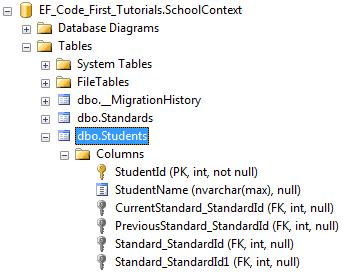
InverseProperty overrides this convention and specifies alignment of the properties. The following example uses InverseProperty in Standard class to fix this problem.
public class Student

{

    public Student()

    {

    }

    public int StudentID { get; set; }

    public string StudentName { get; set; }

    public Standard CurrentStandard { get; set; }

    public Standard PreviousStandard { get; set; }

}

public class Standard

{

    public Standard()

    {

    }

    public int StandardId { get; set; }

    public string StandardName { get; set; }

    [InverseProperty("CurrentStandard")]

    public ICollection<Student> CurrentStudents { get; set; }

    [InverseProperty("PreviousStandard")]

        public ICollection<Student> PreviousStudents { get; set; }

}
As you can see in the above example, we have applied InverseProperty attribute to CurrentStudents & PreviousStudents property and specify which reference property of Student class it belongs to. Now, Code-First will create only two foreign key column in Student table as shown below.
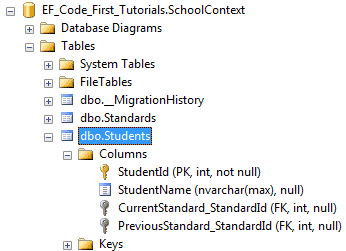
You can also use ForeignKey attribute to include foreign key property with different name as shown below.
public class Student

{

    public Student()

    {

    }

    public int StudentID { get; set; }

    public string StudentName { get; set; }

    public int CurrentStandardId { get; set; }

    public int PreviousStandardId { get; set; }

    [ForeignKey("CurrentStandardId")]

    public Standard CurrentStandard { get; set; }

    [ForeignKey("PreviousStandardId")]

    public Standard PreviousStandard { get; set; }

}

public class Standard

{

    public Standard()

    {

    }

    public int StandardId { get; set; }

    public string StandardName { get; set; }

    [InverseProperty("CurrentStandard")]

    public ICollection<Student> CurrentStudents { get; set; }

    [InverseProperty("PreviousStandard")]

    public ICollection<Student> PreviousStudents { get; set; }

}
The above example will create the following columns.
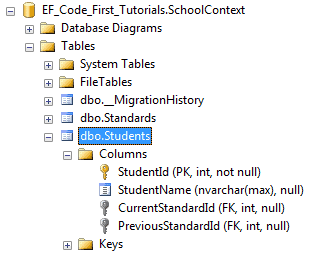
Thus, you can use InverseProperty and ForeignKey attribute for multiple relationships between the same classes.
Entity Framework Code-First(9.11):DataAnnotations - InverseProperty Attribute的更多相关文章
- Entity Framework Code-First(9.6):DataAnnotations - StringLength Attribute
DataAnnotations - StringLength Attribute: StringLength attribute can be applied to a string type pro ...
- Entity Framework Code-First(9.5):DataAnnotations - MaxLength Attribute
DataAnnotations - MaxLength Attribute: MaxLength attribute can be applied to a string or array type ...
- Entity Framework Code-First(9.10):DataAnnotations - NotMapped Attribute
DataAnnotations - NotMapped Attribute: NotMapped attribute can be applied to properties of a class. ...
- Entity Framework Code-First(9.9):DataAnnotations - ForeignKey Attribute
DataAnnotations - ForeignKey Attribute: ForeignKey attribute can be applied to properties of a class ...
- Entity Framework Code-First(9.8):DataAnnotations - Column Attribute
DataAnnotations - Column Attribute: Column attribute can be applied to properties of a class. Defaul ...
- Entity Framework Code-First(9.7):DataAnnotations - Table Attribute
DataAnnotations - Table Attribute: Table attribute can be applied to a class. Default Code-First con ...
- Entity Framework Code-First(9.2):DataAnnotations - TimeStamp Attribute
DataAnnotations - TimeStamp Attribute: TimeStamp attribute can be applied to only one byte array pro ...
- Entity Framework Code-First(9.1):DataAnnotations - Key Attribute
DataAnnotations - Key Attribute: Key attribute can be applied to properties of a class. Default Code ...
- Entity Framework Code-First(9.4):DataAnnotations - Required Attribute
Required attribute can be applied to a property of a domain class. EF Code-First will create a NOT N ...
随机推荐
- mini2440移植uboot 2014.04(三)
我修改的代码已经上传到github上,地址:https://github.com/qiaoyuguo/u-boot-2014.04-mini2440.git 参考文档: s3c2440手册(下载地址) ...
- mysql的binlog太多太大占用了空间的解决办法
现象:网站访问越来越慢,最后无法访问了,经过检查发现磁盘满了 分析过程及解决方案:通常出现这种问题都应该登录服务器检查磁盘.内存和进程使用的情况,通过top.df –h和free –m来检查,发现磁盘 ...
- 同一台电脑关于多个SSH KEY管理
运用shh -T -v git@github.com查看具体出错信息,再根据信息来调试 原文链接: http://yijiebuyi.com/blog/f18d38eb7cfee860c117d ...
- cpu架构
转自 http://blog.csdn.net/wyzxg/article/details/5027738 CPU架构 Architecture ,结构.架构,这个词用于 CPU 的时候是指 CPU ...
- vue2.0 构建单页应用最佳实战
vue2.0 构建单页应用最佳实战 前言 我们将会选择使用一些 vue 周边的库vue-cli, vue-router,vue-resource,vuex 1.使用 vue-cli 创建项目2.使 ...
- java:Properties属性文件概念
java:Properties属性文件概念 在java之前的国际化程序中提出了一个属性文件的概念,属性文件的后缀是:*.properties,那么在java中提供了意个属性文件的专门操作类,Prope ...
- phalcon: 按年分表的model怎么建?table2017,table2018...相同名的分表模型怎么建
phalcon: 按年分表的model怎么建?table2017,table2018...相同名的分表模型怎么建 场景:当前有一张表:Ntime,因为表太大了,考虑要分表: Ntime2017 Nti ...
- 理解SetCapture()和ReleaseCapture()及GetCapture()作用
正常情况下,鼠标指针位于哪个窗口区域内,鼠标消息就自动发给哪个窗口.如果调用了SetCapture,之后无论鼠标的位置在哪,鼠标消息都发给指定的这个窗口,直到调用ReleaseCapture或者调用S ...
- pyglet模块的EventDispatcher(事件派发对象)
事件派发对象用于处理事件的派发与响应,pyglet的window对象正是继承了它才具有处理事件的能力. 步骤: 1.注册事件类型: EventDispatcher.register_event_typ ...
- 【遍历二叉树】08判断两个二叉树是否相同【Same Tree】
迭代版本用的是二叉树的DFS,中的root->right->left +++++++++++++++++++++++++++++++++++++++++++++++++++++++++++ ...