
Entity Framework Code-First(9.11):DataAnnotations - InverseProperty Attribute
DataAnnotations - InverseProperty Attribute:
We have seen in the Code-First Convention section that Code-First creates {Class Name}_{Primary Key} foreign key column if you have not included foreign key property in a parent class. The InverseProperty attribute is used when you have multiple relationships between classes.
Consider the following example.
public class Student

{

    public Student()

    {

    }

    public int StudentID { get; set; }

    public string StudentName { get; set; }

    public Standard CurrentStandard { get; set; }

    public Standard PreviousStandard { get; set; }

}

public class Standard

{

    public Standard()

    {

    }

    public int StandardId { get; set; }

    public string StandardName { get; set; }

    public ICollection<Student> CurrentStudents { get; set; }

    public ICollection<Student> PreviousStudents { get; set; }

}
As you can see in the above example, Student class includes two navigation properties to Standard class. The same way Standard class includes two collection navigation properties for Student. Code-First creates four columns for this relationship, as shown below.
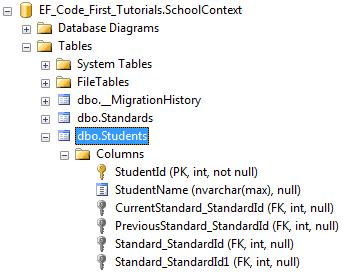
InverseProperty overrides this convention and specifies alignment of the properties. The following example uses InverseProperty in Standard class to fix this problem.
public class Student

{

    public Student()

    {

    }

    public int StudentID { get; set; }

    public string StudentName { get; set; }

    public Standard CurrentStandard { get; set; }

    public Standard PreviousStandard { get; set; }

}

public class Standard

{

    public Standard()

    {

    }

    public int StandardId { get; set; }

    public string StandardName { get; set; }

    [InverseProperty("CurrentStandard")]

    public ICollection<Student> CurrentStudents { get; set; }

    [InverseProperty("PreviousStandard")]

        public ICollection<Student> PreviousStudents { get; set; }

}
As you can see in the above example, we have applied InverseProperty attribute to CurrentStudents & PreviousStudents property and specify which reference property of Student class it belongs to. Now, Code-First will create only two foreign key column in Student table as shown below.
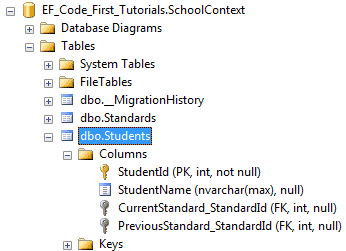
You can also use ForeignKey attribute to include foreign key property with different name as shown below.
public class Student

{

    public Student()

    {

    }

    public int StudentID { get; set; }

    public string StudentName { get; set; }

    public int CurrentStandardId { get; set; }

    public int PreviousStandardId { get; set; }

    [ForeignKey("CurrentStandardId")]

    public Standard CurrentStandard { get; set; }

    [ForeignKey("PreviousStandardId")]

    public Standard PreviousStandard { get; set; }

}

public class Standard

{

    public Standard()

    {

    }

    public int StandardId { get; set; }

    public string StandardName { get; set; }

    [InverseProperty("CurrentStandard")]

    public ICollection<Student> CurrentStudents { get; set; }

    [InverseProperty("PreviousStandard")]

    public ICollection<Student> PreviousStudents { get; set; }

}
The above example will create the following columns.
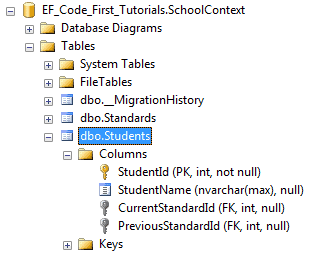
Thus, you can use InverseProperty and ForeignKey attribute for multiple relationships between the same classes.
Entity Framework Code-First(9.11):DataAnnotations - InverseProperty Attribute的更多相关文章
- Entity Framework Code-First(9.6):DataAnnotations - StringLength Attribute
DataAnnotations - StringLength Attribute: StringLength attribute can be applied to a string type pro ...
- Entity Framework Code-First(9.5):DataAnnotations - MaxLength Attribute
DataAnnotations - MaxLength Attribute: MaxLength attribute can be applied to a string or array type ...
- Entity Framework Code-First(9.10):DataAnnotations - NotMapped Attribute
DataAnnotations - NotMapped Attribute: NotMapped attribute can be applied to properties of a class. ...
- Entity Framework Code-First(9.9):DataAnnotations - ForeignKey Attribute
DataAnnotations - ForeignKey Attribute: ForeignKey attribute can be applied to properties of a class ...
- Entity Framework Code-First(9.8):DataAnnotations - Column Attribute
DataAnnotations - Column Attribute: Column attribute can be applied to properties of a class. Defaul ...
- Entity Framework Code-First(9.7):DataAnnotations - Table Attribute
DataAnnotations - Table Attribute: Table attribute can be applied to a class. Default Code-First con ...
- Entity Framework Code-First(9.2):DataAnnotations - TimeStamp Attribute
DataAnnotations - TimeStamp Attribute: TimeStamp attribute can be applied to only one byte array pro ...
- Entity Framework Code-First(9.1):DataAnnotations - Key Attribute
DataAnnotations - Key Attribute: Key attribute can be applied to properties of a class. Default Code ...
- Entity Framework Code-First(9.4):DataAnnotations - Required Attribute
Required attribute can be applied to a property of a domain class. EF Code-First will create a NOT N ...
随机推荐
- codevs 1299 切水果 线段树
1299 切水果 时间限制: 1 s 空间限制: 128000 KB 题目描述 Description 简单的说,一共N个水果排成一排,切M次,每次切[L,R]区间的所有水果(可能有的水果 ...
- 分享知识-快乐自己:idea的断点调试
1:Step Over ,进入下一步,如果是方法,那就直接跳过(F8) 2:Step Into,进入下一步,如果是方法,就进入方法内部,但是不会进入jdk封装的方法.(F7) 3:Force Step ...
- myeclipes如何调试web项目
你可以右击项目,然后选中那个debug as,然后选择open debug dialog,在project中选择要运行的项目,sever中选择服务器,然后单击debug就ok了,,
- freeMarker(五)——模板开发指南补充知识
学习笔记,选自freeMarker中文文档,译自 Email: ddekany at users.sourceforge.net 模板开发指南补充知识 1. 自定义指令 自定义指令可以使用 macro ...
- 1045 Favorite Color Stripe (30)(30 分)
Eva is trying to make her own color stripe out of a given one. She would like to keep only her favor ...
- javascript:function 函数声明和函数表达式 详解
函数声明(缩写为FD)是这样一种函数: 有一个特定的名称 在源码中的位置:要么处于程序级(Program level),要么处于其它函数的主体(FunctionBody)中 在进入上下文阶段创建 影响 ...
- android开发之数据库存取图片
Android数据库中存取图片通常使用两种方式,一种是保存图片所在路径,二是将图片以二进制的形式存储(sqlite3支持BLOB数据类型).对于两种方法的使用,好像第二种方法不如第一种方法更受程序员欢 ...
- Poj 1077 eight(BFS+全序列Hash解八数码问题)
一.题意 经典的八数码问题,有人说不做此题人生不完整,哈哈.给出一个含数字1~8和字母x的3 * 3矩阵,如: 1 2 X 3 4 6 7 5 8 ...
- Erlang generic standard behaviours -- gen_server noblock call
在Erlang 系统中,经常需要gen_server 进程来处理共享性的数据,也就是总希望一个gen_server 进程来为多个普通进程提供某种通用性的服务,这也是gen_server 设计的初衷.但 ...
- HDOJ1114(完全背包)
#include<cstdio> #include<algorithm> #include<cstring> using namespace std; const ...