
Material使用04 MdCardModule和MdButtonModule综合运用
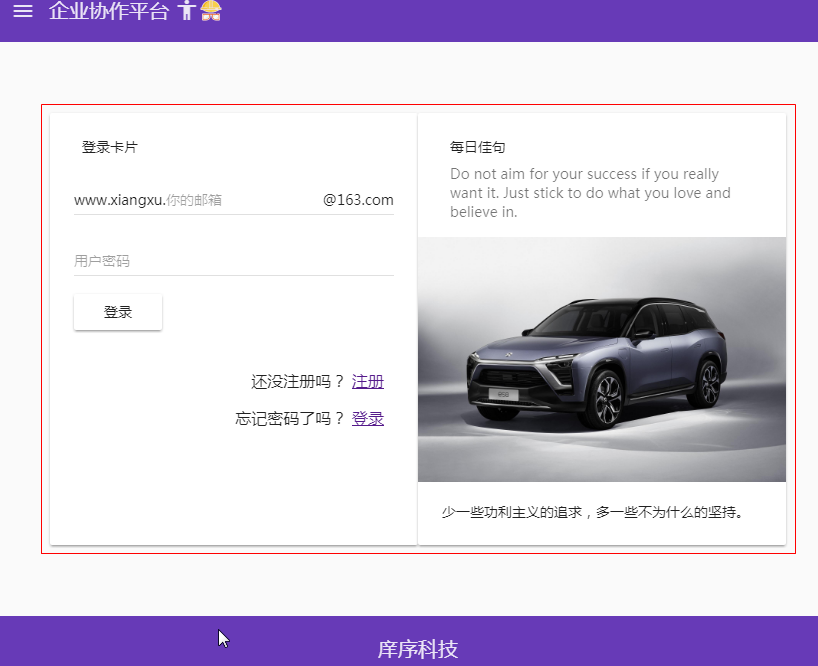
设计需求:设计一个登陆页面
1 模块导入
1.1 将MdCardModule和MdButtonModule模块导入到共享模块中
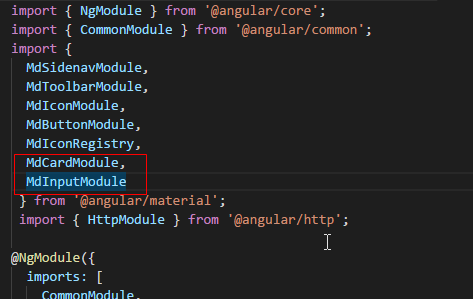
import { NgModule } from '@angular/core';

import { CommonModule } from '@angular/common';

import {

  MdSidenavModule,

  MdToolbarModule,

  MdIconModule,

  MdButtonModule,

  MdIconRegistry,

  MdCardModule,

  MdInputModule

 } from '@angular/material';

 import { HttpModule } from '@angular/http';

@NgModule({

  imports: [

    CommonModule,

    HttpModule,

    MdSidenavModule,

    MdToolbarModule,

    MdIconModule,

    MdButtonModule,

    MdCardModule,

    MdInputModule

  ],

  declarations: [],

  exports: [

    CommonModule,

    MdSidenavModule,

    MdToolbarModule,

    MdIconModule,

    MdButtonModule,

    HttpModule,

    MdCardModule,

    MdInputModule

  ]

})

export class SharedModule { }
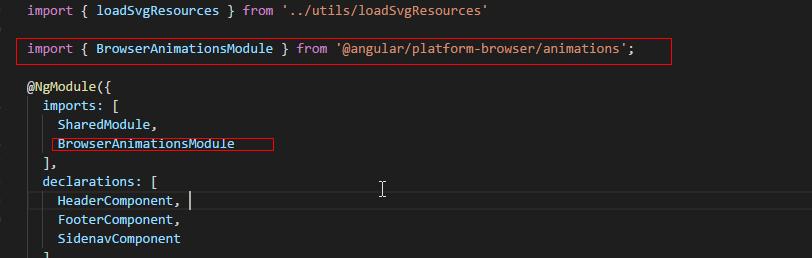
1.2 将material依赖的动画模块通过cnpm进行下载,并将动画模块导入到核心模块中
cnpm install --save @angular/animation
import { NgModule, Optional, SkipSelf } from '@angular/core';

import { SharedModule } from '../shared/shared.module';

import { HeaderComponent } from './header/header.component';

import { FooterComponent } from './footer/footer.component';

import { SidenavComponent } from './sidenav/sidenav.component';

import { DomSanitizer } from '@angular/platform-browser';

import { MdIconRegistry } from '@angular/material';

import { loadSvgResources } from '../utils/loadSvgResources'

import { BrowserAnimationsModule } from '@angular/platform-browser/animations';

@NgModule({

  imports: [

    SharedModule,

    BrowserAnimationsModule

  ],

  declarations: [

    HeaderComponent,

    FooterComponent,

    SidenavComponent

  ]

  ,

  exports: [

    HeaderComponent,

    FooterComponent,

    SidenavComponent

  ]

})

export class CoreModule {

  constructor(

    @Optional() @SkipSelf() parentModule: CoreModule,

    mdIconRegistry: MdIconRegistry,

    domSanitizer: DomSanitizer

  ) {

      if (parentModule) {

        throw new Error('CoreModule模块已经存在,请尽在主模块中进行引入。')

      }

      loadSvgResources(mdIconRegistry, domSanitizer);

  }

}
技巧01:其他模块如果需要用到MdCardModule和MdButtonModule时只需要导入共享模块即可
技巧02:核心模块在angualr应用只加载一次而且是在项目启动时加载的,共享模块可以加载多次
2 md-card组件详解
2.1 md-card组件主要结构
<md-card>

  <md-card-header>

    <md-card-title>主标题</md-card-title>

    <md-card-subtitle>副标题</md-card-subtitle>

  </md-card-header>

  <md-card-content>内容</md-card-content>

  <md-card-actions>行为</md-card-actions>

  <md-card-footer>页脚</md-card-footer>

</md-card>
3 MdButtonModule详解
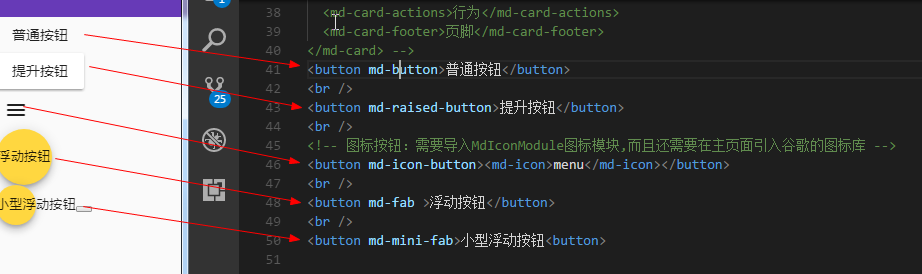
3.1 MdButtonModule模块中按钮的形式
3.1.1 普通按钮:md-button md-raised-button md-icon-button
3.1.2 浮动按钮: md-fab md-mini-fab
3.2 MdButtonModule模块中按钮的使用规则
<button md-button>普通按钮</button>

<br />

<button md-raised-button>提升按钮</button>

<br />

<!-- 图标按钮:需要导入MdIconModule图标模块,而且还需要在主页面引入谷歌的图标库 -->

<button md-icon-button><md-icon>menu</md-icon></button>

<br />

<button md-fab >浮动按钮</button>

<br />

<button md-mini-fab>小型浮动按钮</button>
技巧02:谷歌字体图标库镜像引用 -> <link href="//lib.baomitu.com/material-design-icons/3.0.1/iconfont/material-icons.min.css" rel="stylesheet">
4 MdCardModule 、 MdButtonModule 、 MdInputModule综合应用
4.1 导入这三个模块
4.2 下载依赖的动画模块
4.3 在登录组件中使用者三个模块提供的组件完成设计
<form>
<md-card>
<md-card-header>
<md-card-title>登录模块</md-card-title>
<md-card-subtitle>登录信息录入并提交</md-card-subtitle>
</md-card-header>
<md-card-content>
<md-input-container class="full-width">
<span mdPrefix>XiangXu.</span>
<input mdInput type="text" placeholder="请输入你的邮箱" />
<span mdSuffix>@163.com</span>
</md-input-container>
<md-input-container class="full-width">
<input mdInput type="password" placeholder="请输入你的密码" />
</md-input-container>
<button md-raised-button type="button">登录</button>
</md-card-content>
<md-card-actions class="text-right">
<p>还未注册? <a href="">立即注册</a></p>
<p>忘记密码? <a href="">找回密码</a></p>
</md-card-actions>
<!-- <md-card-footer>页脚</md-card-footer> -->
</md-card> <md-card>
<md-card-header>
<md-card-title>每日佳句</md-card-title>
<md-card-subtitle>Do not aim for your success if you really want it. Just stick to do what you love and believe in.</md-card-subtitle>
</md-card-header>
<img md-card-image src="/assets/img/car.jpg" />
<md-card-content>少一些功利主义的追求,多一些不为什么的坚持。</md-card-content>
</md-card>
</form>
4.4 在全局CSS文件中设置
充满整行的样式
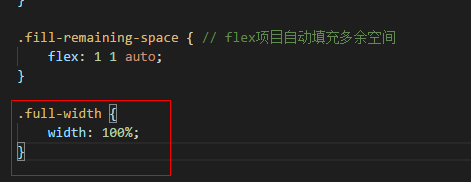
/* You can add global styles to this file, and also import other style files */

@import '~@angular/material/prebuilt-themes/deeppurple-amber.css'; // 导入material的内建主体

html, body, app-root, md-sidenav-container, .site {

    width: 100%;

    height: 100%;

    margin: 0;

}

.site {

    display: flex;

    flex-direction: column;

}

header {

    // background-color: skyblue;

}

main {

    flex: 1;

}

footer {

    // background-color: skyblue;

}

.fill-remaining-space { // flex项目自动填充多余空间

    flex: 1 1 auto;

}

.full-width {

    width: 100%;

}
4.5 在登录组件的CSS文件中设置
将form元素设置成flex容器
md-card组件宽度和高度
文本向右对齐
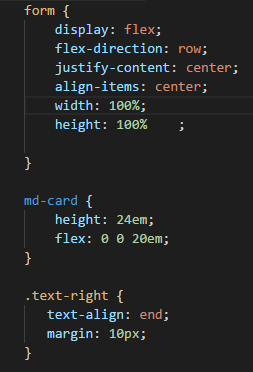
form {

    display: flex;

    flex-direction: row;

    justify-content: center;

    align-items: center;

    width: 100%;

    height: 100%    ;

}

md-card {

    height: 24em;

    flex: 0 0 20em;

}

.text-right {

   text-align: end;

   margin: 10px;

}

// form {

//     display: flex;

//     flex-direction: row;

//     justify-content: center;

//     align-items: center;

//     width: 100%;

//     height: 100%;

// }

// md-card {

//     height: 24em;

//     flex: 0 0 20em;

// }

// .text-right {

//     margin: 10px;

//     text-align: end;

// }
Material使用04 MdCardModule和MdButtonModule综合运用的更多相关文章
- Material04 MdCardModule和MdButtonModule综合运用
设计需求:设计一个登陆页面 1 模块导入 1.1 将MdCardModule和MdButtonModule模块导入到共享模块中 import { NgModule } from '@angular/c ...
- Material使用03 MdCardModule模块、MdInputModule模块
需求:先需要增加一个登录模块 1 创建登录模块 ng g m testLogin 1.1 将共享模块导入到登录模块中 import { NgModule } from '@angular/core'; ...
- 优化MySchool数据库设计之【巅峰对决】
优化MySchool数据库设计 之独孤九剑 船舶停靠在港湾是很安全的,但这不是造船的目的 By:北大青鸟五道口原玉明老师 1.学习方法: 01.找一本好书 初始阶段不适合,可以放到第二个阶段,看到知识 ...
- 让CKEditor支持FLV视频播放
平时都是做C/S开发,最近需要维护一个协会门户网站. 文章编辑使用CKEditor 3.3.2 + ckfinder 2.0的方案.可是这种方案居然不支持FLV视频播放,度娘说以前的老版本是支持的,这 ...
- 万能的 SQL编程
简介:T-SQL语句创建库.创建表和听.和添加约束等.T-SQL是数据库结构化查询语言,常见的增加.删出.修改.查询.创建库和创建表的语句,还支持定义变量.输出语句.逻辑控制语句(IF.CASE.WH ...
- IIS 发布mvc 403.14
转载: iis7 发布mvc3 遇到的HTTP错误 403.14-Forbidden Web 服务器被配置为不列出此目录的内容及Login on failed for “IIS APPPOOL\ASP ...
- Linux(Centos)下jdbc连接oracle速度超慢的问题
最近在centos下写个java swing程序,发现在linux用jdbc连接oracle及其缓慢,还经常失败.但是同样的程序在windows下运行就连接的非常快.网上搜索了很长时间都和我这情况没关 ...
- XAF 如何从Excel复制多个单元格内容到GridView(收藏)
XAF 如何从Excel复制多个单元格内容到GridView 2012年04月11日 ⁄ 综合 ⁄ 共 10998字 ⁄ 字号 小 中 大 ⁄ 评论关闭 how to paste some excel ...
- 问题:部署到iis上后Chart图片不显示;结果:使用webchart过程中遇到的一些问题
使用webchart过程中遇到的一些问题 2013年04月30日 ⁄ 综合 ⁄ 共 4874字 ⁄ 字号 小 中 大 ⁄ 评论关闭 安装条件:1.操作系统如果是2003的,那么需要到sp2补丁2. ...
随机推荐
- simple--factory--abstract
<?php /* 示例2: */ //简单工厂模式 /* * 定义运算类 */ abstract class Operation { protected $_NumberA = 0; prote ...
- .vimrc .bashrc
怕丢了,赶快保存! .bashrc # switch caps lock with escxmodmap -e 'clear Lock' -e 'keycode 0x42 = Escape'sudo ...
- flask初次搭建rest服务笔记
官网中有用的记录一下,太多只是记录了最简单的官网docs:http://flask.pocoo.org/docs/0.12/ 跑起来一个程序 $ export FLASK_APP=hello.py $ ...
- LISP
LISP是一种通用高级计算机程序语言,长期以来垄断人工智能领域的应用.LISP作为因应人工智能而设计的语言,是第一个声明式系内函数式程序设计语言,有别于命令式系内过程式的C.Fortran和面向对象的 ...
- POJ 之2386 Lake Counting
Lake Counting Time Limit: 1000MS Memory Limit: 65536K Total Submissions: 20003 Accepted: 10063 D ...
- 剑指offer之 二叉搜索树与双向链表
class TreeNode { int val = 0; TreeNode left = null; TreeNode right = null; public TreeNode(int val) ...
- castle windsor学习-----How components are created
- Drools Fusion (CEP) Example 和 关键概念
Drools Fusion (Complex Event Processing) 是Drools对于复杂事件处理的模块, 与它功能相似的是Esper, 两者都可以提供基于时间跨度和滑动窗口的事件处理, ...
- Codeforces 372B Counting Rectangles is Fun:dp套dp
题目链接:http://codeforces.com/problemset/problem/372/B 题意: 给你一个n*m的01矩阵(1 <= n,m <= 40). 然后有t组询问( ...
- 异步刷新页面的前进与后退的实现--pushState replaceState
实现目标 页面的跳转(前进后退,点击等)不重新请求页面 页面URL与页面展现内容一致(符合人们对传统网页的认识) 在不支持的浏览器下降级成传统网页的方式 使用到的API history.state 当 ...