
react-native 项目实战 -- 新闻客户端(3) -- 包装导航控制器
1.修改后的 Main.js
/**

 * 主页面

 */

import React, { Component } from 'react';

import {

    StyleSheet,

    Text,

    View,

    Image,

    Platform,  //判断当前运行的系统

} from 'react-native';

/*=============导入外部组件类==============*/

import TabNavigator from 'react-native-tab-navigator';

import CustomerComponents, { Navigator } from 'react-native-deprecated-custom-components';

// 引入外部的组件(此处注意是相当于了项目根目录)

var Home = require('../Component/Home');

var Message = require('../Component/Message');

var Find = require('../Component/Find');

var Mine = require('../Component/Mine');

// ES5

var Main = React.createClass({

    // 初始化函数(变量是可以改变的,充当状态机的角色)

    getInitialState(){

        return{

            selectedTab:'home' // 默认选中的tabBar

        }

    },

    render() {

        return (

            <TabNavigator>

                {/*--首页--*/}

                {this.renderTabBarItem('首页','icon_tabbar_home','icon_tabbar_home_selected','home','首页',Home,1)}

                {/*--消息--*/}

                {this.renderTabBarItem('消息','icon_tabbar_message','icon_tabbar_message_selected','message','消息',Message,2)}

                {/*--发现--*/}

                {this.renderTabBarItem('发现','icon_tabbar_find','icon_tabbar_find_selected','find','发现',Find)}

                {/*--我的--*/}

                {this.renderTabBarItem('我的','icon_tabbar_mine','icon_tabbar_mine_selected','mine','我的',Mine)}

            </TabNavigator>

        );

    },

    // 封装tabBarItem

    renderTabBarItem(title,iconName,selectedIconName,selectedTab,componentName,component,badgeText){

        return(

            <TabNavigator.Item

                title={title}

                renderIcon={() => <Image source={{uri:iconName}} style={styles.iconStyle} />}

                renderSelectedIcon={() => <Image source={{uri:selectedIconName}} style={styles.iconStyle} />}

                selected={this.state.selectedTab === selectedTab}

                onPress={() => this.setState({ selectedTab: selectedTab })}

                selectedTitleStyle={styles.selectedTitleStyle} //tabBarItem选中的文字样式

                badgeText={badgeText}

            >

                <Navigator

                    initialRoute={{name: componentName, component:component}}

                    configureScene={()=>{

                        return Navigator.SceneConfigs.PushFromRight;

                    }}

                    renderScene={(route, navigator) =>{

                        let Component = route.component;

                        return <Component {...route.passProps} navigator={navigator} />

                    }}

                />

            </TabNavigator.Item>

        )

    }

});

const styles = StyleSheet.create({

    // icon默认样式

    iconStyle:{

        width: Platform.OS === 'ios' ? 30 : 25,

        height:Platform.OS === 'ios' ? 30 : 25,

    },

    // tabBarItem选中的文字样式

    selectedTitleStyle:{

        color: 'rgba(212,97,0,1)',

    }

});

// 输出

module.exports = Main;
2.效果图
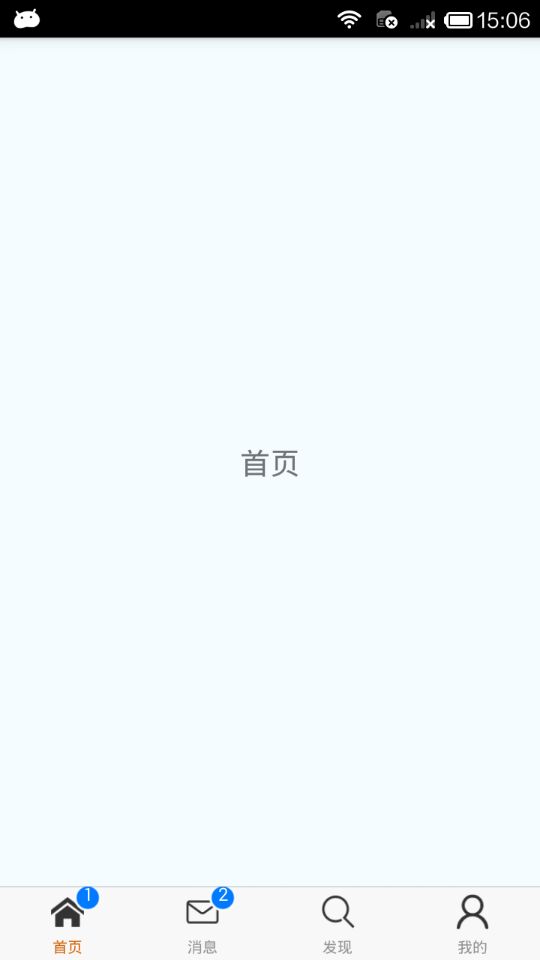
.
react-native 项目实战 -- 新闻客户端(3) -- 包装导航控制器的更多相关文章
- React Native 项目实战-Tamic
layout: post title: React Native 项目实战 date: 2016-10-18 15:02:29 +0800 comments: true categories: Rea ...
- 【腾讯Bugly干货分享】React Native项目实战总结
本文来自于腾讯bugly开发者社区,非经作者同意,请勿转载,原文地址:http://dev.qq.com/topic/577e16a7640ad7b4682c64a7 “8小时内拼工作,8小时外拼成长 ...
- React Native 项目实战 -- DoubanProject
引言:本文是我研究react-native时写的一个简单的demo,代码里有详细的注释,好废话不多说,直接上代码. 1.项目目录 2.index.android.js /** * index.andr ...
- React Native项目实战
算是学习React Native的一次项目总结吧,目的还是提高自己. 包含的内容: 1>仿"美团"页面的实现; 2>封装项目中和自己常用的一些组件; 3>学习别人 ...
- react-native 项目实战 -- 新闻客户端(7) -- 新闻详情页
http://c.3g.163.com/nc/article/BUH64L0J00031H2L/full.html 观察这个地址,BUH64L0J00031H2L 就是每条新闻数据里的postid. ...
- react-native 项目实战 -- 新闻客户端(6) -- 完善ListView头部视图
1.因为需要定时器,所以我们要cd到当前项目根目录下安装这个类库: $ npm i react-timer-mixin --save 2.Component/ScrollImage.js /** * ...
- react-native 项目实战 -- 新闻客户端(4) -- 请求网络数据
1.Home.js /** * 首页 */ import React, { Component } from 'react'; import { AppRegistry, StyleSheet, Te ...
- react-native 项目实战 -- 新闻客户端(2) -- 完善TabBar
1.创建 drawable-xxhdpi 文件夹,保存 TabBar 的 icon图标 android -- app -- src -- main -- res -- drawab ...
- react-native 项目实战 -- 新闻客户端(1) -- 初始化项目结构
1.在项目根目录新建Componet文件夹(专门用来放我们的自定义组件),里面新建Main.js.Home.js.Message.js.Mine.js.Find.js 2.修改 index.andro ...
随机推荐
- 创建型设计模式之建造者模式(Builder)
结构 意图 将一个复杂对象的构建与它的表示分离,使得同样的构建过程可以创建不同的表示. 适用性 当创建复杂对象的算法应该独立于该对象的组成部分以及它们的装配方式时. 当构造过程必须允许被构造的对象有不 ...
- Centos的APK解包打包签名
http://www.v5b7.com/other/apk.html vi /etc/profile PATH=/usr/local/mysql/bin:/usr/local/mysql/lib:/u ...
- Laravel中setAttribute和queryScope的用法
setAttribute使用场景: 数据在存入数据库的时候需要进行预先处理,每次都会写很多重复代码,使用 setAttribute之后就可以在数据填充时自动完成. setAttribute的写法:se ...
- C#中axWindowsMediaPlayer控件的用法
属性/方法名: 说明:[基本属性] URL:String; 指定媒体位置,本机或网络地址uiMode:String; 播放器界面模式,可为Full, Mini, None, Invisibleplay ...
- HDU 1847 【巴什博弈】
Good Luck in CET-4 Everybody! Time Limit: 1000/1000 MS (Java/Others) Memory Limit: 32768/32768 K (Ja ...
- RQNOJ PID217 / [NOIP1999]拦截导弹【n^2 / LIS】
题目描述 某国为了防御敌国的导弹袭击,发展出一种导弹拦截系统.但是这种导弹拦截系统有一个缺陷:虽然它的第一发炮弹能够到达任意的高度,但是以后每一发炮弹都不能高于前一发的高度.某天,雷达捕捉到敌国的导弹 ...
- 洛谷 P1060 开心的金明【DP/01背包】
题目描述 金明今天很开心,家里购置的新房就要领钥匙了,新房里有一间他自己专用的很宽敞的房间.更让他高兴的是,妈妈昨天对他说:"你的房间需要购买哪些物品,怎么布置,你说了算,只要不超过N元钱就 ...
- poj2774(最长公共子串)
poj2774 题意 求两个字符串的最长公共子串 分析 论文 将两个字符串合并,中间插入分隔符,在找最大的 height 值的时候保证,两个字符串后缀的起始点分别来自原来的两个字符串. code #i ...
- luogu P1122 最大子树和
题目描述 小明对数学饱有兴趣,并且是个勤奋好学的学生,总是在课后留在教室向老师请教一些问题.一天他早晨骑车去上课,路上见到一个老伯正在修剪花花草草,顿时想到了一个有关修剪花卉的问题.于是当日课后,小明 ...
- JAVA实现网页快照,存为图片格式
原文:http://blog.csdn.net/java2000_net/article/details/3643528 截取的google的效果,将就吧,不是特别好. 但是作为普通的应用,我想这个效 ...