
Openresty配置文件上传下载
1. 下载包安装Openresty
openresty-1.13.6.1下载地址 https://openresty.org/download/openresty-1.13.6.1.tar.gz
安装请自行百度。
2. 配置
2.1 nginx.conf
user root;

worker_processes  20;

error_log  logs/error.log notice;

events {

    worker_connections  1024;

}

http {

    include       mime.types;

    default_type  application/octet-stream;

    server {

        listen       8082;

        server_name  localhost;

        # 最大允许上传的文件大小

        client_max_body_size 200m;

        location / {

            root   html;

            index  index.html index.htm;

        }

        set $store_dir "/sdf/slb/openresty/nginx/html/download/"; # 文件存储路径

        # 文件上传接口:http://xxx:8082/upfile

        location /upfile {

            content_by_lua_file conf/lua/upload.lua; # 实现文件上传的逻辑

        }

        # 文件下载入口: http://xxx:8082/download

        location /download {

            autoindex on;

            autoindex_localtime on;

            root   html;

            index  index.html;

        }

        # redirect server error pages to the static page /50x.html

        error_page   500 502 503 504  /50x.html;

        location = /50x.html {

            root   html;

        }

    }

}
2.2 upload.lua(文件位于conf/lua/upload.lua)
-- upload.lua

--==========================================

-- 文件上传

--==========================================

local upload = require "resty.upload"

local cjson = require "cjson"

local chunk_size = 4096

local form, err = upload:new(chunk_size)

if not form then

    ngx.log(ngx.ERR, "failed to new upload: ", err)

    ngx.exit(ngx.HTTP_INTERNAL_SERVER_ERROR)

end

form:set_timeout(1000)

-- 字符串 split 分割

string.split = function(s, p)

    local rt= {}

    string.gsub(s, '[^'..p..']+', function(w) table.insert(rt, w) end )

    return rt

end

-- 支持字符串前后 trim

string.trim = function(s)

    return (s:gsub("^%s*(.-)%s*$", "%1"))

end

-- 文件保存的根路径

local saveRootPath = ngx.var.store_dir

-- 保存的文件对象

local fileToSave

--文件是否成功保存

local ret_save = false

while true do

    local typ, res, err = form:read()

    if not typ then

        ngx.say("failed to read: ", err)

        return

    end

    if typ == "header" then

        -- 开始读取 http header

        -- 解析出本次上传的文件名

        local key = res[1]

        local value = res[2]

        if key == "Content-Disposition" then

            -- 解析出本次上传的文件名

            -- form-data; name="testFileName"; filename="testfile.txt"

            local kvlist = string.split(value, ';')

            for _, kv in ipairs(kvlist) do

                local seg = string.trim(kv)

                if seg:find("filename") then

                    local kvfile = string.split(seg, "=")

                    local filename = string.sub(kvfile[2], 2, -2)

                    if filename then

                        fileToSave = io.open(saveRootPath .. filename, "w+")

                        if not fileToSave then

                            ngx.say("failed to open file ", filename)

                            return

                        end

                        break

                    end

                end

            end

        end

    elseif typ == "body" then

        -- 开始读取 http body

        if fileToSave then

            fileToSave:write(res)

        end

    elseif typ == "part_end" then

        -- 文件写结束,关闭文件

        if fileToSave then

            fileToSave:close()

            fileToSave = nil

        end

        ret_save = true

    elseif typ == "eof" then

        -- 文件读取结束

        break

    else

        ngx.log(ngx.INFO, "do other things")

    end

end

if ret_save then

    ngx.say("save file ok")

end
3. 测试
3.1 启动openresty
sbin/nginx
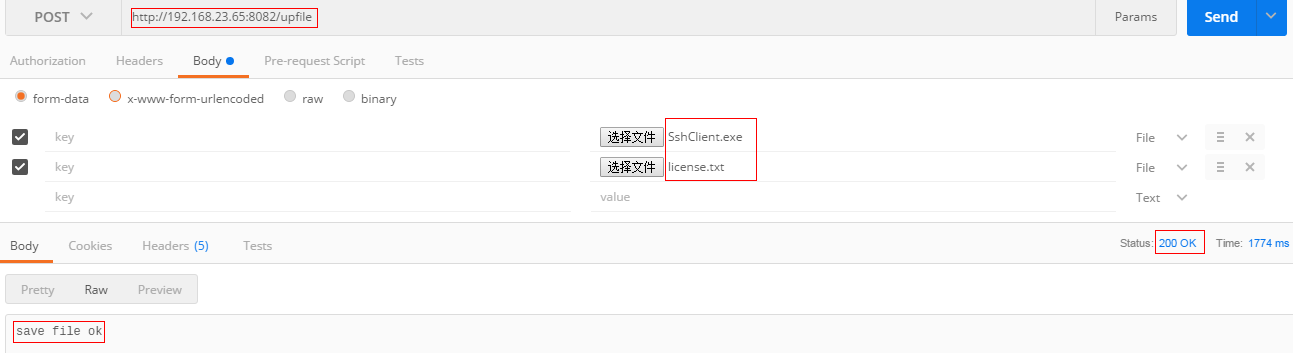
3.2 上传文件
通过地址http://192.168.23.65:8082/upfile上传文件。
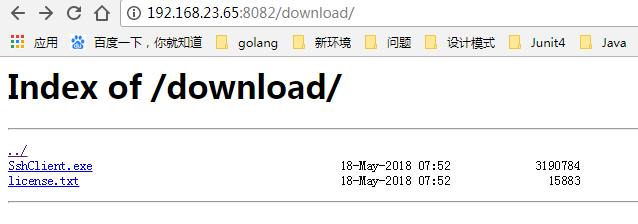
3.3 下载文件
通过http://192.168.23.65:8082/download下载文件。
x. 参考资料
http://www.codexiu.cn/nginx/blog/11024/
Openresty配置文件上传下载的更多相关文章
- EasyNVR摄像机网页Chrome无插件视频播放功能二次开发之通道配置文件上传下载示例代码
背景需求 熟悉EasyNVR产品的朋友们都知道,产品设计初期根据整个直播流程层级,我们将EasyNVR无插件直播系统划分为:硬件层.能力层.应用层,连接硬件与应用之间的桥梁,同时屏蔽各种厂家硬件的不同 ...
- springboot三种配置文件上传下载大小的配置
配置文件为application.yml格式: spring: http: multipart: enabled: true max-file-size: 30MB max-request-size: ...
- win7下利用ftp实现华为路由器的配置文件上传和下载
win7下利用ftp实现华为路由器的配置文件上传和下载 1. Win7下ftp的安装和配置 (1)开始—>控制面板—>程序—>程序和功能—>打开或关闭Windows功能 (2 ...
- Struts的文件上传下载
Struts的文件上传下载 1.文件上传 Struts2的文件上传也是使用fileUpload的组件,这个组默认是集合在框架里面的.且是使用拦截器:<interceptor name=" ...
- 基于Spring Mvc实现的Excel文件上传下载
最近工作遇到一个需求,需要下载excel模板,编辑后上传解析存储到数据库.因此为了更好的理解公司框架,我就自己先用spring mvc实现了一个样例. 基础框架 之前曾经介绍过一个最简单的spring ...
- 用Canvas+Javascript FileAPI 实现一个跨平台的图片剪切、滤镜处理、上传下载工具
直接上代码,其中上传功能需要自己配置允许跨域的文件服务器地址~ 或者将html文件贴到您的站点下同源上传也OK. 支持: 不同尺寸图片获取. 原图缩小放大. 原图移动. 选择框大小改变. 下载选中的区 ...
- 艺萌TCP文件上传下载及自动更新系统介绍(TCP文件传输)(一)
艺萌TCP文件上传下载及自动更新系统介绍(TCP文件传输) 该系统基于开源的networkComms通讯框架,此通讯框架以前是收费的,目前已经免费并开元,作者是英国的,开发时间5年多,框架很稳定. 项 ...
- Webwork 学习之路【07】文件上传下载
Web上传和下载应该是很普遍的一个需求,无论是小型网站还是大并发访问的交易网站.WebWork 当然也提供了很友好的拦截器来实现对文件的上传,让我们可以专注与业务逻辑的设计和实现,在实现上传和下载时顺 ...
- .NET两种常见上传下载文件方法
1.FTP模式 代码如下: (1)浏览 /// <summary> /// 浏览文件 /// </summary> /// <param name="tbCon ...
随机推荐
- Navicat无法连接到MySQL
今天新装的linux,装好以后想用Navicat连接一下数据库,发现连接不上 思路,捋一下 第一种:Access denied for user 'root'@'localhost' (using p ...
- Clover 的功能就是给资源管理器加上 Chrome 一样的标签页
官网下载地址:http://cn.ejie.me/
- (救星啊)im-switch -s ibus错误:Error: no configuration file "ibus" exists.
转自:http://www.cnblogs.com/csulennon/p/4194902.html 在虚拟机上安装Ubuntu14.04 后安装ibus输入法,万万没想到在切换输入法的时候居然出错了 ...
- 翻译:Spring-Framework-Reference Document:15.2-DispatcherServlet
写在前面的话: 最近被项目的代码折腾的死去活来的,其实框架也没有那么难理解,只是自己的Web基础太差,被Request和Response这一对神雕侠侣坑到泪流满面!今天捣腾了一下Spring We ...
- [转]SSIS数据转换组件_派生列、审核、字符映射转换和条件性拆分转换
本文转自:http://www.cnblogs.com/gudujianxiao/archive/2012/04/14/2446925.html 一 派生列 派生列转换通过对输入列进行类型转换或应用表 ...
- linux CMakeLists.txt 语法
CMake入门教程 参考文献:http://www.ibm.com/developerworks/cn/linux/l-cn-cmake/index.html 官方网址:http://www.cmak ...
- centos使用密钥替换密码登录服务器
一.首先登陆centos,切换用户,切换到你要免密码登陆的用户,进入到家目录,以下我以admin为例,命令:su admincd ~ 二.创建钥匙,命令:ssh-keygen -t rsa,一路按Y搞 ...
- 会声会影X10 64位整合光盘V10.1.0.14简体中文版 下载
http://xiazai.huishenghuiying.com.cn/wm/huishenghuiyingx10_64bit_wmqm.exe
- JavaScript 数组的常用操作
JavaScript splice 方法 splice 方法用于插入.删除或替换数组的元素.语法如下: array_object.splice(start, num, element1, elemen ...
- 解决启动WebLogic输入用户名密码问题
转自:http://wenku.baidu.com/link?url=M6wJDVwm_Us6NsYi5u-PDTTbTHpO_ncsv5yClXSxhDIhA70IRga5ZdvotT4bW__MG ...