
WebService-CXF使用
一、SOAP和WSDL概念:
SOAP(Simple Object Access Protocol):简单对象访问协议
SOAP作为一个基于XML语言的协议用于在网上传输数据
SOAP=在Http的基础上+xml数据
SOAP是基于http的
WSDL(WebService Description Language):web 服务描述语言,就是一个xml文档,用于描述当前服务的一些信息(服务名称、服务的发布地址、服务提供的方法、方法的参数类型、方法的返回值类型等)。
二、apache CXF入门
官网:cxf.apache.org下载CXF的开发包:
服务端开发:
第一步:创建动态web项目
第二步:导入CXF相关jar包
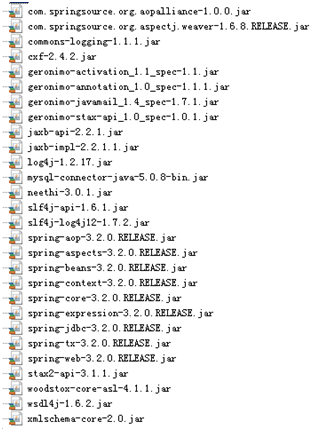
第三步:在web.xml中配置CXF框架提供的一个Servlet
 <?xml version="1.0" encoding="UTF-8"?>

 <web-app xmlns:xsi="http://www.w3.org/2001/XMLSchema-instance"

     xmlns="http://java.sun.com/xml/ns/javaee"

     xsi:schemaLocation="http://java.sun.com/xml/ns/javaee http://java.sun.com/xml/ns/javaee/web-app_3_0.xsd"

     id="WebApp_ID" version="3.0">

     <display-name>crm</display-name>

     <welcome-file-list>

         <welcome-file>index.html</welcome-file>

         <welcome-file>index.htm</welcome-file>

         <welcome-file>index.jsp</welcome-file>

         <welcome-file>default.html</welcome-file>

         <welcome-file>default.htm</welcome-file>

         <welcome-file>default.jsp</welcome-file>

     </welcome-file-list>

     <!-- CXF Servlet -->

     <servlet>

         <servlet-name>cxf</servlet-name>

         <servlet-class>org.apache.cxf.transport.servlet.CXFServlet</servlet-class>

     </servlet>

     <servlet-mapping>

         <servlet-name>cxf</servlet-name>

         <url-pattern>/service/*</url-pattern>

     </servlet-mapping>

     <!-- needed for ContextLoaderListener -->

     <context-param>

         <param-name>contextConfigLocation</param-name>

         <param-value>classpath:cxf.xml</param-value>

     </context-param>

     <listener>

         <listener-class>org.springframework.web.context.ContextLoaderListener</listener-class>

     </listener>

 </web-app>
第四步:在类路径下提供cxf.xml
<?xml version="1.0" encoding="UTF-8"?>

<beans xmlns="http://www.springframework.org/schema/beans"

    xmlns:xsi="http://www.w3.org/2001/XMLSchema-instance" xmlns:jaxws="http://cxf.apache.org/jaxws"

    xmlns:jaxrs="http://cxf.apache.org/jaxrs" xmlns:core="http://cxf.apache.org/core"

    xmlns:context="http://www.springframework.org/schema/context" xmlns:tx="http://www.springframework.org/schema/tx"

    xsi:schemaLocation="http://cxf.apache.org/jaxws http://cxf.apache.org/schemas/jaxws.xsd

        http://cxf.apache.org/core http://cxf.apache.org/schemas/core.xsd

        http://www.springframework.org/schema/beans http://www.springframework.org/schema/beans/spring-beans.xsd

        http://www.springframework.org/schema/context http://www.springframework.org/schema/context/spring-context-3.2.xsd

        http://cxf.apache.org/jaxrs http://cxf.apache.org/schemas/jaxrs.xsd

        http://www.springframework.org/schema/tx http://www.springframework.org/schema/tx/spring-tx-3.2.xsd">

    <!-- 引入CXF Bean定义如下,早期的版本中使用 -->

    <import resource="classpath:META-INF/cxf/cxf.xml" />

    <import resource="classpath:META-INF/cxf/cxf-extension-soap.xml" />

    <import resource="classpath:META-INF/cxf/cxf-servlet.xml" />

</beans>
第五步:开发一个接口和实现类
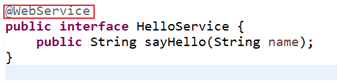

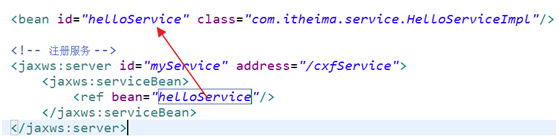
第六步:在cxf.xml中注册服务
客户端开发
第一步:创建Java项目并导入CXF相关jar包
第二步:使用wsimport或者CXF提供wsdl2java生成本地代码,只需要生成接口文件
wsdl2java 工具:此工具位于cxf_home/bin目录下,
它包含以下参数:
-d:指定代码生成的目录
-p:指定生成的新的包结构

第三步:将接口文件复制到项目中
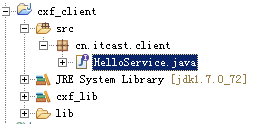
第四步:提供spring配置文件,注册客户端代理对象

第五步:读取spring配置文件,创建spring工厂,从工厂中获取代理对象,实现远程调用

WebService-CXF使用的更多相关文章
- webservice cxf error:类的两个属性具有相同名称 "password"
execption detail: Caused by: javax.xml.ws.WebServiceException: org.apache.cxf.service.factory.Servic ...
- WebService CXF调试常见报错及解决方案
1.CXF java.lang.RuntimeException: Cannot create a secure XMLInputFactory 解决方案:从apache-cxf/lib下寻找Wood ...
- webservice(CXF)基于3.1.1版本实例
引言 有没有一种办法可以实现跨应用程序进行通信和跨平台进行通信呢? 换句话说,就是有什么办法可以实现我的应用程序 A 可以和应用程序 B 进行通信呢? 或者说是,我用 Java 写的应用程序和用 . ...
- WebService CXF知识总结
2018-10-23 <wsdl:service name="Iptv3aBasicService"> 客户端client信息,CXF会生成一个名为Iptv3ABasi ...
- WebService—CXF整合Spring实现接口发布和调用过程
一.CXF整合Spring实现接口发布 发布过程如下: 1.引入jar包(基于maven管理) <!-- cxf --> <dependency> <groupId> ...
- WebService—CXF—实现接口发布和客户端调用
(一)接口发布的几种方式 定义接口: @WebService(targetNamespace="http://www.itfad.net/queryUser") public in ...
- webservice -- cxf客户端调用axis2服务端
背景: 有个项目, 需要由第三方提供用户信息, 实现用户同步操作, 对方给提供webservice接口(axis2实现)并也使用axis2作主客户端调用我方提供的webservice接口 起初, 由于 ...
- webservice CXF 相关面试题
Web Service的优点(1) 可以让异构的程序相互访问(跨平台)(2) 松耦合(3) 基于标准协议(通用语言,允许其他程序访问) 1:WEB SERVICE名词解释.JSWDL开发包的介绍.JA ...
- WebService CXF Spring
web.xml <?xml version="1.0" encoding="UTF-8"?> <web-app xmlns:xsi=" ...
- Webservice(CXF) 、 POI(excel)操作部署到weblogic上冲突解决
这几日把webservice和POI 操作部署到WebLogic上,问题重重,有各种冲突. 部署到tomcat上没有问题 版本: jdk:6 tomcat:6 weblogic:10.3.3 cxf: ...
随机推荐
- R在Centos下安装
R语言是主要用于统计分析.绘图的语言和操作环境. 官方网站: http://www.r-project.org/ Windows下面有直接的安装包,直接下载安装很方便,但是对于刚出的CentOS6.0 ...
- Linux 统计文件夹,文件数量的命令
用的最多的就是: ls -l | grep "^-" | wc -l ls -l 普通文件就是以 - 开头,文件夹以 d 开头 grep 后面接正则表达式:^- 以 - 开头的匹配 ...
- pat——1017. Queueing at Bank (java中Map用法)
由PAT1017例题展开: Suppose a bank has K windows open for service. There is a yellow line in front of the ...
- CToolBarCtrl工具栏设置总结(转)
(一)工具条控制的主要功能 所谓工具条就是具有位图和分隔符组成的一组命令按钮,位图按钮部分可以是下推按钮.检查盒按钮.无线按 钮等.工具条对象类派生于主窗口架框类CframeWnd或CMDIFrame ...
- jquery实现页面图片轮播
1.创建一个html页面 <!DOCTYPE html><html lang="en"><head> <meta charset=&quo ...
- Knowledge Point 20180305 十进制转换成二进制浮点数
如何将十进制的浮点数 转换二进制的浮点数,分为两部分: 1. 先将整数部分转换为二进制, 2. 将小数部分转换为二进制, 然后将整数部分与小数部分相加. 以 20.5 转换为例,20转换后变为1010 ...
- mpvue开发美团外卖点餐小程序
mpvue-meituan mpvue-meituan 是一款使用mpvue开发的实战小程序项目,完全仿制美团官方外卖点餐小程序开发而成,项目的框架结构完全按照企业开发架构搭建而成.结合了原生小程序的 ...
- SQL注入点的类型
1.数字型注入点 形如“http://****?ID=55”,这类注入的参数是“数字”,因此称为“数字型注入点”. 此类注入点提交的SQL语句,其原形大致为:Select * from 表名 wher ...
- percona数据库监控工具的安装部署
Percona Monitoring and Management 安装 PMM是一个开源,免费的mysql管理监控平台,他可以用来分析mysql,mariadb和mongodb的服务器性能. 安装步 ...
- Virtualization state: Optimized (version 7.4 installed)
[Virtualization state: Optimized (version 7.4 installed)] [root@localhost ~]# cd /mnt/ [root@localho ...