
自定义View的实现流程

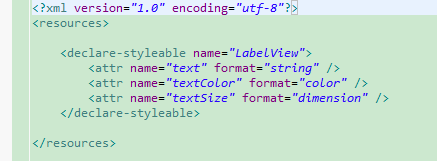
import android.content.Context;

import android.content.res.TypedArray;

import android.graphics.Canvas;

import android.graphics.Paint;

import android.util.AttributeSet;

import android.view.View;

/**

* Example of how to write a custom subclass of View. LabelView is used to draw

* simple text views. Note that it does not handle styled text or right-to-left

* writing systems.

*

*/

public class LabelView extends View {

     private Paint mTextPaint;

     private String mText;

     private int mAscent;

     /**

     * Constructor. This version is only needed if you will be instantiating the

     * object manually (not from a layout XML file).

     *

     * @param context

     */

     public LabelView(Context context) {

          super(context);

          initLabelView();

     }

     /**

     * Construct object, initializing with any attributes we understand from a

     * layout file. These attributes are defined in

     * SDK/assets/res/any/classes.xml.

     *

     * @see android.view.View#View(android.content.Context,

     *      android.util.AttributeSet)

     */

     public LabelView(Context context, AttributeSet attrs) {

          super(context, attrs);

          initLabelView();

          TypedArray a = context.obtainStyledAttributes(attrs,

                    R.styleable.LabelView);

          CharSequence s = a.getString(R.styleable.LabelView_text);

          if (s != null) {

               setText(s.toString());

          }

          // Retrieve the color(s) to be used for this view and apply them.

          // Note, if you only care about supporting a single color, that you

          // can instead call a.getColor() and pass that to setTextColor().

          setTextColor(a.getColor(R.styleable.LabelView_textColor, 0xFF000000));

          int textSize = a.getDimensionPixelOffset(

                    R.styleable.LabelView_textSize, 0);

          if (textSize > 0) {

               setTextSize(textSize);

          }

          a.recycle();

     }

     private final void initLabelView() {

          mTextPaint = new Paint();

          mTextPaint.setAntiAlias(true);

          // Must manually scale the desired text size to match screen density

          mTextPaint.setTextSize(16 * getResources().getDisplayMetrics().density);

          mTextPaint.setColor(0xFF000000);

          setPadding(3, 3, 3, 3);

     }

     /**

     * Sets the text to display in this label

     *

     * @param text

     *            The text to display. This will be drawn as one line.

     */

     public void setText(String text) {

          mText = text;

          requestLayout();

          invalidate();

     }

     /**

     * Sets the text size for this label

     *

     * @param size

     *            Font size

     */

     public void setTextSize(int size) {

          // This text size has been pre-scaled by the getDimensionPixelOffset

          // method

          mTextPaint.setTextSize(size);

          requestLayout();

          invalidate();

     }

     /**

     * Sets the text color for this label.

     *

     * @param color

     *            ARGB value for the text

     */

     public void setTextColor(int color) {

          mTextPaint.setColor(color);

          invalidate();

     }

     /**

     * @see android.view.View#measure(int, int)

     */

     @Override

     protected void onMeasure(int widthMeasureSpec, int heightMeasureSpec) {

          setMeasuredDimension(measureWidth(widthMeasureSpec),

                    measureHeight(heightMeasureSpec));

     }

     /**

     * Determines the width of this view

     *

     * @param measureSpec

     *            A measureSpec packed into an int

     * @return The width of the view, honoring constraints from measureSpec

     */

     private int measureWidth(int measureSpec) {

          int result = 0;

          int specMode = MeasureSpec.getMode(measureSpec);

          int specSize = MeasureSpec.getSize(measureSpec);

          if (specMode == MeasureSpec.EXACTLY) {

               // We were told how big to be

               result = specSize;

          } else {

               // Measure the text

               result = (int) mTextPaint.measureText(mText) + getPaddingLeft()

                         + getPaddingRight();

               if (specMode == MeasureSpec.AT_MOST) {

                    // Respect AT_MOST value if that was what is called for by

                    // measureSpec

                    result = Math.min(result, specSize);

               }

          }

          return result;

     }

     /**

     * Determines the height of this view

     *

     * @param measureSpec

     *            A measureSpec packed into an int

     * @return The height of the view, honoring constraints from measureSpec

     */

     private int measureHeight(int measureSpec) {

          int result = 0;

          int specMode = MeasureSpec.getMode(measureSpec);

          int specSize = MeasureSpec.getSize(measureSpec);

          mAscent = (int) mTextPaint.ascent();

          if (specMode == MeasureSpec.EXACTLY) {

               // We were told how big to be

               result = specSize;

          } else {

               // Measure the text (beware: ascent is a negative number)

               result = (int) (-mAscent + mTextPaint.descent()) + getPaddingTop()

                         + getPaddingBottom();

               if (specMode == MeasureSpec.AT_MOST) {

                    // Respect AT_MOST value if that was what is called for by

                    // measureSpec

                    result = Math.min(result, specSize);

               }

          }

          return result;

     }

     /**

     * Render the text

     *

     * @see android.view.View#onDraw(android.graphics.Canvas)

     */

     @Override

     protected void onDraw(Canvas canvas) {

          super.onDraw(canvas);

          canvas.drawText(mText, getPaddingLeft(), getPaddingTop() - mAscent,

                    mTextPaint);

     }

}
自定义View的实现流程的更多相关文章
- 自定义View分类与流程
自定义View分类与流程(进阶篇)## 转载出处: http://www.gcssloop.com/customview/CustomViewProcess/ 自定义View绘制流程函数调用链(简化版 ...
- Android查缺补漏(View篇)--自定义 View 的基本流程
View是Android很重要的一部分,常用的View有Button.TextView.EditView.ListView.GridView.各种layout等等,开发者通过对这些View的各种组合以 ...
- 自定义View的基本流程
1.明确需求,确定你想实现的效果2.确定是使用组合控件的形式还是全新自定义的形式,组合控件即使用多个系统控件来合成一个新控件,你比如titilebar,这种形式相对简单,参考:http://blog. ...
- 从一个简洁的进度刻度绘制中了解自定义View的思路流程
先看效果(原谅我的渣像素),进度的刻度.宽度.颜色可以随意设定: [项目github地址: https://github.com/zhangke3016/CircleLoading] 实现起来并不难, ...
- 自定义View(1)简单流程及示例模板
1,继承View , ViewGroup,或TextView等等 2,绘制相关的api, canvas 画布, paint 画笔 2,重写重要的函数(注意这个顺序) onMeasure 属于View的 ...
- 自定义控件(视图)2期笔记01:自定义控件之自定义View的步骤
1. 根据Android Developers官网的介绍,自定义控件你需要以下的步骤: (1)创建View (2)处理View的布局 (3)绘制View (4)与用户进行交互 (5)优化已定义的Vie ...
- Android -- 自定义view实现keep欢迎页倒计时效果
1,最近打开keep的app的时候,发现它的欢迎页面的倒计时效果还不错,所以打算自己来写写,然后就有了这篇文章. 2,还是老规矩,先看一下我们今天实现的效果 相较于我们常见的倒计时,这次实现的效果是多 ...
- Android查缺补漏(View篇)--自定义View利器Canvas和Paint详解
上篇文章介绍了自定义View的创建流程,从宏观上给出了一个自定义View的创建步骤,本篇是上一篇文章的延续,介绍了自定义View中两个必不可少的工具Canvas和Paint,从细节上更进一步的讲解自定 ...
- 自定义View实战--实现一个清新美观的加载按钮
本篇文章已授权微信公众号 guolin_blog (郭霖)独家发布 在 Dribble 上偶然看到了一组交互如下: 当时在心里问自己能不能做,答案肯定是能做的,不过我比较懒,觉得中间那个伸缩变化要编写 ...
随机推荐
- java实现屏幕共享的小程序
最近在做软件软件工程的课程设计,做一个用于实验室的屏幕监控系统,参考各种前人代码,最后领悟之后要转换自己的代码,初学者都是这样模仿过来的. 说到屏幕监控系统,有教师断和学生端, ...
- return阻止js继续向下执行
终止JS运行有如下几种可能: 终止函数的运行的方式有两种 在函数中使用return,则当遇到return时,函数终止执行,控制权继续向下运行 在函数中使用try-catch异常处理,需要结束时,使用t ...
- UVALive - 6864 Strange Antennas 扫描线
题目链接: http://acm.hust.edu.cn/vjudge/problem/87213 Strange Antennas Time Limit: 3000MS 题意 一个雷达能够辐射到的范 ...
- Uncaught Error: Syntax error, unrecognized expression: |117的js错误
117指的是js代码在浏览器运行时的出错的行号 var a="117|117" 前面的错误是由于有特殊符号“|”,用$("txtId"+a).val();去取 ...
- Python对字符串进行MD5加密处理
import hashlibimport sysreload(sys)sys.setdefaultencoding('utf-8') m = hashlib.md5()m.update('123456 ...
- Android studio出现Error:Unable to tunnel through proxy. Proxy returns "HTTP/1.1 400 Bad Request"的解决办法
最近更新了一下Android Studio(下文简写成AS),然后打开工程发现出现Error:Unable to tunnel through proxy. Proxy returns "H ...
- BZOJ 1875 HH去散步(矩阵快速幂)
题意: 给定一张无向图,每条路的长度都是1,没有自环,可能有重边,给定起点与终点,求从起点走t步到达终点的方案数. 每一步走的时候要求不能走上一条刚刚走的路. 解析: 显然需要搞出个矩阵之后矩乘. 然 ...
- c# 日志记录 行号
Console.WriteLine(ex.Message); //通过如下代码来记录异常详细的信息 ); Console.WriteLine("文件名:{0},行号:{1},列号:{2}&q ...
- ZOJ1081:Points Within——题解
http://acm.zju.edu.cn/onlinejudge/showProblem.do?problemCode=1081 题目大意:给定一个点数为 n 的多边形,点按照顺序给出,再给出 m ...
- BZOJ3832 [Poi2014]Rally 【拓扑序 + 堆】
题目链接 BZOJ3832 题解 神思路orz,根本不会做 设\(f[i]\)为到\(i\)的最长路,\(g[i]\)为\(i\)出发的最长路,二者可以拓扑序后\(dp\)求得 那么一条边\((u,v ...