
Rabbitmq(6) 主题模式
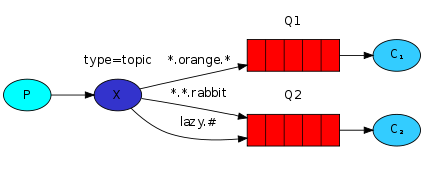
* 匹配1个
# 匹配所有
发送者:
package com.aynu.bootamqp.service;

import com.aynu.bootamqp.commons.utils.Amqp;

import com.rabbitmq.client.Channel;

import com.rabbitmq.client.Connection;

import java.io.IOException;

import java.util.concurrent.TimeoutException;

public class Send {

    private final static String Exchange_NAME ="hello";

    public static void main(String[] args) throws IOException, TimeoutException {

            Connection connection = Amqp.getConnection();

            Channel channel = connection.createChannel();

            //声明交换机

            channel.exchangeDeclare(Exchange_NAME,"topic");

            //在手动确认机制之前

            //一次只发送一条消息,给不同的消费者

            channel.basicQos(1);

            String message = "hello ps";

            String routingKey ="goods.delete";

            channel.basicPublish(Exchange_NAME,routingKey,null,message.getBytes("utf-8"));

            System.out.println(message);

            channel.close();

            connection.close();

    }

}
接受者1
package com.aynu.bootamqp.service;

import com.aynu.bootamqp.commons.utils.Amqp;

import com.rabbitmq.client.*;

import java.io.IOException;

import java.util.concurrent.TimeoutException;

@SuppressWarnings("all")

public class Receive {

    private final static String QUEUE_NAME ="hello";

    private final static String Exchange_NAME ="hello";

    public static void main(String[] args) throws IOException, TimeoutException {

        Connection connection = Amqp.getConnection();

        Channel channel = connection.createChannel();

        channel.queueDeclare(QUEUE_NAME,false,false,false,null);

        //绑定队列


        channel.queueBind(QUEUE_NAME,Exchange_NAME,"goods.add");

       // 一次只处理一个消息

        channel.basicQos(1);

        DefaultConsumer consumer = new DefaultConsumer(channel) {

            @Override

            public void handleDelivery(String consumerTag, Envelope envelope,

                                       AMQP.BasicProperties properties, byte[] body) throws IOException {

                super.handleDelivery(consumerTag, envelope, properties, body);

                String msg = new String(body,"utf-8");

                System.out.println("receive"+msg);

                try {

                    Thread.sleep(1000*2);

                } catch (InterruptedException e) {

                    e.printStackTrace();

                }finally {

                    // 手动发送消息确认机制

                    channel.basicAck(envelope.getDeliveryTag(),false);

                }

            }

        };

        // 自动应答

        boolean autoAck = false;

        channel.basicConsume(QUEUE_NAME,autoAck,consumer);

    }

}
接受者2
package com.aynu.bootamqp.service;

import com.aynu.bootamqp.commons.utils.Amqp;

import com.rabbitmq.client.*;

import java.io.IOException;

import java.util.concurrent.TimeoutException;

@SuppressWarnings("all")

public class Receive2 {

    private final static String QUEUE_NAME ="hello1";

    private final static String Exchange_NAME ="hello";

    public static void main(String[] args) throws IOException, TimeoutException {

        Connection connection = Amqp.getConnection();

        Channel channel = connection.createChannel();

        channel.queueDeclare(QUEUE_NAME,false,false,false,null);

        channel.queueBind(QUEUE_NAME,Exchange_NAME,"goods.#");

        channel.basicQos(1);

        DefaultConsumer consumer = new DefaultConsumer(channel) {

            @Override

            public void handleDelivery(String consumerTag, Envelope envelope,

                                       AMQP.BasicProperties properties, byte[] body) throws IOException {

                super.handleDelivery(consumerTag, envelope, properties, body);

                String msg = new String(body,"utf-8");

                System.out.println("receive2222"+msg);

                try {

                    Thread.sleep(1000);

                } catch (InterruptedException e) {

                    e.printStackTrace();

                }finally {

                    // 手动发送消息确认机制

                    channel.basicAck(envelope.getDeliveryTag(),false);

                }

            }

        };

        boolean autoAck = false;

        channel.basicConsume(QUEUE_NAME,autoAck,consumer);

    }

}
Rabbitmq(6) 主题模式的更多相关文章
- RabbitMQ消息队列(八)-通过Topic主题模式分发消息(.Net Core版)
前两章我们讲了RabbitMQ的direct模式和fanout模式,本章介绍topic主题模式的应用.如果对direct模式下通过routingkey来匹配消息的模式已经有一定了解那fanout也很好 ...
- RabbitMQ (七) 订阅者模式之主题模式 ( topic )
主题模式和路由模式很像 路由模式是精确匹配 主题模式是模糊匹配 依然先通过管理后台添加一个交换机. 生产者 public class Producer { private const string E ...
- (八)RabbitMQ消息队列-通过Topic主题模式分发消息
原文:(八)RabbitMQ消息队列-通过Topic主题模式分发消息 前两章我们讲了RabbitMQ的direct模式和fanout模式,本章介绍topic主题模式的应用.如果对direct模式下通过 ...
- RabbitMQ六种队列模式-主题模式
前言 RabbitMQ六种队列模式-简单队列RabbitMQ六种队列模式-工作队列RabbitMQ六种队列模式-发布订阅RabbitMQ六种队列模式-路由模式RabbitMQ六种队列模式-主题模式 [ ...
- 队列模式&主题模式
# RabbitMQ 消息中间件 **Advanced Message Queuing Protocol (高级消息队列协议** The Advanced Message Queuing Protoc ...
- 【RabbitMQ】工作模式介绍
一.前言 之前,笔者写过< CentOS 7.2 安装 RabbitMQ> 这篇文章,今天整理一下 RabbitMQ 相关的笔记便于以后复习. 二.模式介绍 在 RabbitMQ 官网上提 ...
- RabbitMQ六种队列模式-简单队列模式
前言 RabbitMQ六种队列模式-简单队列 [本文]RabbitMQ六种队列模式-工作队列RabbitMQ六种队列模式-发布订阅RabbitMQ六种队列模式-路由模式RabbitMQ六种队列模式-主 ...
- RabbitMQ六种队列模式-工作队列模式
前言 RabbitMQ六种队列模式-简单队列RabbitMQ六种队列模式-工作队列 [本文]RabbitMQ六种队列模式-发布订阅RabbitMQ六种队列模式-路由模式RabbitMQ六种队列模式-主 ...
- RabbitMQ六种队列模式-发布订阅模式
前言 RabbitMQ六种队列模式-简单队列RabbitMQ六种队列模式-工作队列RabbitMQ六种队列模式-发布订阅 [本文]RabbitMQ六种队列模式-路由模式RabbitMQ六种队列模式-主 ...
随机推荐
- 剑指Offer 10. 矩形覆盖 (递归)
题目描述 我们可以用2*1的小矩形横着或者竖着去覆盖更大的矩形.请问用n个2*1的小矩形无重叠地覆盖一个2*n的大矩形,总共有多少种方法? 题目地址 https://www.nowcoder.com/ ...
- C# 开发ModBus的服务器程序 实现ModBus数据总站 搭建自定义的Modbus服务器 同时支持tcp和rtu
前言 本文将使用一个NuGet公开的组件技术来实现一个ModBus TCP的服务器端数据引擎,方便的实现接收来自各种设备的数据.并且该服务器模拟真实的设备,包含了数据池功能,可以接受来自任何支持Mod ...
- 关于WebAPI跨域踩到的一点坑
最近在尝试前后端分离的WebAPI+AngularJS方案,在率先处理授权的时候,踩到了一点WebAPI跨域的坑,其实严格意义上来说也不算是坑吧,只是我自己对WebAPI不熟悉而已,这里我与大家分享一 ...
- Codeforces1076F. Summer Practice Report(贪心+动态规划)
题目链接:传送门 题目: F. Summer Practice Report time limit per test seconds memory limit per test megabytes i ...
- Linux LVM使用小记
对于Linux LVM一直不太理解,直到最近使用了简单功能后才稍微明白点. 对于硬盘空间物理上的使用,我们都是先对硬盘进行分区,然后格式化成文件系统支持的类型,最后给操作系统使用.但是这种使用方式很不 ...
- unity的一些tips
主要是我知乎上回答的一个关于unity的tip,备忘. 说说我所看到unity相关的,不好的习惯: 1 尽量不要在Awake(), start()等函数内加入业务逻辑的初始化代码.首先无法简便的直接启 ...
- 使用lite-server
进入项目根目录,执行下列步骤 安装lite-server npm install lite-server 新建配置文件bs-config.json bs-config.json中可以: 指定监听的端口 ...
- Centos6.5部署Sonar6.7.1备注
1.一定要用非root账号登录(自己建立账号),建立Sonar目录并部署,因为使用了Elasticsearch 5.6.3做搜索服务器,而它不允许用root账号启动服务,会报如下错误: Excepti ...
- Linux下usb设备驱动详解
USB驱动分为两块,一块是USB的bus驱动,这个东西,Linux内核已经做好了,我们可以不管,我们只需要了解它的功能.形象的说,USB的bus驱动相当于铺出一条路来,让所有的信息都可以通过这条USB ...
- 【rocketMQ】之centos6.9安装RocketMQ4.2
基于最新的RocketMQ4.2版本,搭建2Master模式. 硬件环境:centos6.9_x64(两台虚拟机) IP1:192.168.150.128 IP2:192.168.150.129 1. ...