
如何去掉WordPress分类目录url链接中的category,如何处理生成的作者链接
一个新网站需要结合SEO,才能做成一个优秀的网站,
◆◆◆ 关于WordPress的分类目录url中含有category的处理办法:
1,如果是新网站这些设置需要提前做,方便以后做SEO
1、修改固定链接设置
打开WP后台-设置-固定链接
自定义结构,可以依据对SEO友好设置url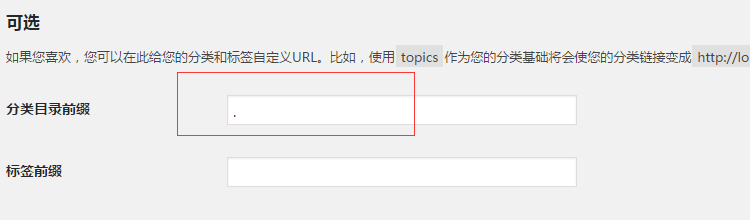
温馨提示:在分类目录那一栏里写入英文半角的点,此时得需要你的网站是全新的,没有分类栏目和文章,这样才不会出错,如果已有文章,这样的方法会使你的文章和分类栏目不存在
2.借助Wordpress插件
使用插件“WP No Category Base”插件
3.WP No category Base 插件的主体代码插入到function.php中(不使用插件,只放代码在后台)
//去除分类标志代码

add_action( 'load-themes.php',  'no_category_base_refresh_rules');

 add_action('created_category', 'no_category_base_refresh_rules');

 add_action('edited_category', 'no_category_base_refresh_rules');

 add_action('delete_category', 'no_category_base_refresh_rules');

 function no_category_base_refresh_rules() {

     global $wp_rewrite;

     $wp_rewrite -> flush_rules();

 }

 // register_deactivation_hook(__FILE__, 'no_category_base_deactivate');

 // function no_category_base_deactivate() {

 //  remove_filter('category_rewrite_rules', 'no_category_base_rewrite_rules');

 //  // We don't want to insert our custom rules again

 //  no_category_base_refresh_rules();

 // }

 // Remove category base

 add_action('init', 'no_category_base_permastruct');

 function no_category_base_permastruct() {

     global $wp_rewrite, $wp_version;

     if (version_compare($wp_version, '3.4', '<')) {

         // For pre-3.4 support

         $wp_rewrite -> extra_permastructs['category'][0] = '%category%';

     } else {

         $wp_rewrite -> extra_permastructs['category']['struct'] = '%category%';

     }

 }

 // Add our custom category rewrite rules

 add_filter('category_rewrite_rules', 'no_category_base_rewrite_rules');

 function no_category_base_rewrite_rules($category_rewrite) {

     //var_dump($category_rewrite); // For Debugging

     $category_rewrite = array();

     $categories = get_categories(array('hide_empty' => false));

     foreach ($categories as $category) {

         $category_nicename = $category -> slug;

         if ($category -> parent == $category -> cat_ID)// recursive recursion

             $category -> parent = 0;

         elseif ($category -> parent != 0)

             $category_nicename = get_category_parents($category -> parent, false, '/', true) . $category_nicename;

         $category_rewrite['(' . $category_nicename . ')/(?:feed/)?(feed|rdf|rss|rss2|atom)/?$'] = 'index.php?category_name=$matches[1]&feed=$matches[2]';

         $category_rewrite['(' . $category_nicename . ')/page/?([0-9]{1,})/?$'] = 'index.php?category_name=$matches[1]&paged=$matches[2]';

         $category_rewrite['(' . $category_nicename . ')/?$'] = 'index.php?category_name=$matches[1]';

     }

     // Redirect support from Old Category Base

     global $wp_rewrite;

     $old_category_base = get_option('category_base') ? get_option('category_base') : 'category';

     $old_category_base = trim($old_category_base, '/');

     $category_rewrite[$old_category_base . '/(.*)$'] = 'index.php?category_redirect=$matches[1]';

     //var_dump($category_rewrite); // For Debugging

     return $category_rewrite;

 }

 // Add 'category_redirect' query variable

 add_filter('query_vars', 'no_category_base_query_vars');

 function no_category_base_query_vars($public_query_vars) {

     $public_query_vars[] = 'category_redirect';

     return $public_query_vars;

 }

 // Redirect if 'category_redirect' is set

 add_filter('request', 'no_category_base_request');

 function no_category_base_request($query_vars) {

     //print_r($query_vars); // For Debugging

     if (isset($query_vars['category_redirect'])) {

         $catlink = trailingslashit(get_option('home')) . user_trailingslashit($query_vars['category_redirect'], 'category');

         status_header(301);

         header("Location: $catlink");

         exit();

     }

     return $query_vars;

 }
◆◆◆WordPress会生成很多作者链接
因为wp有一个作者归档的模板文件
wordpress作者的相关函数调用代码
<?php the_author(); ?> 显示文章的作者

2.<?php the_author_description(); ?> 显示文章作者的描述(作者个人资料中的描述)

3.<?php the_author_login(); ?> 显示文章作者的登录名

4.<?php the_author_firstname(); ?> 显示文章作者的firstname(名)

5.<?php the_author_lastname(); ?> 显示文章作者的lastname(姓)

6.<?php the_author_nickname(); ?> 显示文章作者的昵称

7.<?php the_author_ID(); ?> 显示文章作者的ID号

8.<?php the_author_email(); ?> 显示文章作者的电子邮箱

9.<?php the_author_url(); ?> 显示文章作者的网站地址

10.<?php the_author_link (); ?>(添加于2.1版本) 显示一个以文章作者名为链接名,链接地址为文章作者的网址的链接。

11.<?php the_author_icq(); ?> (不推荐使用) 显示文章作者的icq

12.<?php the_author_aim(); ?> 显示文章作者的aim

13.<?php the_author_yim(); ?> 显示文章作者的yim

14.<?php the_author_msn(); ?> (不推荐使用) 显示文章作者的msn

15.<?php the_author_posts(); ?> 显示文章作者已发表文章的篇数

16.<?php the_author_posts_link(); ?> 显示一个链接到文章作者已发表文章列表的链接

17.<?php list_authors(); ?> (不推荐使用) 显示blog所有作者和他们的相关信息。完整函数如下:
1. 一个不错的解决方法是将WordPress作者存档链接中的用户名改为昵称。
修改方法如下:
/**

 * 将WordPress作者存档链接中的用户名改为昵称

 * https://www.wpdaxue.com/use-nickname-for-author-slug.html

 */

//使用昵称替换用户名,通过用户ID进行查询

add_filter( 'request', 'wpdaxue_request' );

function wpdaxue_request( $query_vars )

{

    if ( array_key_exists( 'author_name', $query_vars ) ) {

        global $wpdb;

        $author_id = $wpdb->get_var( $wpdb->prepare( "SELECT user_id FROM {$wpdb->usermeta} WHERE meta_key='nickname' AND meta_value = %s", $query_vars['author_name'] ) );

        if ( $author_id ) {

            $query_vars['author'] = $author_id;

            unset( $query_vars['author_name'] );

        }

    }

    return $query_vars;

}

//使用昵称替换链接中的用户名

add_filter( 'author_link', 'wpdaxue_author_link', 10, 3 );

function wpdaxue_author_link( $link, $author_id, $author_nicename )

{

    $author_nickname = get_user_meta( $author_id, 'nickname', true );

    if ( $author_nickname ) {

        $link = str_replace( $author_nicename, $author_nickname, $link );

    }

    return $link;

}
如果不希望蜘蛛爬取这些链接:给作者链接添加nofollow
打开wp-includes/author-template.php
查找‘<a href="%1$s" title="%2$s">%3$s</a>',只需加个nofollow标签,例如:'<a href="%1$s" title="%2$s" rel="nofollow">%3$s</a>'
2.更改wordpress主题内的function.php文件,在php循环内增加如下代码:
//给 the_author_post_link 生成的链接加上 rel="nofollow"
add_filter('the_author_posts_link','cis_nofollow_the_author_posts_link');

function cis_nofollow_the_author_posts_link ($link) {

return str_replace('<a href=','<a rel="nofollow" href=', $link);

}
更改/移除WordPress作者存档页面的前缀“author”
3.可以在根目录下新建一个作者页面author.php
如何去掉WordPress分类目录url链接中的category,如何处理生成的作者链接的更多相关文章
- 【面试题】如何去掉vue的url地址中的#号?及其原理?
如何去掉vue的url地址中的#号?及其原理? 点击打开视频讲解更加详细 如何去掉vue的url地址中的#号? import Vue from 'vue'; import VueRouter from ...
- wordpress去掉导航栏链接中的category
找到服务器目录下的functions..php文件,在末尾处添加如下内容即可. 路径:/htdocs/wp-content/themes/functions.php 要追加在functions.php ...
- 如何去掉wordpress网站url里面的index.php(Apache服务器)
在wordpress根目录新建.htaccess文件,并拷贝以下代码保存即可. <IfModule mod_rewrite.c> RewriteEngine On RewriteBase ...
- 通过修改源码,免插件实现wordpress去除链接中的category
将以下代码加在主题目录的functions.php /** * 去除category */ add_action('load-themes.php', 'no_category_base_refres ...
- URL 链接中 井号#、问号?、连接符& 分别有什么作用?
在一个 URL 中可以包含很多的内容,其中不仅仅是包含 26 个英文字母,10 个罗马数字,中文汉字,还可以拥有井号“#”.问号“?”.连接符“&”等三种最常见的符号,那么这些符号在网站中都有 ...
- 转载:URL链接中的不同用处
,井号:表示网页中的一个位置,被称之为锚点,常用于某个网页间不同位置的跳转,简单的说就是在一个网页中,URL 不变的情况下,通过添加"#buy"的字符在 URL 最后可以跳转到当前 ...
- 在WordPress后台菜单系统中添加Home链接
在wordpress后台如果想打开前台的话,要想先把鼠标移动到左上角菜单,然后在下拉菜单中点击“查看站点”,很是麻烦,能不能在 WordPress 后台菜单系统中添加 Home 链接呢? 将下面代码复 ...
- URL 链接中的 UTM参数何定义?
浏览网页或者点击广告的时候,细心的朋友们或者有关注浏览器地址栏的 URL 链接时,一定会发现 utm_source 或者与其类似的链接,那么链接中的这个UTM参数有什么用呢? UTM 为“Urchin ...
- 在nginx下去掉ci框架url中的index.php
ci框架默认的url规则中带有应用的入口文件,例如: example.com/index.php/news/article/my_article 在以上URL中带有入口文件index.PHP,这样的U ...
- 截取URL链接中字段的方法
第一个页面像第二个页面传参方法 location.href = "poster.html?" + "name=" + name + "&tim ...
随机推荐
- #分治 or 线段树+单调栈#CF526F Pudding Monsters
题目 给定一个 \(n \times n\) 的棋盘,其中有 \(n\) 个棋子,每行每列恰好有一个棋子. 求有多少个 \(k \times k\) 的子棋盘中恰好有 \(k\) 个棋子. 分析 先将 ...
- #保序回归问题,单调栈,二分#洛谷 5294 [HNOI2019]序列
题目 给定一个长度为 \(n\) 的序列 \(A\),以及 \(m\) 个操作,每个操作将一个 \(A_i\) 修改为 \(k\). 第一次修改之前及每次修改之后,都要求你找到一个同样长度为 \(n\ ...
- 算法笔记-完全二叉树个数计算(时间复杂度小于O(n))
------------恢复内容开始------------ 首先科普一个事实,对于一个满二叉树来说,节点个数=(1<< (高度))-1. 接下来我们看这道题,管他三七二十一,前面那么多树 ...
- MySQL-ERROR 1701 (42000)
清空具有外键约束的表时报ERROR 1701(42000)的解决 mysql> truncate table events; ERROR 1701 (42000): Cannot truncat ...
- 医疗BI系统如何使医疗行业完成精细化管理转型?
不久前在北京召开的全国医疗管理工作会议,确定了今年的医疗管理工作重点.会议强调,推动医疗管理改革工作的过程中要对形势.规律准确把握,积极应对可能面临的挑战,以"三个转变.三个提高" ...
- 关于集群节点timeline不一致的处理方式
关于集群节点 timeline 不一致的处理方式 本文出处:https://www.modb.pro/db/400223 在 PostgreSQL/MogDB/openGauss 数据库日常维护过程中 ...
- 直播预告丨Hello HarmonyOS进阶课程第四课——ArkUI动画开发
为了帮助初识HarmonyOS的开发者快速入门,我们曾推出Hello HarmonyOS系列课程,从最基础的配置IDE和创建Hello World开始,详细介绍HarmonyOS基础.开发环境搭建.I ...
- Python 潮流周刊第 46 期(摘要)+ 赠书 7 本
本周刊由 Python猫 出品,精心筛选国内外的 250+ 信息源,为你挑选最值得分享的文章.教程.开源项目.软件工具.播客和视频.热门话题等内容.愿景:帮助所有读者精进 Python 技术,并增长职 ...
- Android 开发入门(2)
0x04 简单控件 (1)文本显示 a. 添加文本 设置文本内容主要有两种方式: XML:通过属性android:text设置 在 layout 目录下新建 activity_text_view.xm ...
- IIS 部署到服务器上出现数据库连接失败
前言 以前遇到过本地运行没有任何问题,部署到服务器上却出现数据库连接失败. 正文 排查顺序: 数据库权限 我们的sql的账号决定了我们的权限,那么要观察下是否我们的账号有该数据库的读写权限,先把权限归 ...