
[转]在Eclipse整合Maven3.6.3插件导入maven项目并编译时,控制台提示No compiler is provided in this environment. Perhaps you are running on a JRE rather than a JDK?
近日有同事遇到在编译Maven项目时出现
[ERROR] No compiler is provided in this environment. Perhaps you are running on a JRE rather than a JDK?
的问题, 原以为这是个个例, 源于同事粗心, 配置环境出问题造成, 后到百度查看一下, 遇到这个问题的不在少数, 但是对问题的解释没有说到根源, 于是写下这篇博客供大家参阅, 如有纰漏, 还请指正.
错误代码节选:
[ERROR] COMPILATION ERROR :

[INFO] -------------------------------------------------------------

[ERROR] No compiler is provided in this environment. Perhaps you are running on a JRE rather than a JDK?

[INFO] 1 error

[INFO] -------------------------------------------------------------

[INFO] ------------------------------------------------------------------------

[INFO] BUILD FAILURE

[INFO] ------------------------------------------------------------------------

[INFO] Total time: 1.436 s

[INFO] Finished at: 2017-06-28T11:16:07+08:00

[INFO] Final Memory: 10M/151M

[INFO] ------------------------------------------------------------------------

[ERROR] Failed to execute goal org.apache.maven.plugins:maven-compiler-plugin:3.1:compile (default-compile) on project manage: Compilation failure

[ERROR] No compiler is provided in this environment. Perhaps you are running on a JRE rather than a JDK?

[ERROR] -> [Help 1]
但是编写普通Java Project编译运行却是正常的,下图为只有输出语句的普通java类

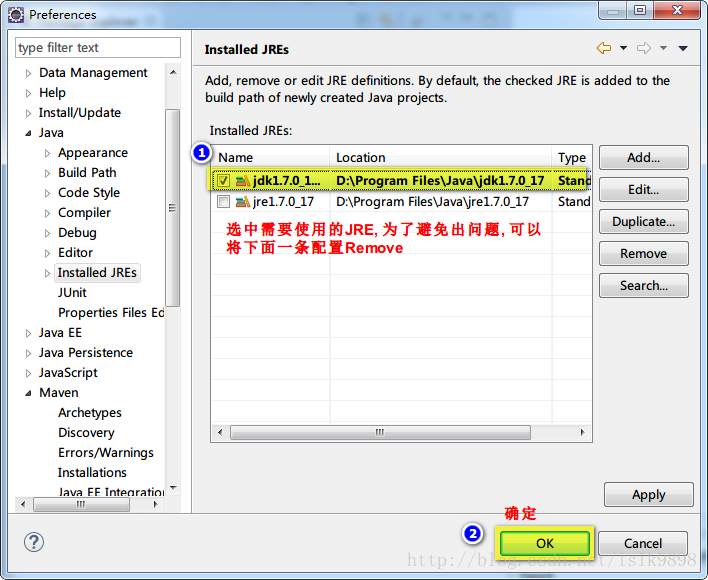
从上图中可以看出, java编译环境未jre1.7.0_17, 也就是说并没有配置成jdk目录, 然后看Eclipse-->Window-->preferences-->Java-->Installed JREs
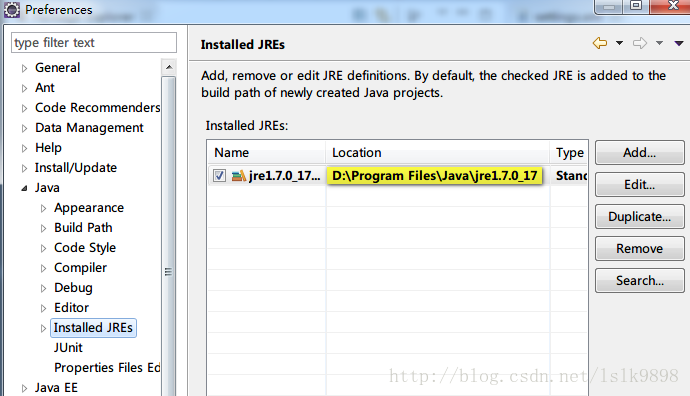
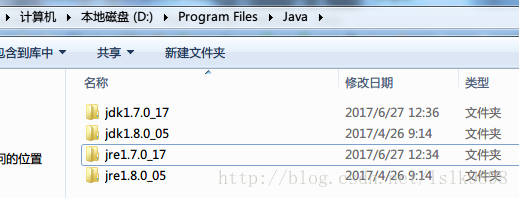
为了演示出效果, 在测试之前, 我已经将系统java环境配置成如上图所示路径, 并只保留该配置, 由下图可以看出, 该路径是我所安装的两个JDK版本中的一个JDK自带的jre运行环境. 使用该环境编译普通项目没有问题, 但为什么会在编译Maven项目时出错呢?
我们看看Maven的环境是如何配置的:先找到Eclipse-->Window-->preferences-->Maven-->Installations

在Maven配置中, 我并没有使用Eclipse自带的Maven插件, 而是重新配置的Maven环境, 然后再看Eclipse-->Window-->preferences-->Maven-->User Settings
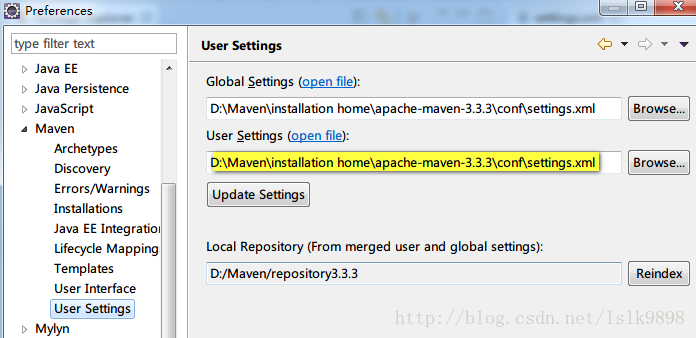
Maven设置使用的是Maven中conf文件夹下的settings.xml, 点击"open file" 在Eclipse中查看具体配置信息, 仅摘录与本错误信息相关的部分

  <profiles>

    <!-- profile

     | Specifies a set of introductions to the build process, to be activated using one or more of the

     | mechanisms described above. For inheritance purposes, and to activate profiles via <activatedProfiles/>

     | or the command line, profiles have to have an ID that is unique.

     |

     | An encouraged best practice for profile identification is to use a consistent naming convention

     | for profiles, such as 'env-dev', 'env-test', 'env-production', 'user-jdcasey', 'user-brett', etc.

     | This will make it more intuitive to understand what the set of introduced profiles is attempting

     | to accomplish, particularly when you only have a list of profile id's for debug.

     |

     | This profile example uses the JDK version to trigger activation, and provides a JDK-specific repo.-->

    <profile>

        <id>jdk-1.7</id>

        <activation>

            <activeByDefault>true</activeByDefault>

            <jdk>1.7</jdk>

        </activation>

        <properties>

            <maven.compiler.source>1.7</maven.compiler.source>

            <maven.compiler.target>1.7</maven.compiler.target>

            <maven.compiler.compilerVersion>1.7</maven.compiler.compilerVersion>

        </properties>

    </profile>

  </profiles>
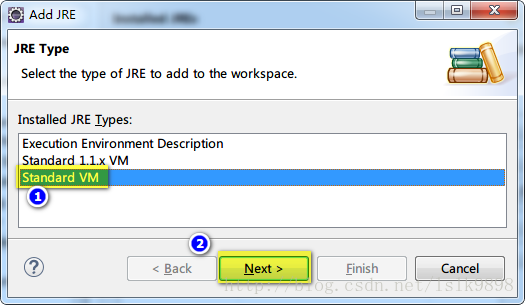
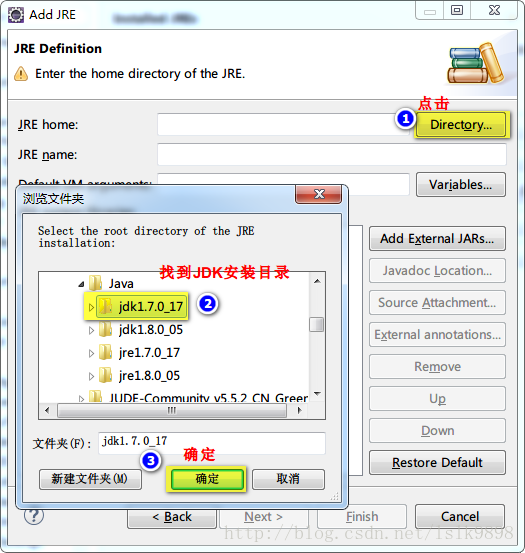
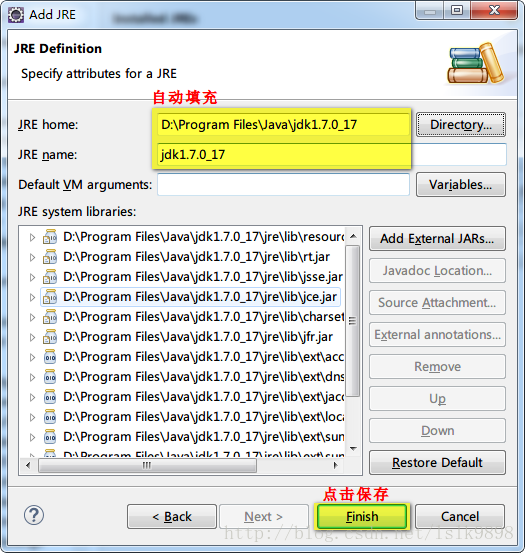
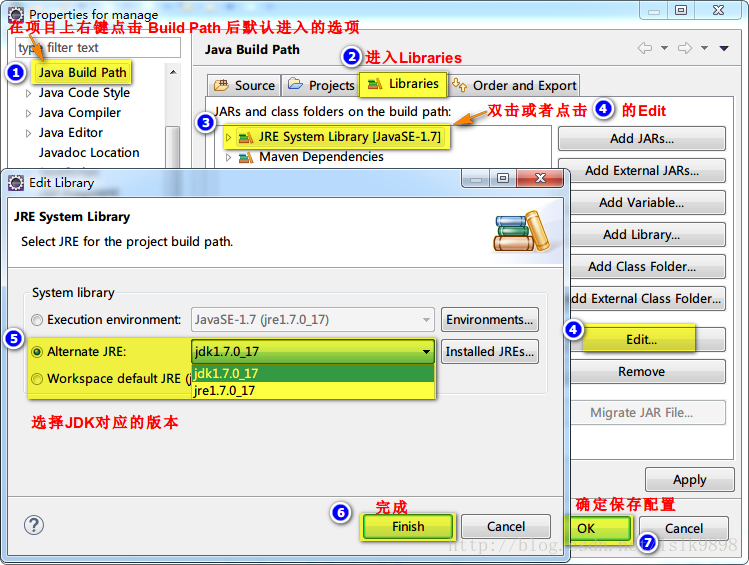
中间具体信息的理解, 可以参见冰河winner的博客:Maven之配置文件. 也就是说, 根据上面的配置, 我们需要指定一个符合配置的JDK环境, 这是我们之前在Eclipse-->Window-->preferences-->Java-->Installed JREs下的配置就不行了, 而需要指定一个JDK目录, 例如我的JDK安装目录下的jdk1.7.0_17, 这也是这个错误出现的罪魁祸首. 不过对于Java开发者来说, Installed JREs中使用jdk目录而不适用jre目录也是最好的选择.
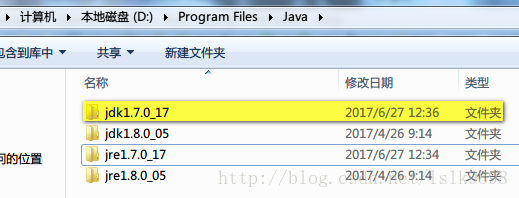
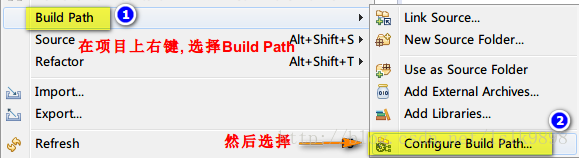
步骤: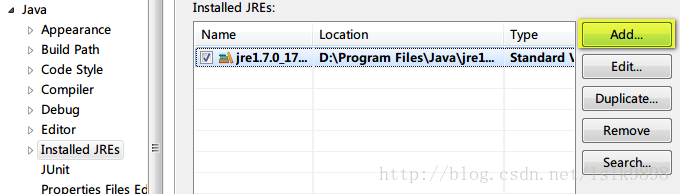
————————————————
版权声明:本文为CSDN博主「Code_buger」的原创文章,遵循 CC 4.0 BY-SA 版权协议,转载请附上原文出处链接及本声明。
原文链接:关于Maven项目build时出现No compiler is provided in this environment的处理
[转]在Eclipse整合Maven3.6.3插件导入maven项目并编译时,控制台提示No compiler is provided in this environment. Perhaps you are running on a JRE rather than a JDK?的更多相关文章
- Maven编译失败,提示No compiler is provided in this enviroment. Perhaps you are running on a JRE rathen a JDK ?
用maven对项目进行构建时,提示No compiler is provided in this enviroment. Perhaps you are running on a JRE rathen ...
- Maven错误:[ERROR] No compiler is provided in this environment. Perhaps you are running on a JRE rather than a JDK?的解决方法
错误: [ERROR] No compiler is provided in this environment. Perhaps you are running on a JRE rather tha ...
- Maven No compiler is provided in this environment. Perhaps you are running on a JRE rather than a JDK? 问题
maven编译项目时出错,提示信息如下: [ERROR] Failed to execute goal org.apache.maven.plugins:maven-compiler-plugin:3 ...
- No compiler is provided in this environment. Perhaps you are running on a JRE rather than a JDK?
以前用MyEclipse,现在用eclipse配置maven后,运行run install.报错: [ERROR] No compiler is provided in this environmen ...
- maven No compiler is provided in this environment. Perhaps you are running on a JRE rather than a JDK?
maven install项目时出错,提示信息如下: [ERROR] Failed to execute goal org.apache.maven.plugins:maven-compiler-pl ...
- No compiler is provided in this environment. Perhaps you are running on a JRE rather than a JDK? 问题
maven编译项目时出错,提示信息如下: [ERROR] Failed to execute goal org.apache.maven.plugins:maven-compiler-plugin:3 ...
- No compiler is provided in this environment. Perhaps you are running on a JRE rather than a JDK? idea maven 打包报错问题解决
mvn clean install -X -Dmaven.test.skip=true -P dev 打包报错:No compiler is provided in this environment. ...
- Maven异常: No compiler is provided in this environment. Perhaps you are running on a JRE rather than a JDK解决(能力工场小马哥)
问题描述: No compiler is provided in this environment. Perhaps you are running on a JRE rather than a JD ...
- Maven构建项目出现No compiler is provided in this environment. Perhaps you are running on a JRE rather than a JDK?
No compiler is provided in this environment. Perhaps you are running on a JRE rather than a JDK? 你应该 ...
- maven install 报错 No compiler is provided in this environment. Perhaps you are running on a JRE rather than a JDK?
1.控制台打印信息 [INFO] Scanning for projects... [INFO] [INFO] ---------------------< org.cqupt.mauger:R ...
随机推荐
- KubeSphere v4 开源并发布全新可插拔架构 LuBan
2024 年 10 月 10 日,KubeSphere 开源社区激动地向大家宣布,KubeSphere v4(开源版)已正式发布,同时发布全新可插拔架构 KubeSphere LuBan. 相较于 K ...
- CSS动画(波光粼粼登录页面)
1.整体效果 https://mmbiz.qpic.cn/sz_mmbiz_gif/EGZdlrTDJa4AbemkU3vLRIDzTIgPHSjicia97wfvMVAhqZL4lsGbQQCbsV ...
- 初识GO语言--并发
- SparkSQL练习:对学生选课成绩进行分析计算
题目内容: 对学生选课成绩进行分析计算 题目要求: (1)该系总共有多少学生: (2)该系共开设来多少门课程: (3)每个学生的总成绩多少: (4)每门课程选修的同学人数: (5)每位同学选修的课程门 ...
- Sqlsugar调用Oracle的存储过程
前段时间在搬迁项目的时候,遇到一个问题,就是用sqlsugar调用oracle的存储过程的时候调用不了: 当时卡了一整天,现在有空了把这个问题记录分享一下. 先去nuget上安装一下sqlsugar的 ...
- VMware使用Ubuntu20.04时发生屏幕闪烁
问题:VMware使用Ubuntu20.04时发生屏幕闪烁 分析:这是由于虚拟机里面的显示器不支持3D加速问题导致的 解决方法:关闭虚拟机 → 左上角菜单 → 虚拟机 → 设置 → 显示器 → 取消勾 ...
- Node.js 构建命令行工具:实现 ls 命令的 -a 和 -l 选项
在日常的前端开发中,我们常常借助各种基于 Node.js 的脚手架工具来加速项目搭建和维护,比如 create-react-app 可以一键初始化一个 React 项目,eslint 则帮助我们保持代 ...
- 9.Kubernetes核心技术-Controller
Kubernetes核心技术-Controller 内容 什么是Controller Pod和Controller的关系 Deployment控制器应用场景 yaml文件字段说明 Deployment ...
- .NET 9 发布 性能提升、AI 支持与全方位改进
前言 .NET 9 正式发布,这是迄今为止最高效.现代.安全.智能且高性能的 .NET 版本. 新版本凝聚了全球数千名开发者的共同努力,包含了数千项性能.安全性和功能性改进. 主要亮点 性能提升:全面 ...
- Air780E量产binpkg文件如何获取
今天我们学习Air780E量产binpkg文件如何获取: 一.背景 最近luatos开发客户增多,客户在量产烧录的时候需要binpkg文件,但是有些客户不知道binpkg文件是什么,在哪里获取,是 ...