
[转]在Eclipse整合Maven3.6.3插件导入maven项目并编译时,控制台提示No compiler is provided in this environment. Perhaps you are running on a JRE rather than a JDK?
近日有同事遇到在编译Maven项目时出现
[ERROR] No compiler is provided in this environment. Perhaps you are running on a JRE rather than a JDK?
的问题, 原以为这是个个例, 源于同事粗心, 配置环境出问题造成, 后到百度查看一下, 遇到这个问题的不在少数, 但是对问题的解释没有说到根源, 于是写下这篇博客供大家参阅, 如有纰漏, 还请指正.
错误代码节选:
[ERROR] COMPILATION ERROR :

[INFO] -------------------------------------------------------------

[ERROR] No compiler is provided in this environment. Perhaps you are running on a JRE rather than a JDK?

[INFO] 1 error

[INFO] -------------------------------------------------------------

[INFO] ------------------------------------------------------------------------

[INFO] BUILD FAILURE

[INFO] ------------------------------------------------------------------------

[INFO] Total time: 1.436 s

[INFO] Finished at: 2017-06-28T11:16:07+08:00

[INFO] Final Memory: 10M/151M

[INFO] ------------------------------------------------------------------------

[ERROR] Failed to execute goal org.apache.maven.plugins:maven-compiler-plugin:3.1:compile (default-compile) on project manage: Compilation failure

[ERROR] No compiler is provided in this environment. Perhaps you are running on a JRE rather than a JDK?

[ERROR] -> [Help 1]
但是编写普通Java Project编译运行却是正常的,下图为只有输出语句的普通java类

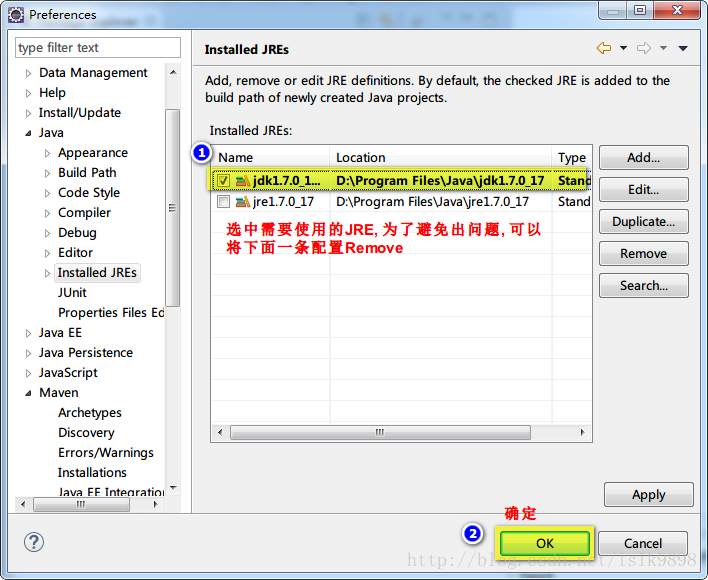
从上图中可以看出, java编译环境未jre1.7.0_17, 也就是说并没有配置成jdk目录, 然后看Eclipse-->Window-->preferences-->Java-->Installed JREs
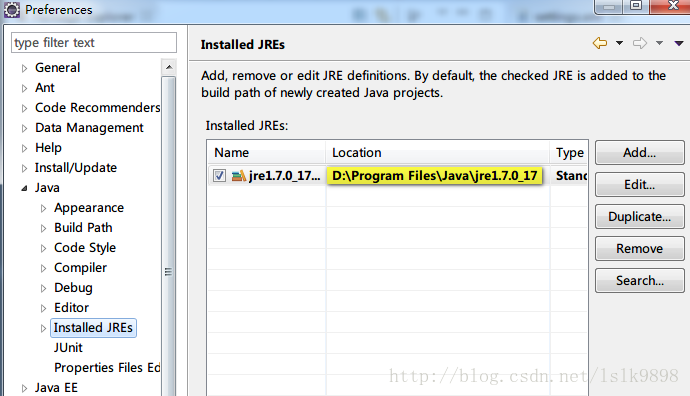
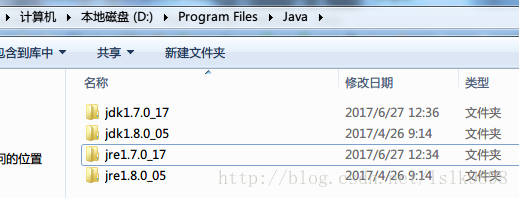
为了演示出效果, 在测试之前, 我已经将系统java环境配置成如上图所示路径, 并只保留该配置, 由下图可以看出, 该路径是我所安装的两个JDK版本中的一个JDK自带的jre运行环境. 使用该环境编译普通项目没有问题, 但为什么会在编译Maven项目时出错呢?
我们看看Maven的环境是如何配置的:先找到Eclipse-->Window-->preferences-->Maven-->Installations

在Maven配置中, 我并没有使用Eclipse自带的Maven插件, 而是重新配置的Maven环境, 然后再看Eclipse-->Window-->preferences-->Maven-->User Settings
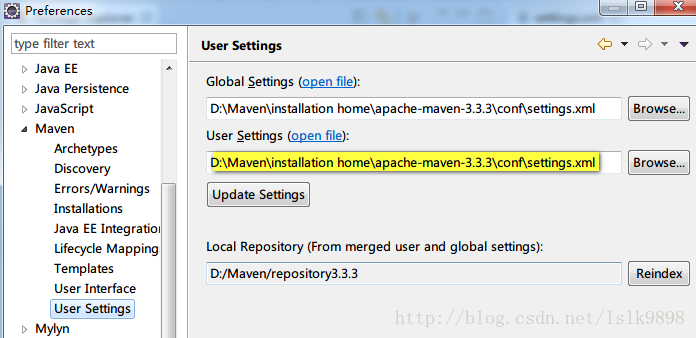
Maven设置使用的是Maven中conf文件夹下的settings.xml, 点击"open file" 在Eclipse中查看具体配置信息, 仅摘录与本错误信息相关的部分

  <profiles>

    <!-- profile

     | Specifies a set of introductions to the build process, to be activated using one or more of the

     | mechanisms described above. For inheritance purposes, and to activate profiles via <activatedProfiles/>

     | or the command line, profiles have to have an ID that is unique.

     |

     | An encouraged best practice for profile identification is to use a consistent naming convention

     | for profiles, such as 'env-dev', 'env-test', 'env-production', 'user-jdcasey', 'user-brett', etc.

     | This will make it more intuitive to understand what the set of introduced profiles is attempting

     | to accomplish, particularly when you only have a list of profile id's for debug.

     |

     | This profile example uses the JDK version to trigger activation, and provides a JDK-specific repo.-->

    <profile>

        <id>jdk-1.7</id>

        <activation>

            <activeByDefault>true</activeByDefault>

            <jdk>1.7</jdk>

        </activation>

        <properties>

            <maven.compiler.source>1.7</maven.compiler.source>

            <maven.compiler.target>1.7</maven.compiler.target>

            <maven.compiler.compilerVersion>1.7</maven.compiler.compilerVersion>

        </properties>

    </profile>

  </profiles>
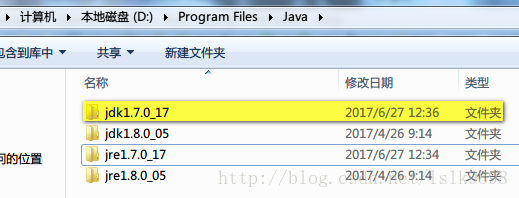
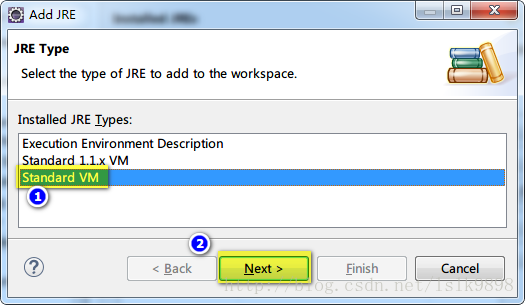
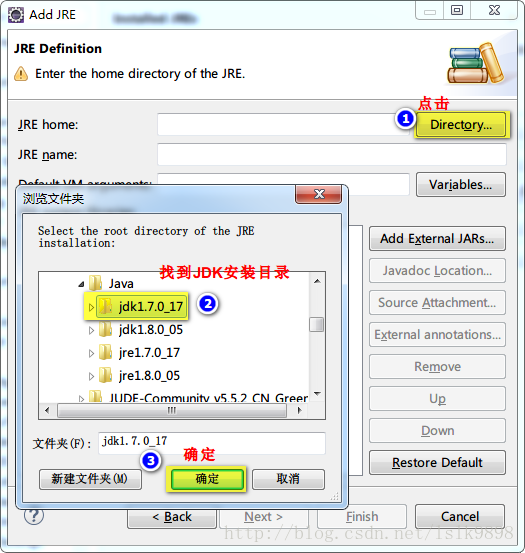
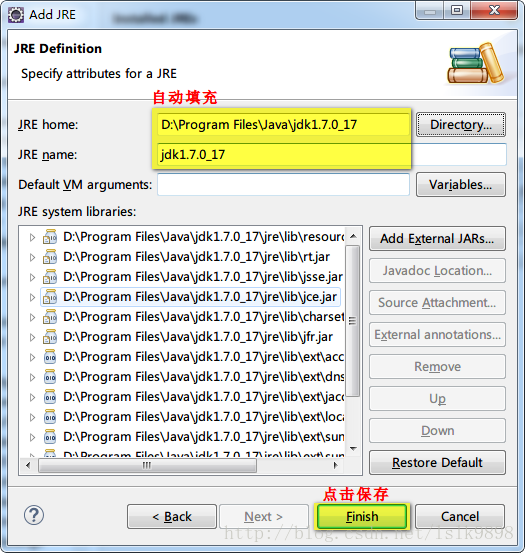
中间具体信息的理解, 可以参见冰河winner的博客:Maven之配置文件. 也就是说, 根据上面的配置, 我们需要指定一个符合配置的JDK环境, 这是我们之前在Eclipse-->Window-->preferences-->Java-->Installed JREs下的配置就不行了, 而需要指定一个JDK目录, 例如我的JDK安装目录下的jdk1.7.0_17, 这也是这个错误出现的罪魁祸首. 不过对于Java开发者来说, Installed JREs中使用jdk目录而不适用jre目录也是最好的选择.
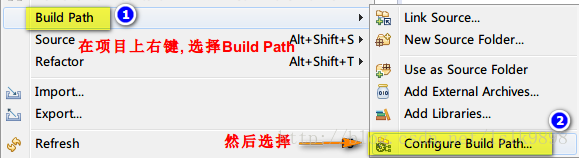
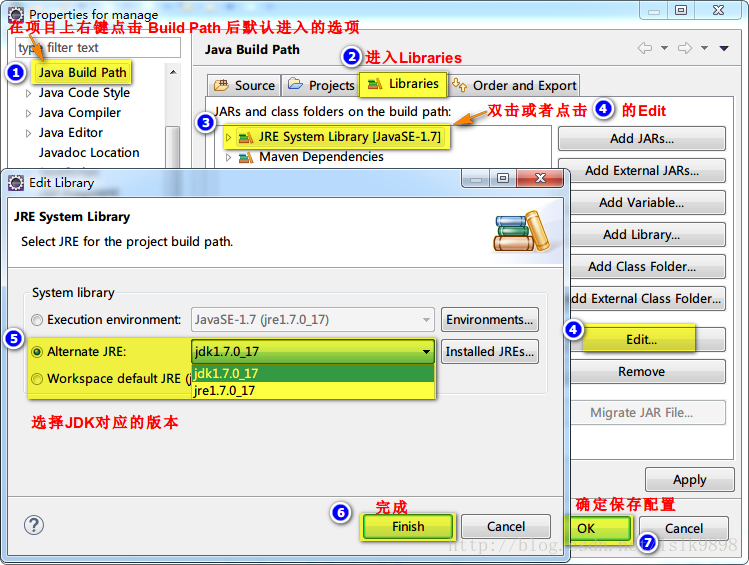
步骤: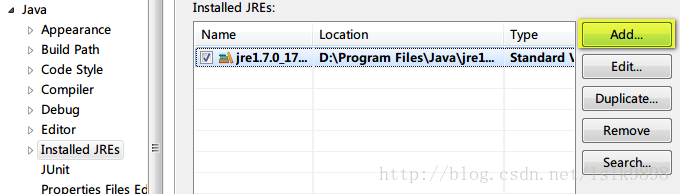
————————————————
版权声明:本文为CSDN博主「Code_buger」的原创文章,遵循 CC 4.0 BY-SA 版权协议,转载请附上原文出处链接及本声明。
原文链接:关于Maven项目build时出现No compiler is provided in this environment的处理
[转]在Eclipse整合Maven3.6.3插件导入maven项目并编译时,控制台提示No compiler is provided in this environment. Perhaps you are running on a JRE rather than a JDK?的更多相关文章
- Maven编译失败,提示No compiler is provided in this enviroment. Perhaps you are running on a JRE rathen a JDK ?
用maven对项目进行构建时,提示No compiler is provided in this enviroment. Perhaps you are running on a JRE rathen ...
- Maven错误:[ERROR] No compiler is provided in this environment. Perhaps you are running on a JRE rather than a JDK?的解决方法
错误: [ERROR] No compiler is provided in this environment. Perhaps you are running on a JRE rather tha ...
- Maven No compiler is provided in this environment. Perhaps you are running on a JRE rather than a JDK? 问题
maven编译项目时出错,提示信息如下: [ERROR] Failed to execute goal org.apache.maven.plugins:maven-compiler-plugin:3 ...
- No compiler is provided in this environment. Perhaps you are running on a JRE rather than a JDK?
以前用MyEclipse,现在用eclipse配置maven后,运行run install.报错: [ERROR] No compiler is provided in this environmen ...
- maven No compiler is provided in this environment. Perhaps you are running on a JRE rather than a JDK?
maven install项目时出错,提示信息如下: [ERROR] Failed to execute goal org.apache.maven.plugins:maven-compiler-pl ...
- No compiler is provided in this environment. Perhaps you are running on a JRE rather than a JDK? 问题
maven编译项目时出错,提示信息如下: [ERROR] Failed to execute goal org.apache.maven.plugins:maven-compiler-plugin:3 ...
- No compiler is provided in this environment. Perhaps you are running on a JRE rather than a JDK? idea maven 打包报错问题解决
mvn clean install -X -Dmaven.test.skip=true -P dev 打包报错:No compiler is provided in this environment. ...
- Maven异常: No compiler is provided in this environment. Perhaps you are running on a JRE rather than a JDK解决(能力工场小马哥)
问题描述: No compiler is provided in this environment. Perhaps you are running on a JRE rather than a JD ...
- Maven构建项目出现No compiler is provided in this environment. Perhaps you are running on a JRE rather than a JDK?
No compiler is provided in this environment. Perhaps you are running on a JRE rather than a JDK? 你应该 ...
- maven install 报错 No compiler is provided in this environment. Perhaps you are running on a JRE rather than a JDK?
1.控制台打印信息 [INFO] Scanning for projects... [INFO] [INFO] ---------------------< org.cqupt.mauger:R ...
随机推荐
- HTML常见的文本语义标签
列举HTML里一些常用的块内语义元素.可以通过F12来查看每个示例. <strong>:即"重点内容",通常是加粗,对应Markdown中的**加粗. 示例:归约数往往 ...
- 关于在有动态的Scroll Bar情况下页面内容的对齐问题
关于在有动态的Scroll Bar情况下页面内容的对齐问题 问题场景 一个标题行 + 一些内容行 要求在内容行超过指定行数时 将多出的行隐藏,并展示Scroll Bar的来提示用户可以下划查看更多内容 ...
- Go语言学习 _基础02 _条件表达式、分支、循环
Go语言学习 _基础02 _条件表达式.分支.循环 条件表达式和switch package condition import "testing" func TestCondict ...
- Andrew 算法求凸包
Andrew 算法求凸包 参考资料: 右手定则(baidu.com) 内积和外积 - OI Wiki (oi-wiki.org) \(a\) 与 \(b\) 相对位置 \(b\) 在 \(a\) 的逆 ...
- 源码开放:WebSocket应用示例
1 WebSocket概述 WebSocket是HTML5下一种新的协议(本质上是一个基于TCP的协议),它实现了浏览器与服务器之间的全双工通信,能够节省服务器资源和带宽,达到实时通讯的目的.WebS ...
- AI智能学生体测小程序解决方案
引言: 近年来,随着教育理念的提升,对学生综合素质的教育越发重视,特别是越发重视学生的身体素质提升,各阶段的升学考试也将体测纳入考核范围.学校也推出了各种体测锻炼促进手段,今天为您介绍一个基于小程序的 ...
- php字符串练习题
把以前发给别人的练习题邮件备份记录一下 1.用php编写统计二维数组内某个字符出现的次数的一个函数.给定二维数组和字符串,返回这个字符串在二维数组中出现的次数. 例: 数组如下: $array=arr ...
- docker番外篇-最详细的安装及部署项目教程(net framework,netcore,java,nodejs,静态html,mysql,redis,私有仓库,https免费证书等)
目录 本地widows(win11)docker环境安装 安装Docker Desktop 服务器liunx(ubuntu)docker环境安装 安装nginx 安装docker环境 安装docker ...
- java应用详解
java应用详解 文档介绍: 1.nio应用(ServerSocketChannel.FileChannel). 2.优化jvm参数提升eclipse运行速度. 3.maven3.0.3安装及入门例子 ...
- java动态跟踪分析工具BTrace实现原理
今天,Team Leader推荐了一个非常棒的动态跟踪分析工具 – BTrace.由于对它的实现原理非常感兴趣,于是花了点时间研究了一下,顺便写点心得. 什么是BTrace? BTrace是SUN K ...