
VTK-8.2.0源码编译和初步使用(Cmake+VS2015+Qt5.14.2)
一、准备数据
1、首先确保已安装VS5015和Qt5.14.2
2、下载Cmake并安装:Download CMake
3、下载VTK-8.2.0源码和数据并解压:Download | VTK
二、Cmake构建
1、在本地磁盘创建相关文件夹

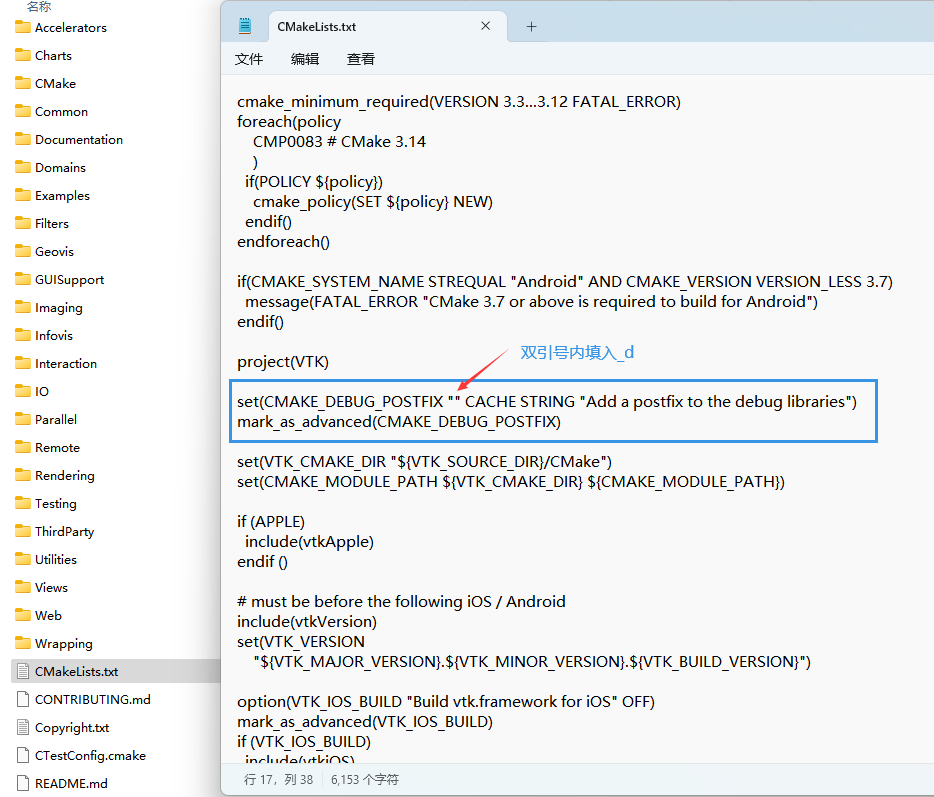
2、进入源码根目录,找到CmakeList.txt,修改CmakeList.txt中的选项,使得Debug模式下生成的lib和dll文件能自带后缀_d,便于Release的库文件进行区分,否则后面可能编译或链接有问题。
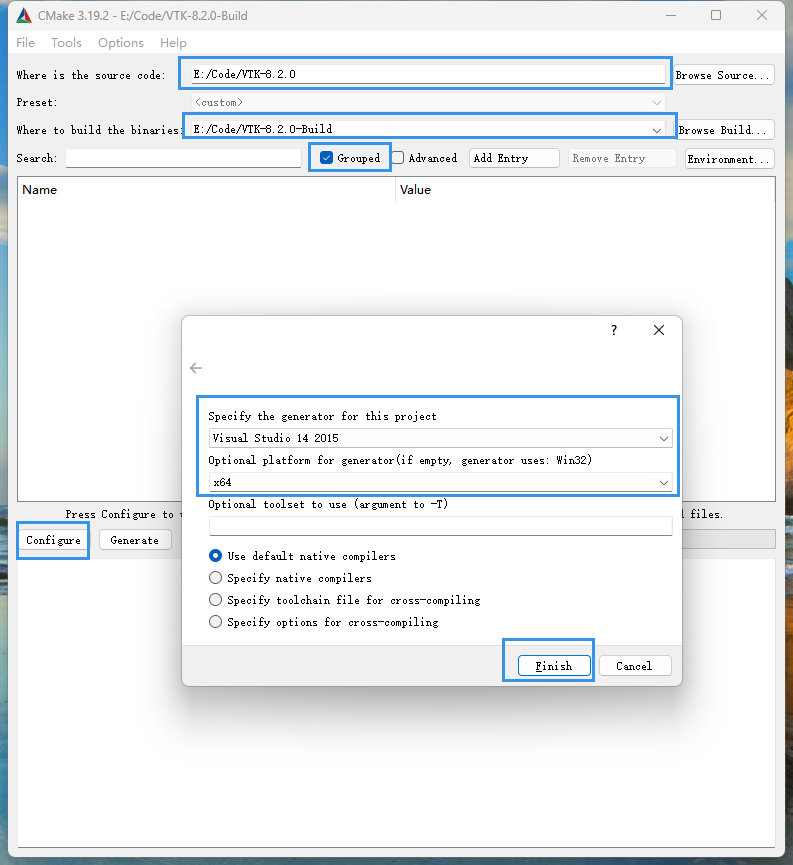
3、在Cmake中填入源码位置,编译后的位置,勾选Grouped方便看分组,点击Configure,选择VS2015,x64,点击Finish,等待配置完成。
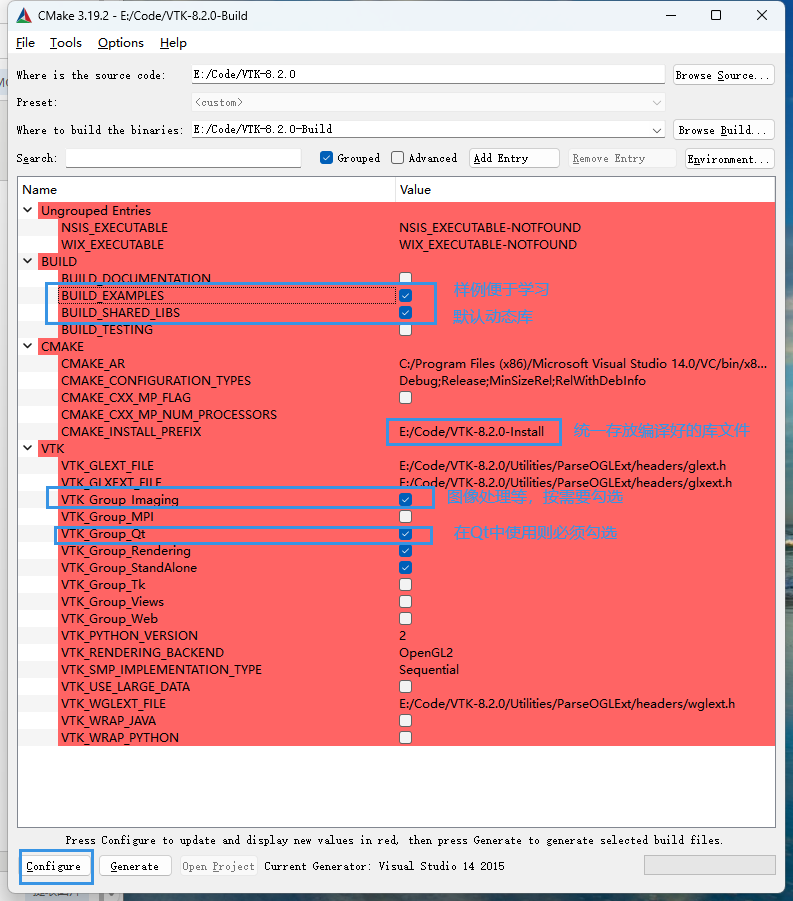
4、按下图勾选,并设置库文件统一存放目录,再次点击Configure。(如果勾选BUILD_TESTING后期VS编译时间会比较长,默认不勾选)
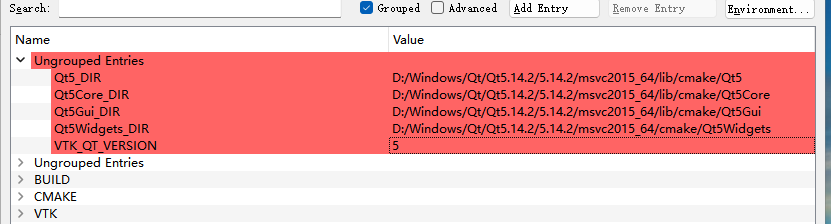
5、确认Qt的相关目录是否正确,不正确手动修改为正确的Qt的目录,VTK_QT_VERSION根据自己的Qt版本选择5或6,再次Configure,直至确认所有红色选项消失,点击Generate
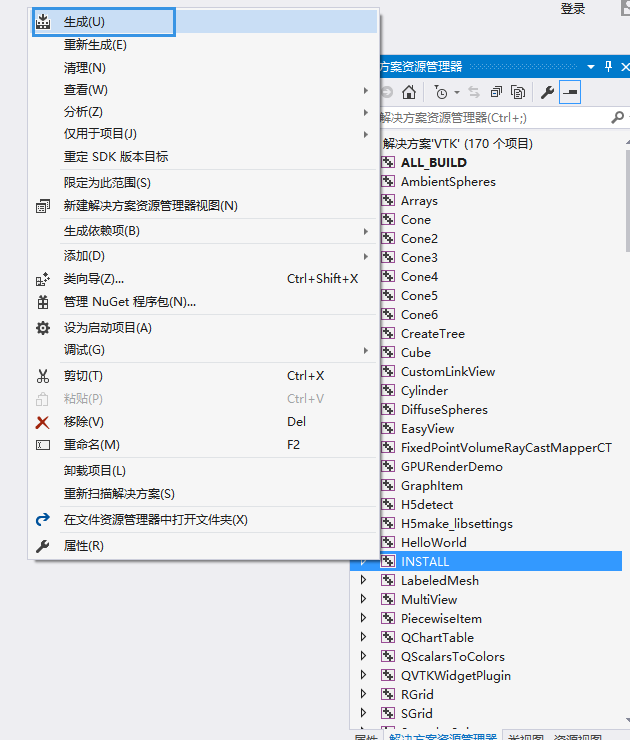
6、进入VTK-8.2.0-Build目录,找到VTK.sln,用VS2015打开,先选择Debug, x64平台,解决方案管理器中,找到INSTALL项目,右键,生成,等待VS编译完成。再选择Release,x64平台,再次生成INSTALL项目。
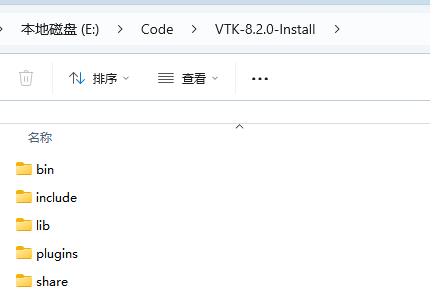
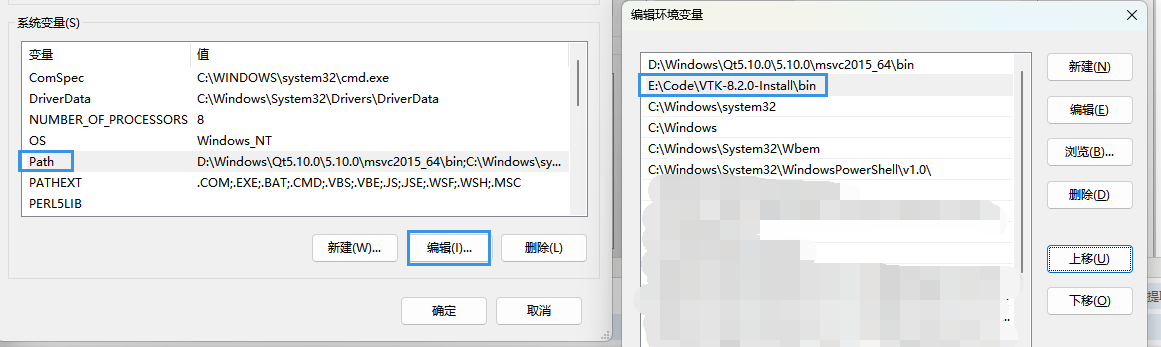
7、VS编译完成后,在VTK-8.2.0-Install文件夹中就会有我们想要的头文件、库文件(Debug和Release库都在里面),随后将bin文件夹加入系统环境变量,方便后续VS或Qt中使用
三、在QCreator中创建工程VTKTest,以官方代码Hello VTK为例,
1、打开pro文件,添加VTK库文件
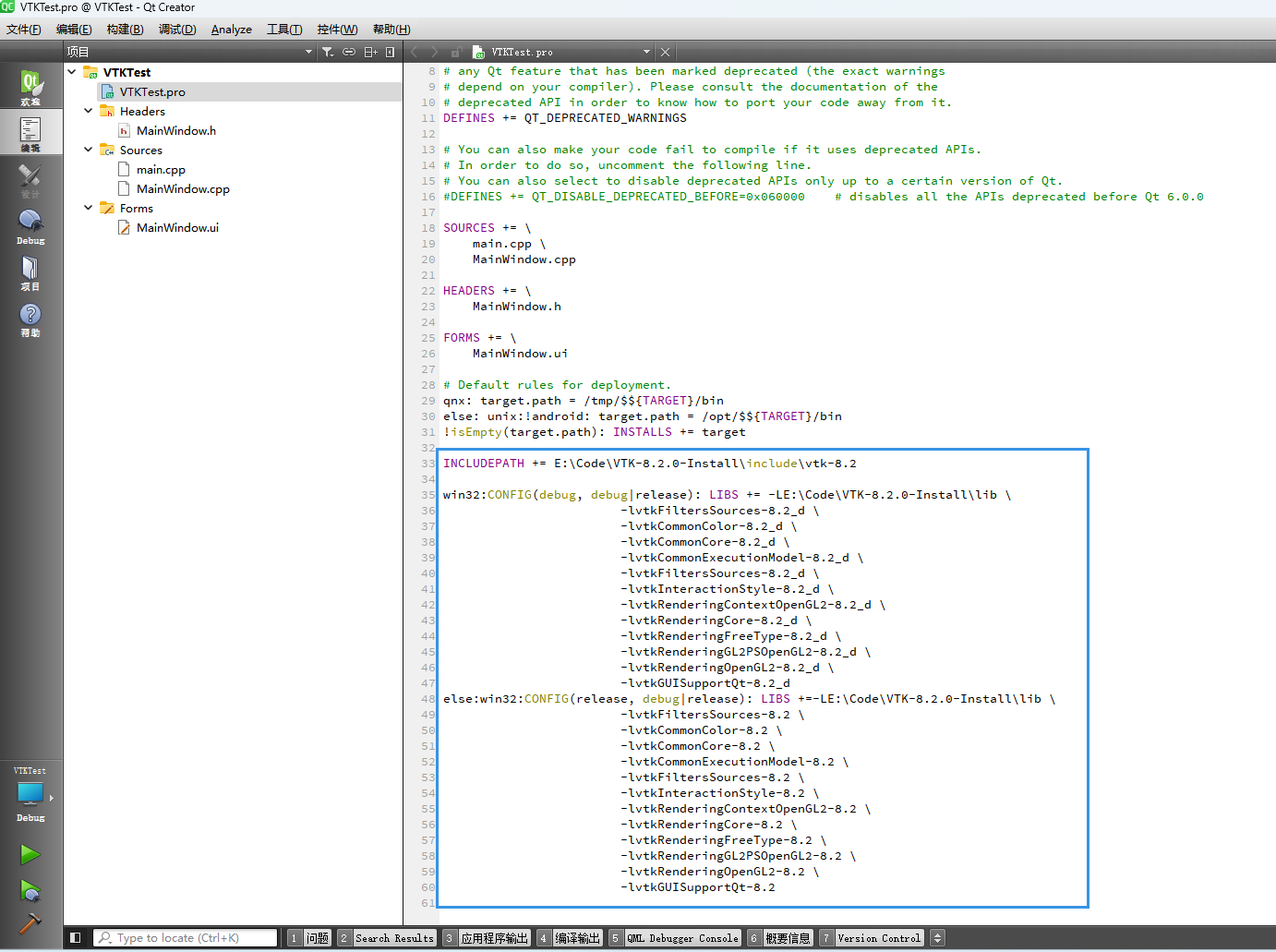
INCLUDEPATH += E:\Code\VTK-8.2.0-Install\include\vtk-8.2

win32:CONFIG(debug, debug|release): LIBS += -LE:\Code\VTK-8.2.0-Install\lib \

                        -lvtkFiltersSources-8.2_d \

                        -lvtkCommonColor-8.2_d \

                        -lvtkCommonCore-8.2_d \

                        -lvtkCommonExecutionModel-8.2_d \

                        -lvtkFiltersSources-8.2_d \

                        -lvtkInteractionStyle-8.2_d \

                        -lvtkRenderingContextOpenGL2-8.2_d \

                        -lvtkRenderingCore-8.2_d \

                        -lvtkRenderingFreeType-8.2_d \

                        -lvtkRenderingGL2PSOpenGL2-8.2_d \

                        -lvtkRenderingOpenGL2-8.2_d \

                        -lvtkGUISupportQt-8.2_d

else:win32:CONFIG(release, debug|release): LIBS +=-LE:\Code\VTK-8.2.0-Install\lib \

                        -lvtkFiltersSources-8.2 \

                        -lvtkCommonColor-8.2 \

                        -lvtkCommonCore-8.2 \

                        -lvtkCommonExecutionModel-8.2 \

                        -lvtkFiltersSources-8.2 \

                        -lvtkInteractionStyle-8.2 \

                        -lvtkRenderingContextOpenGL2-8.2 \

                        -lvtkRenderingCore-8.2 \

                        -lvtkRenderingFreeType-8.2 \

                        -lvtkRenderingGL2PSOpenGL2-8.2 \

                        -lvtkRenderingOpenGL2-8.2 \

                        -lvtkGUISupportQt-8.2
2、在main.cpp中添加初始化代码
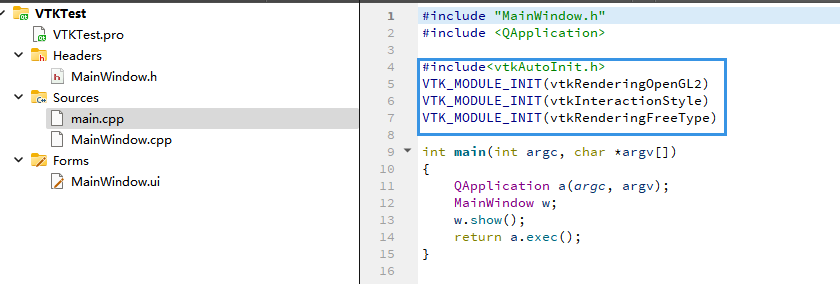
#include<vtkAutoInit.h>

VTK_MODULE_INIT(vtkRenderingOpenGL2)

VTK_MODULE_INIT(vtkInteractionStyle)

VTK_MODULE_INIT(vtkRenderingFreeType)
3、MainWindow.cpp,添加相关代码
#include "MainWindow.h"

#include "ui_MainWindow.h"

#include <vtkActor.h>

#include <vtkCamera.h>

#include <vtkCylinderSource.h>

#include <vtkNamedColors.h>

#include <vtkNew.h>

#include <vtkPolyDataMapper.h>

#include <vtkProperty.h>

#include <vtkRenderWindow.h>

#include <vtkRenderWindowInteractor.h>

#include <vtkRenderer.h>

#include <vtkGenericOpenGLRenderWindow.h>

#include <array>

MainWindow::MainWindow(QWidget *parent)

    : QMainWindow(parent)

    , ui(new Ui::MainWindow)

    , m_pScene(nullptr)

{

    ui->setupUi(this);

    m_pScene = new QVTKOpenGLWidget();

    this->setCentralWidget(m_pScene);

    vtkNew<vtkNamedColors> colors;

    // Set the background color.

    std::array<unsigned char, 4> bkg{{26, 51, 102, 255}};

    colors->SetColor("BkgColor", bkg.data());

    // This creates a polygonal cylinder model with eight circumferential facets

    // (i.e, in practice an octagonal prism).

    vtkNew<vtkCylinderSource> cylinder;

    cylinder->SetResolution(8);

    // The mapper is responsible for pushing the geometry into the graphics

    // library. It may also do color mapping, if scalars or other attributes are

    // defined.

    vtkNew<vtkPolyDataMapper> cylinderMapper;

    cylinderMapper->SetInputConnection(cylinder->GetOutputPort());

    // The actor is a grouping mechanism: besides the geometry (mapper), it

    // also has a property, transformation matrix, and/or texture map.

    // Here we set its color and rotate it around the X and Y axes.

    vtkNew<vtkActor> cylinderActor;

    cylinderActor->SetMapper(cylinderMapper);

    cylinderActor->GetProperty()->SetColor(

        colors->GetColor4d("Tomato").GetData());

    cylinderActor->RotateX(30.0);

    cylinderActor->RotateY(-45.0);

    // The renderer generates the image

    // which is then displayed on the render window.

    // It can be thought of as a scene to which the actor is added

    vtkNew<vtkRenderer> renderer;

    renderer->AddActor(cylinderActor);

    renderer->SetBackground(colors->GetColor3d("BkgColor").GetData());

    // Zoom in a little by accessing the camera and invoking its "Zoom" method.

    renderer->ResetCamera();

    renderer->GetActiveCamera()->Zoom(1.5);

    vtkSmartPointer<vtkGenericOpenGLRenderWindow> window = vtkSmartPointer<vtkGenericOpenGLRenderWindow>::New();

    window->AddRenderer(renderer);

    m_pScene->SetRenderWindow(window);

    m_pScene->GetRenderWindow()->Render();

    m_pScene->GetRenderWindow()->Start();

}

MainWindow::~MainWindow()

{

    delete ui;

}
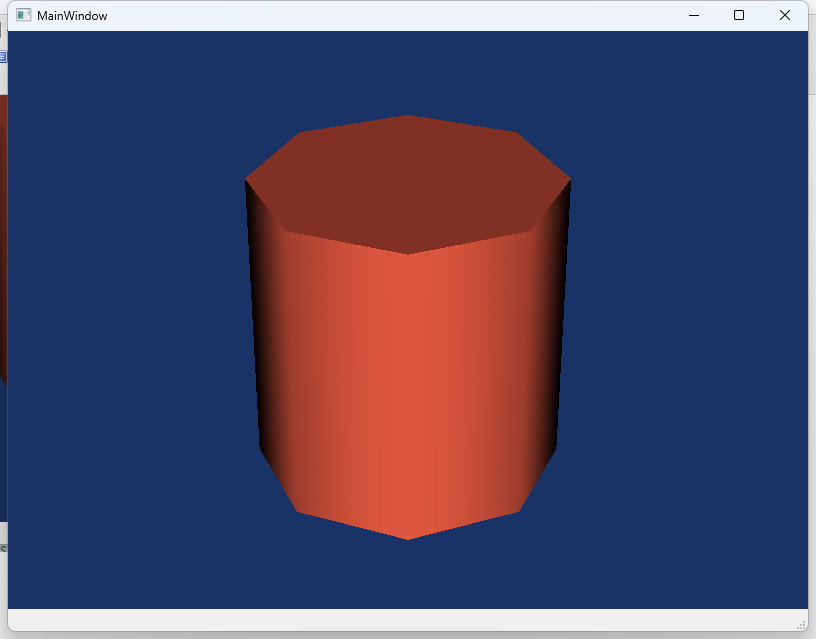
4、结果。
总结:
最好事先在Debug模式下加入后缀_d,否则容易混淆库文件,按上述步骤,在Debug模式和Release模式下都可以运行!
VTK-8.2.0源码编译和初步使用(Cmake+VS2015+Qt5.14.2)的更多相关文章
- hadoop-1.2.0源码编译
以下为在CentOS-6.4下hadoop-1.2.0源码编译步骤. 1. 安装并且配置ant 下载ant,将ant目录下的bin文件夹加入到PATH变量中. 2. 安装git,安装autoconf, ...
- hadoop-2.6.0源码编译问题汇总
在上一篇文章中,介绍了hadoop-2.6.0源码编译的一般流程,因个人计算机环境的不同, 编译过程中难免会出现一些错误,下面是我编译过程中遇到的错误. 列举出来并附上我解决此错误的方法,希望对大家有 ...
- Spark1.0.0 源码编译和部署包生成
问题导读:1.如何对Spark1.0.0源码编译?2.如何生成Spark1.0的部署包?3.如何获取包资源? Spark1.0.0的源码编译和部署包生成,其本质只有两种:Maven和SBT,只不过针对 ...
- ambari 2.5.0源码编译安装
参考:https://www.ibm.com/developerworks/cn/opensource/os-cn-bigdata-ambari/index.html Ambari 是什么 Ambar ...
- 使用Maven将Hadoop2.2.0源码编译成Eclipse项目
编译环境: OS:RHEL 6.3 x64 Maven:3.2.1 Eclipse:Juno SR2 Linux x64 libprotoc:2.5.0 JDK:1.7.0_51 x64 步骤: 1. ...
- hadoop-2.0.0-mr1-cdh4.2.0源码编译总结
准备编译hadoop-2.0.0-mr1-cdh4.2.0的同学们要谨慎了.首先看一下这篇文章: Hadoop作业提交多种方案 http://www.blogjava.net/dragonHadoop ...
- Ubantu16.04进行Android 8.0源码编译
参考这篇博客 经过测试,8.0源码下载及编译之后,占用100多G的硬盘空间,尽量给ubantu系统多留一些硬盘空间,如果后续需要在编译好的源码上进行开发,需要预留更多的控件,为了防止后续出现文件权限问 ...
- jmeter4.0 源码编译 二次开发
准备: 1.jmeter4.0源码 - apache-jmeter-4.0_src.zip 2.IDE Eclipse - Oxygen.3 Release (4.7.3) 3.JDK - 1.8.0 ...
- Spark2.0.0源码编译
Hive默认使用MapReduce作为执行引擎,即Hive on mr,Hive还可以使用Tez和Spark作为其执行引擎,分别为Hive on Tez和Hive on Spark.由于MapRedu ...
- Tomcat8.0源码编译
最近打算开始研究一下Tomcat的工作原理,拜读一下源码.所以先从编译源码开始了.尽管网上有那么多的资料,但是总是觉得,自己研究一遍,写一遍,在动手做一遍能够让我们更加深入的了解.现在整个社会都流行着 ...
随机推荐
- Qt开发经验小技巧91-100
数据库处理一般建议在主线程,如果非要在其他线程,务必记得打开数据库也要在那个线程,即在那个线程使用数据库就在那个线程打开,不能打开数据库在主线程,执行sql在子线程,很可能出问题. 新版的QTcpSe ...
- Qt 中实现系统主题感知
[写在前面] 在现代桌面应用程序开发中,系统主题感知是一项重要的功能,它使得应用程序能够根据用户的系统主题设置(如深色模式或浅色模式)自动调整其外观. Qt 作为一个跨平台的C++图形用户界面应用程序 ...
- 命名空间“System.Web.UI.Design”中不存在类型或命名空间名称“ControlDesigner”
命名空间"System.Web.UI.Design"中不存在类型或命名空间名称"ControlDesigner" 命名空间"System.Web.UI ...
- 即时通讯技术文集(第41期):直播技术合集(Part1) [共12篇]
为了更好地分类阅读 52im.net 总计1000多篇精编文章,我将在每周三推送新的一期技术文集,本次是第41 期. [- 1 -] 移动端实时音视频直播技术详解(一):开篇 [链接] http:// ...
- 不为人知的网络编程(十五):深入操作系统,一文搞懂Socket到底是什么
1.引言 我相信大家刚开始学网络编程中socket的时候,都跟我一样对书上所讲的socket概念云里雾里的.似懂非懂,很是困扰. 这篇文章我打算从初学者的角度,用通俗易懂的文字,跟大家分享下我所理解的 ...
- C# 开发电子印章制作工具 -- 附下载程序
前言 本人在业余时间,开发了一款电子印章制作软件.印章制作软件看似简单,其实不然. 比如对椭圆形印章而言,要求公司名称中的每一个字间隔相等,要求字的方向与椭圆曲线垂直. 要满足这些条件,需要复杂的计算 ...
- Arcgis加载Geoserver矢量切片
原帖地址 洒家废物 - Arcgis加载Geoserver矢量切片 准备点线面图层并发布图层组 此处我准备了石家庄市的县界名称(点).高速公路(线).县界(面),依次发布geoserver服务,创建图 ...
- java基础知识回顾之java Thread类学习(二)--java多线程安全问题(锁)
上一节售票系统中我们发现,打印出了错票,0,-1,出现了多线程安全问题.我们分析为什么会发生多线程安全问题? 看下面线程的主要代码: @Override public void run() { // ...
- 轮播图,swiper使用
背景: 最近接到一个需求,重写首页,需要用到轮播图. 但是轮播图只用两张图,此为前提. 本想直接用ElementUI的走马灯,但是只用两张图的情况下,走马灯不能循环播放,只能来回播放,公司的UI小姐姐 ...
- ISA-L库调研
本文分享自天翼云开发者社区<ISA-L库调研>,作者:何****尔 1.Intel SIMD指令集 SIMD(single instruction multiple data)单指令多数据 ...