
算法实现2D OBB碰撞
box
using System;

using System.Collections;

using System.Collections.Generic;

using UnityEngine;

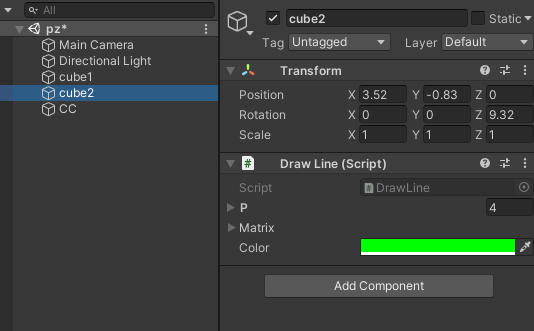
public class DrawLine : MonoBehaviour {

    public Vector3[] p = new Vector3[4];

    public Vector3 up { get; set; }

    public Vector3 right { get; set; }

    private Cube _cube1;

    public Cube cube1 {

        get {

            if (_cube1 == null) {

                _cube1 = new Cube();

                _cube1.halfScale = 1;

            }

            return _cube1;

        }

    }

    public Matrix4x4 matrix;

    public Color color = Color.green;

    private void OnDrawGizmos() {

        Gizmos.color = color;

        Vector3 pos = transform.position;

        //设置与transform相同矩阵

        matrix = Matrix4x4.TRS(pos, transform.rotation, transform.lossyScale);

        up = new Vector3(matrix[0, 1], matrix[1, 1], matrix[2, 1]);

        right = new Vector3(matrix[0, 0], matrix[1, 0], matrix[2, 0]);

        p[0] = up - right + pos;

        p[1] = -up - right + pos;

        p[2] = -up + right + pos;

        p[3] = up + right + pos;

        Gizmos.DrawLine(p[0], p[1]);

        Gizmos.DrawLine(p[1], p[2]);

        Gizmos.DrawLine(p[2], p[3]);

        Gizmos.DrawLine(p[3], p[0]);

    }

}

public class Cube {

    public Vector3 center;

    public float halfScale;

    public Quaternion rotate;

    public Vector3 GetPoint1 => center + new Vector3(-halfScale, halfScale, 0);

    public Vector3 GetPoint2 => center + new Vector3(-halfScale, -halfScale, 0);

    public Vector3 GetPoint3 => center + new Vector3(halfScale, -halfScale, 0);

    public Vector3 GetPoint4 => center + new Vector3(halfScale, halfScale, 0);

}
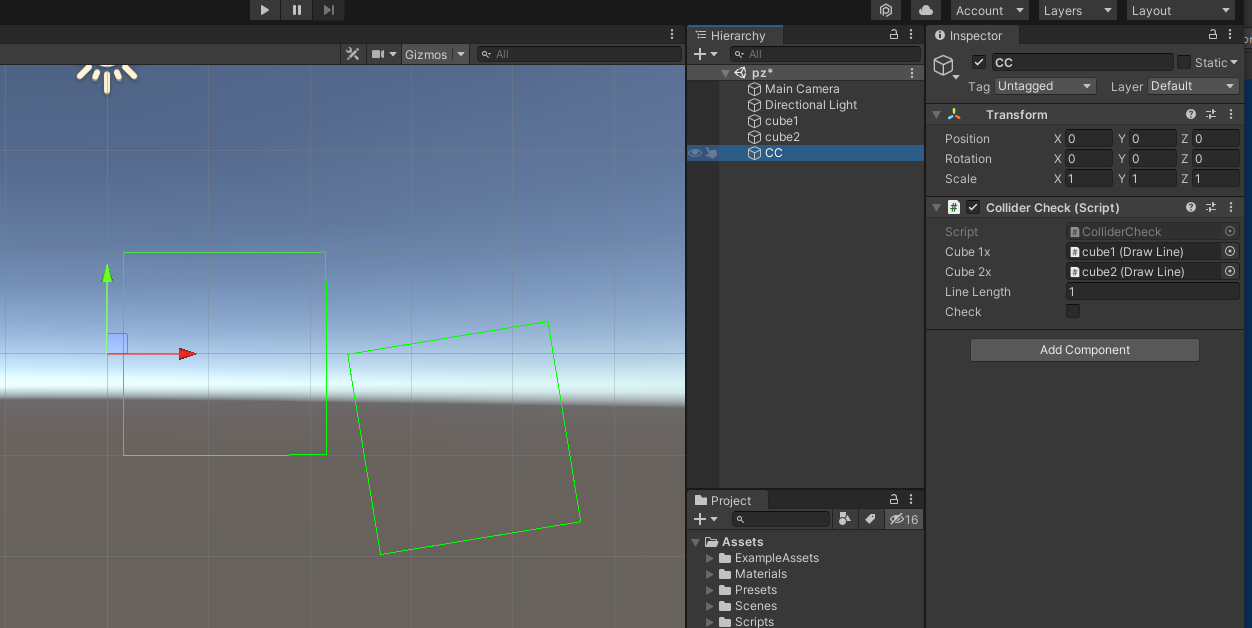
检查是否碰撞
using System.Collections;

using System.Collections.Generic;

using UnityEngine;

public class ColliderCheck : MonoBehaviour {

    public DrawLine cube1x;

    public DrawLine cube2x;

    public float lineLength;

    public bool check;

    // Start is called before the first frame update

    void Start()

    {

    }

    // Update is called once per frame

    void Update()

    {

    }

    private void OnDrawGizmos() {

        //判断 cube1 与 cube2 是否相交

        //获取cube2 在 cube的up 和 right 轴上的投影

        check = CheckIsAxis(cube1x, cube2x) && CheckIsAxis(cube2x, cube1x);

        if (check) {

            cube1x.color = Color.red;

            cube2x.color = Color.red;

        } else {

            cube1x.color = Color.green;

            cube2x.color = Color.green;

        }

        if (Input.GetKeyDown(KeyCode.K)) {

        }

    }

    /// <summary>

    /// 从矩阵获取坐标

    /// </summary>

    /// <param name="matrix"></param>

    /// <returns></returns>

    public Vector3 GetPosition(Matrix4x4 matrix) {

        var x = matrix.m03;

        var y = matrix.m13;

        var z = matrix.m23;

        return new Vector3(x, y, z);

    }

    /// <summary>

    /// 从矩阵获取旋转

    /// </summary>

    /// <param name="matrix"></param>

    /// <returns></returns>

    public Quaternion GetRotation(Matrix4x4 matrix) {

        //m11 + m22 + m33 = 4w^2

        float qw = Mathf.Sqrt(1f + matrix.m00 + matrix.m11 + matrix.m22) / 2;

        float w = 4 * qw;

        float qx = (matrix.m21 - matrix.m12) / w;

        float qy = (matrix.m02 - matrix.m20) / w;

        float qz = (matrix.m10 - matrix.m01) / w;

        return new Quaternion(qx, qy, qz, qw);

    }

    /// <summary>

    /// 从矩阵获取缩放

    /// </summary>

    /// <param name="m"></param>

    /// <returns></returns>

    public static Vector3 GetScale(Matrix4x4 m) {

        var x = Mathf.Sqrt(m.m00 * m.m00 + m.m01 * m.m01 + m.m02 * m.m02);

        var y = Mathf.Sqrt(m.m10 * m.m10 + m.m11 * m.m11 + m.m12 * m.m12);

        var z = Mathf.Sqrt(m.m20 * m.m20 + m.m21 * m.m21 + m.m22 * m.m22);

        return new Vector3(x, y, z);

    }

    private bool CheckIsAxis(DrawLine cube1, DrawLine cube2) {

        //可得y轴上的最小值与最大值

        NewMethod(cube1, cube2, cube1.up, out var maxValue, out var minValue);

        //Debug.Log(minValue + "    " +maxValue);

        //判断y轴是否重合

        bool isOverLayY = false;

        if (maxValue <= cube1.cube1.halfScale && maxValue >= -cube1.cube1.halfScale) {

            isOverLayY = true;

        }

        if (minValue <= cube1.cube1.halfScale && minValue >= -cube1.cube1.halfScale) {

            isOverLayY = true;

        }

        //判断x轴

        NewMethod(cube1, cube2, cube1.right, out var maxValue2, out var minValue2);

        bool isOverLayX = false;

        if (maxValue2 <= cube1.cube1.halfScale && maxValue2 >= -cube1.cube1.halfScale) {

            isOverLayX = true;

        }

        if (minValue2 <= cube1.cube1.halfScale && minValue2 >= -cube1.cube1.halfScale) {

            isOverLayX = true;

        }

        if (isOverLayX && isOverLayY) {

            return true;

        }

        return false;

    }

    private void NewMethod(DrawLine cube1, DrawLine cube2, Vector3 onNormal ,out float maxValue, out float minValue) {

        float[] yArray = new float[4];

        maxValue = 0;

        minValue = 0;

        for (int i = 0; i < 4; i++) {

            Vector3 cube1Pos = cube1.transform.position;

            var line = Vector3.Project(cube2.p[i] - cube1Pos, onNormal);

            float yValue = line.magnitude;

            yArray[i] = yValue;

            //Debug.Log(yValue);

            if (i == 0) {

                maxValue = yValue;

                minValue = yValue;

            } else {

                if (yValue > maxValue) {

                    maxValue = yValue;

                }

                if (yValue < minValue) {

                    minValue = yValue;

                }

            }

        }

    }

}

2D凸多边形碰撞检测算法GJK + EPA
https://zhuanlan.zhihu.com/p/178841676
算法实现2D OBB碰撞的更多相关文章
- 游戏中的2D OBB碰撞模型的碰撞算法介绍和实践
前言 上一篇博文说道,射线与场景中模型上的所有三角形求交时,会大幅度影响效率且花费比较多的时间,因此会采取使用包围盒的形式,进行一个加速求交.在此文中介绍OBB碰撞模型的碰撞算法 OBB的碰撞模型 有 ...
- Cocos2d-x教程(34)-三维物体OBB碰撞检測算法
欢迎增加Cocos2d-x 交流群:193411763 个中心点.1个旋转矩阵和3个1/2边长(注:一个旋转矩阵包括了三个旋转轴,若是二维的OBB包围盒则是一个中心点,两个旋转轴,两个1/2边长). ...
- 2D空间的OBB碰撞实现
OBB全称Oriented bounding box,方向包围盒算法.其表现效果和Unity的BoxCollider并无二致.由于3D空间的OBB需要多考虑一些情况 这里仅关注2D空间下的OBB. 实 ...
- [Unity2D]Box Collider 2D盒子碰撞器
盒子碰撞器(BoxCollider2D)是Unity2D中常用的碰撞器,所有为碰撞器,顾名思义,就是用于检测物体之间的碰撞情况的,Unity2D里面除了BoxCollider2D碰撞器之外还集成Box ...
- OBB碰撞
OBB碰撞检测,坐标点逆时针 class OBBTest extends egret.DisplayObjectContainer { private obb1:OBB; private obb2:O ...
- 2D多边形碰撞器优化器
http://www.unity蛮牛.com/thread-19827-1-1.html http://pan.baidu.com/s/1qW2mWS8 Asset Store Link: http: ...
- 游戏碰撞OBB算法(java代码)
业务需求 游戏2D型号有圆形和矩形,推断说白了就是碰撞检测 : 1.圆形跟圆形是否有相交 2.圆形跟矩形是否相交 3.矩形和矩形是否相交 ...
- 使用TouchScript做2D按钮实现长按功能
导入TouchScript 下载地址:https://www.assetstore.unity3d.com/#/content/7394 把TouchScript和Touch Debugger两个预设 ...
- AABB包围盒、OBB包围盒、包围球的比較
1) AABB 包围盒: AABB 包围盒是与坐标轴对齐的包围盒, 简单性好, 紧密性较差(尤其对斜对角方向放置的瘦长形对象, 採用AABB, 将留下非常大的边角空隙, 导致大量不是必需的包围盒相交測 ...
- 创建基本的2D场景(part2)
让我们继续来学习Unity2D游戏场景的制作,本文分为以下3个部分: · 添加角色和控制 . 添加2D物理阻挡 · 添加2D效果 通过制作一个移动帽子接保龄球的小游戏,我们可以学习到任何创建游戏对象, ...
随机推荐
- c++单例模式总结
分类 懒汉式:实例对象在第一次被使用时才进行初始化. 饿汉式:实例在定义时就被初始化. 特点 1.构造函数和析构函数私有化,不允许外部创建实例对象. 2.拷贝构造函数和复制运算符重载被delete,不 ...
- 🚀 Python f-string 全攻略:从入门到大师,让你的编码效率翻倍!
目录 什么是 f-string 基础用法 变量插值 表达式嵌入 调用函数 数字格式化 千位分隔符 控制小数位数 百分比转换 科学计数法 文本对齐与填充 填充对齐 自定义填充字符 日期时间格式化 进阶技 ...
- deepseek-r1的1.5b、7b、8b、14b、32b、70b和671b有啥区别?
DeepSeek-R1系列提供了多种参数规模的模型(1.5B.7B.8B.14B.32B.70B 和 671B),它们在模型架构.性能表现.资源需求和适用场景上有显著差异.以下是对这些版本的核心区别总 ...
- 1 分钟生成架构图?程序员 AI 绘图保姆级教程
大家好,我是鱼皮.作为一名程序员,画图可以说是工作中的家常便饭了.无论是给领导汇报时画架构图.还是写文档时画流程图.或者头脑风暴时画思维导图,画图能力直接体现出我们的专业水平. 以前画图需要自己费时费 ...
- 重新认识Clientset
重新认识Clientset 1.介绍 Clientset 是调用 Kubernetes 资源对象最常用的客户端,可以操作所有的资源对象. 那么在 Clientset 中使如何用这些资源的呢? 因为在 ...
- 基于TCP实现简单的聊天室
原文出处:<Go 语言编程之旅>第四章4.1节 基于TCP的聊天室 1.服务端 新用户到来,生成一个User的实例,代表该用户. type User struct{ ID int // 用 ...
- go 进阶训练营 微服务可用性(中)笔记
过载保护 令牌桶算法 存放固定容量令牌的桶,按照固定速率往桶里添加令牌 https://pkg.go.dev/golang.org/x/time/rate 漏桶算法 作为计量工具(The Leaky ...
- DTALK直播预约 | 数据资产管理:金融机构数据价值释放的必经之路
当前,数据对金融机构业务和发展的重要性日益凸显,释放数据生产力已经成为金融机构进行全面数字化转型的核心,这就要求金融机构以数据资产为纲不断提升自身数据资产管理能力. 本期DTALK我们邀请到雅拓信息解 ...
- 袋鼠云数栈UI5.0体验升级背后的故事:可用性原则与交互升级
最近,我们袋鼠云的UED部⻔小伙伴们,不声不响地⼲了⼀件⼤事--升级了全新设计语言「数栈UI5.0」. 众所周知,用户在使用产品时,是一个动态的过程,用户和产品之间进行交互的可用性,能否让用户愉悦.快 ...
- DRF案例
1 反序列化更新,instance 就传要修改的对象,保证修改完成 def update(self, instance, validated_data): publish_id = validated ...