
【插件开发】—— 5 SWT控件以及布局使用
前文回顾:
1 插件学习篇
4 SWT编程须知
经过前几篇的介绍,多少对SWT又有了一些认识,那么这篇继续来看一下一些控件的组合使用。
首先是几种简单的控件,Label,Text,Button,Combo这些都是些常用的简单框架,但是为了能够构造出整齐的布局,还是要多花些心思的。
除了这些简单的控件外,还有点复杂的控件,比如Table和树、选项卡和菜单等等,这里就先不做介绍了。
为了整个这些控件,经常要使用两个组合控件以及多种布局。
1 【Group 组】,这个组可以为我们生成一个带有线的框,这样可以把杂乱的控件放到一个规整的容器内。
2 【Composite 组合控件】,它是为了拼接一些简单的控件,形成具有复杂功能的整合控件。
比如文件路径的浏览,往往就需要一个文件浏览的按钮,和一个文本框。
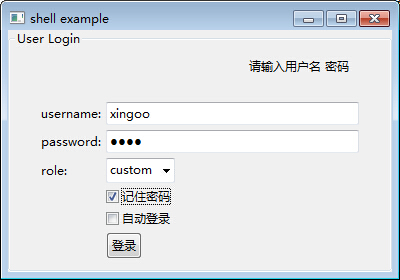
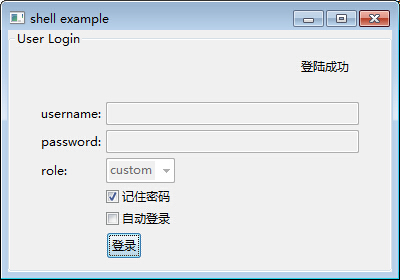
这里先放出一段代码,代码中使用到了简单的布局模型GridLayout(),以及组和组合控件,还有一些简单的控件。形成一个登陆界面,并且单击按钮可以出发响应事件。效果图如下:
登录前:
登陆后:
实现代码如下:
 package com.xingoo.plugin.swttest.test;

 import org.eclipse.swt.SWT;

 import org.eclipse.swt.events.SelectionAdapter;

 import org.eclipse.swt.events.SelectionEvent;

 import org.eclipse.swt.layout.FillLayout;

 import org.eclipse.swt.layout.GridData;

 import org.eclipse.swt.layout.GridLayout;

 import org.eclipse.swt.widgets.Button;

 import org.eclipse.swt.widgets.Combo;

 import org.eclipse.swt.widgets.Composite;

 import org.eclipse.swt.widgets.Group;

 import org.eclipse.swt.widgets.Label;

 import org.eclipse.swt.widgets.MessageBox;

 import org.eclipse.swt.widgets.Shell;

 import org.eclipse.swt.widgets.Text;

 import com.xingoo.plugin.swttest.Abstract.AbstractExample;

 public class Test extends AbstractExample{

     private Label infoLabel;

     private Text usernameText;

     private Text passwordText;

     private Combo roleCombo;

     public static void main(String[] args) {

         new Test().run();

     }

     public void todo(Shell shell) {

         Group testGroup = new Group(shell,SWT.NONE);

         testGroup.setText("User Login");

         GridLayout layout = new GridLayout();

         layout.numColumns = ;

         layout.marginWidth = ;

         layout.marginHeight = ;

         testGroup.setLayout(layout);

         testGroup.setLayoutData(new GridData(GridData.FILL_HORIZONTAL));

         {

             Composite composite = new Composite(testGroup,SWT.NONE);

             GridLayout layoutComposite = new GridLayout();

             layoutComposite.numColumns = ;

             layoutComposite.marginHeight = ;

             composite.setLayout(layoutComposite);

             composite.setLayoutData(new GridData(SWT.FILL,SWT.FILL,true,true,,));

             infoLabel = new Label(composite,SWT.NONE);

             infoLabel.setText("请输入用户名 密码");

             infoLabel.setLayoutData(new GridData(GridData.FILL_BOTH));

             infoLabel.setAlignment(SWT.RIGHT);

         }

         {

             Label usernameLabel = new Label(testGroup,SWT.NONE);

             usernameLabel.setText("username:");

             usernameText = new Text(testGroup,SWT.BORDER);

             usernameText.setLayoutData(new GridData(GridData.FILL_HORIZONTAL));

         }

         {

             Label passwordLabel = new Label(testGroup,SWT.NONE);

             passwordLabel.setText("password:");

             passwordText = new Text(testGroup,SWT.BORDER | SWT.PASSWORD);

             passwordText.setLayoutData(new GridData(GridData.FILL_HORIZONTAL));

         }

         {

             Label roleLabel = new Label(testGroup,SWT.NONE);

             roleLabel.setText("role:");

             roleCombo = new Combo(testGroup,SWT.DROP_DOWN);

             roleCombo.setItems(new String[]{"Admin","custom"});

             roleCombo.select();

         }

         {

             new Label(testGroup,SWT.NONE);

             Button rememberPWBtn = new Button(testGroup,SWT.CHECK);

             rememberPWBtn.setText("记住密码");

         }

         {

             new Label(testGroup,SWT.NONE);

             Button autoLoginBtn = new Button(testGroup,SWT.CHECK);

             autoLoginBtn.setText("自动登录");

         }

         {

             new Label(testGroup,SWT.NONE);

             Button loginBtn = new Button(testGroup,SWT.PUSH);

             loginBtn.setText("登录");

             loginBtn.addSelectionListener(new SelectionAdapter() {

                 public void widgetSelected(SelectionEvent evt){

                     infoLabel.setText("登陆成功");

                     usernameText.setText("");

                     usernameText.setEnabled(false);

                     passwordText.setText("");

                     passwordText.setEnabled(false);

                     roleCombo.setEnabled(false);

                 }

             });

         }

     }

 }
注意其中的一些技巧:
30-36行:我们创建了一个组控件,并且使用了网格布局,设置每行有两列。并且设置了组内填充边界,marginWidth以及marginHeight。
39-49行:我们创建了一个组合对象,使他占有了两个列元素。并且设置组内为两列的网格布局。
关于事件的监听,之后也会搜集整理出一些常用的事件。
剩下的就比较好理解了,当没有空间元素填补的时候,为了防止布局错乱,创建了一个空的Label对象用来占位。
new Label(testGroup,SWT.NONE);
这里面使用到了一个前文提到的抽象类,这里再贴出来一次。
 package com.xingoo.plugin.swttest.Abstract;

 import org.eclipse.swt.layout.FillLayout;

 import org.eclipse.swt.widgets.Display;

 import org.eclipse.swt.widgets.Shell;

 public abstract class AbstractExample{

     public void run(){

         Display display = new Display();

         Shell shell = new Shell(display);

         shell.setText("shell example");

         shell.setBounds(,,,);

         shell.setLayout(new FillLayout());

         todo(shell);

         shell.open();

         while(!shell.isDisposed()){

             if(!display.readAndDispatch())

                 display.sleep();

         }

         //dispose the resource

         display.beep();

         display.dispose();

     }

     public abstract void todo(Shell shell);//extension something here

 }
后续将会更新,复杂控件以及布局模型的介绍。
【插件开发】—— 5 SWT控件以及布局使用的更多相关文章
- Android 手机卫士--自定义组合控件构件布局结构
由于设置中心条目中的布局都很类似,所以可以考虑使用自定义组合控件来简化实现 本文地址:http://www.cnblogs.com/wuyudong/p/5909043.html,转载请注明源地址. ...
- Silverlight项目笔记1:UI控件与布局、MVVM、数据绑定、await/async、Linq查询、WCF RIA Services、序列化、委托与事件
最近从技术支持转到开发岗,做Silverlight部分的开发,用的Prism+MVVM,框架由同事搭好,目前做的主要是功能实现,用到了一些东西,侧重于如何使用,总结如下 1.UI控件与布局 常用的主要 ...
- 重新想象 Windows 8 Store Apps (7) - 控件之布局控件: Canvas, Grid, StackPanel, VirtualizingStackPanel, WrapGrid, VariableSizedWrapGrid
原文:重新想象 Windows 8 Store Apps (7) - 控件之布局控件: Canvas, Grid, StackPanel, VirtualizingStackPanel, WrapGr ...
- 背水一战 Windows 10 (39) - 控件(布局类): VariableSizedWrapGrid, Border, Viewbox, SplitView
[源码下载] 背水一战 Windows 10 (39) - 控件(布局类): VariableSizedWrapGrid, Border, Viewbox, SplitView 作者:webabcd ...
- 背水一战 Windows 10 (38) - 控件(布局类): Panel, Canvas, RelativePanel, StackPanel, Grid
[源码下载] 背水一战 Windows 10 (38) - 控件(布局类): Panel, Canvas, RelativePanel, StackPanel, Grid 作者:webabcd 介绍背 ...
- Android编程 控件与布局
控件和布局的继承结构 常用控件 1.TextView <?xml version="1.0" encoding="utf-8"?> <Line ...
- UIButton内部子控件自定义布局-“UIEdgeInsets”
UIButton UIButton做frame动画时,不响应点击 在一个View内部加入几个按钮,然后改变这个view的frame来做动画,但是按钮不响应点击事件. 问题代码 __block CGRe ...
- Excel开发学习笔记:界面交互与控件的布局
遇到一个数据处理自动化的问题,于是打算开发一个基于excel的小工具.在业余时间一边自学一边实践,抽空把一些知识写下来以备今后参考,因为走的是盲人摸象的野路子,幼稚与错误请多包涵. , ).value ...
- 《深入浅出WPF》学习总结之控件与布局
一.控件到底是什么 控件的本质是“数据+算法”——用户输入原始数据,算法处理原始数据并得到结果数据.问题就在于程序如何将结果数据展示给用户.同样一组数据,你可以使用LED阵列显示出来,或者是以命令行模 ...
随机推荐
- python学习之-- subprocess模块
subprocess 模块 功能:用来生成子进程,并可以通过管道连接它们的输入/输出/错误,以及获得它们的返回值.它用来代替多个旧模块和函数: os.system os.spawn* os.popen ...
- GAN Generative Adversarial Network 生成式对抗网络-相关内容
参考: https://baijiahao.baidu.com/s?id=1568663805038898&wfr=spider&for=pc Generative Adversari ...
- centos 5.11修改ssh默认端口号
查看下服务器端口号范围: # sysctl -a|grep ip_local_port_range net.ipv4.ip_local_port_range = 32768 61000 新 ...
- Deepin-安装php
点击即可:下载:PHP5.6 下载完后执行下面这条shell命令即可完成安装 文件保存为:php_install.sh ,运行时:sh php_install.sh .tar.bz2 cd php- ...
- 【PostgreSQL】PostgreSQL操作-psql基本命令
在阅读的过程中有不论什么问题,欢迎一起交流 邮箱:1494713801@qq.com QQ:1494713801 一.建立数据库连接 ---------------- 接入PostgreSQL数 ...
- REST技术第四步 多个參数注解问题
经过实验,发如今使用@BeanParam注解的查询类字段上. @FormParam和@QueryParam不能同一时候加上去,仅仅能加一个,否则会出现取不到数据的情况. 并且在方法參数上两个注解也不能 ...
- HLJU 1220: AC100天 (枚举)
1220: AC100天 Time Limit: 1 Sec Memory Limit: 128 MB Submit: 89 Solved: 12 [id=1220">Submit ...
- 2016/2/26 jQuery的技术 1,安装 2,语法选择器$ 事件触发 3,常用jQuery函数
在<网页制作Dreamweaver(悬浮动态分层导航)>中,运用到了jQuery的技术,轻松实现了菜单的下拉.显示.隐藏的效果,不必再用样式表一点点地修改,省去了很多麻烦,那么jQuery ...
- 2016/2/25 1、<表单验证<form></form> 2、正则表达式 3、事件
1.<表单验证<form></form> (1).非空验证(去空格) (2).对比验证(跟一个值对比) (3).范围验证(根据一个范围进行判断) (4).固定格式验证:电 ...
- XML中的CDATA是什么?PCDATA是什么?
PCDATA表示已解析的字符数据. 在CDATA内部的所有内容都会被解析器忽略.