
W/MessageQueue: Handler (android.os.Handler) {4241f8f8} sending message to a Handler on a dead thread
稍微纤细一点儿的信息是: Handler (android.os.Handler) {215ddea8} sending message to a Handler on a dead thread。
在另一次在IntentService里使用MediaPlayer 播放铃声也再现错误,信息是:Handler) {42414500} sending message to a Handler on a dead thread。
本次的完整信息是:

W/ActivityManager( 1394): getTasks: caller 10034 is using old GET_TASKS but privileged; allowing

W/MessageQueue( 7666): Handler (android.os.Handler) {215ddea8} sending message to a Handler on a dead thread

W/MessageQueue( 7666): java.lang.IllegalStateException: Handler (android.os.Handler) {215ddea8} sending message to a Handler on a dead thread

W/MessageQueue( 7666):  at android.os.MessageQueue.enqueueMessage(MessageQueue.java:325)

W/MessageQueue( 7666):  at android.os.Handler.enqueueMessage(Handler.java:635)

W/MessageQueue( 7666):  at android.os.Handler.sendMessageAtTime(Handler.java:604)

W/MessageQueue( 7666):  at android.os.Handler.sendMessageDelayed(Handler.java:574)

W/MessageQueue( 7666):  at android.os.Handler.postDelayed(Handler.java:398)

W/MessageQueue( 7666):  at com.bandwidthx.library.l.a(SourceFile:367)

W/MessageQueue( 7666):  at com.bandwidthx.library.l.B(SourceFile:357)

W/MessageQueue( 7666):  at com.bandwidthx.library.BxApproval.aZ(SourceFile:4563)

W/MessageQueue( 7666):  at com.bandwidthx.library.BxApproval.aT(SourceFile:4440)

W/MessageQueue( 7666):  at com.bandwidthx.library.BxApproval.aS(SourceFile:4431)

W/MessageQueue( 7666):  at com.bandwidthx.library.BxApproval.aG(SourceFile:4044)

W/MessageQueue( 7666):  at com.bandwidthx.library.l.a(SourceFile:1320)

W/MessageQueue( 7666):  at com.bandwidthx.library.l.j(SourceFile:1275)

W/MessageQueue( 7666):  at com.bandwidthx.library.q.w(SourceFile:2280)

W/MessageQueue( 7666):  at com.bandwidthx.library.q.a(SourceFile:3399)

W/MessageQueue( 7666):  at com.bandwidthx.library.q.a(SourceFile:3103)

W/MessageQueue( 7666):  at com.bandwidthx.library.q$1.a(SourceFile:1959)

W/MessageQueue( 7666):  at com.bandwidthx.library.q$1.doInBackground(SourceFile:1928)

W/MessageQueue( 7666):  at android.os.AsyncTask$2.call(AsyncTask.java:292)

W/MessageQueue( 7666):  at java.util.concurrent.FutureTask.run(FutureTask.java:237)

W/MessageQueue( 7666):  at android.os.AsyncTask$SerialExecutor$1.run(AsyncTask.java:231)

W/MessageQueue( 7666):  at java.util.concurrent.ThreadPoolExecutor.runWorker(ThreadPoolExecutor.java:1112)

W/MessageQueue( 7666):  at java.util.concurrent.ThreadPoolExecutor$Worker.run(ThreadPoolExecutor.java:587)

W/MessageQueue( 7666):  at java.lang.Thread.run(Thread.java:818)
估计Looper啊,MessageQueue之类的,已经被你们说烂了。
我就简单概括一句(当然下面也有很详细的)
一旦一个线程的消息循环退出后,不能再给其发送消息,否则会有RuntimeException抛出。
就是你一般性看到的:
"RuntimeException: Handler{xxxx} sending message to a Handler on a dead thread"。
一般性的,如果是你实现自己的Looper和Handler,建议在Looper.prepare()后,调用Looper.myLooper()来获取对这个线程Looper的引用。
用途:0. 可以调用quit()终止服务线程 1. 接收消息时检查消息循环是否已经退出
值得一说的是: 线程终止了,有时候并不是你自己终止的,很可能能是系统的某个正常的时序导致的(只是你没有注意到这个次序,然后写代码的时候没有注意)
上面已经说清楚了,下面是详细信息&啰嗦分界线(下面再多说也就这么回事儿,别往下看了,下面就说一个简单的案例)
案例:(使用 IntentService 的发送短信,代码如下)
在IntentService内部实际是开启的一个工作线程。
@Override

protected void onHandleIntent(Intent intent) {

    Bundle data = intent.getExtras();

    String[] recipients = null;

    String message = getString(R.string.unknown_event);

    String name = getString(R.string.app_name);

    if (data != null && data.containsKey(Constants.Services.RECIPIENTS)) {

        recipients = data.getStringArray(Constants.Services.RECIPIENTS);

        name = data.getString(Constants.Services.NAME);

        message = data.getString(Constants.Services.MESSAGE);

        for (int i = 0; i < recipients.length; i++) {

            if(!StringUtils.isNullOrEmpty(recipients[i])) {

                try {

                    Intent sendIntent = new Intent(this, SMSReceiver.class);

                    sendIntent.setAction(Constants.SMS.SEND_ACTION);

                    PendingIntent sendPendingIntent = PendingIntent.getBroadcast(getApplicationContext(), 0, sendIntent, PendingIntent.FLAG_UPDATE_CURRENT);

                    Intent deliveryIntent = new Intent(this, SMSReceiver.class);

                    deliveryIntent.setAction(Constants.SMS.DELIVERED_ACTION);

                    PendingIntent deliveryPendingIntent = PendingIntent.getBroadcast(getApplicationContext(), 0, deliveryIntent, PendingIntent.FLAG_UPDATE_CURRENT);

                    SmsManager.getDefault().sendTextMessage(recipients[i].trim(), null, "[" + name + "] " + message, sendPendingIntent, deliveryPendingIntent);

                } catch (Exception e) {

                    Log.e(TAG, "sendTextMessage", e);

                    e.printStackTrace();

                    Toast.makeText(this, e.getMessage(), Toast.LENGTH_LONG).show();

                    MainActivity.instance.writeToLogFile(e.getMessage(), System.currentTimeMillis());

                }

            }

        }

    }

}
(明眼人一看就知道,那个catch语句写的有问题)
catch (Exception e) {

     Log.e(TAG, "sendTextMessage", e);

     e.printStackTrace();

     Toast.makeText(this, e.getMessage(), Toast.LENGTH_LONG).show();

     MainActivity.instance.writeToLogFile(e.getMessage(), System.currentTimeMillis());

}
结果就报错了:
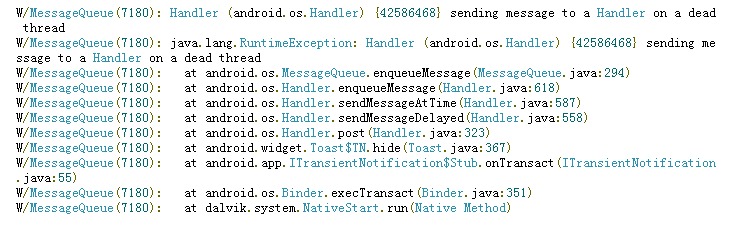
Google了一下资料,网址上是这么说的:
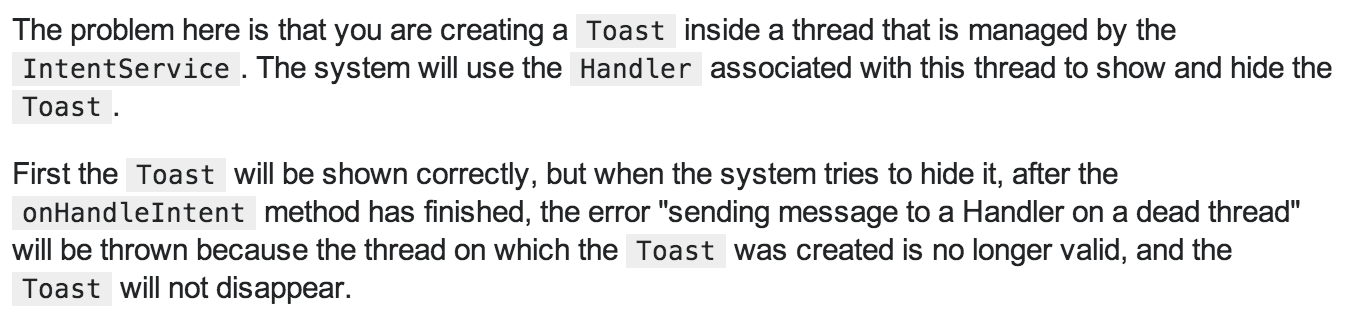
(大意翻译: 原因是你在一个由intentService控制生命周期的线程种创建了toast,手机先会显示这个toast,之后还是用这个线程的handler去隐藏&关闭这个toast;但是当onHandleIntent结束的时候,这个线程就挂了,然后绑定在这个线程上的handler也就不存在了,完事儿这个toast就关闭不了了,怎么办呢?发给主线程吧,它的toast的Handeler还存活,可以隐藏toast)
解决方案呢?(简单,粗暴)

哪些问题还有什么没有说?
为什么会向一个死线程发消息呢?
因为onHandleIntent(Intent intent)结束了这个线程也就没有了,到底怎么回事儿?
handler没有了,所以cannot hide toast?
如果我没有记错的话,这个toast的生命周期应该是NotificationManagerService控制的吧?
(IntentService源码剖析)----TODO
(Toast生命周期源码剖析)----TODO
转自:http://www.cnblogs.com/longhs/p/5557711.html
W/MessageQueue: Handler (android.os.Handler) {4241f8f8} sending message to a Handler on a dead thread的更多相关文章
- 缩略信息是: sending message to a Handler on a dead thread 我是用IntentService时报的
稍微纤细一点儿的信息是: Handler (android.os.Handler) {215ddea8} sending message to a Handler on a dead thread. ...
- Android全面解析之由浅及深Handler消息机制
前言 很高兴遇见你~ 欢迎阅读我的文章. 关于Handler的博客可谓是俯拾皆是,而这也是一个老生常谈的话题,可见的他非常基础,也非常重要.但很多的博客,却很少有从入门开始介绍,这在我一开始学习的时候 ...
- java.lang.RuntimeException: Handler (com.***.behavior.BEvent$1) {421bca80} sending message to a Hand
java.lang.RuntimeException: Handler (com.***.behavior.BEvent$1) {421bca80} sending message to a Hand ...
- 解决发http get请求的时候不成功,出现android.os.NetworkOnMainThreadException的异常
问题描述:在接游戏sdk的时候,由于游戏要求购买的时候是在主线程里面进行的,但是发http请求是不能在主线程里面发,否则就会出现android.os.NetworkOnMainThreadExcept ...
- Caused by: android.os.TransactionTooLargeException总结
错误信息 Error: android.os.TransactionTooLargeException W/ActivityManager(344): android.os.TransactionTo ...
- Android菜鸟的成长笔记(12)——Handler、Loop、MessageQueue
原文:[置顶] Android菜鸟的成长笔记(12)——Handler.Loop.MessageQueue 当一个程序第一次启动时,Android会启动一条主线程(Main Thread),主线程主要 ...
- Android Handler机制 (一个Thead中可以建立多个Hander,通过msg.target保证MessageQueue中的每个msg交由发送message的handler进行处理 ,但是 每个线程中最多只有一个Looper,肯定也就一个MessageQuque)
转载自http://blog.csdn.net/stonecao/article/details/6417364 在android中提供了一种异步回调机制Handler,使用它,我们可以在完成一个很长 ...
- android.os.Handler
android.os.handler A Handler allows you to send and process Message and Runnable objects associated ...
- Android多线程源码学习笔记一:handler、looper、message、messageQueue
最近在学习Android多线程相关知识的源码,现在把自己的笔记整理一下,写出来加深印象. Android多线程通讯的核心是handler.looper.message.messageQueue,这篇文 ...
随机推荐
- 订阅mosquitto服务器状态各主题
mosquitto_sub -v -t \$SYS/broker/client MQTT客户端可以通过订阅位于$SYS层次下的主题来查看mosquitto服务器的状态信息.标记为Static的主题对于 ...
- C#--类之隐藏基类的成员
using System; using System.Collections.Generic; using System.Linq; using System.Text; using System.T ...
- Matlab图形调色
Matlab图形调色 Simple example var colormap = require('colormap') options = { colormap: 'jet', // pic ...
- 高效使用 JavaScript 闭包,避免 Node.js 应用程序中的内存泄漏
在 Node.js 中,广泛采用不同形式的闭包来支持 Node 的异步和事件驱动编程模型.通过很好地理解闭包,您可以确保所开发应用程序的功能正确性.稳定性和可伸缩性. 闭包是一种将数据与处理数据的代码 ...
- 了不起的 “filter(NULL IS NOT NULL)”
经常会在执行计划中看到很奇怪的"FILTER"操作,然后看对应的执行信息是"filter(NULL IS NOT NULL)". 其实这是优化器非常聪明的“短 ...
- 移动端自动化测试 -- appium 之Desired Capabilities与 定位控件
一.Desired Capabilities Desired Capabilities 在启动 session 的时候是必须提供的. Desired Capabilities 本质上是以 key va ...
- ny104 最大和
最大和 时间限制:1000 ms | 内存限制:65535 KB 难度:5 描述 给定一个由整数组成二维矩阵(r*c),现在需要找出它的一个子矩阵,使得这个子矩阵内的所有元素之和最大,并把这个子矩 ...
- 随笔记:Python于Windows下初实践,及使用Connector/Python连接MySQL
有一同事要离职了,我负责交接一个用Python同步数据的项目. 之前木有做过Python,周休,做个简单的查询数据库,小练一下手. 包含: 安装 连接.查询MySQL 列表 元组 for循环 whil ...
- $.cookie is not a function;原因及解决办法
一.没有引入jQuery库文件 二.jQuery库文件和jquery.cookie.js文件的顺序问题.须先引入jQuery库文件再引入cookie插件文件 三.页面的加载顺序所导致 大家的问题大多出 ...
- 获取Django中model字段名 字段的verbose_name
obj._meta.fields 为关键 obj为model类 推荐使用函数 from django.apps import apps def getmodelfield(appname,modeln ...