
vue实现随机验证码功能
效果图:

1.html代码
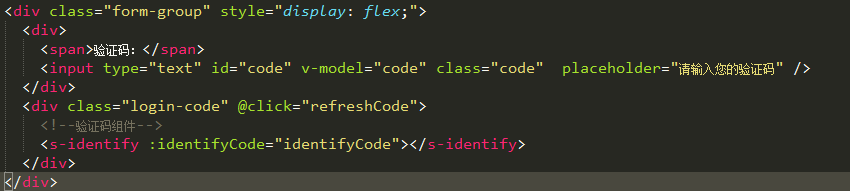
 <div class="form-group" style="display: flex;">

                     <div>

                         <span>验证码:</span>

                         <input type="text" id="code" v-model="code" class="code"  placeholder="请输入您的验证码" />

                     </div>

                   <div class="login-code" @click="refreshCode">

             <!--验证码组件-->

             <s-identify :identifyCode="identifyCode"></s-identify>

             </div>

                 </div>
HTML
2.css样式
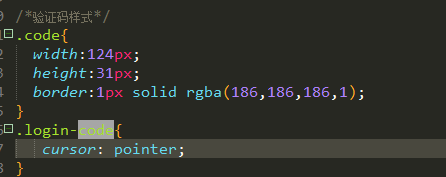
 /*验证码样式*/

 .code{

     width:124px;

     height:31px;

     border:1px solid rgba(186,186,186,1);

 }

 .login-code{

      cursor: pointer;

 }
CSS 代码
3.js引入验证码组件,并且定义三个变量。
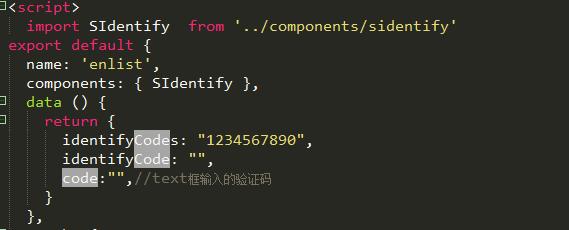
import SIdentify  from '../components/sidentify'

components: { SIdentify },

data () {

    return {

      identifyCodes: "1234567890",

      identifyCode: "",

      code:"",//text框输入的验证码

    }

},
引入验证码组件,以及需要定义的变量
4.mounted里的代码

 mounted(){

     this.identifyCode = "";

     this.makeCode(this.identifyCodes, 4);

 },
mounted代码
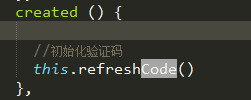
5.在created里初始化验证码
6.methods里添加以下方法。

 //验证码

 randomNum(min, max) {

     return Math.floor(Math.random() * (max - min) + min);

 },

 refreshCode() {

     this.identifyCode = "";

     this.makeCode(this.identifyCodes, 4);

 },

 makeCode(o, l) {

     for (let i = 0; i < l; i++) {

         this.identifyCode += this.identifyCodes[

           this.randomNum(0, this.identifyCodes.length)

         ];

     }

     console.log(this.identifyCode);

 },
需要用到的方法
在提交表单的时候对验证码进行判断。
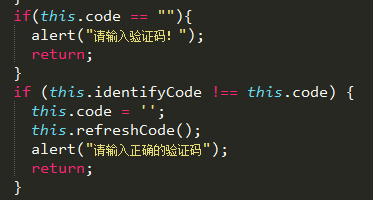
sidentify.vue组件代码:

代码:
 <template>

     <div class="s-canvas">

         <canvas id="s-canvas" :width="contentWidth" :height="contentHeight"></canvas>

     </div>

 </template>

 <script>

 export default {

     name: 'SIdentify',

     props: {

         identifyCode: {

             type: String,

             default: '1234'

         },

         fontSizeMin: {

             type: Number,

             default: 25

         },

         fontSizeMax: {

             type: Number,

             default: 30

         },

         backgroundColorMin: {

             type: Number,

             default: 255

         },

         backgroundColorMax: {

             type: Number,

             default: 255

         },

         colorMin: {

             type: Number,

             default: 0

         },

         colorMax: {

             type: Number,

             default: 160

         },

         lineColorMin: {

             type: Number,

             default: 100

         },

         lineColorMax: {

             type: Number,

             default: 255

         },

         dotColorMin: {

             type: Number,

             default: 0

         },

         dotColorMax: {

             type: Number,

             default: 255

         },

         contentWidth: {

             type: Number,

             default: 112

         },

         contentHeight: {

             type: Number,

             default: 31

         }

     },

     methods: {

         // 生成一个随机数

         randomNum(min, max) {

             return Math.floor(Math.random() * (max - min) + min)

         },

         // 生成一个随机的颜色

         randomColor(min, max) {

             let r = this.randomNum(min, max)

             let g = this.randomNum(min, max)

             let b = this.randomNum(min, max)

             return 'rgb(' + r + ',' + g + ',' + b + ')'

         },

         drawPic() {

             let canvas = document.getElementById('s-canvas')

             let ctx = canvas.getContext('2d')

             ctx.textBaseline = 'bottom'

             // 绘制背景

             ctx.fillStyle = this.randomColor(this.backgroundColorMin, this.backgroundColorMax)

             ctx.fillRect(0, 0, this.contentWidth, this.contentHeight)

             // 绘制文字

             for (let i = 0; i < this.identifyCode.length; i++) {

                 this.drawText(ctx, this.identifyCode[i], i)

             }

             this.drawLine(ctx)

             this.drawDot(ctx)

         },

         drawText(ctx, txt, i) {

             ctx.fillStyle = this.randomColor(this.colorMin, this.colorMax)

             ctx.font = this.randomNum(this.fontSizeMin, this.fontSizeMax) + 'px SimHei'

             let x = (i + 1) * (this.contentWidth / (this.identifyCode.length + 1))

             let y = this.randomNum(this.fontSizeMax, this.contentHeight - 5)

             var deg = this.randomNum(-45, 45)

             // 修改坐标原点和旋转角度

             ctx.translate(x, y)

             ctx.rotate(deg * Math.PI / 180)

             ctx.fillText(txt, 0, 0)

             // 恢复坐标原点和旋转角度

             ctx.rotate(-deg * Math.PI / 180)

             ctx.translate(-x, -y)

         },

         drawLine(ctx) {

             // 绘制干扰线

             for (let i = 0; i < 5; i++) {

                 ctx.strokeStyle = this.randomColor(this.lineColorMin, this.lineColorMax)

                 ctx.beginPath()

                 ctx.moveTo(this.randomNum(0, this.contentWidth), this.randomNum(0, this.contentHeight))

                 ctx.lineTo(this.randomNum(0, this.contentWidth), this.randomNum(0, this.contentHeight))

                 ctx.stroke()

             }

         },

         drawDot(ctx) {

             // 绘制干扰点

             for (let i = 0; i < 80; i++) {

                 ctx.fillStyle = this.randomColor(0, 255)

                 ctx.beginPath()

                 ctx.arc(this.randomNum(0, this.contentWidth), this.randomNum(0, this.contentHeight), 1, 0, 2 * Math.PI)

                 ctx.fill()

             }

         }

     },

     watch: {

         identifyCode() {

             this.drawPic()

         }

     },

     mounted() {

         this.drawPic()

     }

 }

 </script>

 <style scoped>

 .s-canvas {

     height: 38px;

 }

 .s-canvas canvas{

     margin-top: 1px;

     margin-left: 8px;

 }

 </style>
这篇文章是我参考别人写的,很感谢那个博主。
登录功能带验证码的例子:https://www.jianshu.com/p/99c6e2f3e457
vue实现随机验证码功能的更多相关文章
- Java案例之随机验证码功能实现
实现的功能比较简单,就是随机产生了四个字符然后输出.效果图如下,下面我会详细说一下实现这个功能用到了那些知识点,并且会把 这些知识点详细的介绍出来.哈哈 ,大神勿喷,对于初学Java的人帮助应该蛮大的 ...
- JS 实现随机验证码功能
1.验证码 验证是网页常出现的一个验证点,所谓验证码类型有很多,下面代码只是实现一个简单的验证功能. <div> <input type = "text" id ...
- Android实现随机验证码——自定义View
一.问题描述 熟悉web开发中童鞋们都知道为了防止恶意破解.恶意提交.刷票等我们在提交表单数据时,都会使用随机验证码功能.在Android应用中我们同样需要这一功能,该如何实现呢,下面我们就自定义一个 ...
- Vue Springboot (包括后端解决跨域)实现登录验证码功能详细完整版
利用Hutool 基于Vue.ElementUI.Springboot (跨域)实现登录验证码功能 前言 一.Hutool是什么? 二.下面开始步入正题:使用步骤 1.先引入Hutool依赖 2.控制 ...
- c#实现验证码功能
一.验证码简介 验证码功能一般是用于防止批量注册的,不少网站为了防止用户利用机器人自动注册.登录.灌水,都采用了验证码技术.所谓验证码,就是将一串随机产生的数字或字母或符号或文字,生成一幅图片, 图片 ...
- javaweb实现验证码功能
在javaweb的用户注册与登陆功能时,有时为了防止漏洞或者大量注册,可以使用验证码功能,下面是验证码的一个简单实现 验证码类 public class ValiImg extends HttpSer ...
- python_way,day4 内置函数(callable,chr,随机验证码,ord),装饰器
python_way,day4 1.内置函数 - 下 制作一个随机验证码 2.装饰器 1.内置函数 - 下 callable() #对象能否被调用 chr() #10进制数字对应的ascii码表中的内 ...
- python-Day5-深入正则表达式--冒泡排序-时间复杂度 --常用模块学习:自定义模块--random模块:随机验证码--time & datetime模块
正则表达式 语法: mport re #导入模块名 p = re.compile("^[0-9]") #生成要匹配的正则对象 , ^代表从开头匹配,[0 ...
- 用PHP实现验证码功能
目前,不少网站为了防止用户利用机器人自动注册.登录.灌水,都采用了 验证码技术.所谓验证码,就是将一串随机产生的数字或符号,生成一幅图片, 图片里加上一些干扰象素(防止OCR),由用户肉眼识别其中的验 ...
随机推荐
- 集群(heartbeat)搭建
HA 即(high available cluster)高可用集群,又称双机热备,保证关键性业务的不间断提供服务. 如:两台机器A和B,正常情况A提供服务,B待命闲置:一但A宕机或服务宕掉,自动切换至 ...
- spring 源码如何导入到eclipse
spring 源码如何导入到eclipse spring源码解析——spring源码导入eclipse spring framework源码下载并导入eclipse
- 第1课 GUI程序原理分析
1. 命令行应用程序 (1)命令行应用程序的特点 ①是一种基于顺序执行结构的可执行程序 ②程序执行过程中不需要与用户产生交互 ③程序执行后给出最终的运行结果 (2)命令行应用程序的运行模式——程序运行 ...
- php+nginx环境下的php报错设置
修改php.ini的配置: display_errors = Off(关闭) display_errors = On(开启) 设置修改完成后重启php-cgi进程 killall -9 php-cgi ...
- jenkins显示html样式问题的几种解决方案总结
前言 jenkins上使用HTML Publisher plugin插件生成的html报告样式会丢失,需要设置下才能正常显示. 一.样式丢失 1.官方文档的解释如下,参考地址https://stack ...
- http协议再复习(二)
HTTP和HTTPS HTTP协议(HyperText Transfer Protocol,超文本传输协议):是一种发布和接收 HTML页面的方法. HTTPS(Hypertext Transfer ...
- Seetaface 向树莓派 移植
seetaface由中科院计算所山世光研究员带领的人脸识别研究组研发.代码基于C++实现,不依赖第三方库.然而,目前开源的代码,是在windows vs上编译的,对于我们这帮mac/linux用户来说 ...
- Redis 哨兵模式 带密码单机
语法 https://segmentfault.com/a/1190000002680804 启动3台redis 6379,6380,6381 cp 多个redis.conf文件 开启daemoniz ...
- j2ee常用jar包
[b]activation.jar:[/b]与javaMail有关的jar包,使用javaMail时应与mail.jar一起加入到lib中去,具体负责mail的数据源和类型等 [b]ajaxtags- ...
- 【转】楼天城楼教主的acm心路历程(作为励志用)
利用假期空闲之时,将这几年GCJ,ACM,TopCoder 参加的一些重要比赛作个回顾.昨天是GCJ2006 的回忆,今天时间上更早一些吧,我现在还清晰记得3 年前,我刚刚参加ACM 时参加北京赛区2 ...