
selenium java maven 自动化测试(二) 页面元素获取与操作
在第一节中,我们已经成功打开了页面,但是自动化测试必然包含了表单的填写与按钮的点击. 所以在第二章中我以博客园为例,完成按钮点击,表单填写
还是以代码为准,先上代码:
package com.ryan;

import org.openqa.selenium.By;

import org.openqa.selenium.WebDriver;

import org.openqa.selenium.WebElement;

import org.openqa.selenium.chrome.ChromeDriver;

public class Demo {

    public static void main(String[] args) {

        System.setProperty("webdriver.chrome.driver", ".\\tools\\chromedriver.exe");

        WebDriver driver = new ChromeDriver();

        driver.get("http://www.cnblogs.com/ryan255/");

        System.out.println(driver.getTitle());

     //获取页面上的按钮

        WebElement button = driver.findElement(By.cssSelector("#blog_nav_admin"));
     //点击按钮

        button.click();
     //获取页面上的输入框

        WebElement input1 = driver.findElement(By.cssSelector("#input1"));
     //清理输入框的内容

        input1.clear();
     //输入

        input1.sendKeys("ryan255");
     Thread.sleep(5000);

        driver.quit();

    }

}
如上面的注释所示这里的代码增加了获取页面元素、点击按钮、输入表单的操作。
- id
- name
- class name
- tag name
- link text
- partial link text
- xpath
- css selector
- findElement(By.id())
- findElement(By.name())
- findElement(By.className())
- findElement(By.tagName())
- findElement(By.linkText())
- findElement(By.partialLinkText())
- findElement(By.xpath())
- findElement(By.cssSelector())
对于chrome来说,有一个非常方便的定位页面元素的方法:
1. F12进入调试页面,点击小箭头,再点击你想要获取的页面元素(如本例中获取的管理按钮)
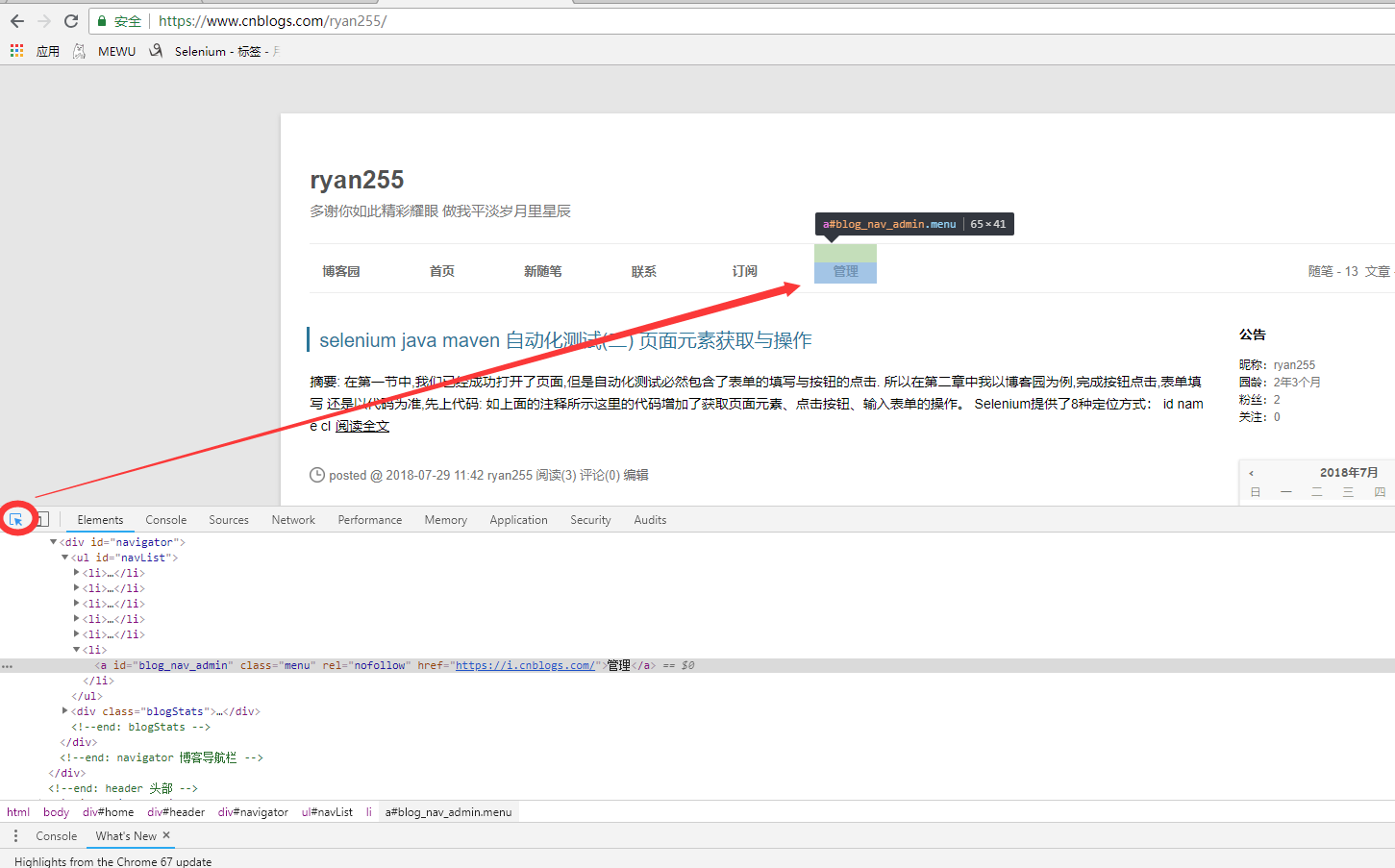
2.在所选元素的html上右键, Copy -> Copy selector或者 Copy XPath, 元素就被定位了.

selenium java maven 自动化测试(二) 页面元素获取与操作的更多相关文章
- selenium java maven 自动化测试(一) helloworld
本教程使用selenium-java,简单的完成了网页访问 网页内容获取,表单填写以及按钮点击. 1. 使用maven构建项目 在pom中添加如下依赖: <dependency> < ...
- selenium java maven自动化测试环境搭建
版本说明: JDK 版本:1.8.0_112: Eclipse IDE: 4.6.1: Maven 版本:apache-maven-3.3.9: Selenium 版本: 3.0.1: Firefox ...
- Java&Selenium自动化测试实现页面元素、页面对象及测试代码分离
一.摘要 本篇博文将介绍自动化测试实现页面元素.页面对象及测试代码分离在自动化框架中的实现 二.解析页面元素定位信息 首先,将页面元素与实际的代码分离,首先我们将页面元素定位信息和定位表达式保存在属性 ...
- Python3.x:Selenium中的webdriver进行页面元素定位
Python3.x:Selenium中的webdriver进行页面元素定位 页面上的元素就像人一样,有各种属性,比如元素名字,元素id,元素属性(class属性,name属性)等等.webdriver ...
- selenium java maven testNg环境搭建
maven获取jar的xml地址:http://mvnrepository.com 步骤一安装jdk(略) 步骤二 安装eclipse(略) 步骤三 安装testNG 步骤四 maven安装 步骤三 ...
- web自动化测试---web页面元素的定位
selenium提供了很多用于定位元素的方法,首先我们自己需要知道元素有哪些属性,这就需要用到安装测试环境中firebug来定位 打开firefox浏览器,按下F12键,我们就可以看到如下图所示的界面 ...
- Selenium WebDriver-通过ActionChains实现页面元素拖拽
#encoding=utf-8 import unittest import time import chardet from selenium import webdriver class Visi ...
- selenium—用NoSuchElementException异常判断页面元素是否存在
一.知识补充 1.find_element的一种使用方法: find_element(by=方法,value=值) 例如: find_element(by="id",value=& ...
- Selenium WebDriver- 操作frame中的页面元素
#encoding=utf-8 import unittest import time from selenium import webdriver from selenium.webdriver i ...
随机推荐
- 002Conditional条件化创建bean
01.条件化配置bean @Bean @Conditional(MagicExistsCondition.class)---->条件化创建bean public MagicBean magicB ...
- LeetCode赛题515----Find Largest Element in Each Row
问题描述 You need to find the largest element in each row of a Binary Tree. Example: Input: 1 / \ 2 3 / ...
- Intelij IDEA 配置Tomcat时找不到 “Application Server”
由于公司突然断电,再打开idea的时候,tomcat就消失了.然后在网上搜了一下,没搜到自己乱点了一下. 如图 : plugins >> application servers Vie ...
- CentOS下二进制包/源码安装方式的MySQL卸载步骤
查看当前系统mysql 运行状态 [root@zendlinux ~]# ps -ef |grep mysql root 1153 1 0 15:40 ? 00:00:00 /bin/sh /usr/ ...
- c# 设计模式 之:抽象工厂
1.作用:抽象工厂的目的就是生产[产品族],之前讲的“工厂模式”的每一个factory只造一种产品,抽象工厂让一个factory造多个产品. uml类图: 代码实现: 抽象工厂代码: namespac ...
- Jmeter————监控服务器性能
1. 下载jmeter插件 上面2个是jmeter插件,第3个要放在监控的服务器中. 2. 解压压缩包 找到解压包中的JAR文件,并拷贝到jmeter的lib/ext目录下,这里下载的1.4版本的插件 ...
- 学习笔记:Nginx反射代理使用缓存和删除其缓存文件的方法
使用nginx做cache服务器 需求就是缓存android的软件包,后缀名是apk.话不多说,直接上配置,供参考: a-->nginx.conf user www www; worker_pr ...
- 乘风破浪:LeetCode真题_006_ZigZag Conversion
乘风破浪:LeetCode真题_006_ZigZag Conversion 一.前言 到这里我们对基本的问题有了一定的理解,其中字符串的操作一直是一个比较困难的问题,这一点我们需要认真对待,采用合理的 ...
- Win10离线安装.NET Framework 3.5的方法技巧(附离线安装包下载)
原文链接: https://www.windows10.pro/win10-net-framework-3-5/ 在Windows10中,当我们安装某些软件的时候会提示“你的电脑上的应用需要使用以下W ...
- kernel3.13 针对 Vmware安装存在的问题解决
vthread-3| W110: Failed to build vmnet. Failed to execute the build command VMware module patches an ...