
Mnist手写数字识别 Tensorflow
Mnist手写数字识别 Tensorflow
任务目标
- 了解mnist数据集
- 搭建和测试模型
编辑环境
操作系统:Win10
python版本:3.6
集成开发环境:pycharm
tensorflow版本:1.*
程序流程图
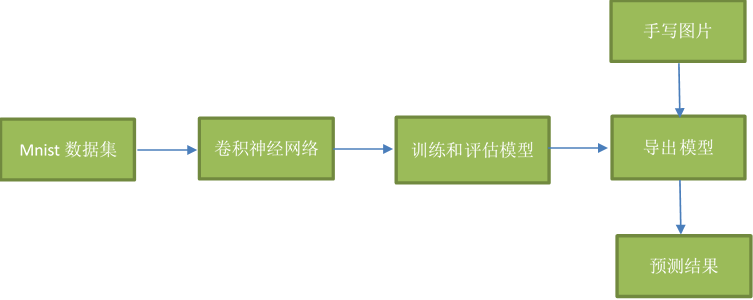
了解mnist数据集
mnist数据集:mnist数据集下载地址
MNIST 数据集来自美国国家标准与技术研究所, National Institute of Standards and Technology (NIST). 训练集 (training set) 由来自 250 个不同人手写的数字构成, 其中 50% 是高中学生, 50% 来自人口普查局 (the Census Bureau) 的工作人员. 测试集(test set) 也是同样比例的手写数字数据.
图片是以字节的形式进行存储, 我们需要把它们读取到 NumPy array 中, 以便训练和测试算法。
读取mnist数据集
mnist = input_data.read_data_sets("mnist_data", one_hot=True)
模型结构
输入层
with tf.variable_scope("data"):

      x = tf.placeholder(tf.float32,shape=[None,784],name='x_pred') # 784=28*28*1 宽长为28,单通道图片

      y_true = tf.placeholder(tf.int32,shape=[None,10]) # 10个类别
第一层卷积
现在我们可以开始实现第一层了。它由一个卷积接一个max pooling完成。卷积在每个5x5的patch中算出32个特征。卷积的权重张量形状是[5, 5, 1, 32],前两个维度是patch的大小,接着是输入的通道数目,最后是输出的通道数目。 而对于每一个输出通道都有一个对应的偏置量。
为了用这一层,我们把x变成一个4d向量,其第2、第3维对应图片的宽、高,最后一维代表图片的颜色通道数(因为是灰度图所以这里的通道数为1,如果是rgb彩色图,则为3)。
我们把x_image和权值向量进行卷积,加上偏置项,然后应用ReLU激活函数,最后进行max pooling。
with tf.variable_scope("conv1"):

      w_conv1 = tf.Variable(tf.random_normal([5,5,1,32])) # 5*5的卷积核  1个通道的输入图像  32个不同的卷积核,得到32个特征图

      b_conv1 = tf.Variable(tf.constant(0.0,shape=[32]))

      x_reshape = tf.reshape(x,[-1,28,28,1]) # n张 28*28 的单通道图片

      conv1 = tf.nn.relu(tf.nn.conv2d(x_reshape,w_conv1,strides=[1,1,1,1],padding="SAME")+b_conv1) #strides为过滤器步长 padding='SAME' 边缘自动补充

      pool1 = tf.nn.max_pool(conv1,ksize=[1,2,2,1],strides=[1,2,2,1],padding="SAME") # ksize为池化层过滤器的尺度,strides为过滤器步长  padding="SAME" 考虑边界,如果不够用 用0填充
第二层卷积
为了构建一个更深的网络,我们会把几个类似的层堆叠起来。第二层中,每个5x5的patch会得到64个特征
with tf.variable_scope("conv2"):

    w_conv2 = tf.Variable(tf.random_normal([5,5,32,64]))

    b_conv2 = tf.Variable(tf.constant(0.0,shape=[64]))

    conv2 = tf.nn.relu(tf.nn.conv2d(pool1,w_conv2,strides=[1,1,1,1],padding="SAME")+b_conv2)

    pool2 = tf.nn.max_pool(conv2,ksize=[1,2,2,1],strides=[1,2,2,1],padding="SAME")
密集连接层
现在,图片尺寸减小到7x7,我们加入一个有1024个神经元的全连接层,用于处理整个图片。我们把池化层输出的张量reshape成一些向量,乘上权重矩阵,加上偏置,然后对其使用ReLU。
为了减少过拟合,我们在输出层之前加入dropout。我们用一个placeholder来代表一个神经元的输出在dropout中保持不变的概率。这样我们可以在训练过程中启用dropout,在测试过程中关闭dropout。 TensorFlow的tf.nn.dropout操作除了可以屏蔽神经元的输出外,还会自动处理神经元输出值的scale。所以用dropout的时候可以不用考虑scale。
with tf.variable_scope("fc1"):

      w_fc1 = tf.Variable(tf.random_normal([7*7*64,1024])) # 经过两次卷积和池化 28 * 28/(2+2) = 7 * 7

      b_fc1 = tf.Variable(tf.constant(0.0,shape=[1024]))

      h_pool2_flat = tf.reshape(pool2, [-1, 7 * 7 * 64])

      h_fc1 = tf.nn.relu(tf.matmul(h_pool2_flat, w_fc1) + b_fc1)

      # 在输出层之前加入dropout以减少过拟合

      keep_prob = tf.placeholder("float32",name="keep_prob")

      h_fc1_drop = tf.nn.dropout(h_fc1, keep_prob)
输出层
&emsp' 最后,我们添加一个softmax层,就像前面的单层softmax regression一样。
with tf.variable_scope("fc2"):

      w_fc2 = tf.Variable(tf.random_normal([1024,10])) # 经过两次卷积和池化 28 * 28/(2+2) = 7 * 7

      b_fc2 = tf.Variable(tf.constant(0.0,shape=[10]))

      y_predict = tf.matmul(h_fc1_drop,w_fc2)+b_fc2

      tf.add_to_collection('pred_network', y_predict)  # 用于加载模型获取要预测的网络结构
训练和评估模型
为了进行训练和评估,我们使用与之前简单的单层SoftMax神经网络模型几乎相同的一套代码,只是我们会用更加复杂的ADAM优化器来做梯度最速下降,在feed_dict中加入额外的参数keep_prob来控制dropout比例。然后每100次迭代输出一次日志。
with tf.variable_scope("loss"):

    loss = tf.reduce_mean(tf.nn.softmax_cross_entropy_with_logits(labels=y_true,logits=y_predict))

with tf.variable_scope("optimizer"):

    # 使用反向传播,利用优化器使损失函数最小化

    train_op = tf.train.AdamOptimizer(0.001).minimize(loss)

with tf.variable_scope("acc"):

    # 检测我们的预测是否真实标签匹配(索引位置一样表示匹配)

    # tf.argmax(y_conv,dimension), 返回最大数值的下标 通常和tf.equal()一起使用,计算模型准确度

    # dimension=0 按列找  dimension=1 按行找

    equal_list = tf.equal(tf.arg_max(y_true,1),tf.arg_max(y_predict,1))

    # 统计测试准确率, 将correct_prediction的布尔值转换为浮点数来代表对、错,并取平均值。

    accuracy = tf.reduce_mean(tf.cast(equal_list,tf.float32))

# tensorboard

# tf.summary.histogram用来显示直方图信息

# tf.summary.scalar用来显示标量信息

# Summary:所有需要在TensorBoard上展示的统计结果

tf.summary.histogram("weight",w_fc2)

tf.summary.histogram("bias",b_fc2)

tf.summary.scalar("loss",loss)

tf.summary.scalar("acc",accuracy)

merged = tf.summary.merge_all()

saver = tf.train.Saver()

with tf.Session() as sess:

    sess.run(tf.global_variables_initializer())

    filewriter = tf.summary.FileWriter("tfboard",graph=sess.graph)

    if is_train: # 训练

        for i in range(20001):

            x_train, y_train = mnist.train.next_batch(50)

            if i%100==0:

                # 评估模型准确度,此阶段不使用Dropout

                print("第%d训练,准确率为%f" % (i + 1, sess.run(accuracy, feed_dict={x: x_train, y_true: y_train, keep_prob: 1.0})))

            # # 训练模型,此阶段使用50%的Dropout

            sess.run(train_op,feed_dict={x:x_train,y_true:y_train,keep_prob: 0.5})

            summary = sess.run(merged,feed_dict={x:x_train,y_true:y_train, keep_prob: 1})

            filewriter.add_summary(summary,i)

        saver.save(sess,savemodel)

    else: # 测试集预测

        count = 0.0

        epochs = 300

        saver.restore(sess, savemodel)

        for i in range(epochs):

            x_test, y_test = mnist.train.next_batch(1)

            print("第%d张图片,真实值为:%d预测值为:%d" % (i + 1,

                                             tf.argmax(sess.run(y_true, feed_dict={x: x_test, y_true: y_test,keep_prob: 1.0}),

                                                       1).eval(),

                                             tf.argmax(

                                                 sess.run(y_predict, feed_dict={x: x_test, y_true: y_test,keep_prob: 1.0}),

                                                 1).eval()

                                             ))

            if (tf.argmax(sess.run(y_true, feed_dict={x: x_test, y_true: y_test,keep_prob: 1.0}), 1).eval() == tf.argmax(

                    sess.run(y_predict, feed_dict={x: x_test, y_true: y_test,keep_prob: 1.0}), 1).eval()):

                count = count + 1

        print("正确率为 %.2f " % float(count * 100 / epochs) + "%")
评估结果
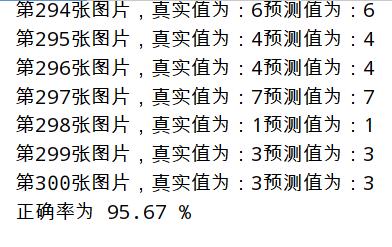
传入手写图片,利用模型预测
首先利用opencv包将图片转为单通道(灰度图),调整图像尺寸28*28,并且二值化图像,通过处理最后得到一个(0~1)扁平的图片像素值(一个二维数组)。
手写数字图片
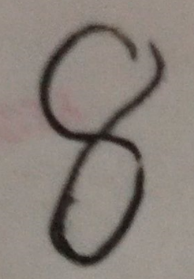
处理手写数字图片
def dealFigureImg(imgPath):

    img = cv2.imread(imgPath)  # 手写数字图像所在位置

    img = cv2.cvtColor(img, cv2.COLOR_BGR2GRAY)  # 转换图像为单通道(灰度图)

    resize_img = cv2.resize(img, (28, 28))  # 调整图像尺寸为28*28

    ret, thresh_img = cv2.threshold(resize_img, 127, 255, cv2.THRESH_BINARY)  # 二值化

    cv2.imwrite("image/temp.jpg",thresh_img)

    im = Image.open('image/temp.jpg')

    data = list(im.getdata()) # 得到一个扁平的 图片像素

    result = [(255 - x) * 1.0 / 255.0 for x in data] # 像素值范围(0-255),转换为(0-1) ->符合模型训练时传入数据的值

    result = np.expand_dims(result, 0) # 扩展维度 ->符合模型训练时传入数据的维度

    os.remove('image/temp.jpg')

    return result
载入模型进行预测
def predictFigureImg(imgPath):

    result = dealFigureImg(imgPath)

    with tf.Session() as sess:

        new_saver = tf.train.import_meta_graph("model/mnist_model.meta")

        new_saver.restore(sess, "model/mnist_model")

        graph = tf.get_default_graph()

        x = graph.get_operation_by_name('data/x_pred').outputs[0]

        keep_prob = graph.get_operation_by_name('fc1/keep_prob').outputs[0]

        y = tf.get_collection("pred_network")[0]

        predict = np.argmax(sess.run(y, feed_dict={x: result,keep_prob:1.0}))

        print("result:",predict)
预测结果
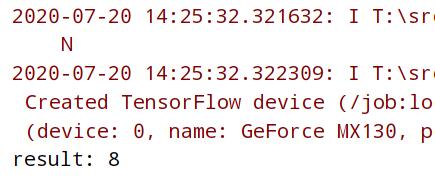
完整代码
import tensorflow as tf

import cv2

import os

import numpy as np

from PIL import Image

from tensorflow.examples.tutorials.mnist import input_data

# 构造模型

def getMnistModel(savemodel,is_train):

    """

    :param savemodel:  模型保存路径

    :param is_train: True为训练,False为测试模型

    :return:None

    """

    mnist = input_data.read_data_sets("mnist_data", one_hot=True)

    with tf.variable_scope("data"):

        x = tf.placeholder(tf.float32,shape=[None,784],name='x_pred') # 784=28*28*1 宽长为28,单通道图片

        y_true = tf.placeholder(tf.int32,shape=[None,10]) # 10个类别

    with tf.variable_scope("conv1"):

        w_conv1 = tf.Variable(tf.random_normal([5,5,1,32])) # 5*5的卷积核  1个通道的输入图像  32个不同的卷积核,得到32个特征图

        b_conv1 = tf.Variable(tf.constant(0.0,shape=[32]))

        x_reshape = tf.reshape(x,[-1,28,28,1]) # n张 28*28 的单通道图片

        conv1 = tf.nn.relu(tf.nn.conv2d(x_reshape,w_conv1,strides=[1,1,1,1],padding="SAME")+b_conv1) #strides为过滤器步长 padding='SAME' 边缘自动补充

        pool1 = tf.nn.max_pool(conv1,ksize=[1,2,2,1],strides=[1,2,2,1],padding="SAME") # ksize为池化层过滤器的尺度,strides为过滤器步长  padding="SAME" 考虑边界,如果不够用 用0填充

    with tf.variable_scope("conv2"):

        w_conv2 = tf.Variable(tf.random_normal([5,5,32,64]))

        b_conv2 = tf.Variable(tf.constant(0.0,shape=[64]))

        conv2 = tf.nn.relu(tf.nn.conv2d(pool1,w_conv2,strides=[1,1,1,1],padding="SAME")+b_conv2)

        pool2 = tf.nn.max_pool(conv2,ksize=[1,2,2,1],strides=[1,2,2,1],padding="SAME")

    with tf.variable_scope("fc1"):

        w_fc1 = tf.Variable(tf.random_normal([7*7*64,1024])) # 经过两次卷积和池化 28 * 28/(2+2) = 7 * 7

        b_fc1 = tf.Variable(tf.constant(0.0,shape=[1024]))

        h_pool2_flat = tf.reshape(pool2, [-1, 7 * 7 * 64])

        h_fc1 = tf.nn.relu(tf.matmul(h_pool2_flat, w_fc1) + b_fc1)

        # 在输出层之前加入dropout以减少过拟合

        keep_prob = tf.placeholder("float32",name="keep_prob")

        h_fc1_drop = tf.nn.dropout(h_fc1, keep_prob)

    with tf.variable_scope("fc2"):

        w_fc2 = tf.Variable(tf.random_normal([1024,10])) # 经过两次卷积和池化 28 * 28/(2+2) = 7 * 7

        b_fc2 = tf.Variable(tf.constant(0.0,shape=[10]))

        y_predict = tf.matmul(h_fc1_drop,w_fc2)+b_fc2

        tf.add_to_collection('pred_network', y_predict)  # 用于加载模型获取要预测的网络结构

    with tf.variable_scope("loss"):

        loss = tf.reduce_mean(tf.nn.softmax_cross_entropy_with_logits(labels=y_true,logits=y_predict))

    with tf.variable_scope("optimizer"):

        # 使用反向传播,利用优化器使损失函数最小化

        train_op = tf.train.AdamOptimizer(0.001).minimize(loss)

    with tf.variable_scope("acc"):

        # 检测我们的预测是否真实标签匹配(索引位置一样表示匹配)

        # tf.argmax(y_conv,dimension), 返回最大数值的下标 通常和tf.equal()一起使用,计算模型准确度

        # dimension=0 按列找  dimension=1 按行找

        equal_list = tf.equal(tf.arg_max(y_true,1),tf.arg_max(y_predict,1))

        # 统计测试准确率, 将correct_prediction的布尔值转换为浮点数来代表对、错,并取平均值。

        accuracy = tf.reduce_mean(tf.cast(equal_list,tf.float32))

    # tensorboard

    # tf.summary.histogram用来显示直方图信息

    # tf.summary.scalar用来显示标量信息

    # Summary:所有需要在TensorBoard上展示的统计结果

    tf.summary.histogram("weight",w_fc2)

    tf.summary.histogram("bias",b_fc2)

    tf.summary.scalar("loss",loss)

    tf.summary.scalar("acc",accuracy)

    merged = tf.summary.merge_all()

    saver = tf.train.Saver()

    with tf.Session() as sess:

        sess.run(tf.global_variables_initializer())

        filewriter = tf.summary.FileWriter("tfboard",graph=sess.graph)

        if is_train: # 训练

            for i in range(20001):

                x_train, y_train = mnist.train.next_batch(50)

                if i%100==0:

                    # 评估模型准确度,此阶段不使用Dropout

                    print("第%d训练,准确率为%f" % (i + 1, sess.run(accuracy, feed_dict={x: x_train, y_true: y_train, keep_prob: 1.0})))

                # # 训练模型,此阶段使用50%的Dropout

                sess.run(train_op,feed_dict={x:x_train,y_true:y_train,keep_prob: 0.5})

                summary = sess.run(merged,feed_dict={x:x_train,y_true:y_train, keep_prob: 1})

                filewriter.add_summary(summary,i)

            saver.save(sess,savemodel)

        else: # 测试集预测

            count = 0.0

            epochs = 300

            saver.restore(sess, savemodel)

            for i in range(epochs):

                x_test, y_test = mnist.train.next_batch(1)

                print("第%d张图片,真实值为:%d预测值为:%d" % (i + 1,

                                                 tf.argmax(sess.run(y_true, feed_dict={x: x_test, y_true: y_test,keep_prob: 1.0}),

                                                           1).eval(),

                                                 tf.argmax(

                                                     sess.run(y_predict, feed_dict={x: x_test, y_true: y_test,keep_prob: 1.0}),

                                                     1).eval()

                                                 ))

                if (tf.argmax(sess.run(y_true, feed_dict={x: x_test, y_true: y_test,keep_prob: 1.0}), 1).eval() == tf.argmax(

                        sess.run(y_predict, feed_dict={x: x_test, y_true: y_test,keep_prob: 1.0}), 1).eval()):

                    count = count + 1

            print("正确率为 %.2f " % float(count * 100 / epochs) + "%")

# 手写数字图像预测

def dealFigureImg(imgPath):

    img = cv2.imread(imgPath)  # 手写数字图像所在位置

    img = cv2.cvtColor(img, cv2.COLOR_BGR2GRAY)  # 转换图像为单通道(灰度图)

    resize_img = cv2.resize(img, (28, 28))  # 调整图像尺寸为28*28

    ret, thresh_img = cv2.threshold(resize_img, 127, 255, cv2.THRESH_BINARY)  # 二值化

    cv2.imwrite("image/temp.jpg",thresh_img)

    im = Image.open('image/temp.jpg')

    data = list(im.getdata()) # 得到一个扁平的 图片像素

    result = [(255 - x) * 1.0 / 255.0 for x in data] # 像素值范围(0-255),转换为(0-1) ->符合模型训练时传入数据的值

    result = np.expand_dims(result, 0) # 扩展维度 ->符合模型训练时传入数据的维度

    os.remove('image/temp.jpg')

    return result

def predictFigureImg(imgPath):

    result = dealFigureImg(imgPath)

    with tf.Session() as sess:

        new_saver = tf.train.import_meta_graph("model/mnist_model.meta")

        new_saver.restore(sess, "model/mnist_model")

        graph = tf.get_default_graph()

        x = graph.get_operation_by_name('data/x_pred').outputs[0]

        keep_prob = graph.get_operation_by_name('fc1/keep_prob').outputs[0]

        y = tf.get_collection("pred_network")[0]

        predict = np.argmax(sess.run(y, feed_dict={x: result,keep_prob:1.0}))

        print("result:",predict)

if __name__ == '__main__':

    # 训练和预测

    modelPath = "model/mnist_model"

    getMnistModel(modelPath,True) # True 训练 False 预测

    # 图片传入模型 进行预测

    # imgPath = "image/8.jpg"

    # predictFigureImg(imgPath)
Mnist手写数字识别 Tensorflow的更多相关文章
- MNIST手写数字识别 Tensorflow实现
def conv2d(x, W): return tf.nn.conv2d(x, W, strides=[1, 1, 1, 1], padding='SAME') 1. strides在官方定义中是一 ...
- Android+TensorFlow+CNN+MNIST 手写数字识别实现
Android+TensorFlow+CNN+MNIST 手写数字识别实现 SkySeraph 2018 Email:skyseraph00#163.com 更多精彩请直接访问SkySeraph个人站 ...
- 基于tensorflow的MNIST手写数字识别(二)--入门篇
http://www.jianshu.com/p/4195577585e6 基于tensorflow的MNIST手写字识别(一)--白话卷积神经网络模型 基于tensorflow的MNIST手写数字识 ...
- Tensorflow之MNIST手写数字识别:分类问题(1)
一.MNIST数据集读取 one hot 独热编码独热编码是一种稀疏向量,其中:一个向量设为1,其他元素均设为0.独热编码常用于表示拥有有限个可能值的字符串或标识符优点: 1.将离散特征的取值扩展 ...
- TensorFlow——MNIST手写数字识别
MNIST手写数字识别 MNIST数据集介绍和下载:http://yann.lecun.com/exdb/mnist/ 一.数据集介绍: MNIST是一个入门级的计算机视觉数据集 下载下来的数据集 ...
- 基于TensorFlow的MNIST手写数字识别-初级
一:MNIST数据集 下载地址 MNIST是一个包含很多手写数字图片的数据集,一共4个二进制压缩文件 分别是test set images,test set labels,training se ...
- Tensorflow实现MNIST手写数字识别
之前我们讲了神经网络的起源.单层神经网络.多层神经网络的搭建过程.搭建时要注意到的具体问题.以及解决这些问题的具体方法.本文将通过一个经典的案例:MNIST手写数字识别,以代码的形式来为大家梳理一遍神 ...
- mnist手写数字识别——深度学习入门项目(tensorflow+keras+Sequential模型)
前言 今天记录一下深度学习的另外一个入门项目——<mnist数据集手写数字识别>,这是一个入门必备的学习案例,主要使用了tensorflow下的keras网络结构的Sequential模型 ...
- mnist 手写数字识别
mnist 手写数字识别三大步骤 1.定义分类模型2.训练模型3.评价模型 import tensorflow as tfimport input_datamnist = input_data.rea ...
随机推荐
- 登录CentOS用户很慢/usr/bin/xauth: timeout in locking authority file /home/***/.Xauthority
当使用非root用户登录CentOS时,发现很慢,而且弹出以下信息: /usr/bin/xauth: timeout in locking authority file /home/***/.Xau ...
- Windows下6款实用软件(强烈推荐!)
Windows下6款实用软件 1.notepads Notepads作为一款编辑器,美观.轻量,功能强大,支持多标签页.Markdown.日常文本编辑.查看,Notepads轻松胜任,如果厌烦了Win ...
- mysql定时备份任务
简介 在生产环境上,为了避免数据的丢失,通常情况下都会定时的对数据库进行备份.而Linux的crontab指令则可以帮助我们实现对数据库定时进行备份.首先我们来简单了解crontab指令,如果你会了请 ...
- Dll的多字节和Unicode
Dll的多字节和Unicode 分类: MFC2013-10-17 13:00 28人阅读 评论(0) 收藏 举报 dll字符集字符集多字节Unicode 我们定义dll的时候会区分: 字符集:使用多 ...
- SpringBoot项目部署到tomcat
SpringBoot部署到tomcat 一.修改maven.xml 1.添加<.packaging>war</.packaging>,打包为war包 <packaging ...
- 集合类List底层数据结构总结
数组: 1. 不安全 ArrayList 2. 安全 Vector链表LinkedList不安全 3.2.1 ArrayList 1. 适合随机查找和遍历,不适合删除和增加 2. 大小不足时,需要将已 ...
- springboot + rabbitmq 用了消息确认机制,感觉掉坑里了
本文收录在个人博客:www.chengxy-nds.top,技术资源共享,一起进步 最近部门号召大伙多组织一些技术分享会,说是要活跃公司的技术氛围,但早就看穿一切的我知道,这 T M 就是为了刷KPI ...
- pycharm一直显示Process finished with exit code 0
后来排查发现原来是解释器的问题我之前使用的解释器是pycharm提供的虚拟解释器#####如何查看解释器点file–>new projects 如果选择的是2就是使用了pycharm提供的虚拟解 ...
- 关于数据文件的文件头1-P2
文章目录 1 疑问点 2 问题模拟 2.1 dump 0,1块 2.2 查看trc文件 2.3 如何查看 1 疑问点 这里引用p2处的一段话: 事实上,每个文件的前128个块,都是文件头,被Oracl ...
- Red Hat Enterprise Linux 6上安装Oracle 11G(11.2.0.4.0)缺少pdksh包的问题
RHEL 6上安装Oracle 11G警告缺少pdksh包 前言 相信很多刚刚接触学习Oracle的人,在RHEL6上安装11.2.0.3 or 11.2.0.4这两个版本的时候, 都遇到过先决条件检 ...