
好用到飞起的12个jupyter lab插件
1 简介
jupyter lab作为jupyter notebook的升级改造版,除了更加人性化的交互界面以及更多的用户自主定制功能之外,最吸引人的就是其丰富多样的拓展插件,使得每个使用jupyter lab的人都可以按照自己所需挑选安装插件,组合出自己心中的完美工作台。
 图1
图1
本文就将给大家介绍在我的日常工作中经常使用到的12个jupyter lab实用插件。
2 jupyter lab实用插件推荐
2.1 debugger
在jupyter notebook或jupyter lab中debug有多么蛋疼,尝试过的朋友们应该都有所体会。但随着jupyter lab官方插件debugger的横空出世,在jupyter lab中进行debug变得不再痛苦,充满了乐趣:
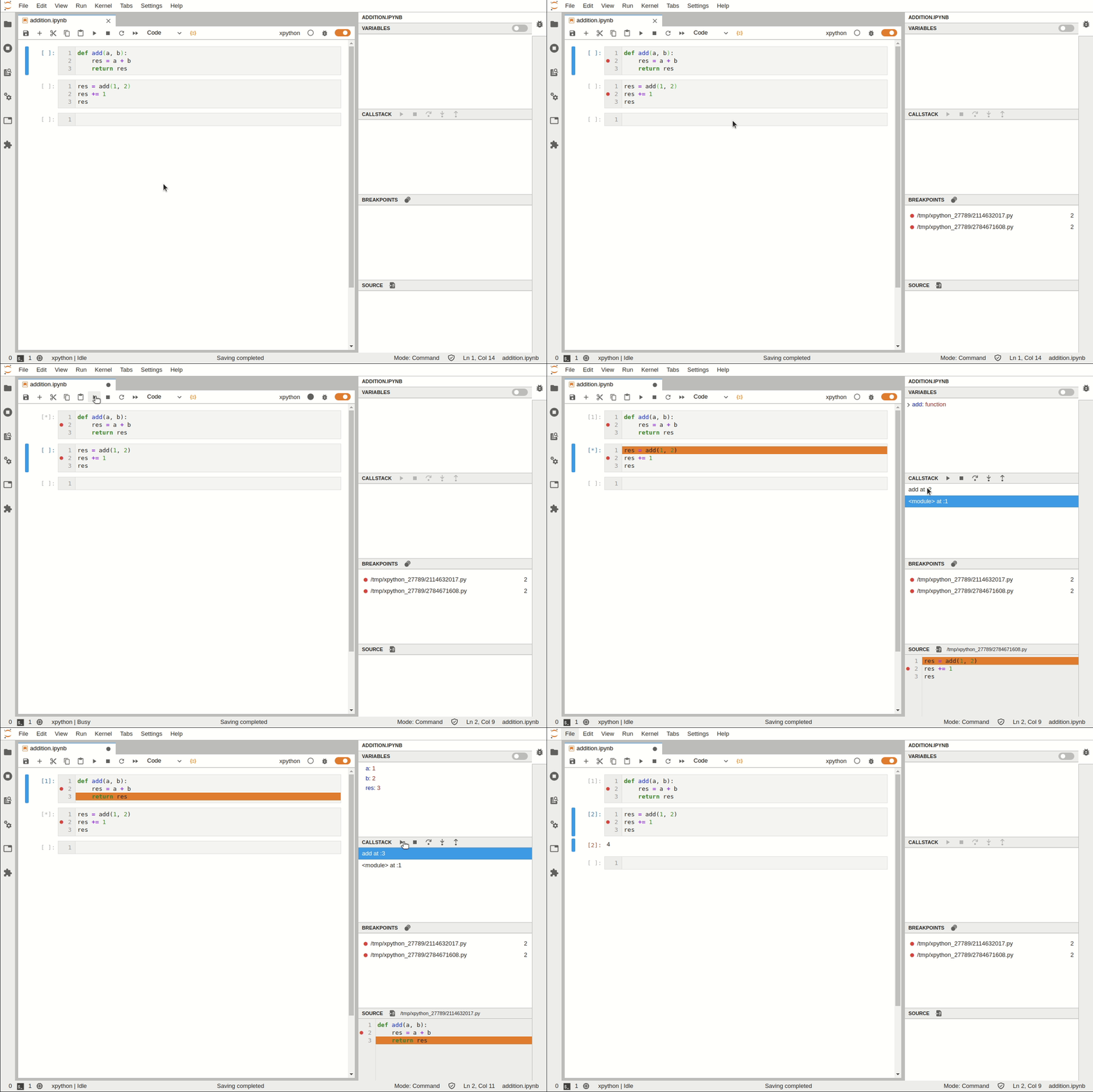 图2
图2
但要注意当前的debugger插件基于xeus内核,这是与我们平常使用的ipykernel内核不太一样,所以要想在jupyter lab中使用debugger插件,需要先安装xeus内核再进行debugger的安装,安装过程命令如下:
conda install xeus-python=0.8.0 -c conda-forge

jupyter labextension install @jupyterlab/debugger
官方文档:https://github.com/jupyterlab/debugger
2.2 geojson-extension
对于经常处理矢量数据的朋友而言,geojson格式的文件想必也是比较熟悉,而jupyter lab中的geojson-extension插件可以帮助我们在jupyter lab界面中以地图可视化的方式打开查看geojson文件:
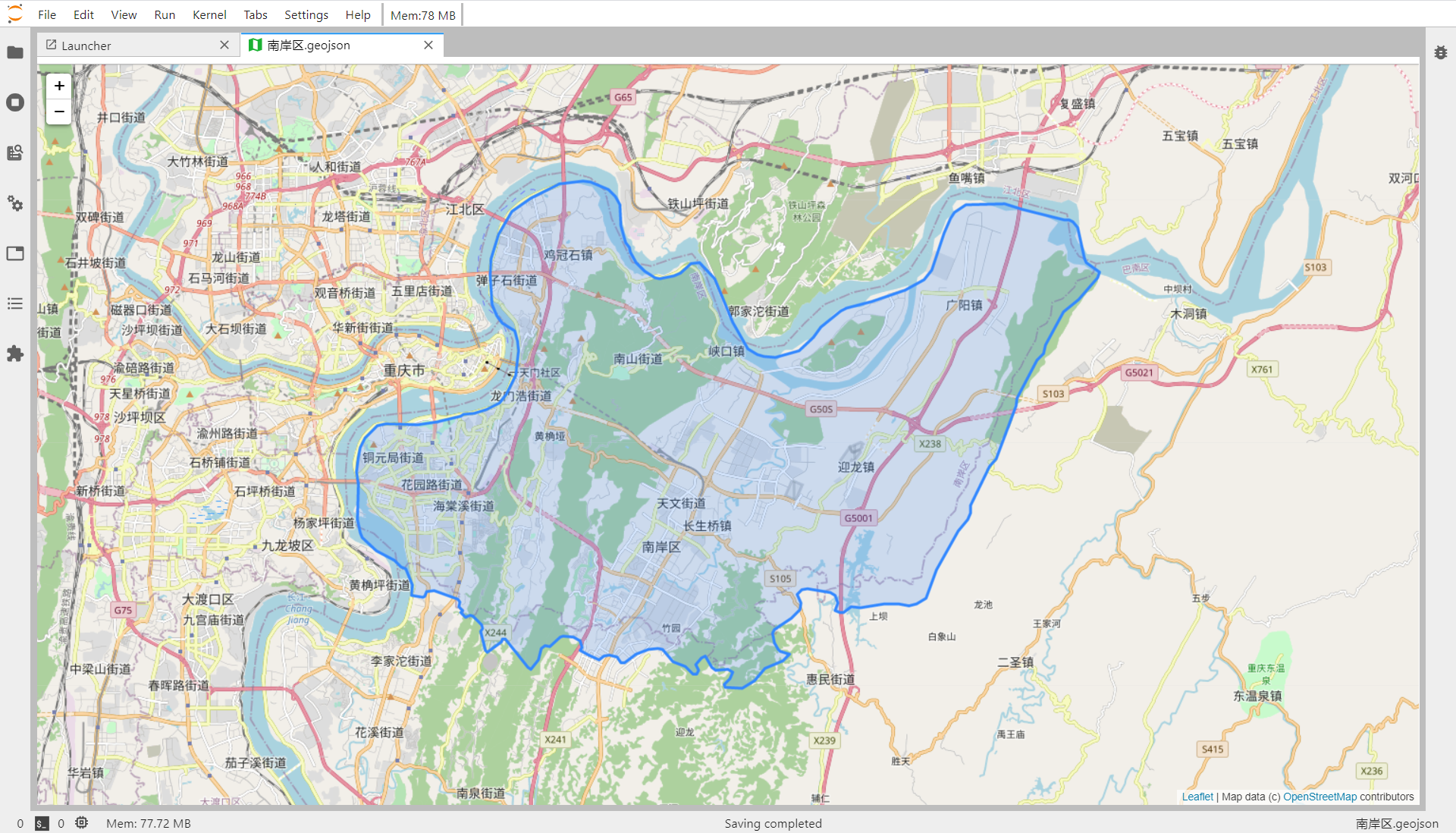 图3
图3
但要注意的是,因为是基于leaflet的界面,所以不要用这种方式来查看要素太多的geojson文件(不过应该没有人会用geojson格式存大量矢量信息吧)
安装命令:
jupyter labextension install @jupyterlab/geojson-extension
官方文档:https://github.com/jupyterlab/jupyter-renderers
2.3 jupyterlab-toc
jupyterlab-toc帮助我们在notebook界面利用markdown来创建目录,辅助我们更好地整合梳理数据分析工作流:
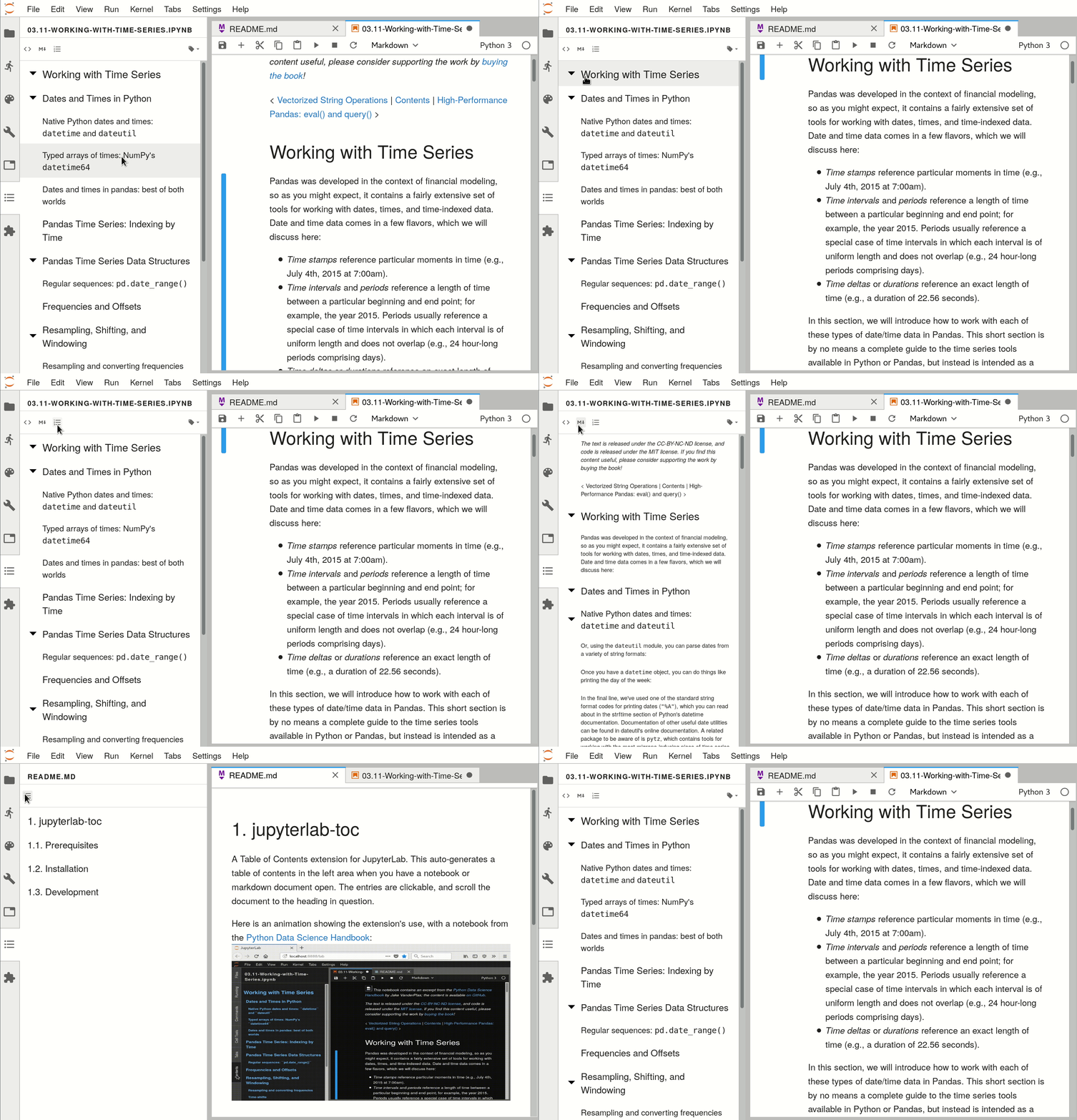 图4
图4
安装命令:
jupyter labextension install @jupyterlab/toc
官方文档:https://github.com/jupyterlab/jupyterlab-toc
2.4 jupyter-matplotlib
jupyter-matplotlib帮助我们在notebook界面配合matplotlib实现交互式的作图,只需要在绘图之前执行魔法命令%matplotlib widget,之后绘制的所有matplotlib图表即可自动转换为交互式的:
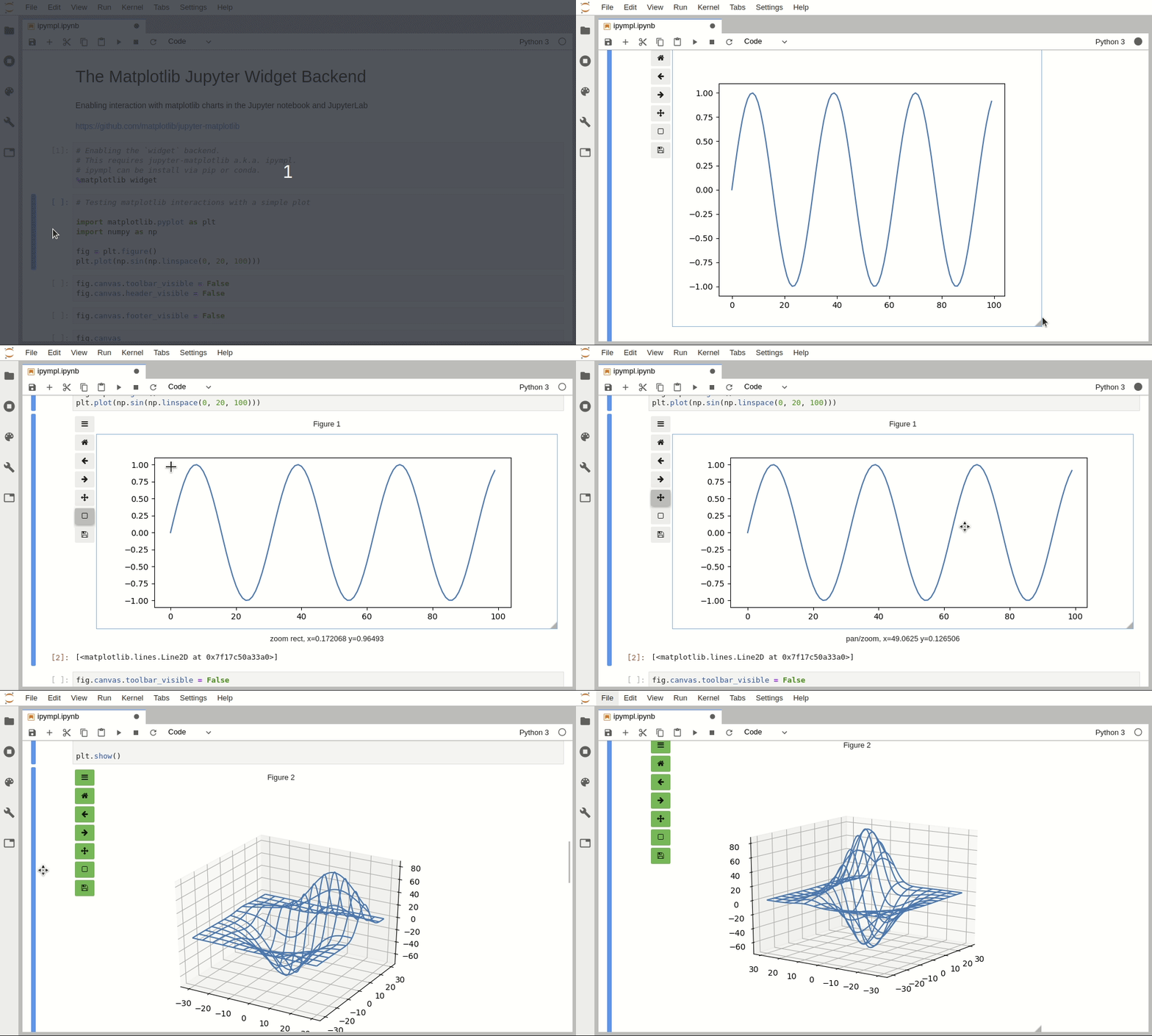 图5
图5
安装命令:
pip install ipympl

jupyter labextension install @jupyter-widgets/jupyterlab-manager jupyter-matplotlib
官方文档:https://github.com/matplotlib/ipympl
2.5 jupyterlab-drawio
jupyterlab-drawio是一个让我们可以在jupyter lab界面内基于drawio绘制流程图、思维导图等示意图的插件:
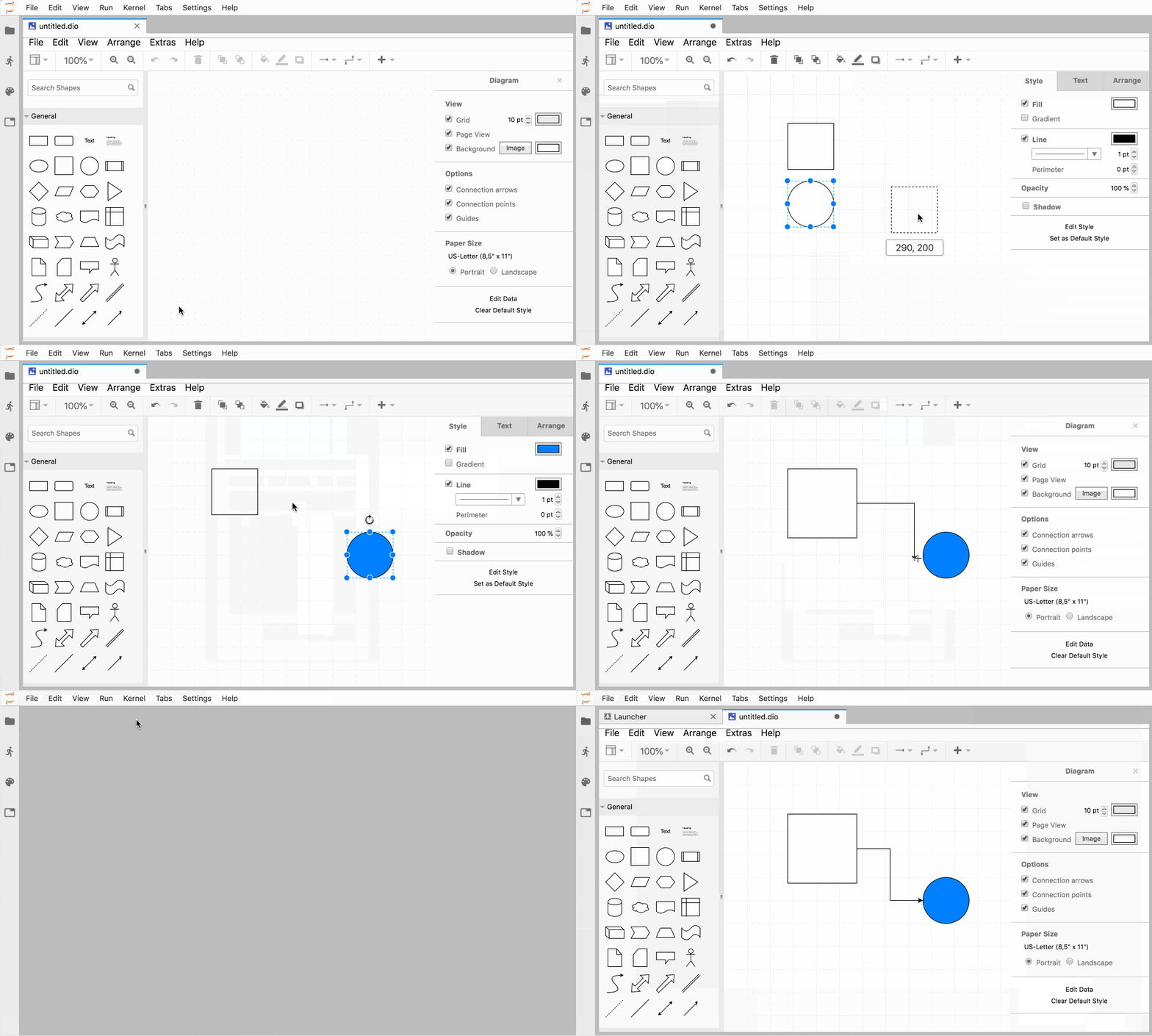 图6
图6
安装命令:
jupyter labextension install jupyterlab-drawio
官方文档:https://github.com/QuantStack/jupyterlab-drawio
2.6 jupyterlab-execute-time
jupyterlab-execute-time插件帮助我们在jupyter lab中记录每个单元cell的执行开始以及运行耗时:
 图7
图7
安装命令:
jupyter labextension install jupyterlab-execute-time
官方文档:https://github.com/deshaw/jupyterlab-execute-time
2.7 jupyterlab-plotly
jupyterlab-plotly是一款帮助plotly图像在jupyter lab中正常渲染的插件:
 图8
图8
安装命令:
jupyter labextension install @jupyter-widgets/jupyterlab-manager plotlywidget@4.9.0
官方文档:https://github.com/plotly/plotly.py
2.8 jupyterlab-spreadsheet
jupyterlab-spreadsheet帮助我们在jupyter lab中查看表格类文件,特别是其支持查看多工作表的excel表格文件:
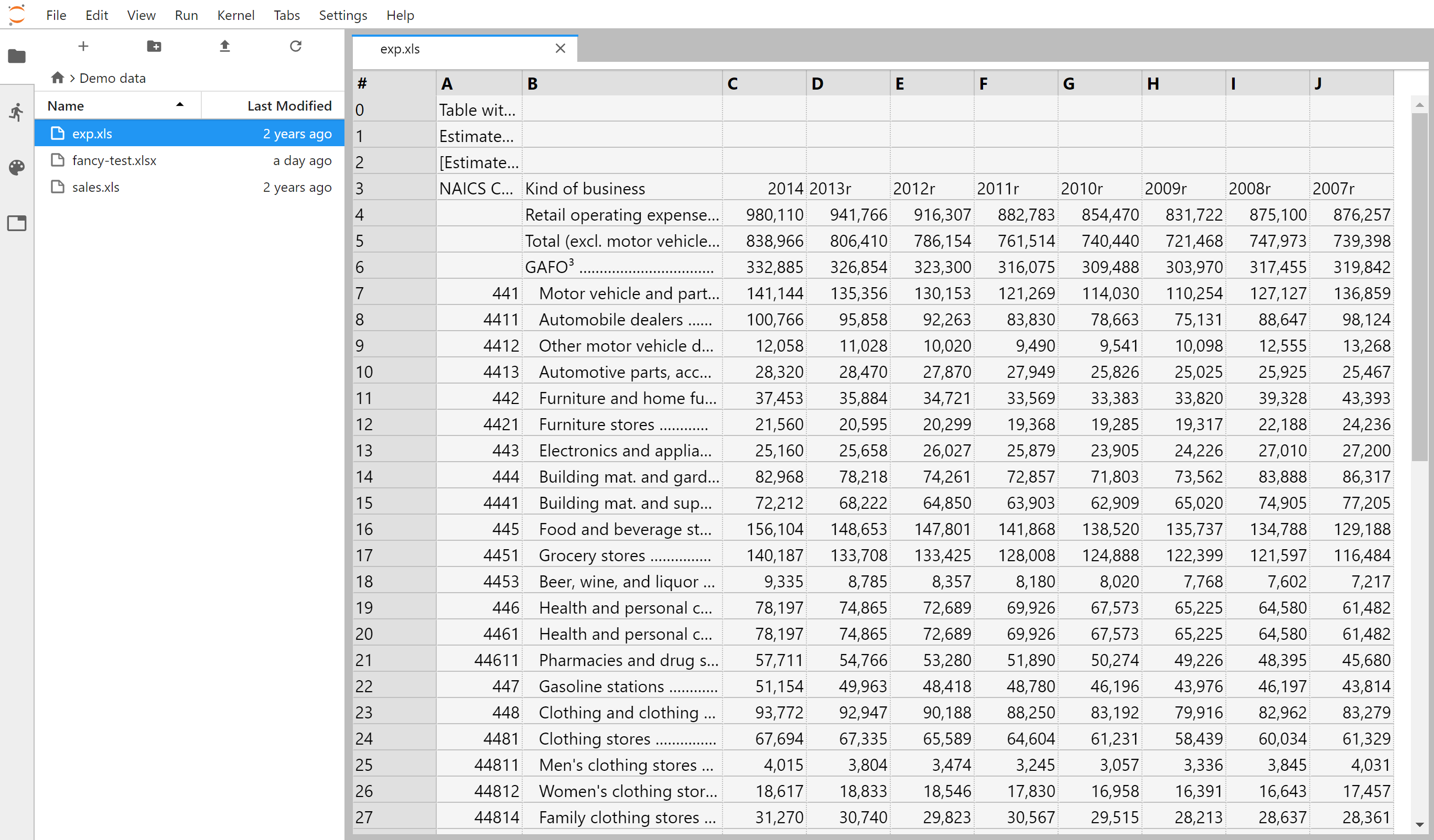 图9
图9
安装命令:
jupyter labextension install jupyterlab-spreadsheet
官方文档:https://github.com/quigleyj97/jupyterlab-spreadsheet
2.9 jupyterlab-system-monitor
jupyterlab-system-monitor通过在jupyter lab界面中添加资源监视器部件,能帮助我们在工作过程中方便的看到CPU、内存的实时占用情况:
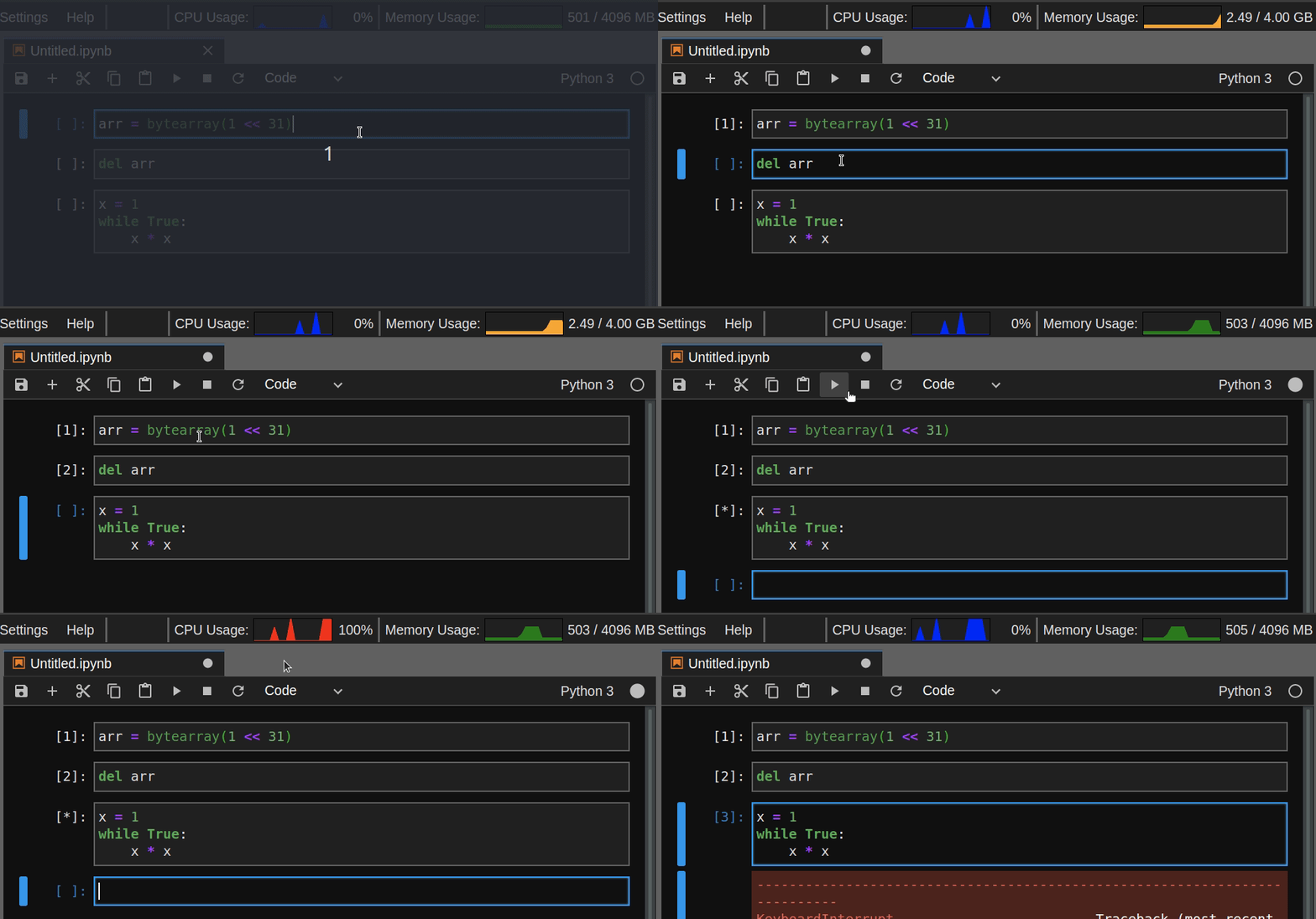 图10
图10
安装命令:
pip install nbresuse

jupyter labextension install jupyterlab-topbar-extension jupyterlab-system-monitor
官方文档:https://github.com/jtpio/jupyterlab-system-monitor
2.10 keplergl-jupyter
keplergl-jupyter是我使用非常频繁的jupyter lab插件,因为没有它就无法在jupyter lab中正常使用keplergl:
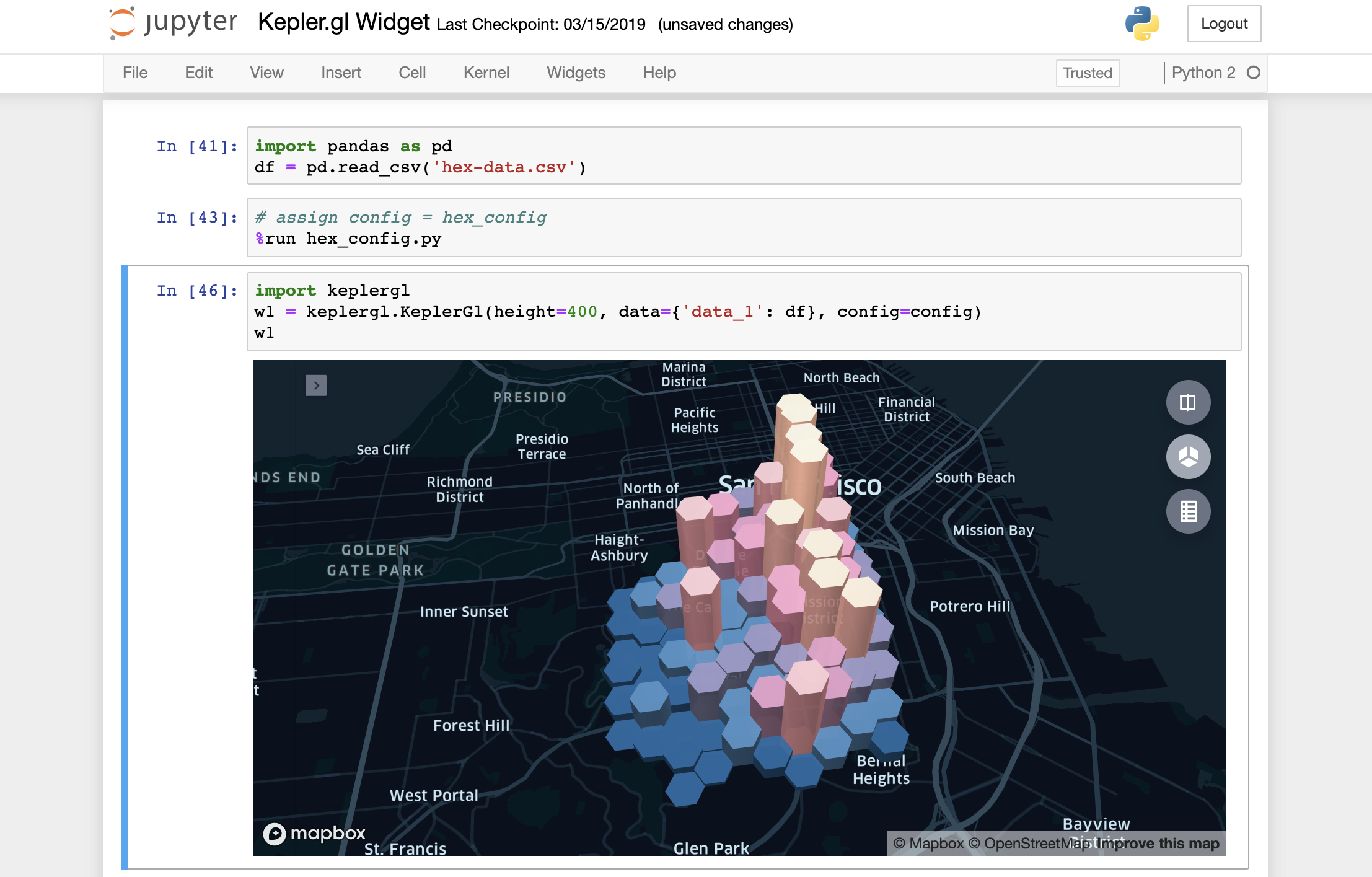 图11
图11
安装命令:
jupyter labextension install @jupyter-widgets/jupyterlab-manager keplergl-jupyter
官方文档:https://github.com/keplergl/kepler.gl/tree/master/bindings/kepler.gl-jupyter
2.11 jupyterlab-kite
这个插件我们之前的文章仔细介绍过,帮助我们建立代码补全神器kite与jupyter lab之间的通道,帮助我们在jupyter lab使用kite代码补全服务:
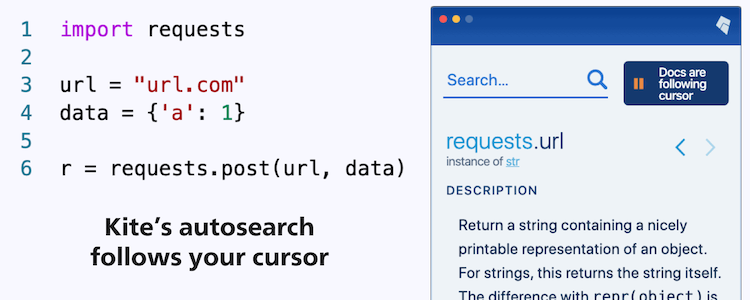 图12
图12
安装命令(需要jupyter lab版本大于等于2.2.0):
pip install jupyter-kite

jupyter labextension install @kiteco/jupyterlab-kite
官方文档:https://github.com/kiteco/jupyterlab-kite
2.12 jupyterlab-variableInspector
jupyterlab-variableInspector帮助我们在jupyter lab中查看当前环境中存在的变量相关信息,以美观的界面形式对多种类型的对象予以呈现:
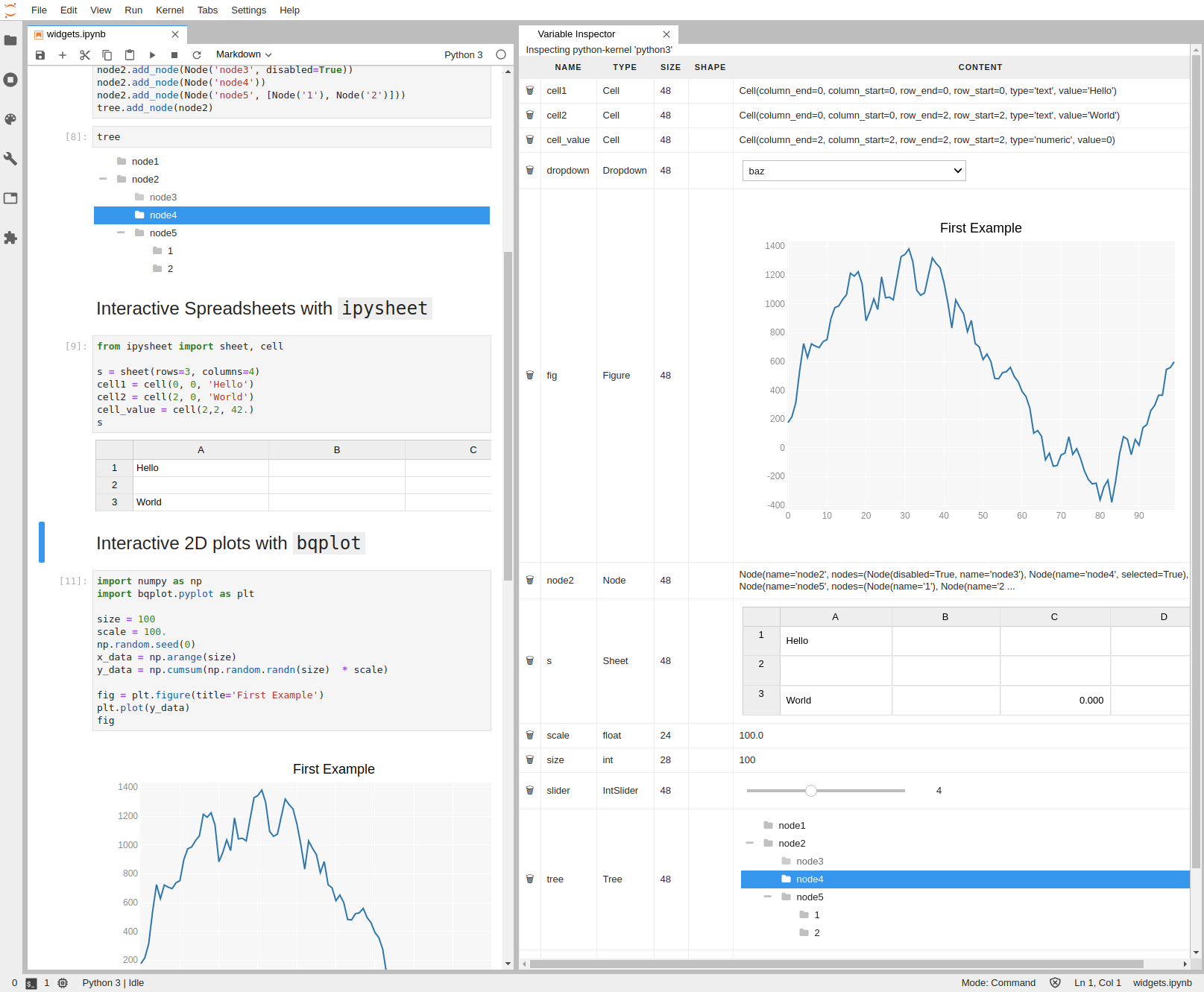 图13
图13
安装命令:
jupyter labextension install @lckr/jupyterlab_variableinspector
官方文档:https://github.com/lckr/jupyterlab-variableInspector
以上就是本文的全部内容,如有疑问欢迎在评论区与我进行讨论~
好用到飞起的12个jupyter lab插件的更多相关文章
- (数据科学学习手札95)elyra——jupyter lab最强插件
本文示例文件已上传至我的Github仓库https://github.com/CNFeffery/DataScienceStudyNotes 1 简介 jupyter lab是我最喜欢的编辑器,在过往 ...
- (数据科学学习手札95)elyra——jupyter lab平台最强插件集
本文示例文件已上传至我的Github仓库https://github.com/CNFeffery/DataScienceStudyNotes 1 简介 jupyter lab是我最喜欢的编辑器,在过往 ...
- 这款拓展让你的jupyter lab更高效
有一段时间没有分享过有关jupyter lab的内容了,今天给大家介绍一款实用的jupyter lab插件,可以帮助我们打造更灵活易用的jupyter lab. 图1 这款拓展的名称叫做jlab-en ...
- 基于jupyter lab搭建网页编程环境并添加自定义python kernel和matlab kernel以及plotly的使用
内容转载自我的博客 目录 说明 1. 创建虚拟环境jupyter 2. 安装nodejs(用于jupyterlab安装扩展) 3. 安装pip包 4. 使用jupyterlab 5. 配置jupyte ...
- 使用Jupyter lab前应该读的几篇文章
知乎上的一篇文章: 如何优雅的使用Jupyter? Jupyter Lab原来还有如下使用方式: 执行Shell命令 Hintland(提示命令).snippets(插入代码段).一键美化代码等功能( ...
- 【Python学习笔记】Jupyter Lab目录插件安装
Jupyter Lab目录插件安装 当然首先你得有python和已经安装了jupyter lab. 1 安装jupyter_contrib_nbextensions 首先先安装jupyter_cont ...
- 2017.12.25 Mybatis物理分页插件PageHelper的使用(二)
参考来自: 官方文档的说明:https://github.com/pagehelper/Mybatis-PageHelper/blob/master/wikis/zh/HowToUse.md 上篇博客 ...
- 机器学习中jupyter lab的安装方法以及使用的命令
安装JupyterLab使用pip安装: pip install jupyterlab# 必须将用户级目录添加 到环境变量才能启动pip install --userbinPATHjupyter la ...
- jupyter lab(notebook)相关配置
安装的是Anaconda3(Python 3.6.4),自带的版本较低,这里升级版本conda update jupyterlab 一.配置jupyter lab(notebook)远程访问 1.1 ...
随机推荐
- Selenium Grid的原理、配置与使用(转)
Selenium GridSelenium Grid在前面介绍Selenium的时候说过它有三大组件,Selenium Grid就是其中之一而作用就是分布式执行测试.讲分布式之前还是要说说UI自动化的 ...
- 入门大数据---Hbase容灾与备份
一.前言 本文主要介绍 Hbase 常用的三种简单的容灾备份方案,即CopyTable.Export/Import.Snapshot.分别介绍如下: 二.CopyTable 2.1 简介 CopyTa ...
- Maven搭建Spring MVC
Maven搭建SpringMVC 点击Enable Auto Import 下面配置文件 配置两个文件 web.app-->Web-INF--web.xml <!DOCTYPE web-a ...
- IntelliJ IDEA安装配置、搭建Spring MVC
安装前必备软件: 1.jdk1.8.0_144安装包 2.IntelliJ IDEA 2016.1.1(64) 3.Tomcat安装包 4.Mysql.MySQL-JDBC驱动安装包 5.Jetbra ...
- caffe的python接口学习(2)生成solver文件
caffe在训练的时候,需要一些参数设置,我们一般将这些参数设置在一个叫solver.prototxt的文件里面 有一些参数需要计算的,也不是乱设置. 假设我们有50000个训练样本,batch_si ...
- Asp.net Core AOP实现(采用Autofac)
引用正确的库来实现AOP 新的.NET Core是基于.NET Standard的..所以我们在引用库的时候特别要注意相关的兼容问题. 在传统的ASP.NET中,使用过Autofac来进行AOP操作的 ...
- SpringBoot中VO,DTO,DO,PO的概念、区别和用处
版权声明:本文为博主原创文章,遵循 CC 4.0 BY-SA 版权协议,转载请附上原文出处链接和本声明.本文链接:https://blog.csdn.net/zhuguang10/article/de ...
- Nginx 从入门到放弃(二)
学习完了nginx的基本知识后,我们来了解下nginx的虚拟主机. 说到虚拟主机,那就得说一说虚拟主机的三种方式了 基于端口的虚拟主机 基于域名的虚拟主机 基于ip的虚拟主机 基于端口实现虚拟主机 只 ...
- vi/vim 行删除操作
好东西就要多用,vi/vim越用越喜欢了. 删除多行怎么办呢? 命令输入“:32,65d”,回车键,32-65行就被删除了.
- redo log 与 binlog
redo log 与 binlog redo log redo log (重做日志)是处于存储引擎层的,是InnoDB引擎特有的 redo log 存储的是物理日志 --- 即,"在某个 ...